
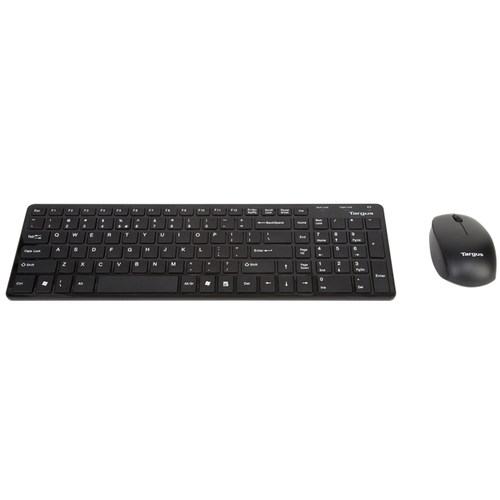
Targus KM610 keyboard Mouse included Office RF Wireless QWERTY English Black
- Connection: Wireless, RF Wireless
- Key switches: Membrane
- Layout: Full-size (100%), QWERTY
- Extras: mouse included
- Made for: Office
- Colour: Black
Where to buy
We're not tracking prices for this product yet. Check current prices directly at:
We may earn a commission when you buy through links on this page — at no extra cost to you. Learn more
About this product
Go cordless with a wireless keyboard-mouse combo that connects with plug-and-play ease using a single Stow-n-Go USB receiver for both peripherals.
Vital workstation accessories, this KM610 Wireless Keyboard and Mouse Combo delivers comfort, performance, and freedom from cord clutter. The full-size keys on the QWERTY keyboard provide a comfortable typing feel. Short between-key distance enables efficient typing and quiet keystrokes. The responsive mouse glides easily, with perfectly matched movements, thanks to a 1,600 DPI optical sensor. Navigate efficiently with the integrated smooth-rolling scroll wheel. The single USB receiver connects both peripherals, conserving USB ports and offering plug-and-play ease. The USB receiver stows conveniently when not in use and the included batteries get you going right out of the box.
Specifications
Key specifications
- Connectivity technologyThe technology that enables connectivity of the device, e.g. wired or wireless.
- Wireless
- Device interfaceThe ports (sockets) where the device connects with other devices.
- RF Wireless
- Keyboard key switchThe characteristics of the key switch, mechanical vs rubber dome. A mechanical key switch is usually more expensive, gives a stronger feedback and can be more precise.
- Membrane
- Keyboard form factorKeyboard size, e.g. standard, mini.
- Full-size (100%)
- Keyboard layoutThe type of keys on a keyboard, and their position on the keyboard. This can differ from country to country.
- QWERTY
- Mouse includedA mouse is included with this product.
- Yes
- Recommended usageWhat the product should be used for, and how it should be used (e.g. ambient temperature).
- Office
- Product colourThe colour e.g. red, blue, green, black, white.
- Black
Show all 32 specificationsShow key specifications only
Packaging content
- Mouse includedA mouse is included with this product.
- Yes
- Wireless receiver interfaceThe type of physical connection used by the wireless receiver to connect to a host device (e.g. USB Type-A or USB Type-C).
- USB Type-A
- Receiver typeDescribes type of receiver which is a device for picking up an external signal.
- Nano receiver
Design
- BacklightProduct has a built-in light source for its illuminating.
- No
- Form factorThe shape or design of the product.
- Ambidextrous
- Keyboard styleThe style of the keyboard e.g. straight, curved.
- Straight
- Wrist restA padded cushion placed in front of a computer keyboard to rest your wrists on when typing.
- No
- Adjustable keyboard heightIndicates whether the tilt or height of the device can be modified to improve ergonomic positioning.
- Yes
- Product colourThe colour e.g. red, blue, green, black, white.
- Black
Performance
- Recommended usageWhat the product should be used for, and how it should be used (e.g. ambient temperature).
- Office
- Non-slip baseIndicates whether the product features a base designed to prevent sliding during use.
- Yes
Ports & interfaces
- Connectivity technologyThe technology that enables connectivity of the device, e.g. wired or wireless.
- Wireless
Keyboard
- Device interfaceThe ports (sockets) where the device connects with other devices.
- RF Wireless
- Keyboard key switchThe characteristics of the key switch, mechanical vs rubber dome. A mechanical key switch is usually more expensive, gives a stronger feedback and can be more precise.
- Membrane
- Keyboard layoutThe type of keys on a keyboard, and their position on the keyboard. This can differ from country to country.
- QWERTY
- Keyboard languageThe letters which are marked on the keys for convenience of the keyboard usage with specific language.
- English
- Pointing deviceThe type of integrated input mechanism used to control the cursor (e.g., Clickpad or DialPad).
- No
- Keyboard form factorKeyboard size, e.g. standard, mini.
- Full-size (100%)
- Windows keysIndicates whether the product includes dedicated keys for Windows operating system shortcuts.
- Yes
- Multimedia keysIndicates whether the product has dedicated keys for controlling media playback and volume.
- Yes
- USB hubIndicates whether the product includes an integrated USB hub for connecting multiple peripheral devices.
- No
Features
- Windows operating systems supportedWindows vesions wich can be used with the device.
- Windows 10, Windows 10 Education, Windows 10 Education x64, Windows 10 Enterprise, Windows 10 Enterprise x64, Windows 10 Home, Windows 10 Home x64, Windows 10 IOT Core, Windows 10 Pro, Windows 10 Pro x64, Windows 10 x64, Windows 7, Windows 7 Enterprise, Windows 7 Enterprise x64, Windows 7 Home Basic, Windows 7 Home Basic x64, Windows 7 Home Premium, Windows 7 Home Premium x64, Windows 7 Professional, Windows 7 Professional x64, Windows 7 Starter, Windows 7 Starter x64, Windows 7 Ultimate, Windows 7 Ultimate x64, Windows 7 x64, Windows 8, Windows 8 Enterprise, Windows 8 Enterprise x64, Windows 8 Pro, Windows 8 Pro x64, Windows 8 x64, Windows 8.1, Windows 8.1 Enterprise, Windows 8.1 Enterprise x64, Windows 8.1 Pro, Windows 8.1 Pro x64, Windows 8.1 x64
- Plug and PlayIndicates whether this product supports is "plug and play". Plug and play is hardware or software that, after being installed ("plugged in"), can immediately be used ("played with"), as opposed to hardware or software which requires configuration.
- Yes
- PurposeWhat the product is used for.
- PC/Server
Other features
- Mac compatibilityProduct can be used with Apple Mac software and/or hardware.
- Yes
Software
- Mac operating systems supportedMac operating systems e.g. OS X can be used with the device.
- Mac OS X 10.11 El Capitan, Mac OS X 10.12 Sierra, Mac OS X 10.6 Snow Leopard, Mac OS X 10.7 Lion, Mac OS X 10.8 Mountain Lion, Mac OS X 10.9 Mavericks
Mouse
- Buttons quantityThe number of buttons that there are in/on the product.
- 3
- ScrollMove displayed text or graphics in a particular direction on a computer screen in order to view different parts of them.
- Yes
- Scroll typeType of scroll in computer input device, e.g. wheel, touch.
- Wheel
- Scrolling directionsSpecifies the axis along which the scrolling function operates, such as vertical or horizontal.
- Vertical
- Number of scroll wheelsThe total count of integrated wheels used for scrolling through documents or pages (e.g., 1 or 2).
- 1
Power
- Power source typeWhat the power source is.
- Battery
Database Right data-sheet 2026 Icecat. All rights reserved. Provided “as is”, without warranty — check details with the store before buying.
Price history (90 days, best daily price)
Price history is still being collected for this product — check back soon.
Alternative models

Targus AKB631UKZ
keyboard USB QWERTY English Black

Targus BUS0399
keyboard Mouse included Universal Bluetooth QWERTY English Black

Targus AKB631NO
keyboard Universal USB QWERTY Nordic Black

Targus AKB214TT
keyboard Office RF Wireless QWERTY Black

Targus KB55
keyboard Universal Bluetooth QWERTY Nordic Black
Targus AKM15USZ
keyboard Mouse included Universal RF Wireless QWERTY English Black