
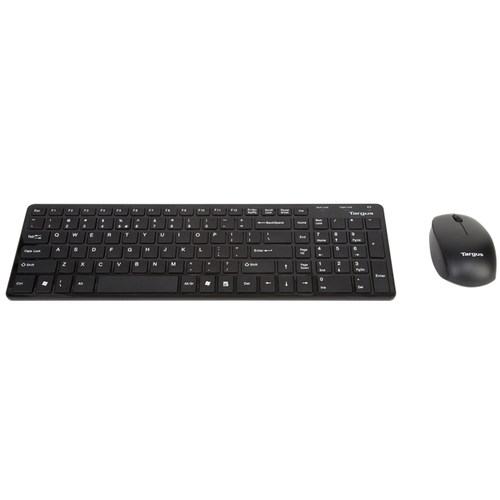
Targus BUS0399 keyboard Mouse included Universal Bluetooth QWERTY English Black
- Connection: Wireless, Bluetooth
- Key switches: Mechanical
- Layout: Mini, QWERTY
- Extras: mouse included
- Made for: Universal
- Colour: Black
Where to buy
We're not tracking prices for this product yet. Check current prices directly at:
We may earn a commission when you buy through links on this page — at no extra cost to you. Learn more
About this product
Put productivity at your fingertips with two workstation essentials, the Targus B580 Bluetooth Mouse and KB55 Multi-Platform Bluetooth Keyboard. The keyboard will connect to your smartphone or laptop thanks to its Bluetooth 3.0 wireless connection. It provides a better typing response with scissor-switch keys, and you’ll know when its needs new batteries thanks to its battery life indicator. The mouse easily glides along with your movements thanks to its 1,600 DPI optical sensor, and its three buttons allow for all the left clicking and right clicking you need. Since both are cordless, you’ll have fewer cords your desk, as well as free up USB ports for charging your phone or plugging in a peripheral.
- Bluetooth wireless connection for both peripherals
- Scissor-switch keyboard provides a better typing response
- Battery life indicator on keyboard
- Mouse with 1,600 DPI optical sensor for a precise response
- Mouse has 3 buttons for easy navigation
- 1 AA and 2 AAA batteries included
Specifications
Key specifications
- Connectivity technologyThe technology that enables connectivity of the device, e.g. wired or wireless.
- Wireless
- Device interfaceThe ports (sockets) where the device connects with other devices.
- Bluetooth
- Keyboard key switchThe characteristics of the key switch, mechanical vs rubber dome. A mechanical key switch is usually more expensive, gives a stronger feedback and can be more precise.
- Mechanical
- Keyboard form factorKeyboard size, e.g. standard, mini.
- Mini
- Keyboard layoutThe type of keys on a keyboard, and their position on the keyboard. This can differ from country to country.
- QWERTY
- Mouse includedA mouse is included with this product.
- Yes
- Recommended usageWhat the product should be used for, and how it should be used (e.g. ambient temperature).
- Universal
- Product colourThe colour e.g. red, blue, green, black, white.
- Black
Show all 32 specificationsShow key specifications only
Packaging content
- Mouse includedA mouse is included with this product.
- Yes
- Batteries includedIndicates whether the required batteries are supplied with the product.
- Yes
Design
- BacklightProduct has a built-in light source for its illuminating.
- No
- Form factorThe shape or design of the product.
- Right-hand
- Keyboard styleThe style of the keyboard e.g. straight, curved.
- Straight
- Wrist restA padded cushion placed in front of a computer keyboard to rest your wrists on when typing.
- No
- Product colourThe colour e.g. red, blue, green, black, white.
- Black
Performance
- Recommended usageWhat the product should be used for, and how it should be used (e.g. ambient temperature).
- Universal
Ports & interfaces
- Connectivity technologyThe technology that enables connectivity of the device, e.g. wired or wireless.
- Wireless
Keyboard
- Device interfaceThe ports (sockets) where the device connects with other devices.
- Bluetooth
- Keyboard key switchThe characteristics of the key switch, mechanical vs rubber dome. A mechanical key switch is usually more expensive, gives a stronger feedback and can be more precise.
- Mechanical
- Keyboard layoutThe type of keys on a keyboard, and their position on the keyboard. This can differ from country to country.
- QWERTY
- Keyboard languageThe letters which are marked on the keys for convenience of the keyboard usage with specific language.
- English
- Pointing deviceThe type of integrated input mechanism used to control the cursor (e.g., Clickpad or DialPad).
- Pointing Stick
- Keyboard form factorKeyboard size, e.g. standard, mini.
- Mini
- Numeric keypadSmall, palm-sized, seventeen key section of a computer keyboard, usually on the very far right. The numeric keypad features digits 0 to 9, addition (+), subtraction (-), multiplication (*) and division (/) symbols, a decimal point (.) and Num Lock and Enter keys. Laptop keyboards often do not have a numpad, but may provide numpad input by holding a modifier key (typically labelled "Fn") and opera…
- No
- USB hubIndicates whether the product includes an integrated USB hub for connecting multiple peripheral devices.
- No
Weight & dimensions
- Keyboard dimensions (WxDxH)The physical width, depth, and height of the device, measured in mm.
- 285.75 x 22.35 x 120.65 mm
- Keyboard weightThe total mass of the device, typically measured in grams or kilograms.
- 277 g
- Mouse dimensions (WxDxH)The physical width, depth, and height of the device, measured in mm.
- 105 x 29 x 60.4 mm
- Mouse weightHow heavy the mouse is.
- 64 g
Features
- Windows operating systems supportedWindows vesions wich can be used with the device.
- Yes
- PurposeWhat the product is used for.
- Universal
Other features
- Mac compatibilityProduct can be used with Apple Mac software and/or hardware.
- Yes
- Battery LED indicatorIndicates whether the product features a light-emitting diode to display the current battery charge level or status.
- Yes
Mouse
- Movement detection technologyThe technology employed to detect motion, e.g. Dual, using combinations of different sensing technologies to help reduce false triggering.
- Optical
- Movement resolutionThe sensitivity of the sensor, measured as the number of dots per inch (DPI) that the device detects during movement (e.g. 1600).
- 1600 DPI
- Buttons quantityThe number of buttons that there are in/on the product.
- 3
- ScrollMove displayed text or graphics in a particular direction on a computer screen in order to view different parts of them.
- Yes
- Scroll typeType of scroll in computer input device, e.g. wheel, touch.
- Wheel
Power
- Power source typeWhat the power source is.
- Battery
Security
- Fingerprint readerA scanner used to identify a person's fingerprint for security purposes. After a sample is taken, access to a computer or other system is granted if the fingerprint matches the stored sample. A PIN may also be used with the fingerprint sample.
- No
Database Right data-sheet 2026 Icecat. All rights reserved. Provided “as is”, without warranty — check details with the store before buying.
Price history (90 days, best daily price)
Price history is still being collected for this product — check back soon.
Alternative models

Targus KM610
keyboard Mouse included Office RF Wireless QWERTY English Black

Targus AKB214TT
keyboard Office RF Wireless QWERTY Black

Targus AKB631UKZ
keyboard USB QWERTY English Black
Targus AKM15USZ
keyboard Mouse included Universal RF Wireless QWERTY English Black

Targus AKB631NO
keyboard Universal USB QWERTY Nordic Black

Targus AKB30US
keyboard Office USB QWERTY Black