
GIGABYTE FO48U computer monitor 120.7 cm (47.5") 3840 x 2160 pixels 4K Ultra HD OLED Black
- Screen: 120.7 cm (47.5"), 3840 x 2160 pixels, Flat
- Refresh rate: 120 Hz, 1 ms response time
- Ports: 2 × HDMI, 1 × DisplayPort
- Stand: VESA 300 x 300 mm
- Extras: speakers, USB hub
- Colour: Black
Where to buy
We're not tracking prices for this product yet. Check current prices directly at:
We may earn a commission when you buy through links on this page — at no extra cost to you. Learn more
About this product
4K. Transforming Your Gaming Experience!
AORUS FO48U, 47.53-inch UHD resolution and equipped with the latest HDMI 2.1, 120Hz refresh rate and 1ms GTG for the most fluid gaming experience and awesome picture quality. The 10-bit color and super-wide color gamut of 98% DCI-P3/ 130% sRGB offering the outstanding color accuracy and consistency.
The 4K Experience
With more higher resolution game content have been created, in order to have the best visual experience, it is time for you to invest a 4K display! AORUS 4K Monitors delivers crisp, detailed visual and offers you a more true-to-life viewing experience!
OLED
OLED displays are able to deliver true color and express perfect black. Due to the self-emissive nature, it does not require a backlight and therefore reduce response time and meanwhile offering color with perfect hues, saturation and contrast.
47.53” with 4K
47.53” UHD panel (3840 x 2160 resolution) in a 16:9 aspect ratio with a 120Hz refresh rate for fluid gameplays.
HDMI 2.1
The newest HDMI 2.1 can improve your gaming experience by providing a higher bandwidth of 4K@120Hz, offering a competitive advantage on a range of games from adventure to shooters. The new standard also supports the next-gen consoles.
10-bit with 98% DCI P3
AORUS FO48U is a 10-bit display with 98% of DCI-P3 color space, offering the richer variety of color graduations and greater accuracy.
FreeSync Premium
It equips gamers with a fluid, tear-free gameplay experience at peak performance.
SPACE AUDIO
With exclusive sound reinforcement techniques, AORUS FO48U presents you with the most pure and melodic sound experience and offers extra modes for tailoring to either game or any other entertainment.
OSD SIDEKICK
The exclusive AORUS OSD Sidekick allows you to set the display options with keyboard and mouse. This gives you the privilege to adjust the options swiftly without using the buttons on the monitor. AORUS also provides firmware updates and backups for this monitor, so you can enjoy new features and make your sidekick smarter with protection.
DASHBOARD
The Dashboard shows you critical hardware information in real-time. No matter what kinds of scenario, it won't be blocked by any game. It's even customizable that you get to choose to show the info that matters to you most!
AIM STABILIZER
AORUS Aim Stabilizer reduces motion blur and maintain extra clarity in the game for outstanding smoothing experience. Just turn this feature on and you can double up the aiming ability! Let's get some enemies down!
BLACK EQUALIZER
The Black Equalizer deepens the details of the dark side on the scene without affecting other display areas. Enabling this feature to reveal all of your hidden enemies!
GAMEASSIST
It equips you extra power to win at battlefields: customizable crosshairs, onscreen timer/counter, PIP/PBP, HDR Mode etc. Whatever you need, you name it, AORUS offers it!
6 AXIS COLOR CONTROL
This feature allows you to adjust six colors (red, green, blue, cyan, magenta, and yellow) individually to more accurately display the color gamut on the monitor.
Auto-Update
The exclusive Auto-Update function allows users to effortlessly enjoy the finest gaming experience with features AORUS continues to develop and upgrade while giving extra protection to your monitor
KVM
KVM feature allows you to control multiple devices via one set of keyboard, video and mouse.
DESIGN CONCEPT
In the AORUS dimension, everything is constructed digitally. The lighting and patterns are mapped onto the products with an efficient, free flowing style. Welcome to the Digital Code Era.
Documents
- ManualUser manual ↗
- Product information sheetEU Product Fiche ↗
Specifications
Key specifications
- Display diagonalSize of the display for this product, measured diagonally, usually in inches.
- 120.7 cm (47.5")
- Display resolutionThe number of distinct pixels in each dimension that can be displayed. It is usually quoted as width × height, with the units in pixels: for example, "1024 × 768" means the width is 1024 pixels and the height is 768 pixels. The higher the number of pixels, the sharper the image.
- 3840 x 2160 pixels
- Screen shapeDescribes the physical curvature of the display panel, such as whether it is flat or curved.
- Flat
- Maximum refresh rateThe highest number of times per second the image is updated, measured in hertz (Hz).
- 120 Hz
- Response timeThe response time is the time difference between the moment that a source (for example a video card) sends a signal and that equipment (for example a monitor) receives or display the signal. (Used abbreviations: R/F = Rise and Fall.)
- 1 ms
- HDMI ports quantityThe number of sockets (ports) for HDMI connections. HDMI (High-Definition Multimedia Interface) is a compact audio/video interface for transferring uncompressed video data and compressed/uncompressed digital audio data from a HDMI-compliant device ("the source device") to a compatible computer monitor, video projector, digital television, or digital audio device. HDMI is a digital replacement for…
- 2
- DisplayPorts quantityNumber of DisplayPorts. A DisplayPort is a digital display interface developed by the Video Electronics Standards Association (VESA). The interface is primarily used to connect a video source to a display device such as a computer monitor, though it can also be used to carry audio, USB, and other forms of data.
- 1
- Panel mounting interfaceThe product can be used wih VESA mounting interfaces.
- 300 x 300 mm
- Built-in speaker(s)The device contains speaker(s) to produce sound.
- Yes
- Built-in USB hubWhether or not the device features a USB hub to connect more than one other device via USB.
- Yes
- Product colourThe colour e.g. red, blue, green, black, white.
- Black
Show all 74 specificationsShow key specifications only
Design
- VESA mountingIndicates whether the product supports the VESA mounting standard for attachment to compatible arms, brackets, or wall mounts.
- Yes
- Market positioningUnder which category can the device be positioned in the market, e.g. camera phone.
- Gaming
- Product colourThe colour e.g. red, blue, green, black, white.
- Black
- Panel mounting interfaceThe product can be used wih VESA mounting interfaces.
- 300 x 300 mm
Ports & interfaces
- Built-in USB hubWhether or not the device features a USB hub to connect more than one other device via USB.
- Yes
- USB Type-A downstream ports quantityThe number of USB Type-A ports available for connecting peripheral devices to the unit.
- 2
- USB Type-C downstream ports quantityThe number of USB Type-C ports available for connecting peripheral devices to the unit.
- 1
- HDMIHDMI (High-Definition Multimedia Interface) is a compact audio/video interface for transferring uncompressed video data and compressed/uncompressed digital audio data from a HDMI-compliant device ("the source device") to a compatible computer monitor, video projector, digital television, or digital audio device. HDMI is a digital replacement for existing analog video standards.
- Yes
- HDMI ports quantityThe number of sockets (ports) for HDMI connections. HDMI (High-Definition Multimedia Interface) is a compact audio/video interface for transferring uncompressed video data and compressed/uncompressed digital audio data from a HDMI-compliant device ("the source device") to a compatible computer monitor, video projector, digital television, or digital audio device. HDMI is a digital replacement for…
- 2
- DisplayPorts quantityNumber of DisplayPorts. A DisplayPort is a digital display interface developed by the Video Electronics Standards Association (VESA). The interface is primarily used to connect a video source to a display device such as a computer monitor, though it can also be used to carry audio, USB, and other forms of data.
- 1
- DisplayPort versionThe specific release version of the DisplayPort standard supported by the device (e.g., 1.2 or 1.4).
- 1.4
- Headphone outThe socket for connecting headphones to the device.
- Yes
- Built-in KVM switchIndicates whether the product includes an integrated keyboard, video, and mouse switch to control multiple computers with a single set of peripherals.
- Yes
Audio
- Built-in speaker(s)The device contains speaker(s) to produce sound.
- Yes
- Number of speakersThe quantity of speakers included in/with the product.
- 3
- RMS rated powerRMS (Root mean square) is a measure of the continuous power required by a device, in particular audio amplifiers and loudspeakers.
- 50 W
Multimedia
- Built-in cameraThe product has an integrated camera.
- No
Display
- Display diagonalSize of the display for this product, measured diagonally, usually in inches.
- 120.7 cm (47.5")
- Display resolutionThe number of distinct pixels in each dimension that can be displayed. It is usually quoted as width × height, with the units in pixels: for example, "1024 × 768" means the width is 1024 pixels and the height is 768 pixels. The higher the number of pixels, the sharper the image.
- 3840 x 2160 pixels
- Native aspect ratioThe aspect ratio is the ratio of the width of an image to its height. The native aspect ratio is the one which the projector/display is particularly designed for. Images shown in native aspect ratio will utilize the entire resolution of the display and achieve maximum brightness. Images shown in other than native aspect ratio will always have less resolution and less brightness than images shown…
- 16:9
- Display technologyThe technology used in the display e.g. plasma, LED.
- OLED
- TouchscreenA screen of a laptop, smartphone, etc., that responds to touch so you can control the interface using your fingers.
- No
- Native refresh rateThe number of times per second the hardware updates, measured in hertz (Hz).
- 60 Hz
- HD typeType of supported High Definition (e.g. Full HD, 4K Ultra HD).
- 4K Ultra HD
- Response timeThe response time is the time difference between the moment that a source (for example a video card) sends a signal and that equipment (for example a monitor) receives or display the signal. (Used abbreviations: R/F = Rise and Fall.)
- 1 ms
- Response time measurement typeThe method used to measure the time it takes for a pixel to change colors, such as GTG (Gray to Gray) or BwB (Black-white-Black).
- GTG (Gray to Gray)
- Screen shapeDescribes the physical curvature of the display panel, such as whether it is flat or curved.
- Flat
- Supported graphics resolutionsThe graphic resolutions that can be displayed by the device. The graphic resolution describes the width and height dimensions of a display, such as a computer monitor, measured in pixels.
- 3840 x 2160
- Supported video modesThe video modes that can be displayed by the device.
- 2160p
- Aspect ratioThe aspect ratio is the ratio of the width of a shape to its height. For example, 4:3 is common for standard displays and 16:9 is the ratio for Widescreen TV.
- 16:9
- Contrast ratio (typical)The difference in light intensity between the brightest white and the darkest black.
- 135000:1
- Maximum refresh rateThe highest number of times per second the image is updated, measured in hertz (Hz).
- 120 Hz
- Viewing angle, horizontalMaximum horizontal angle at which a display can be viewed with acceptable visual performance.
- 178°
- Viewing angle, verticalMaximum vertical angle at which a display can be viewed with acceptable visual performance.
- 178°
- Display number of coloursThe total number of distinct colours that the device is capable of displaying (e.g. 1.07 billion colours).
- 1.073 billion colours
- Response time (fast)The minimum time it takes for a pixel to change from one color to another, measured in milliseconds.
- 1 ms
- High Dynamic Range (HDR) technologyThe specific standard or version of high contrast and color reproduction used to enhance the detail in the darkest and brightest areas of an image (e.g. DisplayHDR 600).
- High Dynamic Range 10 (HDR10)
- Colour depthThe number of bits used to represent the colour of a single pixel, which determines the total number of possible colours that can be displayed.
- 10 bit
- Colour gamut standardThe specific color space standard the device is designed to reproduce, such as Adobe RGB or DCI-P3.
- DCI-P3
- Colour gamutThe range of colours that the display can accurately reproduce, typically expressed as a percentage of a standard colour space (e.g. sRGB or Adobe RGB).
- 98%
- sRGB coverage (typical)The percentage of the sRGB color space that the device is capable of reproducing.
- 130%
Other features
- HBR3 supportIndicates whether the product supports High Bit Rate 3 (HBR3), allowing for higher data transfer speeds and resolutions.
- Yes
Packaging content
- Cables includedSpecifies the types and quantities of connection cables provided with the product (e.g., 3.5 mm to 3.5 mm or SATA).
- AC, DisplayPort, HDMI, USB
- Quick start guideInstructions, either online, as a computer program or in paper form, to allow you to set up and start using the product quickly.
- Yes
Weight & dimensions
- Width (with stand)The total horizontal measurement of the product when the supporting stand is attached, measured in millimetres.
- 1068.5 mm
- Depth (with stand)The measurement of the product from front to back when any supporting accessory or base is attached, expressed in millimetres or centimetres.
- 251.1 mm
- Height (with stand)The total vertical measurement of the product including its base or support structure, expressed in millimetres or centimetres.
- 675.1 mm
- Weight (with stand)The total mass of the unit including its supporting base, measured in kilograms or grams.
- 15 kg
- Width (without stand)The horizontal measurement of the device excluding the base or support structure, expressed in millimetres.
- 1068.5 mm
- Depth (without stand)The measurement of the product from front to back without its base or support, typically expressed in millimetres or centimetres.
- 43.1 mm
- Height (without stand)The vertical measurement of the device when the stand is removed, measured in mm.
- 611.8 mm
- Weight (without stand)The mass of the device excluding the support base, measured in g.
- 14.7 kg
Power
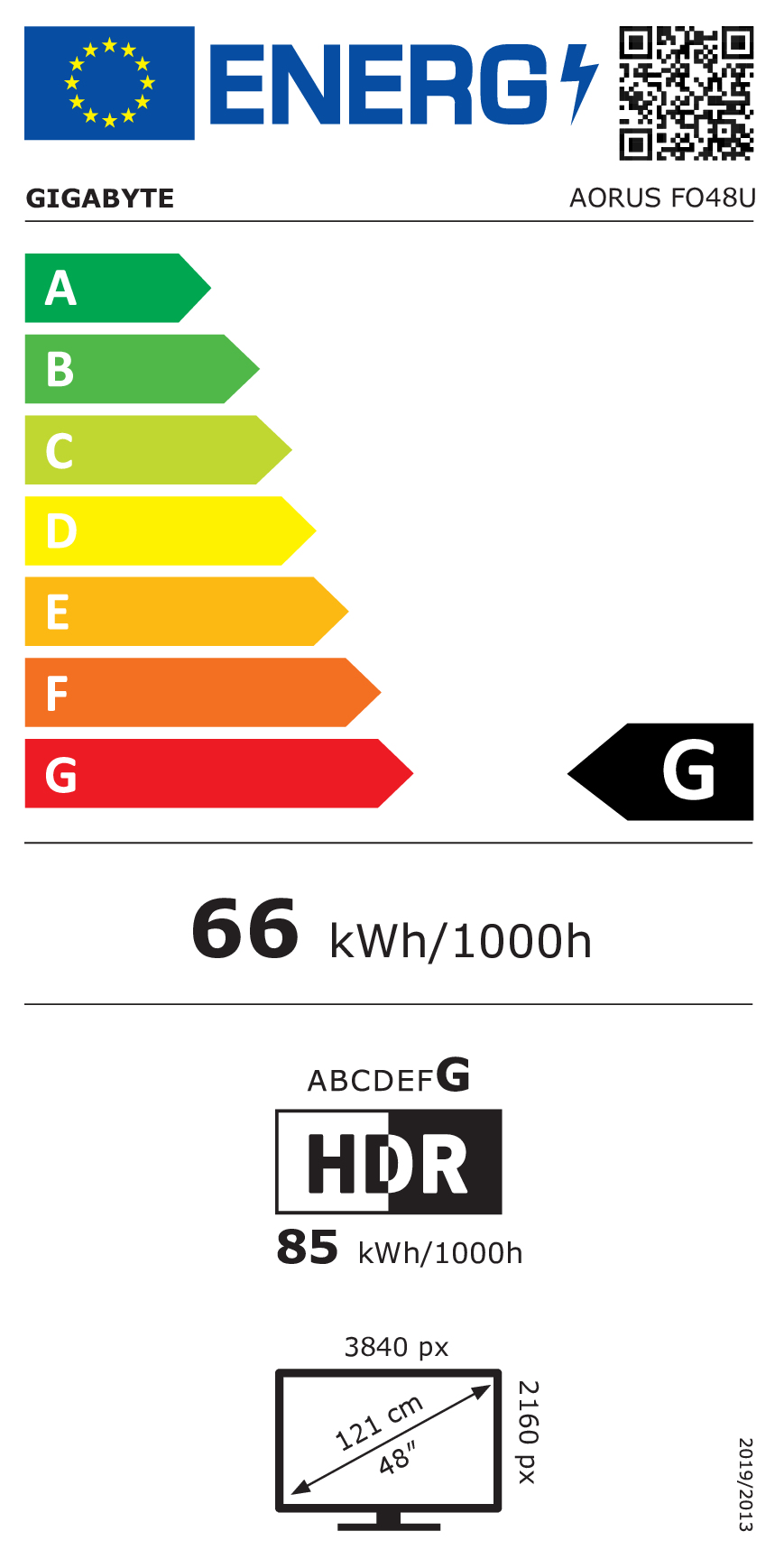
- Energy efficiency class (SDR)The energy efficiency rating of the device when operating in Standard Dynamic Range (SDR) mode, categorized from A to G.
- G
- Energy efficiency class (HDR)The energy efficiency rating of the device when High Dynamic Range (HDR) mode is active, ranging from A to G.
- G
- Energy consumption (SDR) per 1000 hoursThe amount of electric energy consumed by the device during standard dynamic range (SDR) operation over a period of 1000 hours, measured in kilowatt-hours (kWh).
- 66 kWh
- Energy consumption (HDR) per 1000 hoursThe amount of electrical energy consumed by the device when displaying High Dynamic Range (HDR) content over a period of 1000 hours, measured in kilowatt-hours (kWh).
- 85 kWh
- Power consumption (standby)The amount of electricity that is consumed when the product is on standby.
- 0.5 W
- Power consumption (max)The maximum amount of power used by the device.
- 325 W
- Power consumption (off)The amount of electrical energy consumed by the device when it is switched off, measured in watts.
- 0.3 W
- AC input voltageThe voltage of the AC electricity that is inputted into the product.
- 100 - 240 V
- Power supply typeThe type of power supply which this product uses.
- Internal
- Energy efficiency scaleThe range of energy efficiency classes used to rate the product's power consumption, such as A to G.
- A to G
Security
- Cable lock slotHoles on the edge of devices through which a cable lock can be passed, so the device can be locked to a desk etc.
- Yes
- Cable lock slot typeThe standard of the security slot used to attach a physical locking cable to the device (e.g. Kensington or Noble).
- Kensington
Ergonomics
- Height adjustmentThe part of the device that can be adjusted to change the height.
- No
Management features
- Picture-in-PicturePicture-in-picture (PiP) is a feature of some television receivers and similar devices. One program (channel) is displayed on the full TV screen at the same time as one or more other programs are displayed in inset windows. Sound is usually from the main program only.
- Yes
- On Screen Display (OSD)Indicates whether the device can display a graphical menu or information directly on the screen for adjusting settings and viewing status.
- Yes
Performance
- Flicker-free technologyIndicates whether the device employs technology to reduce or eliminate screen flickering to decrease eye strain during prolonged use.
- Yes
- High Dynamic Range (HDR) supportedIndicates whether the device supports High Dynamic Range for improved contrast and a wider range of colours and luminosity.
- Yes
Packaging data
- Package widthThe distance from one side of the packaging to the other.
- 1180 mm
- Package depthThe distance from the front to the back of the packaging.
- 160 mm
- Package heightThe distance from the top to the bottom of the packaging.
- 760 mm
- Package weightWeight of the packaged product.
- 20.8 kg
- Package typeThe type of product package e.g. box.
- Box
Database Right data-sheet 2026 Icecat. All rights reserved. Provided “as is”, without warranty — check details with the store before buying.
Expert reviews
- 60
techteamgb.co.uk2022
On paper, the Aorus FO48U is possibly the best display you can buy right now. It offers 48 inches of 4K 120Hz OLED glory with 10 bit colour, instant response times and even genuinely impressive speakers built in, but there's a catch. Actually there are qu...
Read the review at techteamgb.co.uk ↗
Price history (90 days, best daily price)
Price history is still being collected for this product — check back soon.
Alternative models

GIGABYTE AORUS FI32Q-X
computer monitor 81.3 cm (32") 2560 x 1440 pixels Quad HD LED Black

GIGABYTE G34WQC A 34" WQHD Curved Gaming Monitorr - 3440 x 1440, 1500R
144Hz, 1ms, 350 cd/m², FreeSync Premium, Display HDR400, HDMI 2.0, Displayport 1.4

GIGABYTE M32QC
computer monitor 80 cm (31.5") 2560 x 1440 pixels Quad HD LED Black

GIGABYTE M34WQ 34" WQHD Gaming Monitor - 3440 x 1440
144Hz, 1ms, 400 cd/m², FreeSync Premium, DisplayHDR400, HDMI 2.0, Displayport 1.4
GIGABYTE AORUS FI32Q X 32” QHD Gaming Monitor - 2560 x 1440
240Hz, 1ms, 400 cd/m², AMD FreeSync Premium Pro, Display HDR600, HDMI 2.1, Displayport 1.4

GIGABYTE M34WQ
computer monitor 86.4 cm (34") 3440 x 1440 pixels Wide Quad HD LCD Black
Accessories & compatible products

R-Go Tools Monitor arm R-Go Zepher Single, fully adjustable, 0-8 Kg load capacity, 100% circular, black

R-Go Tools Monitor arm R-Go Caparo Single, fully adjustable with gas spring, 3-9 kg load capacity, 100% circular, black

R-Go Tools Monitor arm R-Go Zepher Dual, for two monitors, fully adjustable, 0
8 kg load capacity, 100% circular, black
