
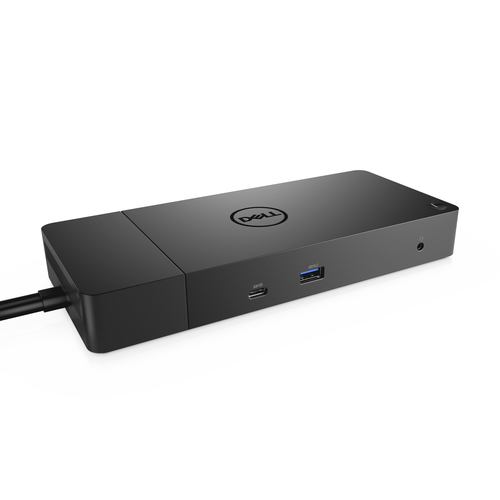
DELL RWJDV laptop dock/port replicator Docking Black
- Product colour: Black
- AC input voltage: 120 - 230 V
- AC input frequency: 50-60 Hz
- Ethernet LAN
- Ethernet LAN (RJ-45) ports: 1
- Ethernet LAN data rates: 10,100,1000 Mbit/s
Where to buy
We're not tracking prices for this product yet. Check current prices directly at:
We may earn a commission when you buy through links on this page — at no extra cost to you. Learn more
About this product
The Rugged Desk Dock from Dell is the industry’s first portfolio-wide desk dock that supports the entire family of Latitude Rugged and Rugged Extreme notebooks. It has better video connectivity with dual Display Port outputs and also includes simple toolless adjustment and improved guiding features. Moreover, it ensure your notebook is secure with dual cable lock slots. With all these features and more it is compatible with Latitude 14/12 Rugged Extreme and Latitude 14 Rugged notebooks (first and second generation).
Specifications
Design
- Product colourThe colour e.g. red, blue, green, black, white.
- Black
Power
- AC input voltageThe voltage of the AC electricity that is inputted into the product.
- 120 - 230 V
- AC input frequencyThe range of alternating current frequencies the device can accept from the power source, measured in hertz (e.g., 45 - 65).
- 50-60 Hz
Storage
- Card reader integratedA card reader is a device that enables reading and, in some cases, writing data to and from a memory card.
- No
Features
- CompatibilityThe other products, software and hardware this product can be used with.
- Latitude 12 Rugged Extreme (7204), 14 Rugged (5404), 14 Rugged Extreme (7404), 5414 Rugged, 7214 Rugged Extreme, 7414 Rugged Extreme
Network
- Ethernet LANAn Ethernet LAN (Local Area Network) interface is present, for a wired conection via a cable.
- Yes
- Ethernet LAN data ratesThe different speed levels of the Ethernet LAN connection.
- 10,100,1000 Mbit/s
Ports & interfaces
- Ethernet LAN (RJ-45) portsNumber of Ethernet LAN (RJ-45) ports (connecting interfaces) in the device. Ethernet LAN (RJ-45) ports allow a computer to connect to the ethernet.
- 1
- Connectivity technologyThe technology that enables connectivity of the device, e.g. wired or wireless.
- Docking
- VGA (D-Sub) ports quantityNumber of VGA (D-Sub) ports (connecting interfaces) in the device. The VGA (D-Sub) connector is a 15 pin connector between a computer and a monitor. It was first introduced in 1987 by IBM.
- 1
- DisplayPorts quantityNumber of DisplayPorts. A DisplayPort is a digital display interface developed by the Video Electronics Standards Association (VESA). The interface is primarily used to connect a video source to a display device such as a computer monitor, though it can also be used to carry audio, USB, and other forms of data.
- 2
- Microphone inThe socket where a microphone is connected to the device.
- No
- Combo headphone/mic portIndicates whether the device features a single integrated jack that supports both audio output for headphones and audio input for a microphone.
- Yes
Logistics data
- Harmonized System (HS) codeThe standardized numerical method of classifying traded products used by customs authorities around the world to identify goods for tariffs and statistics.
- 84733020
Database Right data-sheet 2026 Icecat. All rights reserved. Provided “as is”, without warranty — check details with the store before buying.
Price history (90 days, best daily price)
Price history is still being collected for this product — check back soon.
Alternative models

DELL Pro 7-in-1 USB-C Travel Hub - DA310
DELL 2WND0
laptop dock/port replicator Docking Black

DELL WD19TBS-180W Wired USB 3.2 Gen 2
(3.1 Gen 2) Type-C Black
DELL WD19 Wired USB 3.2 Gen 1
(3.1 Gen 1) Type-C Black

DELL Dock – WD19S
130W

DELL Mobile Adapter DA300 Wired USB 3.2 Gen 2
(3.1 Gen 2) Type-C Black