
DELL Mobile Adapter DA300 Wired USB 3.2 Gen 2 (3.1 Gen 2) Type-C Black
- Product colour: Black
- USB data transfer rates: 480,10000 Mbit/s
- Quick start guide
- User guide
- Windows operating systems supported: Windows 10, Windows 7, Windows 8, Windows 8.1
- Mac compatibility
Where to buy
We're not tracking prices for this product yet. Check current prices directly at:
We may earn a commission when you buy through links on this page — at no extra cost to you. Learn more
About this product
Featuring the widest variety of port options available, the Dell USB-C Mobile Adapter - DA300 offers seamless video, network, and data connectivity, in a compact design.
Most comprehensive, compact 6-in-1 USB-C adapter
Featuring the widest variety of port options available including HDMI, DP, VGA, Ethernet, USB-C and USB-A, the Dell USB-C Mobile Adapter - DA300 offers seamless videoi, network, and data connectivity, in a neat, compact design.
Crisp 4K resolution at 60Hz and fast SuperSpeed USB 10 Gbps data transfer rate
Connect to high resolution displays without compromising on performance, thanks to the USB-C Mobile Adapter’s ability to support 4K resolution at 60Hz. Simply plug in your PC to a monitor or projector via DisplayPort or HDMI 2.0. Using legacy video ports is also a breeze with the adapter’s readily available VGA port.
The USB-C and USB-A downstream ports let you connect other supported peripherals and enjoy faster file transfers with SuperSpeed USB 10Gbps data transfer speeds.
Innovative design
The small, round-shaped adapter fits neatly in your bag, while the concealed cable can be extended or retracted by rotating the top and bottom cover of the adapter, for easy storage. The longer coaxial cable offers flexibility to connect to various form factors from clamshells to 2-in-1s to detachables, providing enhanced signal quality for stable connectivity wherever your busy day takes you.
Easy plug and play. Best with Dell systems
Easy to use, the adapter is ready to go when you plug it in - no installation of external drivers is necessary. Pair your adapter with Dell systems to enjoy Business Class features such as MAC address pass-through, PXE Boot, and Wake-On-LAN. It works with most operating systems, including Windows and MAC.
Additional Product Notes
1. Only one video output is supported at a time.
2. Available with select PC models (with support for DisplayPort Alt-Mode 1.3 & above standard) when connected to displays that offer 4K resolution at 60Hz. Otherwise, default
resolution will be 4K at 30Hz.
3. a) When adapter is connected to a Thunderbolt or 15W USB-C (DisplayPort Alt-mode) port – two downstream USB-C and USB-A ports with USB3.1 Gen 2 file transfer rate of up
to 10 Gbps is supported.
b) When adapter is connected to a 7.5W USB-C (DisplayPort Alt-mode) port – only one of the two downstream USB-C and USB-A ports with USB2.0. file transfer rate up to 480
Mbps is supported on a 1st come 1st serve basis (the peripheral connected first to either the USB-C or USB-A port is supported)
4. USB mice, keyboards, mice dongles, select SSDs and flash drives.
5. Dell Business Class Features include:
PXE Boot – Pre eXecution Environment Boot allows a computer to be troubleshot remotely when connected to the network via its network card. Wake-On-LAN – Starts your PC
remotely using the signal over your network.
MAC address pass-through – MAC address pass through recognizes only a unique MAC address entered in the system’s BIOS (Basic Input/Output System) by overriding the
adapter MAC address every time your laptop is connected to the network, ensuring that your PC’s MAC address stays the same no matter which USB-C adapter you use.
6. Tested with macOS High Sierra 10.13.4 and macOS Sierra 10.12.6.
Videos & documents
Specifications
Key specifications
- Product colourThe colour e.g. red, blue, green, black, white.
- Black
- USB data transfer ratesThe maximum speed at which data can be transmitted via the USB interface, measured in Mbit/s.
- 480,10000 Mbit/s
- Quick start guideInstructions, either online, as a computer program or in paper form, to allow you to set up and start using the product quickly.
- Yes
- User guideIndicates whether a user manual or instructional guide is included with the product.
- Yes
- Windows operating systems supportedWindows vesions wich can be used with the device.
- Windows 10, Windows 7, Windows 8, Windows 8.1
- Mac compatibilityProduct can be used with Apple Mac software and/or hardware.
- Yes
- Power source typeWhat the power source is.
- USB
- Maximum digital resolutionThe highest number of pixels that the device can output or support, typically expressed as width by height (e.g. 3840 x 2160).
- 3840 x 2160 pixels
- Number of displays supportedThe number of displays that can be used with this product.
- 2
- Plug and PlayIndicates whether this product supports is "plug and play". Plug and play is hardware or software that, after being installed ("plugged in"), can immediately be used ("played with"), as opposed to hardware or software which requires configuration.
- Yes
Show all 32 specificationsShow key specifications only
Design
- Product colourThe colour e.g. red, blue, green, black, white.
- Black
Ports & interfaces
- USB data transfer ratesThe maximum speed at which data can be transmitted via the USB interface, measured in Mbit/s.
- 480,10000 Mbit/s
- Ethernet LAN (RJ-45) portsNumber of Ethernet LAN (RJ-45) ports (connecting interfaces) in the device. Ethernet LAN (RJ-45) ports allow a computer to connect to the ethernet.
- 1
- Connectivity technologyThe technology that enables connectivity of the device, e.g. wired or wireless.
- Wired
- Host interfaceInterface that enables a host controller to communicate with a driver.
- USB 3.2 Gen 2 (3.1 Gen 2) Type-C
- USB 3.2 Gen 2 (3.1 Gen 2) Type-A ports quantityThe total number of USB Type-A ports that support the 3.2 Gen 2 (formerly 3.1 Gen 2) standard for high-speed data transfer.
- 1
- USB 3.2 Gen 2 (3.1 Gen 2) Type-C ports quantityNumber of USB 3.1 (3.1 Gen 2) ports with Type-C connector. USB 3.1 (3.1 Gen 2) is USB interface version which supports transfer rate up to 10 Gbit/s (SuperSpeed+). USB Type-C connector has symmetrical design architecture and compatible with Thunderbolt 3 interface.
- 1
- HDMI ports quantityThe number of sockets (ports) for HDMI connections. HDMI (High-Definition Multimedia Interface) is a compact audio/video interface for transferring uncompressed video data and compressed/uncompressed digital audio data from a HDMI-compliant device ("the source device") to a compatible computer monitor, video projector, digital television, or digital audio device. HDMI is a digital replacement for…
- 1
- HDMI versionThe specific release version of the High-Definition Multimedia Interface standard supported by the device (e.g. 1.3 or 2.0).
- 2.0
- VGA (D-Sub) ports quantityNumber of VGA (D-Sub) ports (connecting interfaces) in the device. The VGA (D-Sub) connector is a 15 pin connector between a computer and a monitor. It was first introduced in 1987 by IBM.
- 1
- DisplayPorts quantityNumber of DisplayPorts. A DisplayPort is a digital display interface developed by the Video Electronics Standards Association (VESA). The interface is primarily used to connect a video source to a display device such as a computer monitor, though it can also be used to carry audio, USB, and other forms of data.
- 1
- Microphone inThe socket where a microphone is connected to the device.
- No
Packaging content
- Quick start guideInstructions, either online, as a computer program or in paper form, to allow you to set up and start using the product quickly.
- Yes
- User guideIndicates whether a user manual or instructional guide is included with the product.
- Yes
- Quantity per packThe number of individual units contained within a single sales package, measured in pc(s).
- 1 pc(s)
Weight & dimensions
- WidthThe measurement or extent of something from side to side.
- 69.8 mm
- DepthThe distance from the front to the back of something.
- 69.8 mm
- HeightThe measurement of the product from head to foot or from base to top.
- 24.5 mm
- WeightWeight of the product without packaging (net weight). If possible, the net weight is given including standard accessories and supplies. Please note that sometimes the manufacturer leaves out the weight of accessories and/or supplies.
- 80 g
Features
- Windows operating systems supportedWindows vesions wich can be used with the device.
- Windows 10, Windows 7, Windows 8, Windows 8.1
- Plug and PlayIndicates whether this product supports is "plug and play". Plug and play is hardware or software that, after being installed ("plugged in"), can immediately be used ("played with"), as opposed to hardware or software which requires configuration.
- Yes
- Brand compatibilityWhat other brands this brand can be used with.
- Dell
- CompatibilityThe other products, software and hardware this product can be used with.
- - Latitude 5280 - Latitude 5480 - Latitude 5580 - XPS 9365 2-in-1 - Precision 5520 - Latitude 7280 - Precision 3520 - Latitude 7480 - Precision 7520 - Latitude 5289 2-in-1 - Latitude 7285 2-in-1 - Latitude 7380 - Latitude 7389 2-in-1 - Precision 7720 - Inspiron 15 5000 Series (5570) - Latitude 7490 - Latitude 7390 - Latitude 5490 - Latitude 5590 - Latitude 5290 - Latitude 7290 - Inspiron 13 7000 Series (7373) - Inspiron 15 7000 Series (7573) - Inspiron 17 5000 Series (5770) - Inspiron 13 7000 Series (7370) - Inspiron 15 7000 Series (7570) - XPS 13 9370 - Latitude 5290 2 In 1 - Latitude 3490 - Latitude 3390 2 In 1 - Latitude 3590 - Chromebook 5190 - XPS 15 (9575) - XPS 15 (9560) - Vostro 15 (7570)
Other features
- Mac compatibilityProduct can be used with Apple Mac software and/or hardware.
- Yes
Power
- Power source typeWhat the power source is.
- USB
Storage
- Card reader integratedA card reader is a device that enables reading and, in some cases, writing data to and from a memory card.
- No
Processor
- Maximum digital resolutionThe highest number of pixels that the device can output or support, typically expressed as width by height (e.g. 3840 x 2160).
- 3840 x 2160 pixels
Mounting
- Number of displays supportedThe number of displays that can be used with this product.
- 2
Network
- Ethernet LANAn Ethernet LAN (Local Area Network) interface is present, for a wired conection via a cable.
- Yes
- Ethernet LAN data ratesThe different speed levels of the Ethernet LAN connection.
- 10,100,1000 Mbit/s
- Wake-on-LAN readyIndicates whether the device can be turned on or woken up from a low-power state by a network message sent from another networked device.
- Yes
Logistics data
- Harmonized System (HS) codeThe standardized numerical method of classifying traded products used by customs authorities around the world to identify goods for tariffs and statistics.
- 84733020
Database Right data-sheet 2026 Icecat. All rights reserved. Provided “as is”, without warranty — check details with the store before buying.
Price history (90 days, best daily price)
Price history is still being collected for this product — check back soon.
Alternative models
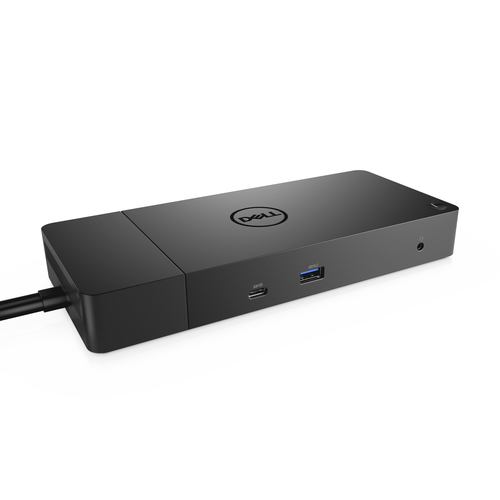
DELL WD19 Wired USB 3.2 Gen 1
(3.1 Gen 1) Type-C Black

DELL D6000 Wired USB 3.2 Gen 1
(3.1 Gen 1) Type-C Black

DELL 2WND0
laptop dock/port replicator Docking Black

DELL D6000 Wired USB 3.2 Gen 1
(3.1 Gen 1) Type-C Black
DELL RWJDV
laptop dock/port replicator Docking Black

DELL 492-BCTT Wired USB 3.2 Gen 2
(3.1 Gen 2) Type-C Black
Accessories & compatible products

DELL Precision T3630
Intel Core i7 i7-8700K 32 GB DDR4-SDRAM 1.25 TB HDD+SSD Windows 10 Pro Tower Workstation Black
DELL Precision T3630
Intel Xeon E E-2146G 16 GB DDR4-SDRAM 1.25 TB HDD+SSD NVIDIA Quadro P2000 Windows 10 Pro Tower Workstation Black
DELL Precision T3630
Intel Xeon E-2174G 16 GB DDR4-SDRAM 256 GB SSD NVIDIA Quadro P2000 Windows 10 Pro Tower Workstation Black
DELL Precision T3630
Intel Core i7 i7-8700 16 GB DDR4-SDRAM 1.51 TB HDD+SSD Windows 10 Pro Tower Workstation Black
DELL Precision T3630
Intel Core i7 i7-8700K 16 GB DDR4-SDRAM 1.51 TB HDD+SSD NVIDIA Quadro P2000 Windows 10 Pro Tower Workstation Black
DELL Precision T3630
Intel Xeon E-2174G 8 GB DDR4-SDRAM 256 GB SSD NVIDIA Quadro P620 Windows 10 Pro Tower Workstation Black