
BenQ RL2755HM computer monitor 68.6 cm (27") 1920 x 1080 pixels Full HD LED Black
- Screen: 68.6 cm (27"), 1920 x 1080 pixels, TN
- Refresh rate: 1 ms response time
- Brightness: 300 cd/m²
- Ports: 2 × HDMI
- Stand: tilt, VESA 100 x 100 mm
- Extras: speakers
- Colour: Black
Where to buy
We're not tracking prices for this product yet. Check current prices directly at:
We may earn a commission when you buy through links on this page — at no extra cost to you. Learn more
About this product
Absolute Control and Visibility for Console Gaming
The RL755HM is designed to give you the most fluid console gaming experience. The 27”W professional console gaming monitor offers every motion with no latency, low input lag and the best visibility with the latest features: 1ms GTG response time, dual HDMI, the Black eQualizer and image quality supported by BenQ’s world-leading color expertise. So you can stay fiercely competitive while enjoying total gaming satisfaction.
Ultra-Fast 1ms GTG Response Time
Control your gaming destiny and don’t leave it in the hands of slow display. Blistering fast response time of 1ms GTG means virtually unnoticeable input lag for action-oriented console games. All fast-moving action and dramatic transitions will be rendered smoothly without smearing or ghosting. In turn, every your movement can be faster on the gaming monitor than on a traditional television.
Bringing Everything Together to Complete Your Console Gaming Experience
Every detail about the RL2755HM screams out perfection for console gaming – even when it comes to storage for your gaming gear. The next-generation angular, compact base stand has been enhanced with slip-resistant rubber finish on the inner side to effectively grip your controller, so you can easily tuck it away and out of the way after each game.
Even though the RL2755HM is built with speakers for outstanding audio output, a retractable headphone hook has also been installed at the side of the monitor display for you to keep your favorite headphones within arm’s reach. Last but not least, you can keep your desk space tidy and the cables tangle-free using the glossy red cord organizer behind the neck of the monitor.
With the RL2755HM, we hope to complete your console gaming experience with quality and design unmatched by any other.
Dual HDMI for Added Flexibility
Equipped with two HDMI ports, the RL2755HM allows you to connect your game console and another HDMI device at the same time. So there’s no need to frequently plug and change your connection.
Having two HDMI ports available also means you can play head-to-head with another player using the same screen, as well as mirror your gameplay to a larger display when there’s a larger audience without risking input latency, especially for time-sensitive console game genres.
Console Game Mode Colors
Gaming is in the details. Every feature and function of the RL2755HM is designed and tested by professional gamers and BenQ color experts to provide you with vital visibility and command for console gaming. The monitor is also meticulously developed to bring out every color, shade and tone with optimized clarity and precision. This is all to help you thrive and achieve peak performance.
20-Level Color Vibrance Setting to Optimize Gaming Precision
It is absolutely vital that the RL2755HM give you the flexibility you need to get the color performance you seek. This is why BenQ built into the monitor 20 levels of Color Vibrance setting to meet gamers’ specific viewing requirements and preferences for all types of gameplay. This unique feature is accessible via On Screen Display (OSD) or Display Pilot for added convenience.
The Black eQualizer Gives You Razor-Sharp Visibility
Poor visibility and judgment can cost even the most skillful gamers their game. The Black eQualizer color engine technology is designed to offer an unprecedented level of control and visibility.
Dark scenes are brightened without over-exposing the bright areas to preserve vital details, enabling gamers to spot their enemies easily in critical combat and react quickly in any situation.
Fighting Mode to Sharpen Your Focus
Absolute focus on characters is the key to master every fighting game. To optimize the gamers' chance of winning, BenQ invited fighting game legend, Justin "JWong" Wong of Evil Geniuses, to co-design the Fighting Mode. Through this feature, gamers can access specific color calibration settings that help them highlight the characters in combat, giving them the boost they need to improve their gameplay and destroy their opponents.
Low Blue Light as Eye Safety Precautionary Measure
Practice long hours with clear, comfortable vision or compete with top-notch vision condition with BenQ’s new Low Blue Light. The blue spectrum light, which is produced by regular computer screens, is a critical cause of eye damage, eyestrain, headaches and sleeping disorders. Now with the offering of various adjustable low blue light levels, gamers can better protect their eyes. So there would be no need for yellow tinted eyeglasses for additional eye protection, and gameplay can be clear, comfortable and hassle-free!
Gaming-comfort Flicker-free Technology
Co-developed by pro gamers, the RL2755HM is upgraded to eliminate flickering at all brightness levels, effectively reducing eye fatigue herewith providing extreme comfort for even the most hardcore gamers after long hours of play time. The gaming focus Flicker-free Technology makes BenQ Gaming Monitor an epic weapon against your opponents!
Documents
Specifications
Key specifications
- Display diagonalSize of the display for this product, measured diagonally, usually in inches.
- 68.6 cm (27")
- Display resolutionThe number of distinct pixels in each dimension that can be displayed. It is usually quoted as width × height, with the units in pixels: for example, "1024 × 768" means the width is 1024 pixels and the height is 768 pixels. The higher the number of pixels, the sharper the image.
- 1920 x 1080 pixels
- Panel typeThe technology used to manufacture the panel, such as AMOLED or AH-IPS.
- TN
- Response timeThe response time is the time difference between the moment that a source (for example a video card) sends a signal and that equipment (for example a monitor) receives or display the signal. (Used abbreviations: R/F = Rise and Fall.)
- 1 ms
- Display brightness (typical)Display brightness, measured by its Luminance, presented as a figure in nits. Typical brightness ratings for monitors range from 250 to 350 nits with a target value of between 80 to 120 nits being suitable for most displays in a normal viewing environment.
- 300 cd/m²
- HDMI ports quantityThe number of sockets (ports) for HDMI connections. HDMI (High-Definition Multimedia Interface) is a compact audio/video interface for transferring uncompressed video data and compressed/uncompressed digital audio data from a HDMI-compliant device ("the source device") to a compatible computer monitor, video projector, digital television, or digital audio device. HDMI is a digital replacement for…
- 2
- Tilt adjustmentThe tilt, which means the angle at which the device is pointing (up or down), can be changed.
- Yes
- Panel mounting interfaceThe product can be used wih VESA mounting interfaces.
- 100 x 100 mm
- Built-in speaker(s)The device contains speaker(s) to produce sound.
- Yes
- Product colourThe colour e.g. red, blue, green, black, white.
- Black
Show all 64 specificationsShow key specifications only
Design
- VESA mountingIndicates whether the product supports the VESA mounting standard for attachment to compatible arms, brackets, or wall mounts.
- Yes
- Market positioningUnder which category can the device be positioned in the market, e.g. camera phone.
- Gaming
- Product colourThe colour e.g. red, blue, green, black, white.
- Black
- Panel mounting interfaceThe product can be used wih VESA mounting interfaces.
- 100 x 100 mm
- LED indicatorsThe specific status lights available on the unit to provide visual feedback on its current state or connectivity (e.g., AC input, ACT, or Access).
- Yes
Audio
- Built-in speaker(s)The device contains speaker(s) to produce sound.
- Yes
- Number of speakersThe quantity of speakers included in/with the product.
- 2
- RMS rated powerRMS (Root mean square) is a measure of the continuous power required by a device, in particular audio amplifiers and loudspeakers.
- 4 W
Multimedia
- Built-in cameraThe product has an integrated camera.
- No
Display
- Display diagonalSize of the display for this product, measured diagonally, usually in inches.
- 68.6 cm (27")
- Display resolutionThe number of distinct pixels in each dimension that can be displayed. It is usually quoted as width × height, with the units in pixels: for example, "1024 × 768" means the width is 1024 pixels and the height is 768 pixels. The higher the number of pixels, the sharper the image.
- 1920 x 1080 pixels
- Native aspect ratioThe aspect ratio is the ratio of the width of an image to its height. The native aspect ratio is the one which the projector/display is particularly designed for. Images shown in native aspect ratio will utilize the entire resolution of the display and achieve maximum brightness. Images shown in other than native aspect ratio will always have less resolution and less brightness than images shown…
- 16:9
- Display technologyThe technology used in the display e.g. plasma, LED.
- LED
- TouchscreenA screen of a laptop, smartphone, etc., that responds to touch so you can control the interface using your fingers.
- No
- HD typeType of supported High Definition (e.g. Full HD, 4K Ultra HD).
- Full HD
- Panel typeThe technology used to manufacture the panel, such as AMOLED or AH-IPS.
- TN
- Display brightness (typical)Display brightness, measured by its Luminance, presented as a figure in nits. Typical brightness ratings for monitors range from 250 to 350 nits with a target value of between 80 to 120 nits being suitable for most displays in a normal viewing environment.
- 300 cd/m²
- Response timeThe response time is the time difference between the moment that a source (for example a video card) sends a signal and that equipment (for example a monitor) receives or display the signal. (Used abbreviations: R/F = Rise and Fall.)
- 1 ms
- Supported graphics resolutionsThe graphic resolutions that can be displayed by the device. The graphic resolution describes the width and height dimensions of a display, such as a computer monitor, measured in pixels.
- 1920 x 1080 (HD 1080)
- Supported video modesThe video modes that can be displayed by the device.
- 1080p
- Aspect ratioThe aspect ratio is the ratio of the width of a shape to its height. For example, 4:3 is common for standard displays and 16:9 is the ratio for Widescreen TV.
- 16:9
- Contrast ratio (typical)The difference in light intensity between the brightest white and the darkest black.
- 1000:1
- Contrast ratio (dynamic)A property of a display system, defined as the ratio of the luminance of the brightest color (white) to that of the darkest color (black) that the system is capable of producing.
- 12000000:1
- Viewing angle, horizontalMaximum horizontal angle at which a display can be viewed with acceptable visual performance.
- 170°
- Viewing angle, verticalMaximum vertical angle at which a display can be viewed with acceptable visual performance.
- 160°
- Display number of coloursThe total number of distinct colours that the device is capable of displaying (e.g. 1.07 billion colours).
- 16.78 million colours
- Pixel pitchThis is the parameter of a picture tube, which specifies the shortest distance between two dots of the same colour. The principle is: the smaller the dot pitch, the better sharpness of image.
- 0.311 x 0.311 mm
- Viewable size, horizontalThe viewable size is often somewhat smaller than the actual size of a monitor, because there is a border around the image.
- 59.8 cm
- Viewable size, verticalThe height of the screen area that can actually display an image, measured in millimetres or inches.
- 33.6 cm
- Digital horizontal frequencyThe range of horizontal scanning frequencies the device can support, measured in kHz.
- 30 - 83 kHz
- Digital vertical frequencyThe range of refresh rates the device can support when operating in digital mode, measured in Hertz (Hz).
- 50 - 76 Hz
- Colour gamutThe range of colours that the display can accurately reproduce, typically expressed as a percentage of a standard colour space (e.g. sRGB or Adobe RGB).
- 72%
Thin Client
- Thin client installedThe product includes a thin client, which is a computer or a computer program which depends heavily on some other computer (its server) to fulfill its computational roles. This is different from the traditional fat client, which is a computer designed to take on these roles by itself. The specific roles assumed by the server may vary, from providing data persistence (for example, for diskless nod…
- No
Performance
- On/off switchThe button which is pressed to switch the device on or off.
- Yes
Other features
- TV tuner integratedDevice has an in-built TV tuner.
- No
- Supplied AC adapter typeThe type of power supply provided with the product to connect it to an alternating current source (e.g. AC).
- LED
- 3DThe device can be used with 3D technology.
- No
Power
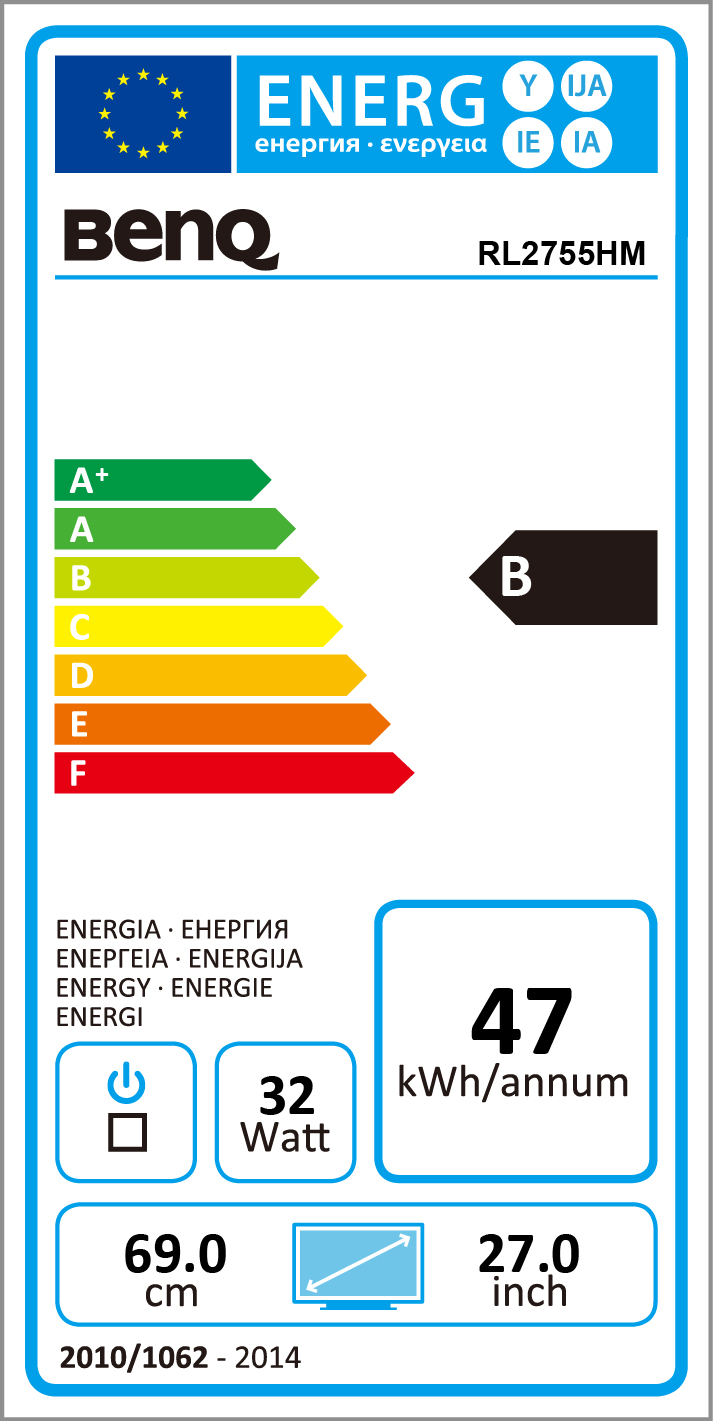
- Energy efficiency class (legacy scale)The energy efficiency rating of the product based on the previous labeling scale (e.g. A+++).
- B
- Power consumption (typical)Amount of power consumed by this model, often expressed in watts (W). Typical values that manufacturers give are power consumption when off, standby/suspended mode, typical use, maximum usage.
- 32 W
- Power consumption (PowerSave)The amount of electrical energy consumed by the device when it is operating in a power-saving mode, measured in Watts.
- 0.5 W
- AC input voltageThe voltage of the AC electricity that is inputted into the product.
- 90 - 264 V
- Annual energy consumptionThe amount of energy used by the product per year.
- 47 kWh
Sustainability
- Sustainability certificatesThe environmental or ethical certifications the product has received to verify its sustainability standards (e.g., ASC or ACT Organic).
- ENERGY STAR
Packaging content
- Cables includedSpecifies the types and quantities of connection cables provided with the product (e.g., 3.5 mm to 3.5 mm or SATA).
- HDMI
- ManualIndicates whether a printed user manual is included in the package.
- Yes
Weight & dimensions
- Width (without stand)The horizontal measurement of the device excluding the base or support structure, expressed in millimetres.
- 639 mm
- Depth (without stand)The measurement of the product from front to back without its base or support, typically expressed in millimetres or centimetres.
- 213 mm
- Height (without stand)The vertical measurement of the device when the stand is removed, measured in mm.
- 478 mm
- Weight (without stand)The mass of the device excluding the support base, measured in g.
- 5.5 kg
Security
- Cable lock slotHoles on the edge of devices through which a cable lock can be passed, so the device can be locked to a desk etc.
- Yes
- Cable lock slot typeThe standard of the security slot used to attach a physical locking cable to the device (e.g. Kensington or Noble).
- Kensington
Ergonomics
- Height adjustmentThe part of the device that can be adjusted to change the height.
- No
- Tilt adjustmentThe tilt, which means the angle at which the device is pointing (up or down), can be changed.
- Yes
- Tilt angle rangeThe minimum and maximum angles at which the unit can be tilted, typically expressed in degrees.
- -5 - 15°
Management features
- On Screen Display (OSD)Indicates whether the device can display a graphical menu or information directly on the screen for adjusting settings and viewing status.
- Yes
- Number of OSD languagesThe total number of different languages available for the on-screen display menu (e.g. 15).
- 17
Ports & interfaces
- VGA (D-Sub) ports quantityNumber of VGA (D-Sub) ports (connecting interfaces) in the device. The VGA (D-Sub) connector is a 15 pin connector between a computer and a monitor. It was first introduced in 1987 by IBM.
- 1
- DVI portDigital Visual Interface (DVI) is a video display interface to connect a video source to a display device, such as a computer monitor.
- Yes
- HDMI ports quantityThe number of sockets (ports) for HDMI connections. HDMI (High-Definition Multimedia Interface) is a compact audio/video interface for transferring uncompressed video data and compressed/uncompressed digital audio data from a HDMI-compliant device ("the source device") to a compatible computer monitor, video projector, digital television, or digital audio device. HDMI is a digital replacement for…
- 2
- Audio inputThe type of audio input that the device requires, and the connection needed.
- Yes
- Headphone outThe socket for connecting headphones to the device.
- Yes
- Headphone outputsNumber of sockets /ports where headphones are connected.
- 1
- HDCPHigh-bandwidth Digital Content Protection (HDCP) is a form of digital copy protection to prevent copying of digital audio and video content as it travels across connections.
- Yes
- AC (power) inIndicates whether the device can be powered directly via an alternating current (AC) power source.
- Yes
Database Right data-sheet 2026 Icecat. All rights reserved. Provided “as is”, without warranty — check details with the store before buying.
Expert reviews
- –
enostech.com2016
the performance wasn't bad, for a TN panel monitor. Jokes aside, in all honesty this is a fairly decent monitor for console gamers. 27″ and 1080P Is great for those console gamers who want a bit of an edge over their opponents who, a lot of, still use...
Read the review at enostech.com ↗ - 60
trustedreviews.com2015
Image Quality The BenQ's game-friendly design gave way to underwhelming image quality benchmarks. The first problem came from the black level of 0.65 nits, which is high – the brightness level of 327 nits is great, but it means the contrast is a low 503:1...
- +
- Cheaper than competitors, Gaming-friendly features, Very good input lag performance
- −
- Disappointing image quality, Extra modes not particularly helpful, OSD sluggish and awkward
- 80
- 76
gadgetspeak.com2015
There is a good amount of back tilt and a little forward movement from the vertical.The viewable screen is 59x33.5cm and that gives the notional imperial diagonal measurement of 27inches.The on screen controls are accessed from a vertical line of six butt...
Read the review at gadgetspeak.com ↗
Price history (90 days, best daily price)
Price history is still being collected for this product — check back soon.
Alternative models

BenQ GW2265HM
computer monitor 54.6 cm (21.5") 1920 x 1080 pixels Full HD LED Black

BenQ GL2450
computer monitor 61 cm (24") 1920 x 1080 pixels Full HD LED Black

BenQ GL2450
computer monitor 61 cm (24") 1920 x 1080 pixels Full HD LED Black

BenQ GW2265
computer monitor 54.6 cm (21.5") 1920 x 1080 pixels Full HD LED Black

BenQ XL2730Z
computer monitor 68.6 cm (27") 2560 x 1440 pixels Full HD LED Black, Red

BenQ BL2711U
computer monitor 68.6 cm (27") 3840 x 2160 pixels 4K Ultra HD LED Black