
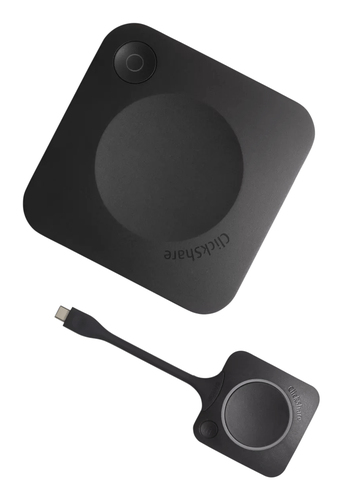
Barco ClickShare CX-50 wireless presentation system HDMI Desktop
- Form factor: Desktop
- Operating temperature (T-T): 0 - 40 °C
- Operating relative humidity (H-H): 0 - 85%
- Storage temperature (T-T): -20 - 60 °C
- Storage relative humidity (H-H): 0 - 90%
- Windows operating systems supported: Windows 10, Windows 11
 Windows 10, Windows 10 Education, Windows 10 Education x64, Windows 10 Enterprise, Windows 10 Enterprise x64, Windows 10 Home, Windows 10 Home x64, Windows 10 IOT Core, Windows 10 IoT Enterprise, Windows 10 Pro, Windows 10 Pro x64, Windows 10 x64, Windows 11, Windows 11 Enterprise, Windows 11 Enterprise x64, Windows 11 Home, Windows 11 Pro, Windows 11 x64
 Windows 10, Windows 11
Where to buy
We're not tracking prices for this product yet. Check current prices directly at:
We may earn a commission when you buy through links on this page — at no extra cost to you. Learn more
About this product
Premium wireless conferencing for large meeting rooms and boardrooms
In the hybrid workplace you need to ensure that your teams are continually in close collaboration with one another. ClickShare CX-50 is a premium agnostic wireless room system designed to facilitate exactly this. Connecting you in less than seven seconds and allowing users to participate in completely wireless and productive hybrid conferences.
Superior wireless conferencing
With ClickShare, the agnostic wireless room system, you start a hybrid meeting from your laptop, using any conference tool. No cables, no mess. Everyone is heard, everyone is seen, no matter where they are.
The ClickShare CX-50 2nd generation provides a flexible solution for every meeting room set-up by enabling automatic switching between Unified Communications mode and Bring Your Own Meeting mode. This allows users to easily switch between a fixed room setup and other videoconferencing solutions.
Connectivity options are simplified, with a single USB-C cable between the Base unit and room display to power the device and send video output to the display. IT managers are able to meet regulatory compliance with both a wireless and wired alternative.
Choose how you want to collaborate
With ClickShare CX-50 2nd generation, you can “bring your own meeting” and decide how you and your guests collaborate. Plug & play with the ClickShare Button and choose for smart, intent-based meeting flows powered by the ClickShare App to make your meetings intuitive and interactive.
Enjoy dual screen support, whereby content & people are shown side-by-side on 2 room displays. Hence, remote participants are always visible during video meetings. This ensures a more equitable experience for all meeting attendees, no matter if they join remotely or in-room. Benefit from interactivity features like local view of the room display, annotation, blackboarding and touch back support.
A user-friendly experience and enhanced security
A set of IT-friendly features makes ClickShare Conference a perfect fit to any enterprise environment. ClickShare Conference, excelling in enhanced security, offers an advanced network integration in any IT- network. With the XMS Cloud Management Platform you enjoy easy management of units, intuitive user experiences and clear analytics to drive your digital workplace.
For practical questions on the advanced network and AV integration options, check our technical support or get in touch with your Barco contact.
Documents
- BrochureProduct Brochure ↗
- ManualUser manual ↗
Specifications
Key specifications
- Form factorThe shape or design of the product.
- Desktop
- Operating temperature (T-T)The minimum and maximum temperatures at which the product can be safely operated.
- 0 - 40 °C
- Operating relative humidity (H-H)The range of relative humidity, expressed as a percentage, within which the device can function correctly without damage or performance loss.
- 0 - 85%
- Storage temperature (T-T)The minimum and maximum temperatures at which the product can be safely stored.
- -20 - 60 °C
- Storage relative humidity (H-H)The permissible range of relative humidity, expressed as a percentage, within which the product can be stored without damage.
- 0 - 90%
- Windows operating systems supportedWindows vesions wich can be used with the device.
- Windows 10, Windows 11
- Mac compatibilityProduct can be used with Apple Mac software and/or hardware.
- Yes
- Mac operating systems supportedMac operating systems e.g. OS X can be used with the device.
- Mac OS X 11.0 Big Sur
- Mobile operating systems supportedThe operating systems e.g. Android, iOS, that can be used with the mobile device.
- Android 11.0, Android 12.0, iOS 14, iOS 14.5, iOS 15
- Power source typeWhat the power source is.
- AC
Show all 37 specificationsShow key specifications only
Design
- Form factorThe shape or design of the product.
- Desktop
- Product colourThe colour e.g. red, blue, green, black, white.
- Black
Weight & dimensions
- WidthThe measurement or extent of something from side to side.
- 200 mm
- DepthThe distance from the front to the back of something.
- 202 mm
- HeightThe measurement of the product from head to foot or from base to top.
- 39 mm
- WeightWeight of the product without packaging (net weight). If possible, the net weight is given including standard accessories and supplies. Please note that sometimes the manufacturer leaves out the weight of accessories and/or supplies.
- 985 g
Operational conditions
- Operating temperature (T-T)The minimum and maximum temperatures at which the product can be safely operated.
- 0 - 40 °C
- Operating relative humidity (H-H)The range of relative humidity, expressed as a percentage, within which the device can function correctly without damage or performance loss.
- 0 - 85%
- Storage temperature (T-T)The minimum and maximum temperatures at which the product can be safely stored.
- -20 - 60 °C
- Storage relative humidity (H-H)The permissible range of relative humidity, expressed as a percentage, within which the product can be stored without damage.
- 0 - 90%
Features
- Windows operating systems supportedWindows vesions wich can be used with the device.
- Windows 10, Windows 11
- InterfaceInterface ports to connect pieces of equipment. USB (Universal Serial Bus) has become the most popular wired interface to connect peripherals. USB 2.0 supports speeds up to 480 Mbit/s (USB 1: 12 Mbit/s). The interface FireWire is also known as the IEEE 1394 standard. Enhanced IDE (EIDE)is sometimes referred to as Fast ATA, Fast IDE or ATA-2.
- HDMI
Other features
- Mac compatibilityProduct can be used with Apple Mac software and/or hardware.
- Yes
Software
- Mac operating systems supportedMac operating systems e.g. OS X can be used with the device.
- Mac OS X 11.0 Big Sur
System requirements
- Mobile operating systems supportedThe operating systems e.g. Android, iOS, that can be used with the mobile device.
- Android 11.0, Android 12.0, iOS 14, iOS 14.5, iOS 15
Power
- Power source typeWhat the power source is.
- AC
- Input voltageThe voltage (V) which is required to power the product.
- 110 - 220 V
- Power consumption (max)The maximum amount of power used by the device.
- 74.5 W
- Power consumption (standby)The amount of electricity that is consumed when the product is on standby.
- 0.27 W
- DC-in jackThe socket/plug where the DC electricity supply connects to the device.
- Yes
Ports & interfaces
- HDMI input ports quantityThe total number of available HDMI ports used for receiving incoming audio and video signals.
- 1
- Number of HDMI outputsPort (socket) for HDMI output.
- 1
- HDMI versionThe specific release version of the High-Definition Multimedia Interface standard supported by the device (e.g. 1.3 or 2.0).
- 1.4b
- Ethernet LAN (RJ-45) portsNumber of Ethernet LAN (RJ-45) ports (connecting interfaces) in the device. Ethernet LAN (RJ-45) ports allow a computer to connect to the ethernet.
- 1
- USB 3.2 Gen 1 (3.1 Gen 1) Type-A ports quantityThe total number of available USB 3.2 Gen 1 (formerly 3.1 Gen 1) Type-A connection ports on the device.
- 2
- USB 3.2 Gen 1 (3.1 Gen 1) Type-C ports quantityNumber of USB 3.0 (3.1 Gen 1) ports with Type-C connector. USB 3.0 (3.1 Gen 1) is USB interface version which supports transfer rate up to 5 Gbit/s (SuperSpeed). USB Type-C connector has symmetrical design architecture and compatible with Thunderbolt 3 interface.
- 2
- S/PDIF out portS/PDIF (Sony/Philips Digital Interconnect Format) is a digital audio interconnect used in consumer audio equipment over relatively short distances. The signal is transmitted over either a coaxial cable with RCA connectors or a fibre optic cable with TOSLINK connectors.
- Yes
- 3.5 mm (1/8-inch) outIndicates whether the device features a 3.5 mm (1/8-inch) audio output jack.
- Yes
Network
- Wi-Fi standardsThe type of wireless local area network (LAN). It can be ad-hoc, where units in a network communicate peer-to-peer, or Infrastructure, where units communicate with each other via an access point A LAN interconnects computers in a small area e.g. home, school or office.
- 802.11a, 802.11g, Wi-Fi 4 (802.11n), Wi-Fi 5 (802.11ac)
- Top Wi-Fi standardConnection of this device is done via Wi-Fi in a high standard.
- Wi-Fi 5 (802.11ac)
- Ethernet LANAn Ethernet LAN (Local Area Network) interface is present, for a wired conection via a cable.
- Yes
Keyboard
- Frequency bandA small section of the spectrum of radio communication frequencies, in which channels are usually used or set aside for the same purpose e.g.for a channel on FM radio; for mobile networks to communicate with mobile phones.
- 2.4, 5 GHz
Wireless LAN features
- Dual-bandA dual band device can work with two different bands. Dual-band WiFi (wireless) contains two different types of wireless radios that can support connections on both 2.4 GHz and 5 GHz links.
- Yes
Performance
- Security algorithmsSecurity algorithms are used to provide authentication, cipher key generation, integrity and radio link privacy to users on mobile networks. The security algorithms supported are the ones that can be used with this product.
- WPA2-PSK
Display
- Supported graphics resolutionsThe graphic resolutions that can be displayed by the device. The graphic resolution describes the width and height dimensions of a display, such as a computer monitor, measured in pixels.
- 3840 x 2160
Security
- Cable lock slotHoles on the edge of devices through which a cable lock can be passed, so the device can be locked to a desk etc.
- Yes
- Cable lock slot typeThe standard of the security slot used to attach a physical locking cable to the device (e.g. Kensington or Noble).
- Kensington
Database Right data-sheet 2026 Icecat. All rights reserved. Provided “as is”, without warranty — check details with the store before buying.
Price history (90 days, best daily price)
Price history is still being collected for this product — check back soon.
Alternative models

Barco CX‑50 G2 wireless presentation system HDMI Desktop

Barco CX‑50 G2 wireless presentation system HDMI Desktop

Barco wePresent WiPG-1000 wireless presentation system HDMI + VGA (D-Sub) Desktop

Barco ClickShare C-5 G2 wireless presentation system HDMI Dongle
Barco ClickShare C‑10 wireless presentation system HDMI Desktop
