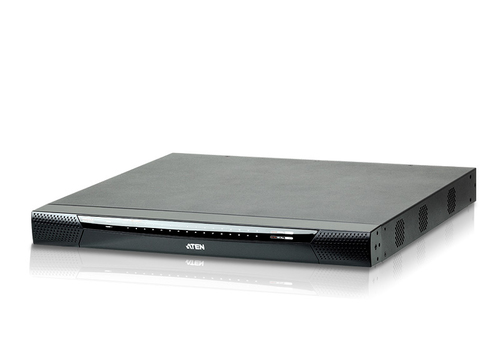
ATEN KN4116VA-AX-E KVM switch Rack mounting Grey
- Cables included: AC
- Manual
- Rack mount kit
- Operating temperature (T-T): 0 - 40 °C
- Storage temperature (T-T): -20 - 60 °C
- Operating relative humidity (H-H): 0 - 80%
Where to buy
We're not tracking prices for this product yet. Check current prices directly at:
We may earn a commission when you buy through links on this page — at no extra cost to you. Learn more
Specifications
Key specifications
- Cables includedSpecifies the types and quantities of connection cables provided with the product (e.g., 3.5 mm to 3.5 mm or SATA).
- AC
- ManualIndicates whether a printed user manual is included in the package.
- Yes
- Rack mount kitIndicates whether the necessary hardware is included to install the unit into a standard 19-inch equipment rack.
- Yes
- Operating temperature (T-T)The minimum and maximum temperatures at which the product can be safely operated.
- 0 - 40 °C
- Storage temperature (T-T)The minimum and maximum temperatures at which the product can be safely stored.
- -20 - 60 °C
- Operating relative humidity (H-H)The range of relative humidity, expressed as a percentage, within which the device can function correctly without damage or performance loss.
- 0 - 80%
- Power sourceWhat is providing power for the product e.g. mains electricity.
- AC
- Input voltageThe voltage (V) which is required to power the product.
- 100 - 240 V
- AC input frequencyThe range of alternating current frequencies the device can accept from the power source, measured in hertz (e.g., 45 - 65).
- 50 - 60 Hz
- Input currentThe amount of electrical current drawn by the device during operation, typically measured in amperes (A) or milliamperes (mA).
- 1 A
Show all 48 specificationsShow key specifications only
Packaging content
- Cables includedSpecifies the types and quantities of connection cables provided with the product (e.g., 3.5 mm to 3.5 mm or SATA).
- AC
- ManualIndicates whether a printed user manual is included in the package.
- Yes
- Rack mount kitIndicates whether the necessary hardware is included to install the unit into a standard 19-inch equipment rack.
- Yes
Weight & dimensions
- WidthThe measurement or extent of something from side to side.
- 433.6 mm
- DepthThe distance from the front to the back of something.
- 412.1 mm
- HeightThe measurement of the product from head to foot or from base to top.
- 44 mm
- WeightWeight of the product without packaging (net weight). If possible, the net weight is given including standard accessories and supplies. Please note that sometimes the manufacturer leaves out the weight of accessories and/or supplies.
- 6.63 kg
Operational conditions
- Operating temperature (T-T)The minimum and maximum temperatures at which the product can be safely operated.
- 0 - 40 °C
- Storage temperature (T-T)The minimum and maximum temperatures at which the product can be safely stored.
- -20 - 60 °C
- Operating relative humidity (H-H)The range of relative humidity, expressed as a percentage, within which the device can function correctly without damage or performance loss.
- 0 - 80%
Power
- Power sourceWhat is providing power for the product e.g. mains electricity.
- AC
- Input voltageThe voltage (V) which is required to power the product.
- 100 - 240 V
- AC input frequencyThe range of alternating current frequencies the device can accept from the power source, measured in hertz (e.g., 45 - 65).
- 50 - 60 Hz
- Input currentThe amount of electrical current drawn by the device during operation, typically measured in amperes (A) or milliamperes (mA).
- 1 A
- DC-in jackThe socket/plug where the DC electricity supply connects to the device.
- Yes
Design
- Built-in displayA display which is part of the product, so you do not need to attach another display.
- No
- Rack mountingThe type of mounting that can position devices in a shelving system (rack).
- Yes
- Product colourThe colour e.g. red, blue, green, black, white.
- Grey
- Housing materialWhat the casing of the product is made of.
- Metal
- CascadableIndicates whether multiple units of the product can be connected together to expand the total number of supported devices.
- Yes
- LED indicatorsThe specific status lights available on the unit to provide visual feedback on its current state or connectivity (e.g., AC input, ACT, or Access).
- Yes
- Push buttonIndicates whether the device is equipped with a physical button that must be pressed to trigger a function or action.
- Yes
Features
- Rack capacityThe spase that device fill in rack.
- 1U
Display
- HD typeType of supported High Definition (e.g. Full HD, 4K Ultra HD).
- WUXGA
Printing
- Maximum resolutionMaximum printing resolution.
- 1920 x 1200 pixels
Performance
- Video bandwidthThe maximum frequency of the video signal that the device can process, measured in Hz.
- 60 Hz
- Scan intervalThe time period between consecutive checks for input signals or status changes, typically measured in seconds (e.g. 0.2 or 1).
- 1,255 s
Technical details
- Auto scan delay (min)The minimum amount of time the device waits before automatically scanning for an active input signal, measured in s.
- 1 s
- Auto scan delay (max)The maximum amount of time the device waits between automatic scans to detect active input sources, measured in s.
- 255 s
Network
- Ethernet LANAn Ethernet LAN (Local Area Network) interface is present, for a wired conection via a cable.
- Yes
- Cabling technologyType of cable technology performance.
- 10/100/1000Base-T(X)
Ports & interfaces
- Ethernet LAN (RJ-45) portsNumber of Ethernet LAN (RJ-45) ports (connecting interfaces) in the device. Ethernet LAN (RJ-45) ports allow a computer to connect to the ethernet.
- 20
- Number of computers controlledThe amount of computers controlled by this device.
- 16
- Keyboard port typeThe type of socket in the device for connecting a keyboard e.g. USB.
- USB
- Mouse port typeThe interface standard used for the mouse connection, such as USB or PS/2.
- USB
- Video port typeThe type of socket in the device for connecting a video e.g. SCART.
- DVI-D/VGA
- DVI-D ports quantityThis is the amount of DVI-I interfaces. Digital Visual Interface (DVI) is a video display interface developed by the Digital Display Working Group (DDWG). The digital interface is used to connect a video source to a display device, such as a computer monitor. DVI-D means DVI digital, which means it can only support digital, but not analog.
- 1
- VGA (D-Sub) ports quantityNumber of VGA (D-Sub) ports (connecting interfaces) in the device. The VGA (D-Sub) connector is a 15 pin connector between a computer and a monitor. It was first introduced in 1987 by IBM.
- 1
- Console portsThe types of physical interfaces available for connecting a local user interface, such as HDMI, DisplayPort, or 3.5mm audio jacks.
- DVI-D, RJ–45, USB A, VGA (D-Sub)
- Console USB ports quantityThe total number of USB ports available on the console interface for connecting peripherals.
- 2
- USB 2.0 Type-A hub ports quantityThe total number of available USB 2.0 Type-A ports provided by the integrated hub for connecting peripheral devices.
- 3
- USB connector typeThe type of USB connector/port that this product has.
- Mini-USB, USB Type-A
- Serial port typeThe physical interface or communication standard used for the serial connection (e.g. DE-9 or RJ-45).
- RJ-45
- Serial ports quantityThe number of serial ports in a computer or peripheral. A serial port is a serial communication physical interface through which information transfers in or out one bit at a time. The term "serial port" usually identifies hardware more or less compliant to the RS-232 standard, intended to interface with a modem or with a similar communication device. In modern computers and peripherals, serial po…
- 1
- Audio connectionsCables used to connect audio inputs or audio outputs to another device e.g, audio amplifier.
- Yes
- Headphone outputsNumber of sockets /ports where headphones are connected.
- 1
- Number of microphone inputsThe total number of available ports for connecting external microphones to the device.
- 1
Keyboard
- USB hubIndicates whether the product includes an integrated USB hub for connecting multiple peripheral devices.
- Yes
Database Right data-sheet 2026 Icecat. All rights reserved. Provided “as is”, without warranty — check details with the store before buying.
Price history (90 days, best daily price)
Price history is still being collected for this product — check back soon.
Alternative models

ATEN CN9950 KVM switch Black
Specs & where to buy
ATEN KN4132VA-AX-E KVM switch Rack mounting Grey
Specs & where to buy

ATEN CN9000 KVM switch Black
Specs & where to buy

ATEN KN8164V-AX-E KVM switch Black
Specs & where to buy

ATEN 2-Port USB 3.0 4K DisplayPort MST KVMP Switch
Specs & where to buy

ATEN KN2132VA-AX-E KVM switch Rack mounting Black, Grey
Specs & where to buy