
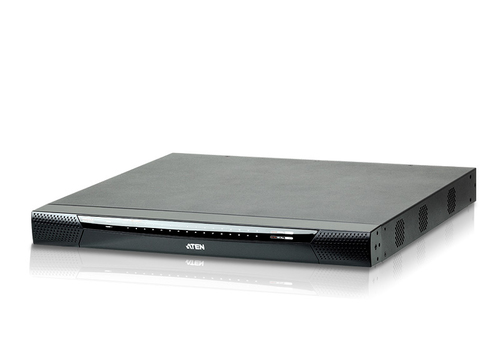
ATEN CN9000 KVM switch Black
- Operating temperature (T-T): 0 - 50 °C
- Storage temperature (T-T): -20 - 60 °C
- Operating relative humidity (H-H): 0 - 80%
- Storage relative humidity (H-H): 0 - 80%
- Power source: AC
- Input voltage: 5 V
Where to buy
We're not tracking prices for this product yet. Check current prices directly at:
We may earn a commission when you buy through links on this page — at no extra cost to you. Learn more
About this product
The CN9000 VGA KVM over IP Switch allows remote access and control of the video, audio, and virtual media of a PC or workstation and features VGA high-definition video with resolutions of up to 1920 x 1200 @ 60 Hz at both the local and remote consoles. Equipped with USB and PS/2 (keyboard and mouse) support, CN9000 is compatible with not only modern-day workstations but also older legacy systems and servers.
For user-friendly operation, a mini USB port on the front panel is designed as a Laptop USB Console (LUC) port for connection to a laptop, which allows the user to access the PC/server for easy routine maintenance without requiring an additional monitor, keyboard, and mouse.
To ensure seamless connectivity, the CN9000 is equipped with dual LAN and dual power functionality to keep operation in the server room smooth and efficient. Its power status detection function automatically sends out event notifications when the device becomes offline (e.g. power failure) for device status monitoring. Moreover, the CN9000 features a 5-pin Relay / DI (digital input) terminal block allowing for remote reboot of the local server, and receiving digital inputs from a connected input/alarm device for notification of critical events.
For ease of remote management, the CN9000 WebClient Viewer supports remote desktop access without additional software applications. The VGA KVM over IP Switch provides a web-based GUI for remote access and management. With a unified multilanguage interface, it can effectively minimize user training time and increase productivity.
Documents
- ManualUser manual ↗
- BrochureProduct Brochure ↗
Specifications
Key specifications
- Operating temperature (T-T)The minimum and maximum temperatures at which the product can be safely operated.
- 0 - 50 °C
- Storage temperature (T-T)The minimum and maximum temperatures at which the product can be safely stored.
- -20 - 60 °C
- Operating relative humidity (H-H)The range of relative humidity, expressed as a percentage, within which the device can function correctly without damage or performance loss.
- 0 - 80%
- Storage relative humidity (H-H)The permissible range of relative humidity, expressed as a percentage, within which the product can be stored without damage.
- 0 - 80%
- Power sourceWhat is providing power for the product e.g. mains electricity.
- AC
- Input voltageThe voltage (V) which is required to power the product.
- 5 V
- Power consumption (typical)Amount of power consumed by this model, often expressed in watts (W). Typical values that manufacturers give are power consumption when off, standby/suspended mode, typical use, maximum usage.
- 7.46 W
- Product colourThe colour e.g. red, blue, green, black, white.
- Black
- Housing materialWhat the casing of the product is made of.
- Metal
- LED indicatorsThe specific status lights available on the unit to provide visual feedback on its current state or connectivity (e.g., AC input, ACT, or Access).
- Yes
Show all 31 specificationsShow key specifications only
Weight & dimensions
- WidthThe measurement or extent of something from side to side.
- 200 mm
- DepthThe distance from the front to the back of something.
- 154.1 mm
- HeightThe measurement of the product from head to foot or from base to top.
- 28.5 mm
- WeightWeight of the product without packaging (net weight). If possible, the net weight is given including standard accessories and supplies. Please note that sometimes the manufacturer leaves out the weight of accessories and/or supplies.
- 860 g
Operational conditions
- Operating temperature (T-T)The minimum and maximum temperatures at which the product can be safely operated.
- 0 - 50 °C
- Storage temperature (T-T)The minimum and maximum temperatures at which the product can be safely stored.
- -20 - 60 °C
- Operating relative humidity (H-H)The range of relative humidity, expressed as a percentage, within which the device can function correctly without damage or performance loss.
- 0 - 80%
- Storage relative humidity (H-H)The permissible range of relative humidity, expressed as a percentage, within which the product can be stored without damage.
- 0 - 80%
Power
- Power sourceWhat is providing power for the product e.g. mains electricity.
- AC
- Input voltageThe voltage (V) which is required to power the product.
- 5 V
- Power consumption (typical)Amount of power consumed by this model, often expressed in watts (W). Typical values that manufacturers give are power consumption when off, standby/suspended mode, typical use, maximum usage.
- 7.46 W
- DC-in jackThe socket/plug where the DC electricity supply connects to the device.
- Yes
Design
- Rack mountingThe type of mounting that can position devices in a shelving system (rack).
- No
- Product colourThe colour e.g. red, blue, green, black, white.
- Black
- Housing materialWhat the casing of the product is made of.
- Metal
- LED indicatorsThe specific status lights available on the unit to provide visual feedback on its current state or connectivity (e.g., AC input, ACT, or Access).
- Yes
Display
- HD typeType of supported High Definition (e.g. Full HD, 4K Ultra HD).
- Full HD
Printing
- Maximum resolutionMaximum printing resolution.
- 1920 x 1200 pixels
Network
- Ethernet LANAn Ethernet LAN (Local Area Network) interface is present, for a wired conection via a cable.
- Yes
Ports & interfaces
- Ethernet LAN (RJ-45) portsNumber of Ethernet LAN (RJ-45) ports (connecting interfaces) in the device. Ethernet LAN (RJ-45) ports allow a computer to connect to the ethernet.
- 2
- Number of computers controlledThe amount of computers controlled by this device.
- 1
- Keyboard port typeThe type of socket in the device for connecting a keyboard e.g. USB.
- USB, PS/2
- Mouse port typeThe interface standard used for the mouse connection, such as USB or PS/2.
- USB, PS/2
- Video port typeThe type of socket in the device for connecting a video e.g. SCART.
- VGA
- VGA (D-Sub) ports quantityNumber of VGA (D-Sub) ports (connecting interfaces) in the device. The VGA (D-Sub) connector is a 15 pin connector between a computer and a monitor. It was first introduced in 1987 by IBM.
- 2
- Console portsThe types of physical interfaces available for connecting a local user interface, such as HDMI, DisplayPort, or 3.5mm audio jacks.
- 3.5mm headphone, 3.5mm mic, USB A, VGA (D-Sub)
- Console USB ports quantityThe total number of USB ports available on the console interface for connecting peripherals.
- 2
- USB connector typeThe type of USB connector/port that this product has.
- USB Type-A
- Serial port typeThe physical interface or communication standard used for the serial connection (e.g. DE-9 or RJ-45).
- RS-232
- Serial ports quantityThe number of serial ports in a computer or peripheral. A serial port is a serial communication physical interface through which information transfers in or out one bit at a time. The term "serial port" usually identifies hardware more or less compliant to the RS-232 standard, intended to interface with a modem or with a similar communication device. In modern computers and peripherals, serial po…
- 1
- Audio connectionsCables used to connect audio inputs or audio outputs to another device e.g, audio amplifier.
- Yes
Database Right data-sheet 2026 Icecat. All rights reserved. Provided “as is”, without warranty — check details with the store before buying.
Price history (90 days, best daily price)
Price history is still being collected for this product — check back soon.
Alternative models

ATEN 2-Port USB 3.0 4K DisplayPort MST KVMP Switch

ATEN CN9950 KVM switch Black

ATEN CL5800N-ATA-1G KVM switch Rack mounting Black
ATEN KN4116VA-AX-E KVM switch Rack mounting Grey

ATEN CL3700NW-ATA-UG KVM switch Rack mounting Black
