
ASUS ROG Swift PG48UQ computer monitor 120.7 cm (47.5") 3840 x 2160 pixels 4K Ultra HD OLED Black
- Screen: 120.7 cm (47.5"), 3840 x 2160 pixels, Flat
- Refresh rate: 138 Hz, 0.1 ms response time
- Brightness: 450 cd/m²
- Adaptive sync: NVIDIA G-SYNC
- Ports: 4 × HDMI, 1 × DisplayPort
- Stand: tilt, VESA 300 x 300 mm
- Extras: speakers, USB hub
- Colour: Black
Where to buy
We're not tracking prices for this product yet. Check current prices directly at:
We may earn a commission when you buy through links on this page — at no extra cost to you. Learn more
About this product
ROG Swift OLED PG48UQ
BUILT FOR GAMING. GREAT FOR EVERYTHING
The ROG Swift OLED PG48UQ is a 47.5-inch 4K OLED gaming monitor that features an anti-glare Micro-texture coating to reduce reflections to ensure you see more accurate onscreen colors. Its superfast 138 Hz (overclocked) refresh rate and blazing 0.1 ms response time delivers incredibly immersive gaming on a larger scale. Plus 98% DCI-P3 gamut, true 10-bit color and Delta E < 2 ensure true-to-life colors and the darkest-possible black hues.
DETAILED VISUALS AND CLEARLY-DEFINED TEXT
ROG Swift OLED gaming monitors feature the latest generation OLED panels designed for greater efficiency and brightness. The sub-pixel layout provides extremely detailed visuals and clearly-defined text to upgrade the viewing experience.
ULTRA-REALISTIC COLORS
The PG48UQ gaming monitor features true 10-bit color depth and a cinema-grade 98% DCI-P3 gamut to deliver unparalleled realism. Each monitor is pre-calibrated to Delta E < 2 to ensure the very best color reproduction on its brilliant OLED panel.
CUSTOM HEATSINK
INTELLIGENT COOLING DESIGN FOR 8% LOWER TEMPERATURES*
The custom heatsink found in the PG48UQ offers more surface area for heat exchange to provide more efficient cooling performance, even in long gaming stints. The lower temperature enables better OLED performance with lower likelihood of image sticking. This robust fanless system operates silently to minimize distractions.
*Compared to ROG monitors with no heatsink.
ANTI-GLARE MICRO-TEXTURE COATING
LESS GLARE, FEWER DISTRACTIONS
A special matte Micro-texture coating on the surface of the display significantly reduces glare. This allows the PG48UQ to display more accurate colors free of distracting screen glare.
GAMING
CERTIFIED NVIDIA G−SYNC COMPATIBLE
The PG48UQ delivers a seamless, tear-free gaming experience by enabling variable refresh rate technology as a default on NVIDIA GeForce graphics cards.
RICH CONNECTIVITY
The PG48UQ has an array of connectivity options that cater to any gaming or streaming setup. It includes HDMI 2.1 and 2.0, as well as DisplayPort 1.4 (DSC) at the rear to connect to various devices. One USB port and a tripod socket on top of the monitor makes it easy to mount a camera. Lastly, there’s even a headphone jack at the bottom of the display.
IN-GAME ENHANCEMENTS
Uniform brightness
When activated, the ROG-exclusive uniform brightness function setting within the OSD menu decreases peak brightness to keep levels consistent for better viewing, even when changing the size of bright white windows. It also makes marathon gaming sessions much more comfortable on the eyes.
ASPECT CONTROL
For gamers that prefer playing on smaller monitors, the PG48UQ supports a range of aspect ratios to cast a 24", 27", or 34" image that can be shifted vertically to aid the viewing experience. See it all, and set the pace with the 0.1ms response time of OLED.
Documents
- ManualUser manual ↗
- Product information sheetEU Product Fiche ↗
Specifications
Key specifications
- Display diagonalSize of the display for this product, measured diagonally, usually in inches.
- 120.7 cm (47.5")
- Display resolutionThe number of distinct pixels in each dimension that can be displayed. It is usually quoted as width × height, with the units in pixels: for example, "1024 × 768" means the width is 1024 pixels and the height is 768 pixels. The higher the number of pixels, the sharper the image.
- 3840 x 2160 pixels
- Screen shapeDescribes the physical curvature of the display panel, such as whether it is flat or curved.
- Flat
- Maximum refresh rateThe highest number of times per second the image is updated, measured in hertz (Hz).
- 138 Hz
- Response timeThe response time is the time difference between the moment that a source (for example a video card) sends a signal and that equipment (for example a monitor) receives or display the signal. (Used abbreviations: R/F = Rise and Fall.)
- 0.1 ms
- Display brightness (typical)Display brightness, measured by its Luminance, presented as a figure in nits. Typical brightness ratings for monitors range from 250 to 350 nits with a target value of between 80 to 120 nits being suitable for most displays in a normal viewing environment.
- 450 cd/m²
- NVIDIA G-SYNCIndicates whether the product supports NVIDIA G-SYNC technology to synchronize the display refresh rate with the GPU to eliminate screen tearing.
- Yes
- HDMI ports quantityThe number of sockets (ports) for HDMI connections. HDMI (High-Definition Multimedia Interface) is a compact audio/video interface for transferring uncompressed video data and compressed/uncompressed digital audio data from a HDMI-compliant device ("the source device") to a compatible computer monitor, video projector, digital television, or digital audio device. HDMI is a digital replacement for…
- 4
- DisplayPorts quantityNumber of DisplayPorts. A DisplayPort is a digital display interface developed by the Video Electronics Standards Association (VESA). The interface is primarily used to connect a video source to a display device such as a computer monitor, though it can also be used to carry audio, USB, and other forms of data.
- 1
- Tilt adjustmentThe tilt, which means the angle at which the device is pointing (up or down), can be changed.
- Yes
- Panel mounting interfaceThe product can be used wih VESA mounting interfaces.
- 300 x 300 mm
- Built-in speaker(s)The device contains speaker(s) to produce sound.
- Yes
- Built-in USB hubWhether or not the device features a USB hub to connect more than one other device via USB.
- Yes
- Product colourThe colour e.g. red, blue, green, black, white.
- Black
Show all 84 specificationsShow key specifications only
Design
- VESA mountingIndicates whether the product supports the VESA mounting standard for attachment to compatible arms, brackets, or wall mounts.
- Yes
- Market positioningUnder which category can the device be positioned in the market, e.g. camera phone.
- Gaming
- Product colourThe colour e.g. red, blue, green, black, white.
- Black
- Panel mounting interfaceThe product can be used wih VESA mounting interfaces.
- 300 x 300 mm
Ports & interfaces
- Built-in USB hubWhether or not the device features a USB hub to connect more than one other device via USB.
- Yes
- USB hub versionThe technical standard of the USB hub, if available, which determines the maximum data transfer speed (e.g., 3.2 Gen 1).
- 3.2 Gen 2 (3.1 Gen 2)
- Number of upstream portsThe total number of available ports used to connect the device to a computer or another network source.
- 1
- USB Type-A downstream ports quantityThe number of USB Type-A ports available for connecting peripheral devices to the unit.
- 4
- HDMIHDMI (High-Definition Multimedia Interface) is a compact audio/video interface for transferring uncompressed video data and compressed/uncompressed digital audio data from a HDMI-compliant device ("the source device") to a compatible computer monitor, video projector, digital television, or digital audio device. HDMI is a digital replacement for existing analog video standards.
- Yes
- HDMI ports quantityThe number of sockets (ports) for HDMI connections. HDMI (High-Definition Multimedia Interface) is a compact audio/video interface for transferring uncompressed video data and compressed/uncompressed digital audio data from a HDMI-compliant device ("the source device") to a compatible computer monitor, video projector, digital television, or digital audio device. HDMI is a digital replacement for…
- 4
- HDMI versionThe specific release version of the High-Definition Multimedia Interface standard supported by the device (e.g. 1.3 or 2.0).
- 2.0/2.1
- DisplayPorts quantityNumber of DisplayPorts. A DisplayPort is a digital display interface developed by the Video Electronics Standards Association (VESA). The interface is primarily used to connect a video source to a display device such as a computer monitor, though it can also be used to carry audio, USB, and other forms of data.
- 1
- DisplayPort versionThe specific release version of the DisplayPort standard supported by the device (e.g., 1.2 or 1.4).
- 1.4
- Audio outputThe type of audio output that the device produces, and the connector(s).
- Yes
- Headphone outThe socket for connecting headphones to the device.
- Yes
- Headphone outputsNumber of sockets /ports where headphones are connected.
- 1
- HDCPHigh-bandwidth Digital Content Protection (HDCP) is a form of digital copy protection to prevent copying of digital audio and video content as it travels across connections.
- Yes
- HDCP versionThe version of the High-bandwidth Digital Content Protection standard supported by the device to prevent the unauthorized copying of digital audio and video content (e.g. 2.2).
- 2.3
Audio
- Built-in speaker(s)The device contains speaker(s) to produce sound.
- Yes
- Number of speakersThe quantity of speakers included in/with the product.
- 2
- RMS rated powerRMS (Root mean square) is a measure of the continuous power required by a device, in particular audio amplifiers and loudspeakers.
- 20 W
Multimedia
- Built-in cameraThe product has an integrated camera.
- No
Performance
- NVIDIA G-SYNCIndicates whether the product supports NVIDIA G-SYNC technology to synchronize the display refresh rate with the GPU to eliminate screen tearing.
- Yes
- NVIDIA G-SYNC typeSpecifies the version of NVIDIA's adaptive sync technology supported by the device to reduce screen tearing and stuttering (e.g. G-SYNC Compatible).
- G-SYNC Compatible
- Flicker-free technologyIndicates whether the device employs technology to reduce or eliminate screen flickering to decrease eye strain during prolonged use.
- Yes
- Low Blue Light technologyIndicates whether the product features technology designed to reduce the amount of harmful short-wave blue light emitted by the screen to decrease eye strain.
- Yes
- Game modeIndicates whether the device has a dedicated preset that optimizes performance, such as reducing input lag or enhancing contrast, for gaming.
- Yes
- High Dynamic Range (HDR) supportedIndicates whether the device supports High Dynamic Range for improved contrast and a wider range of colours and luminosity.
- Yes
Display
- Display diagonalSize of the display for this product, measured diagonally, usually in inches.
- 120.7 cm (47.5")
- Display resolutionThe number of distinct pixels in each dimension that can be displayed. It is usually quoted as width × height, with the units in pixels: for example, "1024 × 768" means the width is 1024 pixels and the height is 768 pixels. The higher the number of pixels, the sharper the image.
- 3840 x 2160 pixels
- Native aspect ratioThe aspect ratio is the ratio of the width of an image to its height. The native aspect ratio is the one which the projector/display is particularly designed for. Images shown in native aspect ratio will utilize the entire resolution of the display and achieve maximum brightness. Images shown in other than native aspect ratio will always have less resolution and less brightness than images shown…
- 16:9
- Display technologyThe technology used in the display e.g. plasma, LED.
- OLED
- TouchscreenA screen of a laptop, smartphone, etc., that responds to touch so you can control the interface using your fingers.
- No
- HD typeType of supported High Definition (e.g. Full HD, 4K Ultra HD).
- 4K Ultra HD
- Display brightness (typical)Display brightness, measured by its Luminance, presented as a figure in nits. Typical brightness ratings for monitors range from 250 to 350 nits with a target value of between 80 to 120 nits being suitable for most displays in a normal viewing environment.
- 450 cd/m²
- Response timeThe response time is the time difference between the moment that a source (for example a video card) sends a signal and that equipment (for example a monitor) receives or display the signal. (Used abbreviations: R/F = Rise and Fall.)
- 0.1 ms
- Display surfaceThe finish of the screen's outer layer, which determines how light reflects off the surface (e.g. Glossy, Matte, or Anti-glare).
- Matt
- Screen shapeDescribes the physical curvature of the display panel, such as whether it is flat or curved.
- Flat
- Contrast ratio (typical)The difference in light intensity between the brightest white and the darkest black.
- 135000:1
- Contrast ratio (dynamic)A property of a display system, defined as the ratio of the luminance of the brightest color (white) to that of the darkest color (black) that the system is capable of producing.
- 1500000:1
- Dynamic contrast ratio marketing nameThe proprietary brand name used by the manufacturer to describe the technology that automatically adjusts the backlight to improve the contrast ratio (e.g., ASUS Smart Contrast Ratio).
- ASUS Smart Contrast Ratio (ASCR)
- Maximum refresh rateThe highest number of times per second the image is updated, measured in hertz (Hz).
- 138 Hz
- Viewing angle, horizontalMaximum horizontal angle at which a display can be viewed with acceptable visual performance.
- 178°
- Viewing angle, verticalMaximum vertical angle at which a display can be viewed with acceptable visual performance.
- 178°
- Display number of coloursThe total number of distinct colours that the device is capable of displaying (e.g. 1.07 billion colours).
- 1.073 billion colours
- Pixel pitchThis is the parameter of a picture tube, which specifies the shortest distance between two dots of the same colour. The principle is: the smaller the dot pitch, the better sharpness of image.
- 0.27405 x 0.27405 mm
- Viewable size, horizontalThe viewable size is often somewhat smaller than the actual size of a monitor, because there is a border around the image.
- 105.2 cm
- Viewable size, verticalThe height of the screen area that can actually display an image, measured in millimetres or inches.
- 59.2 cm
- Digital horizontal frequencyThe range of horizontal scanning frequencies the device can support, measured in kHz.
- 30 - 311 kHz
- Digital vertical frequencyThe range of refresh rates the device can support when operating in digital mode, measured in Hertz (Hz).
- 48 - 138 Hz
- High Dynamic Range (HDR) technologyThe specific standard or version of high contrast and color reproduction used to enhance the detail in the darkest and brightest areas of an image (e.g. DisplayHDR 600).
- High Dynamic Range 10 (HDR10)
- Colour gamut standardThe specific color space standard the device is designed to reproduce, such as Adobe RGB or DCI-P3.
- DCI-P3
- Colour gamutThe range of colours that the display can accurately reproduce, typically expressed as a percentage of a standard colour space (e.g. sRGB or Adobe RGB).
- 98%
- sRGB coverage (typical)The percentage of the sRGB color space that the device is capable of reproducing.
- 133%
Loudspeakers
- WooferLoudspeaker designed to reproduce low frequencies.
- Yes
Weight & dimensions
- Width (with stand)The total horizontal measurement of the product when the supporting stand is attached, measured in millimetres.
- 1068 mm
- Depth (with stand)The measurement of the product from front to back when any supporting accessory or base is attached, expressed in millimetres or centimetres.
- 266 mm
- Height (with stand)The total vertical measurement of the product including its base or support structure, expressed in millimetres or centimetres.
- 686 mm
- Weight (with stand)The total mass of the unit including its supporting base, measured in kilograms or grams.
- 16.2 kg
- Width (without stand)The horizontal measurement of the device excluding the base or support structure, expressed in millimetres.
- 1068 mm
- Depth (without stand)The measurement of the product from front to back without its base or support, typically expressed in millimetres or centimetres.
- 40 mm
- Height (without stand)The vertical measurement of the device when the stand is removed, measured in mm.
- 612 mm
- Weight (without stand)The mass of the device excluding the support base, measured in g.
- 15 kg
Power
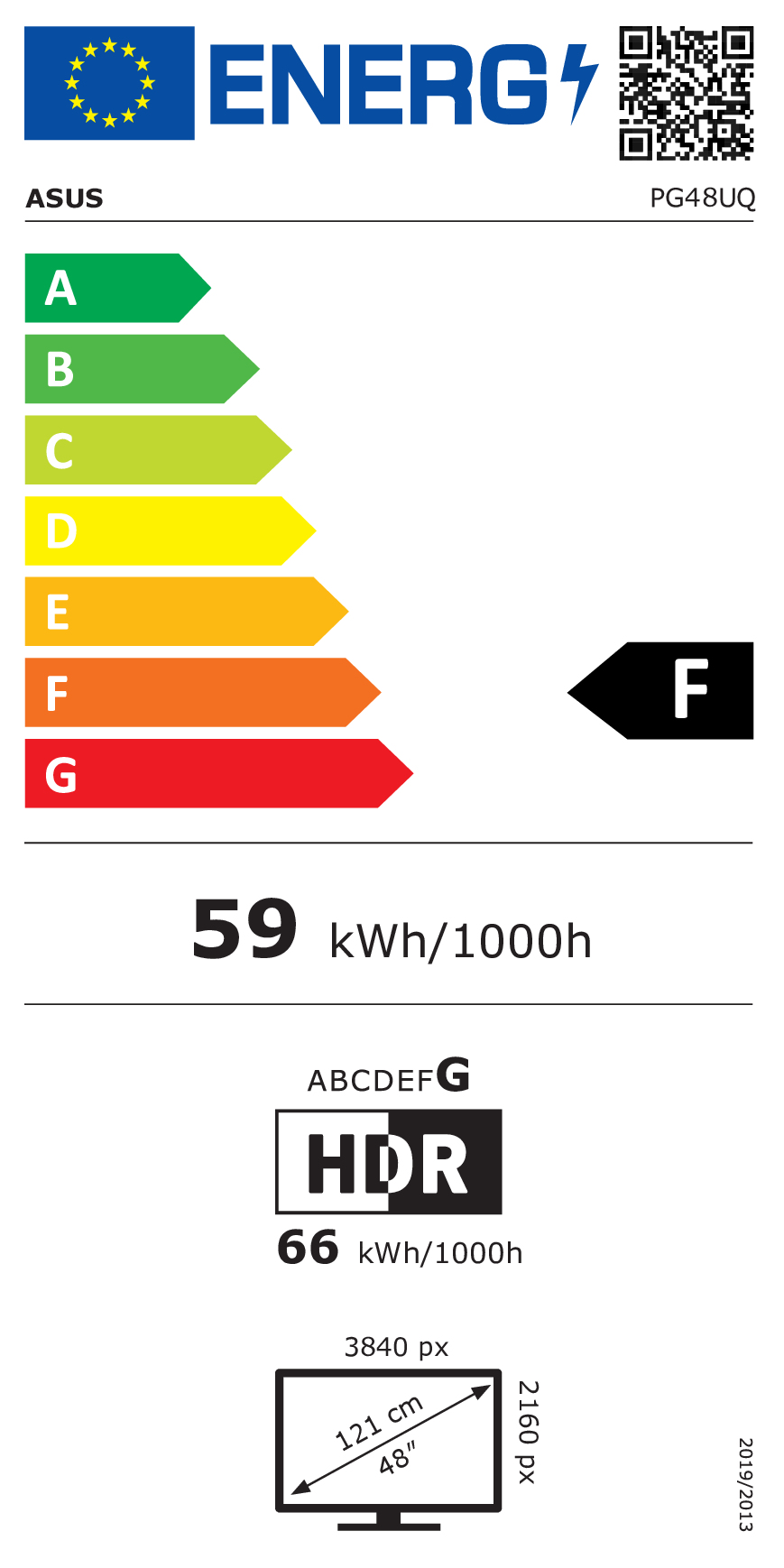
- Energy efficiency class (SDR)The energy efficiency rating of the device when operating in Standard Dynamic Range (SDR) mode, categorized from A to G.
- F
- Energy efficiency class (HDR)The energy efficiency rating of the device when High Dynamic Range (HDR) mode is active, ranging from A to G.
- G
- Energy consumption (SDR) per 1000 hoursThe amount of electric energy consumed by the device during standard dynamic range (SDR) operation over a period of 1000 hours, measured in kilowatt-hours (kWh).
- 59 kWh
- Energy consumption (HDR) per 1000 hoursThe amount of electrical energy consumed by the device when displaying High Dynamic Range (HDR) content over a period of 1000 hours, measured in kilowatt-hours (kWh).
- 66 kWh
- Power consumption (typical)Amount of power consumed by this model, often expressed in watts (W). Typical values that manufacturers give are power consumption when off, standby/suspended mode, typical use, maximum usage.
- 300 W
- Power consumption (off)The amount of electrical energy consumed by the device when it is switched off, measured in watts.
- 0.3 W
- Power consumption (PowerSave)The amount of electrical energy consumed by the device when it is operating in a power-saving mode, measured in Watts.
- 0.3 W
- AC input voltageThe voltage of the AC electricity that is inputted into the product.
- 100 - 240 V
- AC input frequencyThe range of alternating current frequencies the device can accept from the power source, measured in hertz (e.g., 45 - 65).
- 50 - 60 Hz
- Energy efficiency scaleThe range of energy efficiency classes used to rate the product's power consumption, such as A to G.
- A to G
Security
- Cable lock slotHoles on the edge of devices through which a cable lock can be passed, so the device can be locked to a desk etc.
- Yes
- Cable lock slot typeThe standard of the security slot used to attach a physical locking cable to the device (e.g. Kensington or Noble).
- Kensington
Ergonomics
- Height adjustmentThe part of the device that can be adjusted to change the height.
- No
- Tilt adjustmentThe tilt, which means the angle at which the device is pointing (up or down), can be changed.
- Yes
- Tilt angle rangeThe minimum and maximum angles at which the unit can be tilted, typically expressed in degrees.
- -5 - 5°
Smart TV
- Smart modesPredefined performance profiles that automatically adjust settings for specific use cases (e.g., Cinema, Animation, or CAD/CAM).
- Game
Packaging data
- Package widthThe distance from one side of the packaging to the other.
- 1230 mm
- Package depthThe distance from the front to the back of the packaging.
- 180 mm
- Package heightThe distance from the top to the bottom of the packaging.
- 880 mm
- Package weightWeight of the packaged product.
- 20 kg
- Package typeThe type of product package e.g. box.
- Box
Database Right data-sheet 2026 Icecat. All rights reserved. Provided “as is”, without warranty — check details with the store before buying.
Expert reviews
- 80
trustedreviews.com2023
Thanks to a sumptuous 48-inch 4K OLED panel and a stellar 2.1 speaker system, the Asus ROG Swift OLED PG48UQ is hugely impressive. Of course, it's also just plain huge for a monitor, so you must carefully consider where to position it. PROS Sumptuous 4K...
- +
- Sumptuous 4K 138Hz OLED panel,Excellent 2.1 speaker system,Good remote control
- −
- No Type-C video input,Stand has zero adjustability
- 90
avforums.com2022
ProsConsWho said size doesn't matter? PC gamers didn't, that's for sure. Gamers of a certain age, much like this reviewer, used to be happy (not that we knew any better) with a 14-inch CRT monitor, but today even the most basic is a 24” LED, with ultr...
- +
- Glorious 48-inch 4K OLED display, Superb blacks, 138Hz refresh rate, No ghosting, HDMI 2.1
- −
- It's £1500, Size could be too big for some
- 90
pcgamesn.com2022
The Asus ROG Swift PG48UQ is a fantastic gaming monitor in just about every way, providing you can find into your setup and, of course, afford it. Coming in at $1,499 USD / £1,499 GBP, it's by no means cheap, and comes at quite the premium compared to the...
- +
- 4K resolution with 138Hz refresh rate, Per pixel local dimming for great contrast, 0.1ms response time with no ghosting, Surprisingly decent speakers,
- −
- Risk of permanent burn-in, Matte anti-glare coating
- 100
t3.com2022
The Asus ROG Swift OLED PG48UQ isn't going to be the gaming monitor for everyone - not least because of its huge 48-inch size - but in terms of the specs it offers and the picture you get, it's absolutely one of the best options out there for serious game...
- +
- Excellent gaming performance,Bright, high-contrast OLED tech,Gigantic size,
- −
- Gigantic size, Not the easiest to set up, It'll cost you,
Price history (90 days, best daily price)
Price history is still being collected for this product — check back soon.
Alternative models

ASUS ProArt PA248CNV
computer monitor 61.2 cm (24.1") 1920 x 1200 pixels Full HD+ Black

ASUS VP227HE
computer monitor 54.5 cm (21.4") 1920 x 1080 pixels Full HD Black

ASUS ZenScreen OLED MQ16AH
computer monitor 39.6 cm (15.6") 1920 x 1080 pixels Full HD Grey

ASUS ProArt OLED PA32DC
computer monitor 80 cm (31.5") 3840 x 2160 pixels 4K Ultra HD Black

ASUS ZenScreen MB166B
computer monitor 39.6 cm (15.6") 1920 x 1080 pixels Full HD Black

ASUS ZenScreen MQ13AH
computer monitor 33.8 cm (13.3") 1920 x 1080 pixels Full HD OLED Black