
ASUS ProArt OLED PA32DC computer monitor 80 cm (31.5") 3840 x 2160 pixels 4K Ultra HD Black
- Screen: 80 cm (31.5"), 3840 x 2160 pixels, OLED, Flat
- Refresh rate: 60 Hz, 0.1 ms response time
- Brightness: 250 cd/m²
- Ports: 3 × HDMI, 1 × DisplayPort
- Stand: height-adjustable, tilt, VESA 100 x 100 mm
- Extras: speakers, USB hub
- Colour: Black
Where to buy
We're not tracking prices for this product yet. Check current prices directly at:
We may earn a commission when you buy through links on this page — at no extra cost to you. Learn more
About this product
World’s first OLED monitor with auto calibration*
ProArt Display OLED PA32DC is the world’s first OLED monitor with automatic calibration. It also features a built-in motorized flip colorimeter to ensure professional-grade color accuracy. This 31.5-inch 4K HDR monitor offers a cutting-edge OLED panel with pure RGB stripes and 99% DCI-P3 coverage to deliver highly accurate colors that bring out the finest details in your creations. Multiple HDR format support provides creators with the ideal platform for working with fast-moving HDR content. For comfort and convenience, PA32DC includes two stands to cater to any viewing position or work setup.
Filmmakers & Video Editors
An ultra-high-resolution monitor with wide-color-gamut performance is a must-have tool for 4K HDR video production. The adjustable stand and portable design of PA32DC also makes it perfect for on-set shoots, where it can be easily moved to an ideal location or positioned to avoid color shift caused by ambient lighting.
Designers & Photographers
PA32DC provides truly precise color reproduction to bring out the details in photographs or digital artwork. It delivers ultra-high-quality visuals and ensures that creative details aren’t lost on the journey from click to print or production.
Colorists
OLED panels are known for their excellent color reproduction. PA32DC is factory pre-calibrated to ensure industry-leading color fidelity and offers delta E < 1 color difference, plus auto calibration function to ensure outstanding color accuracy.
Premium OLED panel with RGB stripes
PA32DC incorporates OLED technology which achieves ultra-precise control and extreme contrast by making each individual pixel its own light source. PA32DC has a pure RGB Stripe OLED panel with over 24 million of self-illuminating pixels that can be individually activated to reproduce truly lifelike pictures with deep blacks and enhanced color contrast in high-luminance images. These characteristics make PA32DC a natural fit for HDR content mastering.
Ultimate Professional-Grade Color
PA32DC delivers exceptionally detailed and realistic visuals, with a studio-grade 99% DCI-P3 color gamut. This means that the colors reproduced on the display are richer and more vivid, so it’s ideal for color-intensive projects but also enhances any kind of content.
Ultra-Accurate Color
Designers, producers and color-solution companies deal with color-critical decisions and communications each day. ProArt displays are factory pre-calibrated to guarantee industry-leading color accuracy. Each monitor undergoes stringent and meticulous testing to ensure smoother color gradation, and each grayscale level is carefully measure and set to comply with the DICOM standard for medical use.
True Black: See the Unseen
PA32DC reproduces black hues perfectly. Since each OLED pixel uses self-generated illumination, it simply turns off to display the deepest possible black shade for extremely crisp and clear images, even in the darkest scenes.
Fast Response Time
A 0.1 ms response time ensures superfast, blur-free video or animated content.
Built-In Motorized Colorimeter
To maintain professional-level accuracy over the long term, a built-in motorized flip colorimeter moves into place when required, even with the display hood is mounted. This feature makes it easy to calibrate the display, as needed.
Auto Calibration
ProArt display OLED PA32DC can be calibrated using built-in motorized colorimeter and the look-up table subsequently rewritten via the ASUS ProArt calibration software that offers color tuning accuracy and uniformity compensation. It writes and saves color parameter profiles on the ProArt display’s internal scaler IC chip, instead of on the PC, allowing users to connect it to devices with different operating systems or applications without needing to adjust settings. The saved profiles can be easily activated via the hotkey on the monitor.
Seamless Calibration
In addition to having a built-in colorimeter, ProArt displays are compatible with most major calibrators, including those from X-Rite, Datacolor and Klein. They also work seamlessly with Calman and Light Illusion ColourSpace CMS professional hardware calibration software.
Enjoy true-to-life color
PA32DC exceeds industry color reproduction standards with its 99% DCI-P3 color gamut, and it features true 10-bit color depth to display more than 1.07 billion colors. VESA DisplayHDR 400 True Black certification and a 1,000,000:1 contrast ratio ensure the deepest blacks and brightest whites, enabling PA32DC to accurately display the most minute details in shadows and bright highlights for incredibly realistic visuals.
Class-Leading Color Fidelity
Each ProArt display is factory pre-calibrated using a new, three-scale process to guarantee industry-leading color fidelity. The display then undergoes stringent testing using ASUS advanced grayscale tracking technology to ensure smoother color gradations, better uniformity and high color accuracy with a Delta E < 1 color difference value. Each grayscale level is also carefully measured and set to ensure compliance with the precise DICOM standard for medical use.
Uniform Brightness Setting
OLED displays feature an Auto Brightness Limiter (ABL) to maximize power use. When displaying a white (or bright) image in a particular window, the display automatically dims the image as the window size increases.
The optional Uniform Brightness function in the OSD menu is particularly useful when switching between, or changing the size of windows with vastly different contrast levels as it keeps brightness levels consistent with up to 250 nits for comfortable viewing and more accurate colors, even after hours of use.
ASUS Smart HDR Technology
Exclusive ASUS Smart HDR technology enables ProArt Display OLED PA32DC to support multiple HDR formats, including HLG and HDR10.
Documents
- ManualUser manual ↗
- Product information sheetEU Product Fiche ↗
Specifications
Key specifications
- Display diagonalSize of the display for this product, measured diagonally, usually in inches.
- 80 cm (31.5")
- Display resolutionThe number of distinct pixels in each dimension that can be displayed. It is usually quoted as width × height, with the units in pixels: for example, "1024 × 768" means the width is 1024 pixels and the height is 768 pixels. The higher the number of pixels, the sharper the image.
- 3840 x 2160 pixels
- Panel typeThe technology used to manufacture the panel, such as AMOLED or AH-IPS.
- OLED
- Screen shapeDescribes the physical curvature of the display panel, such as whether it is flat or curved.
- Flat
- Maximum refresh rateThe highest number of times per second the image is updated, measured in hertz (Hz).
- 60 Hz
- Response timeThe response time is the time difference between the moment that a source (for example a video card) sends a signal and that equipment (for example a monitor) receives or display the signal. (Used abbreviations: R/F = Rise and Fall.)
- 0.1 ms
- Display brightness (typical)Display brightness, measured by its Luminance, presented as a figure in nits. Typical brightness ratings for monitors range from 250 to 350 nits with a target value of between 80 to 120 nits being suitable for most displays in a normal viewing environment.
- 250 cd/m²
- HDMI ports quantityThe number of sockets (ports) for HDMI connections. HDMI (High-Definition Multimedia Interface) is a compact audio/video interface for transferring uncompressed video data and compressed/uncompressed digital audio data from a HDMI-compliant device ("the source device") to a compatible computer monitor, video projector, digital television, or digital audio device. HDMI is a digital replacement for…
- 3
- DisplayPorts quantityNumber of DisplayPorts. A DisplayPort is a digital display interface developed by the Video Electronics Standards Association (VESA). The interface is primarily used to connect a video source to a display device such as a computer monitor, though it can also be used to carry audio, USB, and other forms of data.
- 1
- Height adjustmentThe part of the device that can be adjusted to change the height.
- Yes
- Tilt adjustmentThe tilt, which means the angle at which the device is pointing (up or down), can be changed.
- Yes
- Panel mounting interfaceThe product can be used wih VESA mounting interfaces.
- 100 x 100 mm
- Built-in speaker(s)The device contains speaker(s) to produce sound.
- Yes
- Built-in USB hubWhether or not the device features a USB hub to connect more than one other device via USB.
- Yes
Show all 98 specificationsShow key specifications only
Design
- VESA mountingIndicates whether the product supports the VESA mounting standard for attachment to compatible arms, brackets, or wall mounts.
- Yes
- Market positioningUnder which category can the device be positioned in the market, e.g. camera phone.
- Graphics design
- Product colourThe colour e.g. red, blue, green, black, white.
- Black
- Panel mounting interfaceThe product can be used wih VESA mounting interfaces.
- 100 x 100 mm
- Detachable standIndicates whether the support base can be removed from the main unit.
- Yes
- Feet colourThe colour of the feet, which are the projecting part on which a device/piece of furniture, or each of its legs, stands.
- Black
Ports & interfaces
- Built-in USB hubWhether or not the device features a USB hub to connect more than one other device via USB.
- Yes
- USB hub versionThe technical standard of the USB hub, if available, which determines the maximum data transfer speed (e.g., 3.2 Gen 1).
- 3.2 Gen 2 (3.1 Gen 2)
- USB upstream port typeThe connector type used for the upstream connection to a host device (e.g., USB Type-B or USB Type-C).
- USB Type-C
- Number of upstream portsThe total number of available ports used to connect the device to a computer or another network source.
- 1
- Number of USB Type-C upstream ports quantityThe total number of USB Type-C ports available to connect the device to a host computer or source.
- 1
- USB Type-A downstream ports quantityThe number of USB Type-A ports available for connecting peripheral devices to the unit.
- 4
- USB Power Delivery up toThe maximum amount of power the device can provide or receive via a USB connection, measured in watts.
- 65 W
- HDMIHDMI (High-Definition Multimedia Interface) is a compact audio/video interface for transferring uncompressed video data and compressed/uncompressed digital audio data from a HDMI-compliant device ("the source device") to a compatible computer monitor, video projector, digital television, or digital audio device. HDMI is a digital replacement for existing analog video standards.
- Yes
- HDMI ports quantityThe number of sockets (ports) for HDMI connections. HDMI (High-Definition Multimedia Interface) is a compact audio/video interface for transferring uncompressed video data and compressed/uncompressed digital audio data from a HDMI-compliant device ("the source device") to a compatible computer monitor, video projector, digital television, or digital audio device. HDMI is a digital replacement for…
- 3
- HDMI versionThe specific release version of the High-Definition Multimedia Interface standard supported by the device (e.g. 1.3 or 2.0).
- 2.0
- DisplayPorts quantityNumber of DisplayPorts. A DisplayPort is a digital display interface developed by the Video Electronics Standards Association (VESA). The interface is primarily used to connect a video source to a display device such as a computer monitor, though it can also be used to carry audio, USB, and other forms of data.
- 1
- DisplayPort versionThe specific release version of the DisplayPort standard supported by the device (e.g., 1.2 or 1.4).
- 1.4
- Headphone outThe socket for connecting headphones to the device.
- Yes
- PC Audio inThe socket (port) for the PC audio input.
- Yes
- HDCPHigh-bandwidth Digital Content Protection (HDCP) is a form of digital copy protection to prevent copying of digital audio and video content as it travels across connections.
- Yes
- HDCP versionThe version of the High-bandwidth Digital Content Protection standard supported by the device to prevent the unauthorized copying of digital audio and video content (e.g. 2.2).
- 2.2
Audio
- Built-in speaker(s)The device contains speaker(s) to produce sound.
- Yes
- Number of speakersThe quantity of speakers included in/with the product.
- 2
- RMS rated powerRMS (Root mean square) is a measure of the continuous power required by a device, in particular audio amplifiers and loudspeakers.
- 6 W
Multimedia
- Built-in cameraThe product has an integrated camera.
- No
Performance
- NVIDIA G-SYNCIndicates whether the product supports NVIDIA G-SYNC technology to synchronize the display refresh rate with the GPU to eliminate screen tearing.
- No
- AMD FreeSyncThe product includes AMD Freesync Technology for the dynamic synchronization of the graphic card and the monitor in order to avoid screen tearing.
- No
- Flicker-free technologyIndicates whether the device employs technology to reduce or eliminate screen flickering to decrease eye strain during prolonged use.
- Yes
- Low Blue Light technologyIndicates whether the product features technology designed to reduce the amount of harmful short-wave blue light emitted by the screen to decrease eye strain.
- Yes
- High Dynamic Range (HDR) supportedIndicates whether the device supports High Dynamic Range for improved contrast and a wider range of colours and luminosity.
- Yes
Display
- Display diagonalSize of the display for this product, measured diagonally, usually in inches.
- 80 cm (31.5")
- Display resolutionThe number of distinct pixels in each dimension that can be displayed. It is usually quoted as width × height, with the units in pixels: for example, "1024 × 768" means the width is 1024 pixels and the height is 768 pixels. The higher the number of pixels, the sharper the image.
- 3840 x 2160 pixels
- Native aspect ratioThe aspect ratio is the ratio of the width of an image to its height. The native aspect ratio is the one which the projector/display is particularly designed for. Images shown in native aspect ratio will utilize the entire resolution of the display and achieve maximum brightness. Images shown in other than native aspect ratio will always have less resolution and less brightness than images shown…
- 16:9
- Display technologyThe technology used in the display e.g. plasma, LED.
- OLED
- TouchscreenA screen of a laptop, smartphone, etc., that responds to touch so you can control the interface using your fingers.
- No
- HD typeType of supported High Definition (e.g. Full HD, 4K Ultra HD).
- 4K Ultra HD
- Panel typeThe technology used to manufacture the panel, such as AMOLED or AH-IPS.
- OLED
- Display brightness (peak)The maximum light intensity the device can achieve, measured in candelas per square metre (cd/m²).
- 500 cd/m²
- Display brightness (typical)Display brightness, measured by its Luminance, presented as a figure in nits. Typical brightness ratings for monitors range from 250 to 350 nits with a target value of between 80 to 120 nits being suitable for most displays in a normal viewing environment.
- 250 cd/m²
- Response timeThe response time is the time difference between the moment that a source (for example a video card) sends a signal and that equipment (for example a monitor) receives or display the signal. (Used abbreviations: R/F = Rise and Fall.)
- 0.1 ms
- Display surfaceThe finish of the screen's outer layer, which determines how light reflects off the surface (e.g. Glossy, Matte, or Anti-glare).
- Matt
- Anti-glare screenAlways gives an optimal view, even in direct sunlight.
- Yes
- Screen shapeDescribes the physical curvature of the display panel, such as whether it is flat or curved.
- Flat
- Contrast ratio (typical)The difference in light intensity between the brightest white and the darkest black.
- 1000000:1
- Maximum refresh rateThe highest number of times per second the image is updated, measured in hertz (Hz).
- 60 Hz
- Viewing angle, horizontalMaximum horizontal angle at which a display can be viewed with acceptable visual performance.
- 178°
- Viewing angle, verticalMaximum vertical angle at which a display can be viewed with acceptable visual performance.
- 178°
- Display number of coloursThe total number of distinct colours that the device is capable of displaying (e.g. 1.07 billion colours).
- 1.073 billion colours
- Pixel pitchThis is the parameter of a picture tube, which specifies the shortest distance between two dots of the same colour. The principle is: the smaller the dot pitch, the better sharpness of image.
- 0.182 x 0.182 mm
- Viewable size, horizontalThe viewable size is often somewhat smaller than the actual size of a monitor, because there is a border around the image.
- 69.8 cm
- Viewable size, verticalThe height of the screen area that can actually display an image, measured in millimetres or inches.
- 39.3 cm
- Digital horizontal frequencyThe range of horizontal scanning frequencies the device can support, measured in kHz.
- 31 - 135 kHz
- Digital vertical frequencyThe range of refresh rates the device can support when operating in digital mode, measured in Hertz (Hz).
- 24 - 75 Hz
- High Dynamic Range (HDR) technologyThe specific standard or version of high contrast and color reproduction used to enhance the detail in the darkest and brightest areas of an image (e.g. DisplayHDR 600).
- Dolby Vision, High Dynamic Range 10 (HDR10), Hybrid Log-Gamma (HLG)
- Colour depthThe number of bits used to represent the colour of a single pixel, which determines the total number of possible colours that can be displayed.
- 10 bit
- Colour gamut standardThe specific color space standard the device is designed to reproduce, such as Adobe RGB or DCI-P3.
- DCI-P3
- Colour gamutThe range of colours that the display can accurately reproduce, typically expressed as a percentage of a standard colour space (e.g. sRGB or Adobe RGB).
- 99%
- Adobe RGB coverageThe percentage of the Adobe RGB color space that the device is capable of displaying.
- 99%
Certificates
- CertificationSpecifies the official standards, safety approvals, or regulatory certifications the product has received.
- Energy Star TÜV Flicker-free TÜV Low Blue Light VESA DisplayHDR 400 True Black Calman Ready
Packaging content
- Stand includedIndicates whether a support stand is supplied with the product.
- Yes
- Cables includedSpecifies the types and quantities of connection cables provided with the product (e.g., 3.5 mm to 3.5 mm or SATA).
- AC, DisplayPort, HDMI, USB Type-C, USB Type-C to USB Type-A
- Sun hood includedIndicates whether a shading accessory is provided to reduce glare and improve contrast on the screen.
- Yes
- Quick start guideInstructions, either online, as a computer program or in paper form, to allow you to set up and start using the product quickly.
- Yes
Weight & dimensions
- Width (with stand)The total horizontal measurement of the product when the supporting stand is attached, measured in millimetres.
- 735.4 mm
- Depth (with stand)The measurement of the product from front to back when any supporting accessory or base is attached, expressed in millimetres or centimetres.
- 245 mm
- Height (with stand)The total vertical measurement of the product including its base or support structure, expressed in millimetres or centimetres.
- 626.9 mm
- Weight (with stand)The total mass of the unit including its supporting base, measured in kilograms or grams.
- 12.1 kg
- Width (without stand)The horizontal measurement of the device excluding the base or support structure, expressed in millimetres.
- 735.4 mm
- Depth (without stand)The measurement of the product from front to back without its base or support, typically expressed in millimetres or centimetres.
- 54.4 mm
- Height (without stand)The vertical measurement of the device when the stand is removed, measured in mm.
- 466.9 mm
- Weight (without stand)The mass of the device excluding the support base, measured in g.
- 7.6 kg
Power
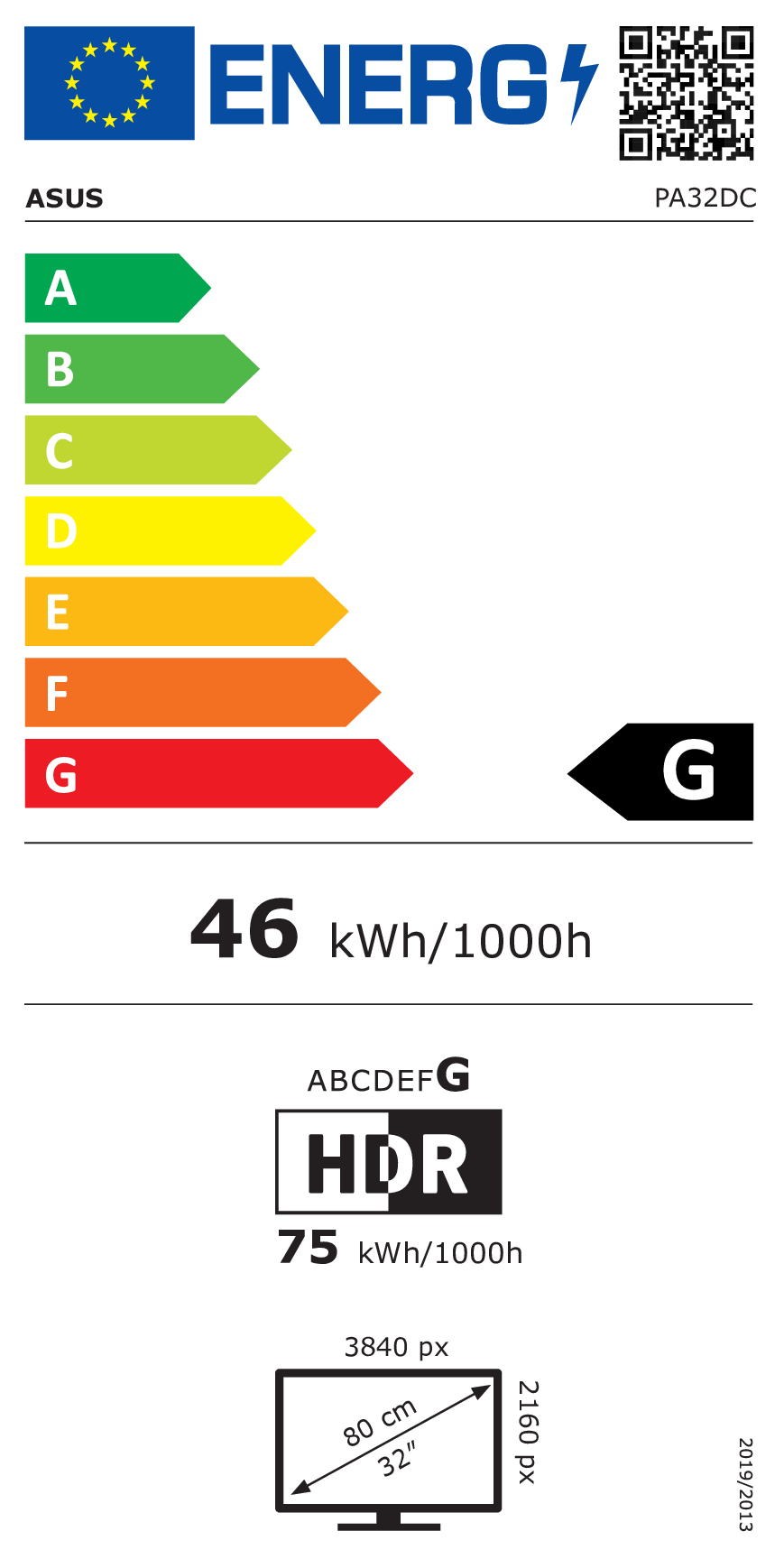
- Energy efficiency class (SDR)The energy efficiency rating of the device when operating in Standard Dynamic Range (SDR) mode, categorized from A to G.
- G
- Energy efficiency class (HDR)The energy efficiency rating of the device when High Dynamic Range (HDR) mode is active, ranging from A to G.
- G
- Energy consumption (SDR) per 1000 hoursThe amount of electric energy consumed by the device during standard dynamic range (SDR) operation over a period of 1000 hours, measured in kilowatt-hours (kWh).
- 46 kWh
- Energy consumption (HDR) per 1000 hoursThe amount of electrical energy consumed by the device when displaying High Dynamic Range (HDR) content over a period of 1000 hours, measured in kilowatt-hours (kWh).
- 75 kWh
- Power consumption (typical)Amount of power consumed by this model, often expressed in watts (W). Typical values that manufacturers give are power consumption when off, standby/suspended mode, typical use, maximum usage.
- 38 W
- Power consumption (off)The amount of electrical energy consumed by the device when it is switched off, measured in watts.
- 0 W
- Power consumption (PowerSave)The amount of electrical energy consumed by the device when it is operating in a power-saving mode, measured in Watts.
- 0.5 W
- AC input voltageThe voltage of the AC electricity that is inputted into the product.
- 100 - 240 V
- AC input frequencyThe range of alternating current frequencies the device can accept from the power source, measured in hertz (e.g., 45 - 65).
- 50 - 60 Hz
- Energy efficiency scaleThe range of energy efficiency classes used to rate the product's power consumption, such as A to G.
- A to G
- USB Power Delivery (USB PD)Indicates whether the device supports the USB Power Delivery standard for faster charging and higher power levels.
- Yes
Security
- Cable lock slotHoles on the edge of devices through which a cable lock can be passed, so the device can be locked to a desk etc.
- Yes
- Cable lock slot typeThe standard of the security slot used to attach a physical locking cable to the device (e.g. Kensington or Noble).
- Kensington
Ergonomics
- Height adjustmentThe part of the device that can be adjusted to change the height.
- Yes
- Adjustable height (max)The maximum distance the unit can be raised vertically from its lowest position, measured in millimetres.
- 13 cm
- PivotIndicates whether the device can be rotated 90 degrees to switch between landscape and portrait orientation.
- Yes
- Pivot angleThe range of motion available for rotating the unit around its vertical axis, typically measured in degrees.
- -90 - 90°
- SwivellingIndicates whether the product has a mechanism that allows it to rotate horizontally.
- Yes
- Swivel angle rangeThe minimum and maximum degrees to which the unit can be rotated horizontally.
- -30 - 30°
- Tilt adjustmentThe tilt, which means the angle at which the device is pointing (up or down), can be changed.
- Yes
- Tilt angle rangeThe minimum and maximum angles at which the unit can be tilted, typically expressed in degrees.
- -5 - 23°
Packaging data
- Package widthThe distance from one side of the packaging to the other.
- 878 mm
- Package depthThe distance from the front to the back of the packaging.
- 298 mm
- Package heightThe distance from the top to the bottom of the packaging.
- 616 mm
- Package weightWeight of the packaged product.
- 19.9 kg
- Package typeThe type of product package e.g. box.
- Box
Database Right data-sheet 2026 Icecat. All rights reserved. Provided “as is”, without warranty — check details with the store before buying.
Expert reviews
- –
creativebloq.com2024
The ASUS ProArt PA32DC is big, clunky and old-fashioned. It's also one of the brightest, sharpest, most professional-ready 4K monitors on the market, whether you work in video, photography, graphic design or animation. Sure, the refresh rate tops out at 6...
- +
- Great range of preset colour profiles, Sharp, bright OLED panel, Fantastic colour accuracy
- −
- Heavy and bulky, Huge bezels, You might not own a bank,
- 100
tomshardware.com2022
Until recently, the term “desktop OLED” was something of a unicorn. With OLED panel production focused on televisions and screens larger than 50 inches, the idea of an OLED computer monitor seemed far-fetched. But that has changed in the past two years. I...
Read the review at tomshardware.com ↗
Price history (90 days, best daily price)
Price history is still being collected for this product — check back soon.
Alternative models

ASUS VP227HE
computer monitor 54.5 cm (21.4") 1920 x 1080 pixels Full HD Black

ASUS ZenScreen MQ13AH
computer monitor 33.8 cm (13.3") 1920 x 1080 pixels Full HD OLED Black

ASUS ROG Swift PG48UQ
computer monitor 120.7 cm (47.5") 3840 x 2160 pixels 4K Ultra HD OLED Black

ASUS TUF Gaming VG249QM1A
computer monitor 60.5 cm (23.8") 1920 x 1080 pixels Full HD Black

ASUS ProArt PA248CNV
computer monitor 61.2 cm (24.1") 1920 x 1200 pixels Full HD+ Black

ASUS ROG Swift PG42UQ
computer monitor 105.4 cm (41.5") 3840 x 2160 pixels 4K Ultra HD OLED Black