
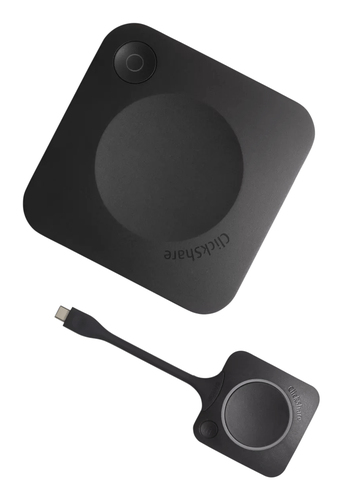
Barco ClickShare C-10 wireless presentation system HDMI Dongle
- Formfaktor: Dongel
- Temperatur vid drift: 0 - 40 ° C
- Intervall för relativ operativ luftfuktighet: 0 - 85%
- Temperaturintervall (förvaring): -20 - 60 ° C
- Fuktighet (förvaring): 0 - 90%
- Windows-operativsystem som stöds: Windows 10, Windows 11, Windows 8, Windows 8.1
Alla 47 specifikationerProduktsida på barco.com ↗
Versioner
 0 - 85%
- 0 - 90%
Var du köper
Vi bevakar inte priser för den här produkten än. Se aktuella priser direkt hos:
Vi kan få provision när du köper via länkar på den här sidan — utan extra kostnad för dig. Läs mer
Om produkten
Making presentation flow in medium-sized and large meeting rooms
Technology can help to make meeting participants engaged, inspired and active. ClickShare C-10 adds interactive features to full BYOD, easy wireless presentation in any medium to large meeting room. It is the wireless presentation hub that makes your meetings flow with one click in the ClickShare Button or ClickShare App, from any laptop or mobile device.
Full BYOD
ClickShare is compatible with any device. Connect your laptop via the ClickShare Button or ClickShare App. Connect smartphones and tablets via Mobile Apps or screen mirroring (AirPlay, Google Cast or Miracast).
Seamless collaboration
Turn any room into a collaboration room overnight with the ClickShare wireless room system, and enjoy engaging, productive meetings.
Wireless presentation made easy
Present & conference from your laptop in any room without cable hassle. Button or App, you decide.
Simple one-click experience
Walk in with your laptop and instantly connect to the room devices, start within seconds with one-click collaboration
Tech-agnostic
Perfectly works with your device, Windows or Mac. Connects to any display and offers full BYOD with any screen mirroring protocol.
Enterprise-ready
Secure, networked and cloud-managed, ClickShare is an IT-friendly solution, ISO27001 certified solution. Packed with five years of coverage, access to analytics and regular software updates. SmartCare included for your peace of mind. Proven ROI.
Full BYOD content sharing
With the ClickShare C-10, you can start a meeting and get your content on screen within seconds. No matter the device you are using. Plug & Play with the ClickShare Button, that works perfectly on both pc or Mac. Go for workflow integration with the ClickShare App on laptop, mobile or tablet. Or enable full Bring Your Own Device (BYOD) on a 4K canvas: screen mirroring with Airplay, GoogleCast and Miracast works flawlessly.
Anyone, including guests, can share content wirelessly to the central room display with our one-click meeting experience. Two users can share side by side in full HD on screen. No cables, no software to download, no training needed.
Enjoy interactive, creative meetings
ClickShare C-10 users can benefit from advanced interactive features including local view of the room display, decide what they share (either a full screen or a single window), annotation, blackboarding and touch back support that allows users to control the touchscreen in the room. Designed especially to make meetings richer and more dynamic. C-10 makes hybrid collaboration flow in creative meetings, brainstorms and discussion in one click.
Enhanced security and seamless integration
Designed for enterprise rollouts, the IT-grade C-10 offers you enhanced security features (ISO27001 certified) and a wide range of connectivity options. With the XMS Cloud Management Platform you enjoy remote management of units and clear analytics to drive your digital workplace. For practical questions on network deployment of the ClickShare range, check our technical support or get in touch with your Barco contact.
Boost collaboration in your meeting room
The ClickShare C-10 can be used stand-alone or in combination with your existing conference room. It empowers meetings with simple, one-click wireless content sharing. ClickShare completes the room set-up and makes presentation simple, easy and wireless. Designed to fit your business perfectly and evolve with it. With flexibility for the future built in, it’s one of the smartest investments you can make in your meeting room.
Button or App, one great experience
Have the most intuitive user experience in all meeting rooms with the ClickShare Button and the ClickShare App. You decide how you like to work.
The ClickShare Button
In seconds, you are able to present wirelessly to the meeting room display from your laptop and can enjoy a more engaging, seamless meeting experience.
The ClickShare App
Collaboration more intuitive than ever before. The App easily connects to the meeting room, offering screen sharing as well as a host of advanced features. The App works on all devices, from desktop to Android and iOS.
ClickShare Present
Services
Your business is our priority, which is why Barco's services program is designed to drive positive business outcomes together.
Our mission is to enable the brightest and most reliable outcomes for you and your customers through
- a first-time right experience.
- ultimate peace-of-mind.
- maximum efficiency and ROI
- additional service revenues
Dokument
- BroschyrProduct Brochure ↗
Specifikationer
Viktigaste specifikationer
- FormfaktorBeskrivning av produktens synliga kännetecken.
- Dongel
- Temperatur vid drift
- 0 - 40 ° C
- Intervall för relativ operativ luftfuktighet
- 0 - 85%
- Temperaturintervall (förvaring)
- -20 - 60 ° C
- Fuktighet (förvaring)
- 0 - 90%
- Windows-operativsystem som stöds
- Windows 10, Windows 11, Windows 8, Windows 8.1
- Strömkälla av typen
- AC
- Spänning
- 110 / 220 V
- Strömförbrukning (max)
- 24 W
- Strömförbrukning (vanlig)Mängden energi förbrukat av denna modell; uttryckt i watt. Typiska värden tillverkare anger är energiförbruk när stängd av, standby/suspended mode, vanlig bruk, maximum bruk.
- 10 W
Visa alla 47 specifikationerVisa bara de viktigaste specifikationerna
Design
- FormfaktorBeskrivning av produktens synliga kännetecken.
- Dongel
- Produktens färg
- Svart
- LED-indikatorer
- Ja
Vikt & dimension
- Bredd
- 135 mm
- Djup
- 135 mm
- HöjdHöjd av produkten
- 34 mm
- ViktProduktens vikt utan förpackning (nettovikt). Om möjligt nettovikten är angett inklusive standardtillbehör och förråd.Obs, ibland anger tillverkaren en för kommersiell interpretation av produktvikten, där han lämnar ut vikten av tillbehör och/eller förråd.
- 900 g
Miljökrav
- Temperatur vid drift
- 0 - 40 ° C
- Intervall för relativ operativ luftfuktighet
- 0 - 85%
- Temperaturintervall (förvaring)
- -20 - 60 ° C
- Fuktighet (förvaring)
- 0 - 90%
Funktioner
- Windows-operativsystem som stöds
- Windows 10, Windows 11, Windows 8, Windows 8.1
- GränssnittÄr en port som kopplar samman flera olika sorter utrustning med hjälp av olika sorters kontaktanslutningar
- HDMI
- Maximal räckvidd
- 30 m
- Högsta upplösning (HDMI)
- 3840 x 2160 pixlar
- Upplösning som stöds för strömmande video
- 4096 x 2160
- AirPlay-skärmdubblering
- Ja
Programvara
- Mac-operativsystem som stöds
- Mac OS X 10.13 High Sierra, Mac OS X 10.14 Mojave, Mac OS X 10.15 Catalina, Mac OS X 10.15.3 Catalina, Mac OS X 11.0 Big Sur
Systemkrav
- Mobila operativsystem som stöds
- Android 10.0, Android 11.0, Android 12.0, Android 9.0, iOS 12, iOS 13, iOS 14.5, iOS 15
Strömtillförsel
- Strömkälla av typen
- AC
- Spänning
- 110 / 220 V
- Strömförbrukning (max)
- 24 W
- Strömförbrukning (vanlig)Mängden energi förbrukat av denna modell; uttryckt i watt. Typiska värden tillverkare anger är energiförbruk när stängd av, standby/suspended mode, vanlig bruk, maximum bruk.
- 10 W
- Likströmsingång
- Ja
Anslutningar
- Antal HDMI-utgångar
- 1
- HDMI-version
- 1.4b
- Antal LAN (RJ-45) anslutningarStrömförsörjningen (intern / extern) med vilket produkten fungerar. PFC = Power Factor Korrigera. CE = CE märket kompatibel. Om flera värden (Watt) ges det ofta för låg linje kontra High Line förhållanden. Flera nätaggregat används för redundans. När en extra strömförsörjning är valfritt indikeras detta genom att nämna det maximala antalet. Nätaggregat kan vara Hot Plug eller icke Hot Plug.
- 1
- Antal USB 3.2 Gen 1 (3.1 Gen 1) typ A-portar
- 1
- Antal USB 3.2 Gen 1 (3.1 Gen 1)typ C-portar
- 1
Nätverk
- Wi-Fi-standarder
- 802.11a, 802,11g, Wi-Fi 4 (802.11n), Wi-Fi 5 (802.11ac)
- Wi-Fi-standard
- Wi-Fi 5 (802.11ac)
- Nätverksansluten (Ethernet)
- Ja
- Datahastighet för Ethernet-LAN
- 10,100,1000 Mbit/s
- Kommunikationsstandarder
- IEEE 802.11a, IEEE 802.11ac, IEEE 802.11g, IEEE 802.11n, IEEE 802.15.1
- Miracast
- Ja
Tangentbord
- Frekvensband
- 2,4 / 5 GHz
Trådlös LAN
- Dual-band
- Ja
Prestanda
- Kryptering/säkerhet
- 802.1x RADIUS, WPA2-PSK
- Webbaserad adminstraion
- Ja
- På / av-knapp
- Ja
- Antal användare
- 32 användare (er)
- Smartphone fjärrsupport
- Ja
Display
- Videolägen som stöds
- 2160p
Kamera
- Maximal bildfrekvens
- 30 fps
Bevakning
- Produktvikt (oz)
- Ja
- Typ av kabellåsanslutning
- Kensington
Certifikat
- Certifiering
- FCC/CE
Database Right data-sheet 2026 Icecat. All rights reserved. Tillhandahålls ”i befintligt skick”, utan garanti — kontrollera detaljerna med butiken innan du köper.
Prishistorik (90 dagar, bästa dagspris)
Vi samlar fortfarande in prishistorik för den här produkten — titta in igen snart.
Alternativa modeller
Barco ClickShare C‑10 wireless presentation system HDMI Desktop

Barco ClickShare C-5 wireless presentation system HDMI Dongle

Barco ClickShare CX‑30 Gen 2 wireless presentation system HDMI Desktop

Barco ClickShare CX-50 wireless presentation system HDMI Desktop
Barco ClickShare CX-20 set Gen 2 wireless presentation system HDMI Desktop