
BakkerElkhuizen Evoluent D Medium Wireless
- Anslutning: RF Trådlös
- Sensor: laser, 3200 DPI
- Knappar: 6, Hjul
- Form: Högerhand
- Avsedd för: Kontor
- Färg: Svart
Alla 56 specifikationerProduktsida på bakkerelkhuizen.co.uk ↗
Var du köper
Vi bevakar inte priser för den här produkten än. Se aktuella priser direkt hos:
Vi kan få provision när du köper via länkar på den här sidan — utan extra kostnad för dig. Läs mer
Om produkten
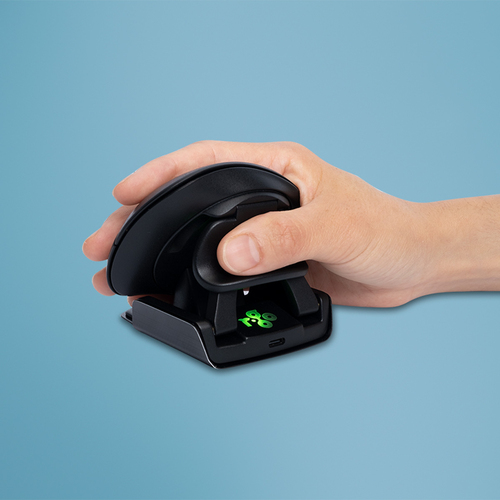
With the Evoluent D vertical mouse you experience ergonomics and comfort at a higher level, and handling is incredibly easy and intuitive.
The latest wireless Evoluent mouse with so many great features!
A patented ergonomic shape, programmable buttons, extra wide lip along the bottom edge, easy to reach thumb buttons, the USB receiver can be stored behind a magnetic battery cover, a direct reachable pointer speed button, three different mouse sizes available, functions like ‘Smart Scrolling’ and ‘Eye Comfort Control’, all those great features are combined in the Evoluent D - we give you even more reasons to get to know and love the Evoluent D.
Perfect shape, even the buttons.
The Evoluent D has grooved buttons, so your fingertips rest in a shallow groove on the buttons. This innovation secures the mouse in your hands and makes moving it much more precise. The easy-to-reach thumb buttons are smartly placed and are both within easy reach at the top and bottom of a contoured thumb rest. All those details will lead to an efficient work.
Your mouse. Your mouse button assignment.
With the free download version of the Evoluent Mouse Manager software , you can easily configure the five buttons of your Evoluent D. With the individual setting of your mouse buttons, you can work as conveniently as possible.
Three sizes, both in wireless and wired.
The Evoluent D is available in three different sizes: small, medium, and large. You can choose if you would like to have a wired or wireless version. The combination of the correct mouse size for your hand and the ergonomic shape, ensure a relaxed grip and a short time to get used to it.
Adjust the DPI conveniently. You determine the pointer speed.
The adjustable pointer speed button of the Evoluent D is easy to reach. It is placed behind the wheel which enables quick changing of the pointer speed to suit different tasks: select higher speed (higher DPI) to make the pointer move faster for general use; select lower speed (lower DPI) to make the pointer move slower and more precisely for drawing, photo editing, etc. The favourable thing is, that four lights show the different pointer speeds from slow to fast.
Plug-and-play.
The Evoluent D can be added to the computer without having to do a manual configuration. Just put the USB cable of the wired version or the USB receiver of the wireless version in your computer and start working. The USB receiver of the wireless versions of the Evoluent D can be stored behind a magnetic battery cover, so you will never lose it. The laser sensor ensures reliable tracking on most surfaces.
Cool features.
The Evoluent D has useful features for a more efficiency at work. With the ‘Excel Horizontal Scroll’ you can scroll horizontally in Microsoft Excel by pressing a thumb button and rolling the wheel. The function ‘Smart Scrolling’ enables dramatically varies sensitivity per notch in response to the speed you roll the wheel, from slow-and-precise all the way to hyper speed for blazing through long pages. With ‘Eye Comfort Control’ you can quickly lower your screen’s brightness to help reduce eye strain by simply rolling the mouse wheel. Easily change the brightness of the screen as your ambient light level changes.
Details make the difference. For the perfect ergonomic shape.
The ergonomic shape of the Evoluent D was inspired by many years of experience and research. The shape of the mouse lies perfectly in the hand and doesn’t feel too large. The ergonomic shape supports the user’s hand in a handshake position. - Grabbing the vertical mouse in a handshake position, relieves or prevents automatically pain in your arm and wrist. - The extra wide lip along the bottom edge prevents the little finger from rubbing the desk. This provides superior comfort for your work and leads to more productivity.
Ergonomic background
Prolonged use of a regular mouse can lead to pain and discomfort in the shoulders, forearms, and hands (Chang et al., 2007 & Andersen et al., 2008). The handshake position of vertical mice keeps the wrist from bending as much to the side while the forearm also turns inward to a lesser degree (Schmid, et al., 2015). This means that muscle activity in the forearm is less than it would be when using a conventional mouse (Quemelo & Vieira, 2013). Research has shown that the use of a vertical joystick mouse ensures a faster recovery from forearm, wrist and hand complaints (Aarås, et al., 2001). And therefore, vertical mice compared to standard mice lead to a healthier and more comfortable way of working.
Stylish and high quality.
The Evoluent D has not only a high functionality and guarantees a healthy, ergonomic way of working, it has also a stylish design. The various high-quality materials, the modern design in matt black with metallic highlights, and the chrome housing give the mouse a premium look and feel.
Videor och dokument
BakkerElkhuizen Evoluent D
- BroschyrProduct Brochure ↗
- BruksanvisningUser manual ↗
- DokumentEU Declaration of Conformity ↗
- DokumentEU Declaration of Conformity ↗
- DokumentDeclaration of Sustainability ↗
Specifikationer
Viktigaste specifikationer
- Gränssnitt
- RF Trådlös
- Rörelsedetektor-teknik
- laser
- Rörelseupplösning
- 3200 DPI
- Antal knappar
- 6
- Scroll-typ
- Hjul
- FormfaktorBeskrivning av produktens synliga kännetecken.
- Högerhand
- ÄndamålAnger om produkten är nätverksklar ur lådan
- Kontor
- Produktens färg
- Svart
Visa alla 56 specifikationerVisa bara de viktigaste specifikationerna
Funktioner
- ÄndamålAnger om produkten är nätverksklar ur lådan
- Kontor
- Ursprungsland
- Kina
- Windows-operativsystem som stöds
- Windows 10, Windows 11, Windows 7, Windows 8, Windows 8.1
- Plug & Play-kompatibelAnger om denna produkt stöder "plug and play". Plug-and-play är hårdvara eller mjukvara som, efter att vara installerad ("plugged in"), kan användas omedelbart ("played with"), i motsats till hårdvara eller mjukvara som kräver konfiguration.
- Ja
- Material
- Plast
Tangentbord
- Gränssnitt
- RF Trådlös
- Stöd för flera enheter
- Nej
- Frekvensband
- 2,4 GHz
Mus
- Rörelsedetektor-teknik
- laser
- Rörelseupplösning
- 3200 DPI
- Scroll-typ
- Hjul
- Antal knappar
- 6
- Antalet rullningshjul
- 1
- Rullande riktningar
- Vågrät
- Typ av knappar
- Tryckbara knappar
- Programmerbara musknappar
- Ja
- Antal programmerbara knappar
- 6
- Knappfunktion
- Copy/Paste, DPI-omkopplare, Framåt, Bak
- Anpassningsbar rörelseupplösning
- Ja
- Antal rörelseupplösningslägen
- 4
Övrigt
- Garantitid
- 5 År
Förpackningens innehåll
- Mottagare medföljer
- Ja
- Trådlös mottagargränssnitt
- USB Type-A
- Batterier medföljer
- Ja
- Manual
- Ja
- Antal per förpackning
- 1 styck
Vikt & dimension
- Bredd
- 88 mm
- Djup
- 110 mm
- HöjdHöjd av produkten
- 77 mm
- ViktProduktens vikt utan förpackning (nettovikt). Om möjligt nettovikten är angett inklusive standardtillbehör och förråd.Obs, ibland anger tillverkaren en för kommersiell interpretation av produktvikten, där han lämnar ut vikten av tillbehör och/eller förråd.
- 167 g
Programvara
- Mac-operativsystem som stöds
- Mac OS X 10.10 Yosemite, Mac OS X 10.11 El Capitan, Mac OS X 10.12 Sierra, Mac OS X 10.13 High Sierra, Mac OS X 10.14 Mojave, Mac OS X 10.15 Catalina, Mac OS X 10.5 Leopard, Mac OS X 10.6 Snow Leopard, Mac OS X 10.7 Lion, Mac OS X 10.8 Mountain Lion, Mac OS X 10.9 Mavericks
- Linux operativsystem som stöds
- Ja
Systemkrav
- Andra operativsystem som stöds
- ChromeOS, Unix
Strömtillförsel
- Strömkälla
- Batterier
- Antal batterier
- 1
- BatteritypBeskrivningen av batteriet levereras med produkten
- AA
Anslutningar
- Täckning, trådlös router
- 6 m
Design
- FormfaktorBeskrivning av produktens synliga kännetecken.
- Högerhand
- Ergonomisk design
- Ja
- Vertikal design
- Ja
- Produktens färg
- Svart
Logistikdata
- Harmonized System (HS)-kod
- 84716070
- Produkter per ytterförpackning
- 100 styck
- Ytterförpackningens bredd
- 590 mm
- Ytterförpackningens längd
- 820 mm
- Ytterförpackningens höjd
- 450 mm
- Produkter per lastpallKvantitet av en produkt per pall. Om mer än en produkt packas per kartong, det är antalet produkter (inte antal kartonger) per frakt pall
- 1280 styck
- Lastpallens totalbredd
- 120 cm
- Lastpallens totallängd
- 100 cm
- Lastpallens totalhöjd
- 190 cm
- Lastpallens bruttovikt
- 329 g
- Tullens varukod, tulltaxa (TARIC)
- 8471607090
Förpackning
- Förpackningens breddEn lista med vilka tjänster och mjukvaror som följer med produkten
- 110 mm
- LåddjupFör att visa hur mycket som kan bli skrivit eller läst på tejpen
- 110 mm
- Förpackningens höjdTjockleken på tejpen är uttryckt i microner
- 100 mm
- Vikt inkl. förpackningVikt av den förpackade produkten i gram.
- 233 g
Database Right data-sheet 2026 Icecat. All rights reserved. Tillhandahålls ”i befintligt skick”, utan garanti — kontrollera detaljerna med butiken innan du köper.
Prishistorik (90 dagar, bästa dagspris)
Vi samlar fortfarande in prishistorik för den här produkten — titta in igen snart.
Alternativa modeller

BakkerElkhuizen Evoluent D Small

BakkerElkhuizen Evoluent D Large Wireless
BakkerElkhuizen Evoluent D Medium
BakkerElkhuizen Evoluent D Large
R-Go Tools Ergonomic
mouse R-Go Twister, with break software, ambidextrous mouse for both hands, foldable, bluetooth and wired

R-Go Tools Vertical
mouse R-Go HE Basic, ergonomic mouse, medium (hand size ≥ 185 mm), right-handed, Bluetooth, grey