
Contour Design RollerMouse Red Plus Wireless
- Połączenie: RF Wireless
- Czujnik: 2800 DPI
- Przyciski: 7, Kula
- Kształt: Oburęczny
- Przeznaczenie: Biuro
- Kolor: Czarny, Srebrny
Gdzie kupić
Nie śledzimy jeszcze cen tego produktu. Sprawdź aktualne ceny bezpośrednio w sklepach:
Możemy otrzymać prowizję, gdy kupujesz przez linki na tej stronie — bez dodatkowych kosztów dla Ciebie. Dowiedz się więcej
O produkcie
Contour RollerMouse Red plus Wireless – Freedom of movement
With the Contour RollerMouse Red plus Wireless you really get the freedom to move around in – and with – your workplace. RollerMouse Red plus Wireless is an ergonomic mouse designed to give you the same full control that you get from RollerMouse Red, but with the freedom of movement that a wireless connection gives you. So if you work in a hot-desking environment, or if you move your workplace from time to time, you no longer need to go without all the benefits of the Contour RollerMouse that you know and love.
Ground-breaking technology provides optimal efficiency
Contour RollerMouse Red plus Wireless features the same award-winning aluminium housing, the same ground-breaking technology, advanced rollerbar and seven central buttons that you will recognise from RollerMouse Red, which all help to increase your productivity.
The rollerbar very accurately detects both large-scale movements and micro-movements of your cursor position, allowing you to work calmly and comfortably – and at your pace. This gives you optimal efficiency and precision.
The surface, and the large rollerbar, give you better control over the cursor and reduce hand, arm and shoulder strain. Furthermore, the mechanical click has been replaced by an electronic click to eliminate unnecessary strain and to minimise the risk of mouse-related injuries and pain.
Improve your performance with RollerMouse Red
RollerMouse Red is a series of centred mice with an award-winning design that ensures you have variation and control when spending many hours working in front of a computer. RollerMouse Red’s buttons and open rollerbar allow you to alternate between your right and left hands. It minimises repetitive strain injuries associated with one-sided use of muscles and tendons, and ensures an increased performance after a long day working with a mouse.
Great range and precision
No matter whether you work with one screen or more, RollerMouse Red has been optimised to facilitate screen navigation, and the cursor’s range can be altered, meaning you can easily work with multiple screens at the same time. The stable rubber-covered rollerbar with its textured surface makes it easy to move the cursor and click precisely, which is very important during intense computer work.
Award-winning design with documented effect
In 2013, RollerMouse Red won the “Red Dot Award” design prize for its sophisticated design, with its soft-brushed aluminium case and characteristic red detailing, and the design is still popular. The impact RollerMouse can have on your work should not be overlooked. In a Nordic survey with 4,000 participants conducted in collaboration with Coxit, as many as 99% of those surveyed who had experienced pain or discomfort associated with mouse work stated that a centred mouse had eliminated pain and discomfort.
Achieve comfort and increased performance
RollerMouse Red is designed with a number of pre-programmed buttons that facilitate the most commonly used mouse functions such as double-click, copy and paste. By using the buttons on the mouse, you minimise the number of clicks that you would otherwise do with a traditional computer mouse – a detail that may prove itself valuable in many situations and can help to minimise the strain of using a computer mouse. If you need to reprogram the buttons, this is easily done with our optional software driver.
Wideo i dokumenty
RollerMouse Red
RollerMouse Red Wireless Getting Started
RollerMouse
- InstrukcjaUser manual ↗
- BroszuraProduct Brochure ↗
- DokumentBrochure ↗
Specyfikacja
Najważniejsze parametry
- Interfejs urządzeniaGniazda, przez które urządzenie można podłączyć do innych urządzeń.
- RF Wireless
- Rozdzielczość ruchu
- 2800 DPI
- Liczba przyciskówLiczba przycisków na urządzeniu.
- 7
- Typ przewijania (scroll type)Rodzaj przewijania w urządzeniu wejściowym.
- Kula
- UkładOpis cech zewnętrznych produktu.
- Oburęczny
- PrzeznaczenieWykorzystanie produktu.
- Biuro
- Kolor produktuKolor, np. czerwony, niebieski, zielony, czarny, biały.
- Czarny, Srebrny
Pokaż wszystkie parametry (41)Pokaż tylko najważniejsze parametry
Funkcje
- PrzeznaczenieWykorzystanie produktu.
- Biuro
- Obsługiwane systemy operacyjne WindowsWersja Windowsa, której można używać z tym urządzeniem.
- Tak
- Obsługa funkcji Plug & PlayInformuje czy dany produkt obsługuje funkcję "podłącz i graj" ("plug & play"). Podłącz i graj jest rodzajem urządzenia bądź oprogramowania, które może być używane natychmiast po jego podłączeniu, w przeciwieństwie do urządzeń bądź oprogramowania wymagających konfiguracji.
- Tak
- Kolor powierzchniRodzaj powierzchni, np. kolor, obraz.
- Monochromatyczny
Klawiatura
- Interfejs urządzeniaGniazda, przez które urządzenie można podłączyć do innych urządzeń.
- RF Wireless
Myszka
- Rozdzielczość ruchu
- 2800 DPI
- Typ przewijania (scroll type)Rodzaj przewijania w urządzeniu wejściowym.
- Kula
- Liczba przyciskówLiczba przycisków na urządzeniu.
- 7
- Liczba kółek przewijania myszy
- 1
- Kierunki przewijania
- Pionowa
- Rodzaj przyciskówTyp guzików.
- Wciskane przyciski
- Programowalne przyciski myszy
- Tak
- Liczba przycisków programowalnych
- 6
- Regulowana rozdzielczość ruchu
- Tak
- Liczba trybów rodzielczości ruchu
- 10
Zawartość opakowania
- Odbiornik dołączonyProdukt zawiera odbiornik, czyli urządzenie do wychwytywania sygnału zewnętrznego.
- Tak
- Interfejs odbiornika bezprzewodowego
- USB Typu-A
- Przewodnik użytkownika
- Tak
- Ilość na paczkę
- 1 szt.
- Przewody
- USB
Konstrukcja
- Podstawka na nadgarstekPoduszeczka umieszczana przed klawiaturą dla podtrzymania nadgarstków podczas pracy przy komputerze.
- Tak
- UkładOpis cech zewnętrznych produktu.
- Oburęczny
- Ergonomiczna konstrukcja
- Tak
- Kolor produktuKolor, np. czerwony, niebieski, zielony, czarny, biały.
- Czarny, Srebrny
Waga i rozmiary
- Szerokość produktuMiara szerokości.
- 420 mm
- Głębokość produktuOdległość od przodu do tyłu przedmiotu.
- 155 mm
- Wysokość produktuWysokość produktu.
- 23 mm
- Waga produktuWaga produktu bez opakowania (netto). W miarę możliwości waga netto podawana jest łącznie z wagą standardowego wyposażenia danego sprzętu. Prosimy zwrócić uwagę na fakt, że niektórzy producenci rozumieją wagę produktu jako pojedynczego urządzenia, bez uwzględnienia wagi akcesoriów i/lub zaopatrzenia.
- 1,07 kg
Oprogramowanie
- Obsługiwane systemy operacyjne MacSystem operacyjny Maca, np. OS X, który można używać z tym urządzeniem.
- Tak
Moc
- Źródło zasilaniaŹródło zasilania urządzenia, np. napięcie sieciowe.
- Baterie
Dane logistyczne
- Kod zharmonizowanego systemu (HS)
- 84716070
- Produkty w skrzyni głównej (zewnętrznej)
- 10 szt.
- Szerokość skrzyni zbiorczej (zewnętrznej)
- 420 mm
- Długość skrzyni głównej (zewnętrznej)
- 480 mm
- Wysokość skrzyni wzorcowej (zewnętrznej)
- 255 mm
- Waga brutto obudowy głównej (zewnętrznej)
- 15,4 kg
- Pojemność skrzyni (zewnętrznej)
- 0,0514 cm³
Dane opakowania
- Szerokość opakowaniaOdległość od jednej strony opakowania do drugiej.
- 200 mm
- Głębokość opakowaniaOdległość od początku do końca opakowania.
- 467 mm
- Wysokość opakowaniaOdległość od góry do dołu opakowania.
- 48 mm
- Waga wraz z opakowaniemWaga zapakowanego produktu w gramach.
- 1,36 kg
Database Right data-sheet 2026 Icecat. All rights reserved. Udostępniane „tak jak są”, bez gwarancji — przed zakupem sprawdź szczegóły w sklepie.
Recenzje ekspertów
- –
the-gadgeteer.com2018
I really like the Contour Design RollerMouse Red plus ergonomic mouse because it's comfortable to use and I don't have to move my hands away from the keyboard like a traditional mouse to use it.There are two downsides to the RollerMouse Red plus that I wa...
- +
- Keeps hands on the keyboard, Comfortable, Multiple buttons and scroll wheel, Can be used with any keyboard
- −
- Slight learning curve, Accidental presses of the dedicated left mouse button, Expensive
Historia cen (90 dni, najlepsza cena dnia)
Wciąż zbieramy historię cen tego produktu — zajrzyj wkrótce.
Alternatywne modele

Contour Design RollerMouse Pro3

Contour Design RollerMouse Free3

Contour Design RollerMouse Free3 Wireless
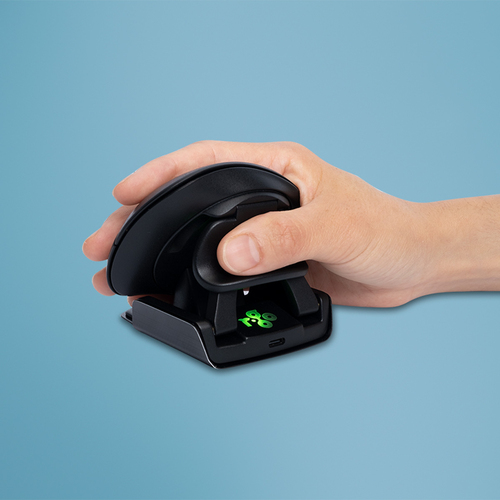
R-Go Tools Ergonomic
mouse R-Go Twister, with break software, ambidextrous mouse for both hands, foldable, bluetooth and wired

R-Go Tools Vertical
mouse R-Go HE Basic, ergonomic mouse, medium (hand size ≥ 185 mm), right-handed, Bluetooth, grey

R-Go Tools Ergonomic
mouse R-Go HE Break with break software, medium (hand size 165-185 mm), right-handed, Bluetooth, black
Akcesoria i produkty kompatybilne

Contour Design Universal ArmSupport

Contour Design Wrist rest for RollerMouse Red Plus Extended - Palm support

Contour Design Universal Sleeve with removable shoulder strap for RollerMouse

Contour Design RollerWave3

Contour Design Red Plus palmsupport

Contour Design Contour
Laptop Stand, foldable