
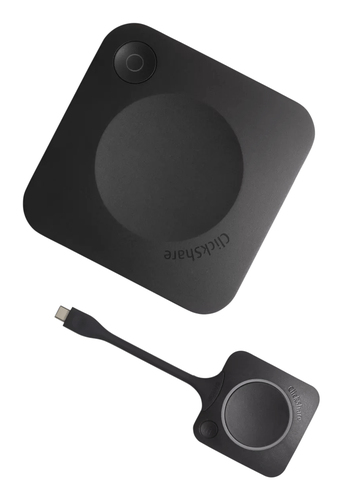
Barco ClickShare C-10 wireless presentation system HDMI Dongle
- Układ: Klucz sprzętowy
- Zakres temperatur (eksploatacja): 0 - 40 °C
- Zakres wilgotności względnej: 0 - 85%
- Zakres temperatur (przechowywanie): -20 - 60 °C
- Dopuszczalna wilgotność względna: 0 - 90%
- Obsługiwane systemy operacyjne Windows: Windows 10, Windows 11, Windows 8, Windows 8.1
Wszystkie parametry (47)Strona produktu na barco.com ↗
Wersje
 0 - 85%
- 0 - 90%
Gdzie kupić
Nie śledzimy jeszcze cen tego produktu. Sprawdź aktualne ceny bezpośrednio w sklepach:
Możemy otrzymać prowizję, gdy kupujesz przez linki na tej stronie — bez dodatkowych kosztów dla Ciebie. Dowiedz się więcej
O produkcie
Making presentation flow in medium-sized and large meeting rooms
Technology can help to make meeting participants engaged, inspired and active. ClickShare C-10 adds interactive features to full BYOD, easy wireless presentation in any medium to large meeting room. It is the wireless presentation hub that makes your meetings flow with one click in the ClickShare Button or ClickShare App, from any laptop or mobile device.
Full BYOD
ClickShare is compatible with any device. Connect your laptop via the ClickShare Button or ClickShare App. Connect smartphones and tablets via Mobile Apps or screen mirroring (AirPlay, Google Cast or Miracast).
Seamless collaboration
Turn any room into a collaboration room overnight with the ClickShare wireless room system, and enjoy engaging, productive meetings.
Wireless presentation made easy
Present & conference from your laptop in any room without cable hassle. Button or App, you decide.
Simple one-click experience
Walk in with your laptop and instantly connect to the room devices, start within seconds with one-click collaboration
Tech-agnostic
Perfectly works with your device, Windows or Mac. Connects to any display and offers full BYOD with any screen mirroring protocol.
Enterprise-ready
Secure, networked and cloud-managed, ClickShare is an IT-friendly solution, ISO27001 certified solution. Packed with five years of coverage, access to analytics and regular software updates. SmartCare included for your peace of mind. Proven ROI.
Full BYOD content sharing
With the ClickShare C-10, you can start a meeting and get your content on screen within seconds. No matter the device you are using. Plug & Play with the ClickShare Button, that works perfectly on both pc or Mac. Go for workflow integration with the ClickShare App on laptop, mobile or tablet. Or enable full Bring Your Own Device (BYOD) on a 4K canvas: screen mirroring with Airplay, GoogleCast and Miracast works flawlessly.
Anyone, including guests, can share content wirelessly to the central room display with our one-click meeting experience. Two users can share side by side in full HD on screen. No cables, no software to download, no training needed.
Enjoy interactive, creative meetings
ClickShare C-10 users can benefit from advanced interactive features including local view of the room display, decide what they share (either a full screen or a single window), annotation, blackboarding and touch back support that allows users to control the touchscreen in the room. Designed especially to make meetings richer and more dynamic. C-10 makes hybrid collaboration flow in creative meetings, brainstorms and discussion in one click.
Enhanced security and seamless integration
Designed for enterprise rollouts, the IT-grade C-10 offers you enhanced security features (ISO27001 certified) and a wide range of connectivity options. With the XMS Cloud Management Platform you enjoy remote management of units and clear analytics to drive your digital workplace. For practical questions on network deployment of the ClickShare range, check our technical support or get in touch with your Barco contact.
Boost collaboration in your meeting room
The ClickShare C-10 can be used stand-alone or in combination with your existing conference room. It empowers meetings with simple, one-click wireless content sharing. ClickShare completes the room set-up and makes presentation simple, easy and wireless. Designed to fit your business perfectly and evolve with it. With flexibility for the future built in, it’s one of the smartest investments you can make in your meeting room.
Button or App, one great experience
Have the most intuitive user experience in all meeting rooms with the ClickShare Button and the ClickShare App. You decide how you like to work.
The ClickShare Button
In seconds, you are able to present wirelessly to the meeting room display from your laptop and can enjoy a more engaging, seamless meeting experience.
The ClickShare App
Collaboration more intuitive than ever before. The App easily connects to the meeting room, offering screen sharing as well as a host of advanced features. The App works on all devices, from desktop to Android and iOS.
ClickShare Present
Services
Your business is our priority, which is why Barco's services program is designed to drive positive business outcomes together.
Our mission is to enable the brightest and most reliable outcomes for you and your customers through
- a first-time right experience.
- ultimate peace-of-mind.
- maximum efficiency and ROI
- additional service revenues
Dokumenty
- BroszuraProduct Brochure ↗
Specyfikacja
Najważniejsze parametry
- UkładOpis cech zewnętrznych produktu.
- Klucz sprzętowy
- Zakres temperatur (eksploatacja)Minimalna i maksymalna temperatura, w której można bezpiecznie używać urządzenia.
- 0 - 40 °C
- Zakres wilgotności względnej
- 0 - 85%
- Zakres temperatur (przechowywanie)Minimalna i maksymalna temperatura, w której bezpiecznie można przechowywać urządzenie.
- -20 - 60 °C
- Dopuszczalna wilgotność względna
- 0 - 90%
- Obsługiwane systemy operacyjne WindowsWersja Windowsa, której można używać z tym urządzeniem.
- Windows 10, Windows 11, Windows 8, Windows 8.1
- Rodzaj zasilaniaRodzaj źródła energii.
- Prąd przemienny
- NapięcieNapięcie potrzebne do zasilania urządzenia.
- 110 / 220 V
- Maksymalne zużycie mocyMaksymalna ilość mocy, jaką zużywa urządzenie.
- 24 W
- Pobór mocyIlość energii zużywanej przez ten model, wyrażona w watach. Typowe wartości podawane przez producentów to zużycie energii w trybie spoczynku, trybie czuwania / zawieszenia, typowego zastosowania, maksymalnego użytkowania.
- 10 W
Pokaż wszystkie parametry (47)Pokaż tylko najważniejsze parametry
Konstrukcja
- UkładOpis cech zewnętrznych produktu.
- Klucz sprzętowy
- Kolor produktuKolor, np. czerwony, niebieski, zielony, czarny, biały.
- Czarny
- Diody LED
- Tak
Waga i rozmiary
- Szerokość produktuMiara szerokości.
- 135 mm
- Głębokość produktuOdległość od przodu do tyłu przedmiotu.
- 135 mm
- Wysokość produktuWysokość produktu.
- 34 mm
- Waga produktuWaga produktu bez opakowania (netto). W miarę możliwości waga netto podawana jest łącznie z wagą standardowego wyposażenia danego sprzętu. Prosimy zwrócić uwagę na fakt, że niektórzy producenci rozumieją wagę produktu jako pojedynczego urządzenia, bez uwzględnienia wagi akcesoriów i/lub zaopatrzenia.
- 900 g
Warunki pracy
- Zakres temperatur (eksploatacja)Minimalna i maksymalna temperatura, w której można bezpiecznie używać urządzenia.
- 0 - 40 °C
- Zakres wilgotności względnej
- 0 - 85%
- Zakres temperatur (przechowywanie)Minimalna i maksymalna temperatura, w której bezpiecznie można przechowywać urządzenie.
- -20 - 60 °C
- Dopuszczalna wilgotność względna
- 0 - 90%
Funkcje
- Obsługiwane systemy operacyjne WindowsWersja Windowsa, której można używać z tym urządzeniem.
- Windows 10, Windows 11, Windows 8, Windows 8.1
- InterfejsInterfejs do podłączania poszczególnych części wyposażenia. Port USB stał się jednym z najpopularniejszych interfejsów przewodowego łączenia urządzeń peryferyjnych. USB 2.0 obsługuje prędkości do 480 Megabitów/sekundę (USB 1: 12Mbit/s). Interfejst FireWire znany jest również jako standard IEEE 1394. Udoskonalony IDE (EIDE) określa się czasem jako Fast ATA, Fast IDE lub ATA-2.
- HDMI
- Maksymalny zasięg działaniaMaksymalna odległość umożliwiająca sterowanie urządzeniem.
- 30 m
- Maksymalna rozdzielczość (HDMI)
- 3840 x 2160 px
- Obsługiwana rozdzielczość strumienia wideo
- 4096 x 2160
- AirPlay Mirroring
- Tak
Oprogramowanie
- Obsługiwane systemy operacyjne MacSystem operacyjny Maca, np. OS X, który można używać z tym urządzeniem.
- Mac OS X 10.13 High Sierra, Mac OS X 10.14 Mojave, Mac OS X 10.15 Catalina, Mac OS X 10.15.3 Catalina, Mac OS X 11.0 Big Sur
Wymagania systemowe
- Obsługiwane operacyjne systemy komórkoweSystemy operacyjne, np. Android, iOS, jakie można wykorzystać z tym urządzeniem.
- Android 10.0, Android 11.0, Android 12.0, Android 9.0, iOS 12, iOS 13, iOS 14.5, iOS 15
Moc
- Rodzaj zasilaniaRodzaj źródła energii.
- Prąd przemienny
- NapięcieNapięcie potrzebne do zasilania urządzenia.
- 110 / 220 V
- Maksymalne zużycie mocyMaksymalna ilość mocy, jaką zużywa urządzenie.
- 24 W
- Pobór mocyIlość energii zużywanej przez ten model, wyrażona w watach. Typowe wartości podawane przez producentów to zużycie energii w trybie spoczynku, trybie czuwania / zawieszenia, typowego zastosowania, maksymalnego użytkowania.
- 10 W
- Gniazdko wyjścia DCPodłącznie urządzenia do źródła prądu.
- Tak
Porty i interfejsy
- Liczba wyjść HDMIGniazdo na wyjście HDMI.
- 1
- Wersja HDMI
- 1.4b
- Ilość portów Ethernet LAN (RJ-45)Liczba portów Ethernet LAN (RJ-45) w urządzeniu. Porty Ethernet LAN (RJ-45) umożliwiają komputerowi połączenie się z siecią ethernet.
- 1
- Ilość portów USB 3.2 Gen 1 (3.1 Gen 1) Typu-A
- 1
- Ilość portów USB 3.2 Gen 1 (3.1 Gen 1) Typu-C
- 1
Sieć
- Standardy Wi- FiRodzaj lokalnej sieci LAN. Może pracować w trybie ad-hoc, gdzie urządzenia sieci komunikują się ze sobą bezpośrednio (peer-to-peer), lub w trybie infrastruktury, w którym wszystkie urządzenia komunikują się przez punkty dostępowe. Sieć LAN łączy ze sobą komputery na niewielkim obszarze, np. w domu, szkole lub biurze.
- 802.11a, 802,11g, Wi-Fi 4 (802.11n), Wi-Fi 5 (802.11ac)
- Podstawowy standard Wi-Fi
- Wi-Fi 5 (802.11ac)
- Przewodowa sieć LANInterfejs Ethernet LAN (sieć lokalna) wykorzystywany jest do połączenia przewodowego.
- Tak
- Prędkość transferu danych przez Ethernet LANRóżne poziomy prędkości połączenia LAN Ethernet w megabitach na sekundę.
- 10,100,1000 Mbit/s
- Standardy komunikacyjneStandard pracy sieci, np. IEEE 802.11a, IEEE 802.11b, IEEE 802.11g.
- IEEE 802.11a, IEEE 802.11ac, IEEE 802.11g, IEEE 802.11n, IEEE 802.15.1
- Miracast
- Tak
Klawiatura
- Pasmo częstotliwościNiewielki wycinek zakresu częstotliwości radiowej, obejmujące kanały mające określone przeznaczenie, np. dla radia FM, dla sieci komórkowych do łączenia się z telefonami komórkowymi.
- 2,4 / 5 GHz
Funkcje bezprzewodowej sieci LAN
- Dual-bandUrządzenie dual-band może pracować z dwoma różnymi pasmami. Bezprzewodowy internet dual-band obejmuje dwa różne typy radia bezprzewodowego, które obsługują połączenia zarówno 2.4GHz i 5 GHz.
- Tak
Wydajność
- Szyfrowanie / bezpieczeństwoAlgorytmy szyfrujące wykorzystywane są do autentykacji, szyfrowania kluczy i prywatności połączenia radiowego. Obsługiwane algorytmy szyfrujące to takie, których można użyć razem z tym produktem.
- 802.1x RADIUS, WPA2-PSK
- Zarządzanie przez stronę wwwWykorzystanie aplikacji internetowej do zarządzania określonymi zadaniami.
- Tak
- Wbudowany wyłącznikPrzycisk, który po naciśnięciu uruchamia lub wyłącza urządzenie.
- Tak
- Liczba użytkownikówLiczba osób mogących korzystać z produktu.
- 32 użyt.
- Zdalne wsparcie smartfonaProdukt może być wykorzystywany do sterowania smartfonem z odległości.
- Tak
Wyświetlacz
- Obsługiwane tryby wideoTryby wideo, jakie posiada urządzenie.
- 2160p
Kamera
- Maksymalna liczba klatek na sekundęMaksymalna liczba klatek na sekundę. Jest to częstotliwość, z jaką kolejne statyczne obrazy pojawiają się na ekranie. Termin ten odnosi się zarówno do kamer, aparatów, programów do grafiki komputerowej jak i do systemów motion capture. Częstotliwość wyraża się zwykle w liczbach klatek na sekundę (fps) lub w hercach (Hz) w przypadku skanowania progresywnego.
- 30 fps
Ochrona
- Kensington LockOtwory na krawędziach urządzeń, przez które przechodzi gniazdo zamknięcia przewodu, tak, aby można było przymocować urządzenie do biurka.
- Tak
- Typ gniazda zamka kabla
- Kensington
Certyfikaty
- Certyfikaty
- FCC/CE
Database Right data-sheet 2026 Icecat. All rights reserved. Udostępniane „tak jak są”, bez gwarancji — przed zakupem sprawdź szczegóły w sklepie.
Historia cen (90 dni, najlepsza cena dnia)
Wciąż zbieramy historię cen tego produktu — zajrzyj wkrótce.
Alternatywne modele
Barco ClickShare C‑10 wireless presentation system HDMI Desktop

Barco ClickShare C-5 wireless presentation system HDMI Dongle

Barco ClickShare CX‑30 Gen 2 wireless presentation system HDMI Desktop

Barco ClickShare CX-50 wireless presentation system HDMI Desktop
Barco ClickShare CX-20 set Gen 2 wireless presentation system HDMI Desktop