
BakkerElkhuizen Evoluent D Medium
- Połączenie: USB Typu-A
- Czujnik: Laser, 3200 DPI
- Przyciski: 6, Koło
- Kształt: Dla praworęcznych
- Przeznaczenie: Biuro
- Kolor: Czarny
Wszystkie parametry (49)Strona produktu na bakkerelkhuizen.com ↗
Gdzie kupić
Nie śledzimy jeszcze cen tego produktu. Sprawdź aktualne ceny bezpośrednio w sklepach:
Możemy otrzymać prowizję, gdy kupujesz przez linki na tej stronie — bez dodatkowych kosztów dla Ciebie. Dowiedz się więcej
O produkcie
With the Evoluent D vertical mouse you experience ergonomics and comfort at a higher level.
A patented ergonomic shape, programmable buttons, extra wide lip along the bottom edge, easy to reach thumb buttons, the USB receiver can be stored behind a magnetic battery cover, a direct reachable pointer speed button, three different mouse sizes available, functions like ‘Smart Scrolling’ and ‘Eye Comfort Control’, all those great features are combined in the Evoluent D - we give you even more reasons to get to know and love the Evoluent D.
Perfect shape, even the buttons.
The Evoluent D has grooved buttons, so your fingertips rest in a shallow groove on the buttons. This innovation secures the mouse in your hands and makes moving it much more precise. The easy-to-reach thumb buttons are smartly placed and are both within easy reach at the top and bottom of a contoured thumb rest. All those details will lead to an efficient work.
Your mouse. Your mouse button assignment.
With the free download version of the Evoluent Mouse Manager software , you can easily configure the five buttons of your Evoluent D. With the individual setting of your mouse buttons, you can work as conveniently as possible.
Three sizes, both in wireless and wired.
The Evoluent D is available in three different sizes: small, medium, and large. You can choose if you would like to have a wired or wireless version. The combination of the correct mouse size for your hand and the ergonomic shape, ensure a relaxed grip and a short time to get used to it.
Adjust the DPI conveniently. You determine the pointer speed.
The adjustable pointer speed button of the Evoluent D is easy to reach. It is placed behind the wheel which enables quick changing of the pointer speed to suit different tasks: select higher speed (higher DPI) to make the pointer move faster for general use; select lower speed (lower DPI) to make the pointer move slower and more precisely for drawing, photo editing, etc. The favourable thing is, that four lights show the different pointer speeds from slow to fast.
Plug-and-play.
The Evoluent D can be added to the computer without having to do a manual configuration. Just put the USB cable of the wired version or the USB receiver of the wireless version in your computer and start working. The USB receiver of the wireless versions of the Evoluent D can be stored behind a magnetic battery cover, so you will never lose it. The laser sensor ensures reliable tracking on most surfaces.
Cool features.
The Evoluent D has useful features for a more efficiency at work. With the ‘Excel Horizontal Scroll’ you can scroll horizontally in Microsoft Excel by pressing a thumb button and rolling the wheel. The function ‘Smart Scrolling’ enables dramatically varies sensitivity per notch in response to the speed you roll the wheel, from slow-and-precise all the way to hyper speed for blazing through long pages. With ‘Eye Comfort Control’ you can quickly lower your screen’s brightness to help reduce eye strain by simply rolling the mouse wheel. Easily change the brightness of the screen as your ambient light level changes.
Details make the difference. For the perfect ergonomic shape.
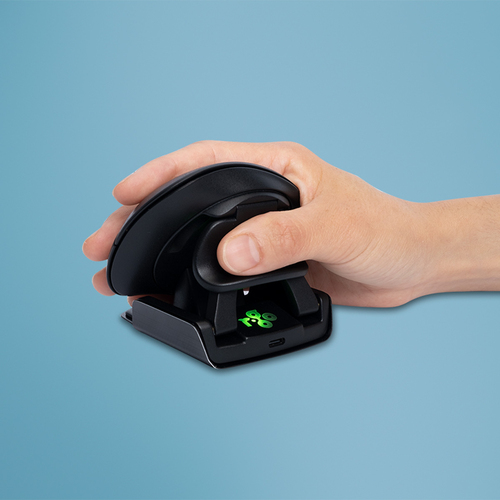
The ergonomic shape of the Evoluent D was inspired by many years of experience and research. The shape of the mouse lies perfectly in the hand and doesn’t feel too large. The ergonomic shape supports the user’s hand in a handshake position. Grabbing the vertical mouse in a handshake position, relieves or prevents automatically pain in your arm and wrist. The extra wide lip along the bottom edge prevents the little finger from rubbing the desk. This provides superior comfort for your work and leads to more productivity.
Ergonomic background
Prolonged use of a regular mouse can lead to pain and discomfort in the shoulders, forearms, and hands (Chang et al., 2007 & Andersen et al., 2008). The handshake position of vertical mice keeps the wrist from bending as much to the side while the forearm also turns inward to a lesser degree (Schmid, et al., 2015). This means that muscle activity in the forearm is less than it would be when using a conventional mouse (Quemelo & Vieira, 2013). Research has shown that the use of a vertical joystick mouse ensures a faster recovery from forearm, wrist and hand complaints (Aarås, et al., 2001). And therefore, vertical mice compared to standard mice lead to a healthier and more comfortable way of working.
Stylish and high quality.
The Evoluent D has not only a high functionality and guarantees a healthy, ergonomic way of working, it has also a stylish design. The various high-quality materials, the modern design in matt black with metallic highlights, and the chrome housing give the mouse a premium look and feel.
Wideo i dokumenty
BakkerElkhuizen Evoluent D
- BroszuraProduct Brochure ↗
- InstrukcjaUser manual ↗
- DokumentEU Declaration of Conformity ↗
- DokumentEMC Certificate ↗
- DokumentDeclaration of Sustainability ↗
Specyfikacja
Najważniejsze parametry
- Interfejs urządzeniaGniazda, przez które urządzenie można podłączyć do innych urządzeń.
- USB Typu-A
- Technologia wykrywania ruchu
- Laser
- Rozdzielczość ruchu
- 3200 DPI
- Liczba przyciskówLiczba przycisków na urządzeniu.
- 6
- Typ przewijania (scroll type)Rodzaj przewijania w urządzeniu wejściowym.
- Koło
- UkładOpis cech zewnętrznych produktu.
- Dla praworęcznych
- PrzeznaczenieWykorzystanie produktu.
- Biuro
- Kolor produktuKolor, np. czerwony, niebieski, zielony, czarny, biały.
- Czarny
Pokaż wszystkie parametry (49)Pokaż tylko najważniejsze parametry
Funkcje
- PrzeznaczenieWykorzystanie produktu.
- Biuro
- Kraj pochodzeniaKraj, w którym wytworzono produkt.
- Chiny
- Obsługiwane systemy operacyjne WindowsWersja Windowsa, której można używać z tym urządzeniem.
- Windows 10, Windows 11, Windows 7, Windows 8, Windows 8.1
- Długość kablaDługość kabla.
- 2,1 m
- Obsługa funkcji Plug & PlayInformuje czy dany produkt obsługuje funkcję "podłącz i graj" ("plug & play"). Podłącz i graj jest rodzajem urządzenia bądź oprogramowania, które może być używane natychmiast po jego podłączeniu, w przeciwieństwie do urządzeń bądź oprogramowania wymagających konfiguracji.
- Tak
- MateriałyMateriał, z którego wykonano określoną rzecz.
- Plastik
Klawiatura
- Interfejs urządzeniaGniazda, przez które urządzenie można podłączyć do innych urządzeń.
- USB Typu-A
Myszka
- Technologia wykrywania ruchu
- Laser
- Rozdzielczość ruchu
- 3200 DPI
- Typ przewijania (scroll type)Rodzaj przewijania w urządzeniu wejściowym.
- Koło
- Liczba przyciskówLiczba przycisków na urządzeniu.
- 6
- Liczba kółek przewijania myszy
- 1
- Kierunki przewijania
- Pionowa
- Rodzaj przyciskówTyp guzików.
- Wciskane przyciski
- Programowalne przyciski myszy
- Tak
- Liczba przycisków programowalnych
- 6
- Funkcje przycisków
- Copy/Paste, Przełącznik DPI, Przedni, Tylne
- Regulowana rozdzielczość ruchu
- Tak
- Liczba trybów rodzielczości ruchu
- 4
Pozostałe funkcje
- Okres gwarancji
- 5 lat(a)
Zawartość opakowania
- Przewodnik użytkownika
- Tak
- Ilość na paczkę
- 1 szt.
Waga i rozmiary
- Szerokość produktuMiara szerokości.
- 88 mm
- Głębokość produktuOdległość od przodu do tyłu przedmiotu.
- 110 mm
- Wysokość produktuWysokość produktu.
- 77 mm
- Waga produktuWaga produktu bez opakowania (netto). W miarę możliwości waga netto podawana jest łącznie z wagą standardowego wyposażenia danego sprzętu. Prosimy zwrócić uwagę na fakt, że niektórzy producenci rozumieją wagę produktu jako pojedynczego urządzenia, bez uwzględnienia wagi akcesoriów i/lub zaopatrzenia.
- 170 g
Oprogramowanie
- Obsługiwane systemy operacyjne MacSystem operacyjny Maca, np. OS X, który można używać z tym urządzeniem.
- Mac OS X 10.10 Yosemite, Mac OS X 10.11 El Capitan, Mac OS X 10.12 Sierra, Mac OS X 10.13 High Sierra, Mac OS X 10.14 Mojave, Mac OS X 10.15 Catalina, Mac OS X 10.5 Leopard, Mac OS X 10.6 Snow Leopard, Mac OS X 10.7 Lion, Mac OS X 10.8 Mountain Lion, Mac OS X 10.9 Mavericks
- Obsługiwany systemy operacyjne Linux
- Tak
Wymagania systemowe
- Pozostałe obsługiwane systemy operacyjne
- ChromeOS, Unix
Moc
- Źródło zasilaniaŹródło zasilania urządzenia, np. napięcie sieciowe.
- Kabel
Konstrukcja
- UkładOpis cech zewnętrznych produktu.
- Dla praworęcznych
- Ergonomiczna konstrukcja
- Tak
- Projekt pionowy
- Tak
- Kolor produktuKolor, np. czerwony, niebieski, zielony, czarny, biały.
- Czarny
Dane logistyczne
- Kod zharmonizowanego systemu (HS)
- 84716070
- Produkty w skrzyni głównej (zewnętrznej)
- 100 szt.
- Szerokość skrzyni zbiorczej (zewnętrznej)
- 590 mm
- Długość skrzyni głównej (zewnętrznej)
- 820 mm
- Wysokość skrzyni wzorcowej (zewnętrznej)
- 450 mm
- Produktów na palecieIlość pojedynczego produktu na paletę. Jeżeli w kartonie umieszczono więcej niż jeden produkt, liczba produktów (nie opakowań) na paletę.
- 1280 szt.
- Szerokość brutto palety
- 120 cm
- Długość brutto palety
- 100 cm
- Wysokość brutto palety
- 190 cm
- Waga brutto palety
- 333 g
- Kod produktu celnego (TARIC)
- 8471607090
Dane opakowania
- Szerokość opakowaniaOdległość od jednej strony opakowania do drugiej.
- 110 mm
- Głębokość opakowaniaOdległość od początku do końca opakowania.
- 110 mm
- Wysokość opakowaniaOdległość od góry do dołu opakowania.
- 100 mm
- Waga wraz z opakowaniemWaga zapakowanego produktu w gramach.
- 236 g
Database Right data-sheet 2026 Icecat. All rights reserved. Udostępniane „tak jak są”, bez gwarancji — przed zakupem sprawdź szczegóły w sklepie.
Historia cen (90 dni, najlepsza cena dnia)
Wciąż zbieramy historię cen tego produktu — zajrzyj wkrótce.
Alternatywne modele

BakkerElkhuizen Evoluent D Medium Wireless
BakkerElkhuizen Evoluent D Small

BakkerElkhuizen Evoluent D Large Wireless
BakkerElkhuizen Evoluent D Large
BakkerElkhuizen Evoluent D Small Wireless
R-Go Tools Ergonomic
mouse R-Go Twister, with break software, ambidextrous mouse for both hands, foldable, bluetooth and wired