
ASUS MB14AHD computer monitor 35.6 cm (14") 1920 x 1080 pixels Full HD LCD Touchscreen Black
- Ekran: 35,6 cm (14"), 1920 x 1080 px, IPS, Płaski
- Częstotliwość odświeżania: 60 Hz, 5 ms czas reakcji
- Kolor: Czarny
Gdzie kupić
Nie śledzimy jeszcze cen tego produktu. Sprawdź aktualne ceny bezpośrednio w sklepach:
Możemy otrzymać prowizję, gdy kupujesz przez linki na tej stronie — bez dodatkowych kosztów dla Ciebie. Dowiedz się więcej
O produkcie
Productivity at the tip of your stylus
ASUS ZenScreen Ink MB14AHD is a 14-inch IPS FHD portable monitor with 10-point touch functionality and ASUS Pen (SA201H)* that allows users to write, draw anytime and anywhere. The included ASUS Pen features MPP 2.0 and 4096 pressure level for precise and lag-free writing and drawing experiences. It even features an integrated stepless kickstand, enabling ZenScreen Ink to be used in almost any position.
*10-point touch and stylus only works in Windows
The ultimate portable touchscreen and pen combination
With the MPP 2.0-compliant ASUS Pen, 10-point touch functionality and portable design, ZenScreen Ink is the perfect companion for taking notes, drawing or even signing documents – anywhere, anytime. Use it as an extended display to work more efficiently on the go, or simply kick back for hands-free tasks.
ASUS Pen
Take note of every creative idea
ASUS Pen is the perfect accessory for ZenScreen Ink, empowering you to write, draw or annotate in any supported app. It features Microsoft Pen Protocol (MPP) 2.0 technology and 4096-level sensitivity for low latency and fast response, enabling smooth, natural writing experiences. With built-in magnets securing it to the top of the monitor, and lasting up to a year on a single battery charge*, ASUS Pen is ready to use whenever and wherever you want.
*Based on average daily use of two hours.
Compatible software
ZenScreen Ink is designed for productivity and is fully compatible with numerous writing software and other tools including Microsoft Windows Ink, Whiteboard and OneNote.
Tap into productivity
With its interactive 10-point touchscreen, ZenScreen Ink offers highly-accurate, responsive and seamless touch experiences*, enabling you to edit documents, draw on slides or play games with your fingertips. It is Windows 10/11 compatible, allowing you to work smarter and more efficiently.
* Availability of 10-point touchscreen functionality depends on operating system.
Flexible viewing positions
The built-in stepless kickstand supports both landscape and portrait modes. It offers up to 150° of hinge movement, so it’s easy to use and flexible for all kinds of touch or writing scenarios. There’s also an integrated tripod socket, enabling ZenScreen Ink to be elevated and oriented into any position.
Automatic screen orientation
When connected to a Windows PC, the ASUS DisplayWidget Lite tool* enables ZenScreen Ink to sense its orientation and automatically switches the display between landscape and portrait modes. Landscape mode is ideal for presentations and spreadsheets, while portrait style provides the perfect long view for documents, books or websites.
*Software required. Auto-rotate function works only with the Windows operating system.
Rich connectivity
ZenScreen Ink includes a Micro HDMI port and two USB-C ports with DisplayPort Alt Mode for quick connections to compatible devices. The USB-C ports can also be used for power input.
Protect your eyes with ASUS Eye Care technology
ASUS Ultra-Low Blue Light technology
Exclusive ASUS Ultra-Low Blue Light technology protects you from potentially harmful blue light. It offers four filter settings that are easily accessed through the onscreen display menu via the hotkey.
Blue Light Filter Level
ASUS Flicker Free technology
TÜV Rheinland-certified ASUS Flicker Free technology eliminates flicker, ensuring comfortable viewing experiences. This technology helps minimize eyestrain and other ailments typically associated with extended hours of viewing.
Dokumenty
- Karta informacyjna produktuEU Product Fiche ↗
Specyfikacja
Najważniejsze parametry
- Długość przekątnej ekranuWielkość wyświetlacza tego produktu; wyrażone w calach, po przekątnej
- 35,6 cm (14")
- RozdzielczośćRozdzielczość wyświetlacza dla systemu.
- 1920 x 1080 px
- Typ ekranu
- IPS
- Kształt ekranu
- Płaski
- Maksymalna częstotliwość odświeżania
- 60 Hz
- Czas odpowiedzi (typowy)Czas reakcji jest to różnica czasu pomiędzy momentem, w którym źródło (na przykład karta wideo) wysyła sygnał a w jakim sprzęt (np. monitor) otrzymuje lub wyświetla sygnał. (Używane skróty:. R / F = Rise and Fall)
- 5 ms
- Kolor produktuKolor, np. czerwony, niebieski, zielony, czarny, biały.
- Czarny
Pokaż wszystkie parametry (54)Pokaż tylko najważniejsze parametry
Konstrukcja
- Kolor produktuKolor, np. czerwony, niebieski, zielony, czarny, biały.
- Czarny
- Montaż naścienny / rzutowanie na sufitUrządzenie może być przymocowane do ściany.
- Nie
Dźwięk
- Wbudowane głośnikiUrządzenie posiada wbudowany głośnik.
- Nie
- Wbudowany mikrofonMikrofon, który jest wbudowany w urządzenie.
- Nie
Multimedia
- Wbudowana kamera/aparatProdukt ma wbudowany aparat fotograficzny.
- Nie
Wydajność
- NVIDIA G-SYNC
- Nie
- AMD FreeSync
- Nie
Wyświetlacz
- Długość przekątnej ekranuWielkość wyświetlacza tego produktu; wyrażone w calach, po przekątnej
- 35,6 cm (14")
- RozdzielczośćRozdzielczość wyświetlacza dla systemu.
- 1920 x 1080 px
- Natywne proporcje obrazuProporcje obrazu to stosunek jego szerokości do wysokości. Natywny format obrazu to taki format, który pierwotnie był przeznaczony dla danego urządzenia. Obrazy wyświetlane w tym formacie wykorzystują maksymalną rozdzielczość i uzyskują maksymalną jasność. Obrazy wyświetlane w innych formatach niż natywny zawsze będą posiadały gorszą rozdzielczość i mniejszą jasność.
- 16:9
- Technologia wyświetlaczaTechnologia wykorzystana w wyświetlaczu, np. plazma, LED.
- LCD
- Ekran dotykowyEkran laptopa, smartfona itp., który reaguje na dotyk, dzięki czemu można sterować urządzeniem za pomocą palców.
- Tak
- Typ HDRodzaj obsługiwanej wysokiej rozdzielczości (e.g. Full HD, 4K Ultra HD).
- Full HD
- Typ ekranu
- IPS
- Podświetlenie LEDRodzaj podświetlenia w wyświetlaczach ciekłokrystalicznych LCD. LED wytwarza jeden rodzaj światła: światło białe lub RGB (czerwone, zielone, niebieskie). Białe światło LED używane jest głównie w notebookach, ekranach komputerów i prawie wszystkich przenośnych urządzeniach LCD. Światła RGB są wykorzystywane w monitorach wysokiej klasy, takich jak HP DreamColor LP2480zx i w wybranych laptopach HP EliteBook, oraz w nowszych wyświetlaczach, takich jak w laptopach Dell's Studio, które posiadają opcjonalny wyświetlacz RGB.
- Tak
- Typ podświetlacza
- LED
- Technologia dotykuTechnologia ekranu dotykowego, np. dual-touch.
- Multi-touch
- Ilość symultanicznych punktów dotyku
- 10
- JasnośćJasność jest to ilość światła emitowanego z ekranu/monitora. Skala jasności mierzona jest w kandelach na metr kwadratowy; powszechnie znanych jako nity.
- 220 cd/m²
- Czas odpowiedzi (typowy)Czas reakcji jest to różnica czasu pomiędzy momentem, w którym źródło (na przykład karta wideo) wysyła sygnał a w jakim sprzęt (np. monitor) otrzymuje lub wyświetla sygnał. (Używane skróty:. R / F = Rise and Fall)
- 5 ms
- Kształt ekranu
- Płaski
- Współczynnik kontrastu (typowy)Różnica w natężeniu światła pomiędzy najjaśniejszym białym i najciemniejszym czarnym.
- 800:1
- Współczynik kontrastu (dynamiczny)Właściwość wyświetlacza, oznacza stosunek jasności najjaśniejszego koloru (białego) do jasności najciemniejszego koloru (czarnego), ktory system jest w stanie wytworzyć.
- 100000000:1
- Maksymalna częstotliwość odświeżania
- 60 Hz
- Kąt widzenia (poziomy)Maksymalny poziomy kąt widzenia, pod którym obraz jest zadowalająco widoczny.
- 170°
- Kąt widzenia (pionowy)Maksymalny pionowy kąt widzenia, pod którym obraz jest zadowalająco widoczny.
- 170°
- Rozstaw pikseliParametr w tubie obrazu oznaczający najkrótszy dystans pomiędzy dwoma punktami o tym samym kolorze. W założeniu, im mniejsza plamka tym lepsza ostrość obrazu.
- 0,161 x 0,161 mm
- Rozmiar obrazu (w poziomie)Podgląd jest często mniejszy niż rozmiar ekranu z powodu ramki w okół zdjęcia.
- 30,9 cm
- Rozmiar obrazu (w pionie)
- 17,4 cm
Pozostałe funkcje
- Część widoczna ekranu
- 309,37 x 174,02 mm
Zawartość opakowania
- Przewody
- Prąd przemienny, HDMI, USB Type-C
- Piórko dołączone
- Tak
Waga i rozmiary
- Szerokość (bez podstawy)
- 324,2 mm
- Głębokość (bez podstawy)
- 12,5 mm
- Wysokość (bez podstawy)
- 201,2 mm
- Waga (bez podstawy)
- 870 g
Moc
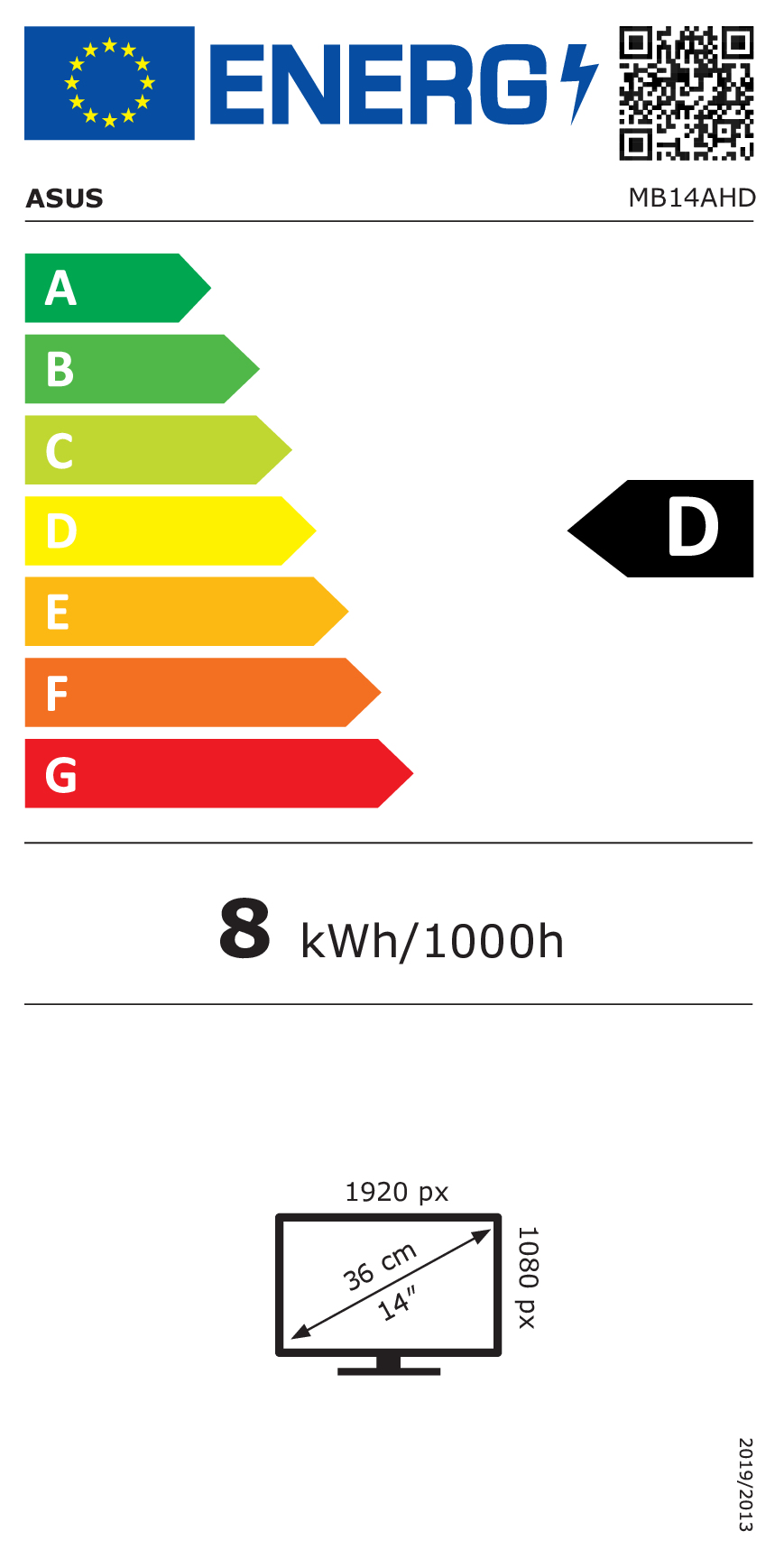
- Klasa efektywności energetycznej (SDR)
- D
- Zużycie energii (SDR) na 1000 godzin
- 8 kWh
- Pobór mocyIlość energii zużywanej przez ten model, wyrażona w watach. Typowe wartości podawane przez producentów to zużycie energii w trybie spoczynku, trybie czuwania / zawieszenia, typowego zastosowania, maksymalnego użytkowania.
- 10 W
- Tryb wyłączenia
- 0,5 W
- Napięcie wejściowe ACNapięcie prądu elektrycznego.
- 100 - 240 V
- Częstotliwość wejściowa AC
- 50 - 60 Hz
- Skala efektywności energetycznej
- Od A do G
Ergonomia
- Opcja regulacji wysokościElement urządzenia umożliwiający regulację wysokości.
- Nie
Porty i interfejsy
- Ilość portów USB 3.2 Gen 1 (3.1 Gen 1) Typu-C
- 2
- Ilość portów Micro HDMI
- 1
- Wyjście na słuchawkiGniazdo do podłączania słuchawek.
- Tak
- Wyjścia słuchawkoweLiczba gniazd/portów do podłączania słuchawek.
- 1
- HDCPHigh-bandwidth Digital Content Protection (HDCP) jest formą ochrony przed kopiowaniem cyfrowym treści audio i wideo podczas ich przemieszczania
- Tak
Dane logistyczne
- Kod zharmonizowanego systemu (HS)
- 85285210
Dane opakowania
- Szerokość opakowaniaOdległość od jednej strony opakowania do drugiej.
- 454 mm
- Głębokość opakowaniaOdległość od początku do końca opakowania.
- 78 mm
- Wysokość opakowaniaOdległość od góry do dołu opakowania.
- 310 mm
- Waga wraz z opakowaniemWaga zapakowanego produktu w gramach.
- 2,64 kg
Database Right data-sheet 2026 Icecat. All rights reserved. Udostępniane „tak jak są”, bez gwarancji — przed zakupem sprawdź szczegóły w sklepie.
Recenzje ekspertów
- –
creativebloq.com2023
On paper, the ZenScreen Ink looks like a good match for the travelling creative, offering a 1080p touchscreen and stylus to accompany a laptop. On closer inspection, though, there are a number of issues with the screen that may cause it to lose some of it...
- +
- Sharp picture, Touchscreen, Stylus
- −
- Poor colour response, Not particularly bright, What's an AAAA battery
- 60
tomshardware.com2022
Asus has one of the most extensive catalogs of portable monitors out there, and it has recently expanded with the addition of the ZenScreen Ink (MB14AHD). This 14-inch device adds touch and a stylus to the mix while offering solid design and usability. Th...
Przeczytaj recenzję w tomshardware.com ↗
Historia cen (90 dni, najlepsza cena dnia)
Wciąż zbieramy historię cen tego produktu — zajrzyj wkrótce.
Alternatywne modele

ASUS ROG Strix XG27AQ-W
computer monitor 68.6 cm (27") 2560 x 1440 pixels Wide Quad HD White

ASUS VA27EQSB
computer monitor 68.6 cm (27") 1920 x 1080 pixels Full HD LCD Black

ASUS VA24DQLB
computer monitor 60.5 cm (23.8") 1920 x 1080 pixels Full HD LED Black

ASUS VA27VQSE
computer monitor 68.6 cm (27") 1920 x 1080 pixels Full HD Black

ASUS TUF Gaming VG248Q1B
computer monitor 61 cm (24") 1920 x 1080 pixels Full HD LED Black

ASUS VG248QG
computer monitor 61 cm (24") 1920 x 1080 pixels Full HD Black