
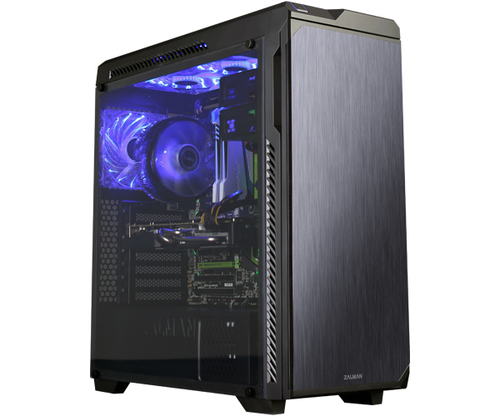
Zalman Z1 NEO computer case Midi Tower Black
- USB 2.0 ports quantity: 2
- USB 3.2 Gen 1 (3.1 Gen 1) Type-A ports quantity: 1
- Form factor: Midi Tower
- Type: PC
- Product colour: Black
- Supported motherboard form factors: ATX, ITX, micro ATX
Where to buy
We're not tracking prices for this product yet. Check current prices directly at:
We may earn a commission when you buy through links on this page — at no extra cost to you. Learn more
About this product
tZalman's Cwling Solution based Cwlingl
- Optimized air flow cooling structure
- Install up to 3 system fans
- Exclusive cooling for power supply
- (Exterior Design and Functionl
- Transparent acryl side applied
- Black cover sash
- Convenient interface for users
- Dust filter installed
- (Internal Structurel
- CPU Cooler Mounting Hole Provided
- Excellent expandability and space
- High performance graphic card installed
- Tool-Free HDD/ODD
Specifications
Key specifications
- USB 2.0 ports quantityNumber of USB 2.0 ports (connecting interfaces) in the device. USB 2.0 was released in April 2000 (now called "Hi-Speed"), adding higher maximum signaling rate of 480 Mbit/s (effective throughput up to 35 MB/s or 280 Mbit/s), USB 2.0 ports are usually black.
- 2
- USB 3.2 Gen 1 (3.1 Gen 1) Type-A ports quantityThe total number of available USB 3.2 Gen 1 (formerly 3.1 Gen 1) Type-A connection ports on the device.
- 1
- Form factorThe shape or design of the product.
- Midi Tower
- TypeCharacteristics of the device.
- PC
- Product colourThe colour e.g. red, blue, green, black, white.
- Black
- Supported motherboard form factorsDesign of the supported motherboards.
- ATX, ITX, micro ATX
- Number of 3.5" baysA drive bay is a standard-area for adding hardware to a computer. Most drive bays are fixed to the inside of a case, but some can be removed. A 3.5" drive bay is for floppy disks.
- 4
- Number of 5.25" baysA drive bay is a standard-area for adding hardware to a computer. Most drive bays are fixed to the inside of a case, but some can be removed. A 5.25" drive bay, also known as full-height bays, were found in old PCs in the early to mid-1980s. They were 3¼″ high by 5¾″ wide, and up to 8″ deep (83 × 146 × 200 mm), used mainly for hard disks and floppy disk drives.
- 1
- ManualIndicates whether a printed user manual is included in the package.
- Yes
- Supported HDD sizesThe size of the hard disk drives which can be used by the device.
- 2.5,3.5"
Show all 29 specificationsShow key specifications only
Ports & interfaces
- USB 2.0 ports quantityNumber of USB 2.0 ports (connecting interfaces) in the device. USB 2.0 was released in April 2000 (now called "Hi-Speed"), adding higher maximum signaling rate of 480 Mbit/s (effective throughput up to 35 MB/s or 280 Mbit/s), USB 2.0 ports are usually black.
- 2
- USB 3.2 Gen 1 (3.1 Gen 1) Type-A ports quantityThe total number of available USB 3.2 Gen 1 (formerly 3.1 Gen 1) Type-A connection ports on the device.
- 1
- Audio inputThe type of audio input that the device requires, and the connection needed.
- Yes
- Audio outputThe type of audio output that the device produces, and the connector(s).
- Yes
Power supply
- Power supply includedThere is a power supply with this product.
- No
Design
- Form factorThe shape or design of the product.
- Midi Tower
- Product colourThe colour e.g. red, blue, green, black, white.
- Black
- Supported motherboard form factorsDesign of the supported motherboards.
- ATX, ITX, micro ATX
- Number of 5.25" baysA drive bay is a standard-area for adding hardware to a computer. Most drive bays are fixed to the inside of a case, but some can be removed. A 5.25" drive bay, also known as full-height bays, were found in old PCs in the early to mid-1980s. They were 3¼″ high by 5¾″ wide, and up to 8″ deep (83 × 146 × 200 mm), used mainly for hard disks and floppy disk drives.
- 1
- Number of 2.5" baysThe total number of available slots for installing 2.5-inch storage drives (e.g. SSDs).
- 5
- Number of internal 3.5" baysThe total number of available slots inside the unit designed to hold 3.5-inch storage drives.
- 4
- Number of external 5.25" baysThe total number of available slots for installing external drive bays with a width of 5.25 inches.
- 1
- Number of expansion slotsThe total number of available slots for installing additional hardware components to extend the functionality of the device.
- 7
- Side windowA side window is a transparent side (or part of side) in a housing which enables you to see the internal space of the device.
- Yes
- Suitable forWho can use the product, or what the product can be used for.
- Gaming
- IlluminationThe device has illumination.
- Yes
- Maximum graphics card lengthThe maximum length of a graphics card that can be physically installed inside the unit, measured in millimetres.
- 37.5 cm
Features
- TypeCharacteristics of the device.
- PC
- MaterialThe material from which a thing is or can be made e.g. wood, plastic.
- Plastic, Steel
Expansion slots
- Number of 3.5" baysA drive bay is a standard-area for adding hardware to a computer. Most drive bays are fixed to the inside of a case, but some can be removed. A 3.5" drive bay is for floppy disks.
- 4
Weight & dimensions
- WidthThe measurement or extent of something from side to side.
- 203 mm
- DepthThe distance from the front to the back of something.
- 464 mm
- HeightThe measurement of the product from head to foot or from base to top.
- 445 mm
Packaging content
- ManualIndicates whether a printed user manual is included in the package.
- Yes
Storage
- Supported HDD sizesThe size of the hard disk drives which can be used by the device.
- 2.5,3.5"
Cooling
- Front fans installedSpecifies the number and size of cooling fans pre-installed at the front of the unit (e.g., 1x 120 mm).
- 2x 120 mm
- Rear fans installedSpecifies the number and size of the cooling fans pre-installed at the rear of the unit (e.g., 1x 120 mm).
- 1x 120 mm
Power
- Power supply locationWhere the power supply is positioned.
- Bottom
Performance
- Reset buttonIndicates whether the device features a dedicated button to restore the unit to its original factory settings.
- Yes
Database Right data-sheet 2026 Icecat. All rights reserved. Provided “as is”, without warranty — check details with the store before buying.
Price history (90 days, best daily price)
Price history is still being collected for this product — check back soon.
Alternative models
Zalman Z9 NEO PLUS Midi Tower Black
Specs & where to buy

Zalman A1 Mini Tower Black
Specs & where to buy

Zalman Z9 NEO PLUS Midi Tower White
Specs & where to buy

Zalman Z9 NEO White Midi Tower
Specs & where to buy

Zalman R1 Midi Tower Black
Specs & where to buy

Zalman Z9 NEO Black Midi Tower
Specs & where to buy