
Viewsonic Professional Series VP2365wb computer monitor 58.4 cm (23") 1920 x 1080 pixels Full HD Black
- Screen: 58.4 cm (23"), 1920 x 1080 pixels
- Refresh rate: 5 ms response time
- Brightness: 250 cd/m²
- Colour: Black
Where to buy
We're not tracking prices for this product yet. Check current prices directly at:
We may earn a commission when you buy through links on this page — at no extra cost to you. Learn more
About this product
The VP2365wb is one of ViewSonic’s new LCD VP series monitors that utilize the power of IPS panel technology. With true 8-bit colour palette, high contrast ratio and wide viewing angles coupled with 1920x1080 Full HD resolution, VP2365wb is the perfect solution for designers, manufacturers, medical applications and movie production. An integrated 4-port USB hub enables cluster free connectivity, ergonomic functions with pivot, height adjust, tilt, swivel and slim bezel make the VP2365wb an amazing monitor. ECO Mode offering up to 40% saving on power consumption and , ViewSonic's strongest pixel performance guarantee, gives you confidence in your investment. The VP2365wb will also contribute to a greener world with its ENERGY STAR compliant power management features and environment-friendly materials.
Specifications
Key specifications
- Display diagonalSize of the display for this product, measured diagonally, usually in inches.
- 58.4 cm (23")
- Display resolutionThe number of distinct pixels in each dimension that can be displayed. It is usually quoted as width × height, with the units in pixels: for example, "1024 × 768" means the width is 1024 pixels and the height is 768 pixels. The higher the number of pixels, the sharper the image.
- 1920 x 1080 pixels
- Response timeThe response time is the time difference between the moment that a source (for example a video card) sends a signal and that equipment (for example a monitor) receives or display the signal. (Used abbreviations: R/F = Rise and Fall.)
- 5 ms
- Display brightness (typical)Display brightness, measured by its Luminance, presented as a figure in nits. Typical brightness ratings for monitors range from 250 to 350 nits with a target value of between 80 to 120 nits being suitable for most displays in a normal viewing environment.
- 250 cd/m²
- Product colourThe colour e.g. red, blue, green, black, white.
- Black
Show all 27 specificationsShow key specifications only
Design
- Market positioningUnder which category can the device be positioned in the market, e.g. camera phone.
- Business
- Product colourThe colour e.g. red, blue, green, black, white.
- Black
Audio
- Built-in speaker(s)The device contains speaker(s) to produce sound.
- No
Multimedia
- Built-in cameraThe product has an integrated camera.
- No
Display
- Display diagonalSize of the display for this product, measured diagonally, usually in inches.
- 58.4 cm (23")
- Display resolutionThe number of distinct pixels in each dimension that can be displayed. It is usually quoted as width × height, with the units in pixels: for example, "1024 × 768" means the width is 1024 pixels and the height is 768 pixels. The higher the number of pixels, the sharper the image.
- 1920 x 1080 pixels
- TouchscreenA screen of a laptop, smartphone, etc., that responds to touch so you can control the interface using your fingers.
- No
- HD typeType of supported High Definition (e.g. Full HD, 4K Ultra HD).
- Full HD
- Display brightness (typical)Display brightness, measured by its Luminance, presented as a figure in nits. Typical brightness ratings for monitors range from 250 to 350 nits with a target value of between 80 to 120 nits being suitable for most displays in a normal viewing environment.
- 250 cd/m²
- Response timeThe response time is the time difference between the moment that a source (for example a video card) sends a signal and that equipment (for example a monitor) receives or display the signal. (Used abbreviations: R/F = Rise and Fall.)
- 5 ms
- Contrast ratio (typical)The difference in light intensity between the brightest white and the darkest black.
- 1000:1
- Viewing angle, horizontalMaximum horizontal angle at which a display can be viewed with acceptable visual performance.
- 178°
- Viewing angle, verticalMaximum vertical angle at which a display can be viewed with acceptable visual performance.
- 178°
Other features
- TV tuner integratedDevice has an in-built TV tuner.
- No
- Power requirementsSpecifies the electrical power specifications needed for the unit to operate correctly, such as voltage and current.
- AC 100-240V, 50-60Hz
Weight & dimensions
- Width (without stand)The horizontal measurement of the device excluding the base or support structure, expressed in millimetres.
- 548 mm
- Depth (without stand)The measurement of the product from front to back without its base or support, typically expressed in millimetres or centimetres.
- 250 mm
- Height (without stand)The vertical measurement of the device when the stand is removed, measured in mm.
- 433 mm
- Weight (without stand)The mass of the device excluding the support base, measured in g.
- 6.8 kg
Operational conditions
- Operating temperature (T-T)The minimum and maximum temperatures at which the product can be safely operated.
- 0 - 40 °C
- Operating relative humidity (H-H)The range of relative humidity, expressed as a percentage, within which the device can function correctly without damage or performance loss.
- 10 - 90%
Power
- Power consumption (typical)Amount of power consumed by this model, often expressed in watts (W). Typical values that manufacturers give are power consumption when off, standby/suspended mode, typical use, maximum usage.
- 130 W
Ports & interfaces
- USB hub versionThe technical standard of the USB hub, if available, which determines the maximum data transfer speed (e.g., 3.2 Gen 1).
- 2.0
- USB Type-A downstream ports quantityThe number of USB Type-A ports available for connecting peripheral devices to the unit.
- 4
- VGA (D-Sub) ports quantityNumber of VGA (D-Sub) ports (connecting interfaces) in the device. The VGA (D-Sub) connector is a 15 pin connector between a computer and a monitor. It was first introduced in 1987 by IBM.
- 1
- DVI-D ports quantityThis is the amount of DVI-I interfaces. Digital Visual Interface (DVI) is a video display interface developed by the Digital Display Working Group (DDWG). The digital interface is used to connect a video source to a display device, such as a computer monitor. DVI-D means DVI digital, which means it can only support digital, but not analog.
- 1
- HDCPHigh-bandwidth Digital Content Protection (HDCP) is a form of digital copy protection to prevent copying of digital audio and video content as it travels across connections.
- No
Database Right data-sheet 2026 Icecat. All rights reserved. Provided “as is”, without warranty — check details with the store before buying.
Price history (90 days, best daily price)
Price history is still being collected for this product — check back soon.
Alternative models

Viewsonic LED LCD VX1932WM-LED
computer monitor 48.3 cm (19") 1440 x 900 pixels Black

Viewsonic LED LCD VA1913w
computer monitor 48.3 cm (19") 1366 x 768 pixels Black

Viewsonic E2 Series VE155
computer monitor 38.1 cm (15") 1024 x 768 pixels White

Viewsonic Graphic Series VG2427WM
computer monitor 59.7 cm (23.5") 1920 x 1080 pixels Black
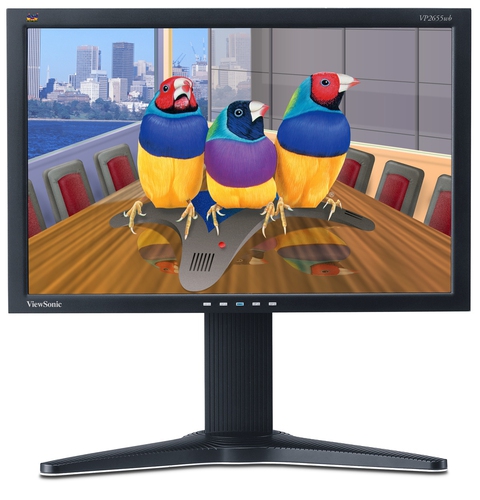
Viewsonic Professional Series VP2655WB
computer monitor 66 cm (26") 1920 x 1200 pixels Full HD Black

Viewsonic X Series VX2268WM
computer monitor 55.9 cm (22") 1680 x 1050 pixels Black
Accessories & compatible products

Neomounts FPMA-C050BLACK Monitor/TV mount ceiling 10-30" - h 60-85 cm

Neomounts FPMA-D935D Monitor arm 14-27"

Neomounts FPMA-D960 Monitor arm 10-30"

Neomounts FPMA-W25 Monitor/TV mount wall 10-30" - ultra-flat

Neomounts FPMA-D960D Monitor arm 10-27"
