
TP-Link TD-W8961ND wireless router Fast Ethernet White
- Antenna design: External
- Ethernet LAN
- Ethernet LAN interface type: Fast Ethernet
- Top Wi-Fi standard: Wi-Fi 4 (802.11n)
- WLAN data transfer rate (max): 300 Mbit/s
- DSL WAN
Where to buy
We're not tracking prices for this product yet. Check current prices directly at:
We may earn a commission when you buy through links on this page — at no extra cost to you. Learn more
About this product
What This Product Does
The TD-W8961ND Wireless N ADSL2+ Modem Router is an All-in-One device that combines the functions of a high speed ADSL modem, a 4-Port 10/100Mbps NAT router and a wireless access point. It is designed to provide end-users with a one-stop solution to acquiring and sharing high-speed Internet access over a wired/wireless network. Supporting the latest ADSL standards, the TD-W8961ND brings with it much higher speed than dial-up connections. Complying with the IEEE 802.11n standard, users will get up to 15X the speed and 5X the range of conventional 11g products. With this product, users can now enjoy more kinds of heavy bandwidth consuming applications like wireless HD video streaming, not possible with 11g products, from anywhere in their entire homes or even in their backyards!
One-Stop Solution
As a 3-in-1 device, the TD-W8961ND combines the functions of a high speed DSL modem, a 4-Port 10/100Mbps NAT router and a wireless N access point. Using a telephone line the TD-W8961ND establishes a high-speed ADSL2+ Internet connection. Once set up, the device's wired/wireless functions can be used to share media between devices, browse the Internet, talk on an IP phone, or even stream HD video. Save time and money using one device instead of multiple devices that take longer to set up and occupy more cluttered space.
Access High-Speed Internet
Unlike dial-up Internet service, a DSL Internet connection is always on, so users need not dial up or wait to access the web. Supporting the latest ADSL standards, the TD-W8961ND provides higher performance (up to 24Mbps downstream) and longer reach from user's local Internet Service Provider (ISP). This device also supports TR-069, which automatically updates the device's firmware and other settings when they become available from the ISP.
Exceptional Wireless Performance
TD-W8961ND is a high-speed solution that complies with IEEE802.11n standards with wireless transmission speeds of up to 300Mbps. It adopts MIMO technology, has two detachable Omni directional antennas providing better wireless performance, transmission rates, stability and coverage. Users can get up to 15x the speed and 5x the range of conventional 11g products and share high-speed DSL Internet connections, photos, music, files, and even heavy bandwidth consuming applications like wireless HD video streaming, something not possible with 11g products, from anywhere in their entire homes or even in their backyards!
Ideal for Multimedia Application
Port VLAN binds specific LAN ports and PVCs for differential services like IPTV. The TD-W8961ND's built-in QoS engine provides various QoS policies that help prioritize Internet traffic to enable smooth IPTV streaming and lag-free online gaming. Thus users can experience the benefits of a smooth network connection without worrying about traffic congestion. Combined with IGMP multicast and IGMP snooping features the TD-W8961ND makes an ideal solution for multimedia applications.
Advanced Network Security And Flexible Management
The TD-W8961ND utilizes NAT and SPI (stateful packet inspection) firewalls which inspect the contents of incoming packets before they are allowed in, preventing potential attacks from across the Internet. For added convenience, it supports access control based on MAC addresses, IP addresses, domain names or applications such as MSN or Yahoo Messenger, so that parents and network administrators can establish restricted access policies for children or staff. Aside from web configuration, the TD-W8961ND also provides TR-069 and SNMP, which automatically update the device's firmware and other settings when they become available from users'ISP. All of these features help users to enhance their network's security and make network management more flexible.
WPS One Button Security
To setup their network's security encryption, users need simply to press the "WPS" button on their TD-W8961ND, then push the "WPS" button or enter the router's PIN Code in the wireless client, and it will automatically establish a WPA secure connection. Not only is this faster than normal security setups but more convenient in that users don't need to remember a password!
Easy To Use
Easy Setup Assistant with multi-language support is provided in the product CD. Users can select their native language when setting up their device and complete Internet connection setup, wireless network settings and security configurations without the use of a multilingual dictionary. This benefit allows even novice users to setup their products without sacrificing any key features. Users need simply insert the TD-W8961ND's bundled Auto-Run CD to have their networks set up quickly and hassle-free in minutes.
Specifications
Key specifications
- Antenna designSpecifies whether the antenna is built into the device or attached as an external component (e.g., External, Internal).
- External
- Ethernet LANAn Ethernet LAN (Local Area Network) interface is present, for a wired conection via a cable.
- Yes
- Ethernet LAN interface typeThe characteristics of the Ethernet LAN interface.
- Fast Ethernet
- Top Wi-Fi standardConnection of this device is done via Wi-Fi in a high standard.
- Wi-Fi 4 (802.11n)
- WLAN data transfer rate (max)The maximum theoretical speed at which data can be transmitted wirelessly, measured in Megabits per second (Mbps) or Gigabits per second (Gbps).
- 300 Mbit/s
- DSL WANWhether or not the product features a DSL WAN (Wide Area Network) connection option.
- Yes
- WLAN data transfer rates supportedThe maximum theoretical speeds for wireless data transmission that the device can achieve, measured in Mbit/s.
- 300 Mbit/s
- Power requirementsSpecifies the electrical power specifications needed for the unit to operate correctly, such as voltage and current.
- AC/DC
- Input currentThe amount of electrical current drawn by the device during operation, typically measured in amperes (A) or milliamperes (mA).
- 0.85 A
- Input voltageThe voltage (V) which is required to power the product.
- 9 V
Show all 55 specificationsShow key specifications only
Antenna
- Antenna designSpecifies whether the antenna is built into the device or attached as an external component (e.g., External, Internal).
- External
- Antenna gain level (max)Antenna gain is the measurement of an antenna's ability to amplify the incoming microwave signals in a particular direction, compared with the sensitivity of an isotropic antenna in any direction, or a dipole antenna in the equatorial direction.
- 3 dBi
- Antennas quantityThe total number of antennas integrated into or supplied with the device.
- 2
- Detachable antenna(s)Indicates whether the product has antennas that can be removed for replacement or upgrading.
- Yes
Network
- Ethernet LANAn Ethernet LAN (Local Area Network) interface is present, for a wired conection via a cable.
- Yes
- Ethernet LAN interface typeThe characteristics of the Ethernet LAN interface.
- Fast Ethernet
- Top Wi-Fi standardConnection of this device is done via Wi-Fi in a high standard.
- Wi-Fi 4 (802.11n)
- DHCP clientWhether the product features a DHCP (Dynamic Host Configuration Protocol) to obtain IP addresses within a network.
- Yes
- Ethernet LAN data ratesThe different speed levels of the Ethernet LAN connection.
- 10,100 Mbit/s
- Cabling technologyType of cable technology performance.
- 10/100Base-T(X)
- Networking standardsThe way in which the network is working, e.g. IEEE 802.11a, IEEE 802.11b, IEEE 802.11g.
- IEEE 802.11b, IEEE 802.11g, IEEE 802.11n, IEEE 802.3, IEEE 802.3u
- VPN supportIndicates whether the device supports the creation or connection of a Virtual Private Network for secure remote access.
- PPTP, L2TP, IPSec Pass-through
- Wi-Fi standardsThe type of wireless local area network (LAN). It can be ad-hoc, where units in a network communicate peer-to-peer, or Infrastructure, where units communicate with each other via an access point A LAN interconnects computers in a small area e.g. home, school or office.
- 802.11b, 802.11g, Wi-Fi 4 (802.11n)
Wireless LAN features
- WLAN data transfer rate (max)The maximum theoretical speed at which data can be transmitted wirelessly, measured in Megabits per second (Mbps) or Gigabits per second (Gbps).
- 300 Mbit/s
WAN connection
- DSL WANWhether or not the product features a DSL WAN (Wide Area Network) connection option.
- Yes
Other features
- WLAN data transfer rates supportedThe maximum theoretical speeds for wireless data transmission that the device can achieve, measured in Mbit/s.
- 300 Mbit/s
- Compatible operating systemsList of desktop operating systems tested as compatible with this product.
- Microsoft Windows 98SE, NT, 2000, XP, Vista, Windows 7, MAC OS, NetWare, UNIX, Linux.
- Power requirementsSpecifies the electrical power specifications needed for the unit to operate correctly, such as voltage and current.
- AC/DC
- Upstream data rateThe maximum speed at which the device can transmit data from the local network to the internet, typically measured in Megabits per second (Mbps).
- 1 Mbit/s
- Downstream data rateThe maximum speed at which data can be received from the network, typically measured in Megabits per second (Mbps) or Gigabits per second (Gbps).
- 24 Mbit/s
- xDSL connectionIndicates whether the device supports a connection via xDSL technology.
- Yes
- Internal modemDevice inside a computer, cash register etc. that enables it to communicate over a network.
- Yes
Power
- Input currentThe amount of electrical current drawn by the device during operation, typically measured in amperes (A) or milliamperes (mA).
- 0.85 A
- Input voltageThe voltage (V) which is required to power the product.
- 9 V
- DC-in jackThe socket/plug where the DC electricity supply connects to the device.
- Yes
Keyboard
- Frequency bandA small section of the spectrum of radio communication frequencies, in which channels are usually used or set aside for the same purpose e.g.for a channel on FM radio; for mobile networks to communicate with mobile phones.
- 2.4 GHz
Features
- BandwidthThe maximum rate at which data can be transferred over the interface or network, typically measured in bits per second (e.g. 10 Gbps) or by frequency band (e.g. 5 GHz).
- 2.4835 GHz
Design
- Rack mountingThe type of mounting that can position devices in a shelving system (rack).
- No
- Product colourThe colour e.g. red, blue, green, black, white.
- White
Weight & dimensions
- WidthThe measurement or extent of something from side to side.
- 195 mm
- DepthThe distance from the front to the back of something.
- 130 mm
- HeightThe measurement of the product from head to foot or from base to top.
- 35 mm
Operational conditions
- Operating temperature (T-T)The minimum and maximum temperatures at which the product can be safely operated.
- 0 - 40 °C
- Storage temperature (T-T)The minimum and maximum temperatures at which the product can be safely stored.
- -40 - 70 °C
- Operating relative humidity (H-H)The range of relative humidity, expressed as a percentage, within which the device can function correctly without damage or performance loss.
- 10 - 90%
- Storage relative humidity (H-H)The permissible range of relative humidity, expressed as a percentage, within which the product can be stored without damage.
- 5 - 90%
Power over Ethernet (PoE)
- Power over Ethernet (PoE)The device supports Power over Ethernet (PoE), which is one of several standardized or ad-hoc systems which pass electrical power along with data on Ethernet cabling. This allows a single cable to provide both data connection and electrical power to devices such as wireless access points or IP cameras.
- No
Management features
- Firmware upgradeableIndicates whether the internal software of the device can be updated to a newer version to improve performance or add features.
- Yes
- Quality of Service (QoS) supportIndicates whether the device supports Quality of Service (QoS) to prioritize specific network traffic to ensure performance for critical applications.
- Yes
Technical details
- Antenna connector typeThe way in which the antenna is connected to the device e.g. coaxial.
- RP-SMA
Certificates
- CertificationSpecifies the official standards, safety approvals, or regulatory certifications the product has received.
- CE, FCC, RoHS
Packaging content
- Cables includedSpecifies the types and quantities of connection cables provided with the product (e.g., 3.5 mm to 3.5 mm or SATA).
- LAN (RJ-45), Phone (RJ-11)
- AC adapter includedIndicates whether a power supply unit for connecting the device to an AC outlet is provided in the package.
- Yes
- Quick start guideInstructions, either online, as a computer program or in paper form, to allow you to set up and start using the product quickly.
- Yes
Performance
- On/off switchThe button which is pressed to switch the device on or off.
- Yes
- Universal Plug and Play (UPnP)Indicates whether the device supports the automatic discovery and configuration of network services to allow seamless communication between devices on a local network.
- Yes
- Security algorithmsSecurity algorithms are used to provide authentication, cipher key generation, integrity and radio link privacy to users on mobile networks. The security algorithms supported are the ones that can be used with this product.
- 128-bit WEP, 64-bit WEP, WPA-PSK, WPA2-PSK
- Web-based managementUsing a website/web application to manage something.
- Yes
- Reset buttonIndicates whether the device features a dedicated button to restore the unit to its original factory settings.
- Yes
Security
- FilteringIndicates whether the device incorporates a system to remove impurities, particles, or unwanted noise and interference from a medium.
- Yes
- MAC address filteringSecurity access control method whereby the 48-bit address assigned to each network card is used to determine access to the network. MAC addresses are uniquely assigned to each card, so using MAC filtering on a network permits and denies network access to specific devices through the use of blacklists and whitelists.
- Yes
- DMZ supportIndicates whether the device supports a Demilitarized Zone to allow external traffic to reach a specific internal host.
- Yes
Ports & interfaces
- Ethernet LAN (RJ-45) portsNumber of Ethernet LAN (RJ-45) ports (connecting interfaces) in the device. Ethernet LAN (RJ-45) ports allow a computer to connect to the ethernet.
- 4
- RJ-11 ports quantityThe total number of RJ-11 connectors available on the device.
- 1
DSL features
- ADSL2+Indicates whether the device supports the ADSL2+ standard for high-speed digital subscriber line internet connectivity.
- Yes
Database Right data-sheet 2026 Icecat. All rights reserved. Provided “as is”, without warranty — check details with the store before buying.
Expert reviews
- 80
expertreviews.co.uk2011
Impressive speed and range, plenty of advanced features and a great price make it worth putting up with the arcane admin controls. ...
Read the review at expertreviews.co.uk ↗
Price history (90 days, best daily price)
Price history is still being collected for this product — check back soon.
Alternative models
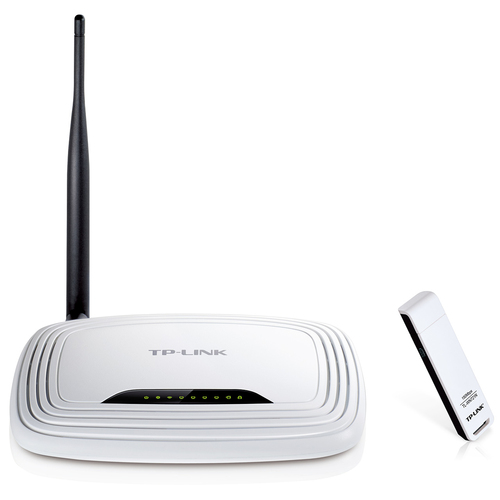
TP-Link TL-WR150KIT wireless router Fast Ethernet White

TP-Link TD-W8961ND wireless router Fast Ethernet

TP-Link TD-W8151N wireless router Fast Ethernet

TP-Link TD-W8951ND wireless router Fast Ethernet White
TP-Link TD-W8961NB wireless router Fast Ethernet
