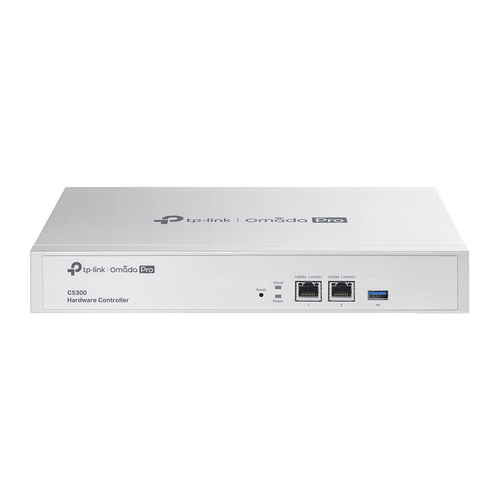
TP-Link Omada Pro C5300 gateway/controller 1000 Mbit/s
- Operating temperature (T-T): 0 - 50 °C
- Storage temperature (T-T): -40 - 70 °C
- Operating relative humidity (H-H): 10 - 90%
- Storage relative humidity (H-H): 5 - 90%
- Cables included: AC, LAN (RJ-45)
- Quick installation guide
Where to buy
We're not tracking prices for this product yet. Check current prices directly at:
We may earn a commission when you buy through links on this page — at no extra cost to you. Learn more
About this product
High-Performance Centralized Management
C5300, the Omada Pro professional on-premises hardware controller, provides 100% centralized management of Omada Pro devices. C5300 supports centralized management of up to 100 Omada Pro access points, 20 Omada Pro switches, and 10 Omada Pro routers—all controlled from a single interface.
There is no need to run a PC/server, making network management simple and efficient.
Hybrid Cloud for Maximum Convenience
Featuring hybrid cloud technology, the Omada Pro hardware controller C5300 allows you to remotely control the whole network via the Omada app or web portal, wherever you are in the world with cloud access. Locally manage devices with the ultimate security and stability.
Industry-Leading Hardware Design
C5300 is equipped with 2× Gigabit RJ45 ports for high-speed networking and 1× USB 3.0 port for auto-backup. With the latest chipset, the C5300 has enough processing power to support the massive management of your business network. Rackmount/desktop design benefits easier and more flexible installation.
Easy and Intelligent Network Monitoring
The easy-to-use dashboard makes it easy to see your real-time network status; check network usage and traffic distribution; receive network condition logs, abnormal event warnings, and notifications; or even track key data for better business results. Network topology helps IT administrators quickly see and troubleshoot connections at a glance.
Multiple Factors Guarantee Easier Network Maintenance
· WiFi Heatmap Simulator
Generate a Wi-Fi solution by simulating the wireless coverage effect of APs at the actual site. Determine the appropriate number and location of APs according to the coverage requirements.
· Visualizable Network Report for Convenient Summary
Help service providers easily report network service quality to their customers through reports. IT administrators can also easily report network operation status through reports.
· Batch Management, Multi-Site Management, and Remote Firmware Updates
Improve network maintenance without needing to configure on-site or manage devices one by one.
· Powerful Scheduling
Maintain your network easily with more agile and effective processing. No manual tasks are required.
Greater Convenience with the Omada App
Remotely access and configure your whole network with a tap of your phone from anywhere in the world.
Specifications
Operational conditions
- Operating temperature (T-T)The minimum and maximum temperatures at which the product can be safely operated.
- 0 - 50 °C
- Storage temperature (T-T)The minimum and maximum temperatures at which the product can be safely stored.
- -40 - 70 °C
- Operating relative humidity (H-H)The range of relative humidity, expressed as a percentage, within which the device can function correctly without damage or performance loss.
- 10 - 90%
- Storage relative humidity (H-H)The permissible range of relative humidity, expressed as a percentage, within which the product can be stored without damage.
- 5 - 90%
Packaging content
- Cables includedSpecifies the types and quantities of connection cables provided with the product (e.g., 3.5 mm to 3.5 mm or SATA).
- AC, LAN (RJ-45)
- Quick installation guideIndicates whether a simplified, fast-start manual is included with the product.
- Yes
Weight & dimensions
- WidthThe measurement or extent of something from side to side.
- 294 mm
- DepthThe distance from the front to the back of something.
- 180 mm
- HeightThe measurement of the product from head to foot or from base to top.
- 44 mm
Power
- Input voltageThe voltage (V) which is required to power the product.
- 100–240
- Input currentThe amount of electrical current drawn by the device during operation, typically measured in amperes (A) or milliamperes (mA).
- 0.6 A
Features
- Input frequencyThe frequency (Hz) which is required to power the product.
- 50/60 Hz
- Rack capacityThe spase that device fill in rack.
- 1U
Performance
- Reset buttonIndicates whether the device features a dedicated button to restore the unit to its original factory settings.
- Yes
- Management protocolsThe communication standards used for the remote administration and monitoring of the device (e.g. LoRaWAN).
- SNMP
- Control display unitIndicates whether the device includes a built-in display unit for monitoring and control purposes.
- No
Ports & interfaces
- USB 3.2 Gen 1 (3.1 Gen 1) Type-A ports quantityThe total number of available USB 3.2 Gen 1 (formerly 3.1 Gen 1) Type-A connection ports on the device.
- 1
- Ethernet LAN (RJ-45) portsNumber of Ethernet LAN (RJ-45) ports (connecting interfaces) in the device. Ethernet LAN (RJ-45) ports allow a computer to connect to the ethernet.
- 2
Network
- Ethernet LAN data ratesThe different speed levels of the Ethernet LAN connection.
- 1000 Mbit/s
- Dynamic DNS (DDNS)Indicates whether the device supports a service that automatically updates a DNS record to map a domain name to a changing IP address.
- Yes
Design
- Product colourThe colour e.g. red, blue, green, black, white.
- Grey
- LED indicatorsThe specific status lights available on the unit to provide visual feedback on its current state or connectivity (e.g., AC input, ACT, or Access).
- Yes
Database Right data-sheet 2026 Icecat. All rights reserved. Provided “as is”, without warranty — check details with the store before buying.
Price history (90 days, best daily price)
Price history is still being collected for this product — check back soon.
Alternative models

TP-Link Omada OC200(UN) gateway/controller 10, 100 Mbit/s

TP-Link Omada ER703WP-4G-Outdoor gateway/controller 10, 100, 1000 Mbit/s

TP-Link Omada OC300(UN) gateway/controller 10, 100, 1000 Mbit/s

TP-Link Omada Hardware Controller
TP-Link Omada ER703WP-4G-OUTDOOR(EU) gateway/controller 10, 100, 1000 Mbit/s
