
Samsung WM65R interactive whiteboard 165.1 cm (65") 3840 x 2160 pixels Touchscreen White
- Display diagonal: 165.1 cm (65")
- Cables included: AC
- Quick start guide
- Operating temperature (T-T): 0 - 40 °C
- Operating relative humidity (H-H): 10 - 80%
- Power consumption (typical): 181.5 W
Versions
 50 - 60 Hz
 50-60 Hz
Where to buy
We're not tracking prices for this product yet. Check current prices directly at:
We may earn a commission when you buy through links on this page — at no extra cost to you. Learn more
About this product
Draw, write & inspire new ideas
Pen mode notation
Samsung Flip provides users with a smooth and familiar pen to paper writing experience in a variety of available colors, styles and widths. Up to 4 people can write simultaneously, using any object as a writing tool. In addition, users can quickly erase the drawings with finger or palm swipe.
Creating a masterpiece
Brush mode notation
On brush mode, Samsung Flip recognizes a wide range of thicknesses, ensuring users can create art at the stroke of a brush. Water and oil painting modes allow different styles and textures, while the Flip also gives users a full, vibrant color palette, even allowing flexible color mixing.
Write on any background
Annotation on
Samsung Flip allows users to write on any background source. By simply clicking the note layer button, users can enjoy smooth writing anytime, anywhere on any content displayed, without affecting any work behind the original layer.
Flexible image editing
Selection tool & Merge to roll
Bringing versatility to the board. With Samsung Flip, users can quickly and easily select, move, crop, capture, and edit any images. Each Image can also be merged to the roll with just one click of a button, allowing it to be edited or erased.
Suitable for all business needs
Various form options
Samsung Flip can be used for a wide range of business applications, providing embedded versatile templates. You can use the Flip as a calendar, scheduler, note or checklist board. Samsung Flip perfectly matches any business need, enabling users to utilize the display in various customized ways.
Easy content navigation & protection
Scroll & Lock
Samsung Flip has up to 20 pages of writing space per roll, allowing users to seamlessly scroll through pages. In addition, the Flip ensures that confidential meeting information remains in the right hands. Its reinforced lock system allows users to safeguard sensitive content from view.
Multiple connection options
Versatile connection
Users are empowered by the Flip’s versatile connection options. USB, HDMI, NFC and screen sharing capabilities enable optimum collaboration and provide interactive content visibility, notation and sharing. The Flip also offers an optional tray as a more powerful connectivity extension.
Synchronized screen viewing
Touch out
The touch out functionality allows users to sync their personal devices with the Samsung Flip, allowing real-time content sharing and control. Any changes made on the Flip display will be mirrored on the connected device, and vice versa, for efficient collaboration.
Connect from anywhere
Remote PC & Bluetooth support
The Samsung Flip allows users to connect their PC to the board remotely, meaning any meeting can be started without a PC to avoid delays and ensure efficiency. A Bluetooth keyboard, mouse and speaker can also be connected to the Flip, creating a convenient meeting environment.
Large audience sharing
Screen share
Users can project content on Samsung Flip to another large digital display in real time, using Wi-Fi network or HDMI out connection. Even connected to a personal device, the Flip display can be shared. This feature is ideal for large meeting environments, delivering information to bigger audiences.
Effortless meeting recap distribution
Easy sharing
Following any meeting, users can distribute recaps to all attendees and colleagues, removing the frustration traditionally associated with handwritten meeting notes. Important conversations and content are stored within the Flip in real-time, easily shareable across mobile and digital channels.
Precise visuals with powerful operation
UHD display & Tizen OS
Samsung Flip displays all content in clear UHD picture quality, regardless of the room, creating a compelling meeting environment. Backed by the powerful Tizen 5.0 operating system for a seamless user experience, embedded sensors automatically activate the display when the screen is knocked.
Convenient, optimized management
Advanced convenience
Samsung Flip offers a host of improved capabilities, including secure wireless connection, automatic firmware updates, LDAP synchronization, file security and remote management – ensuring a convenient and productive meeting experience.
Documents
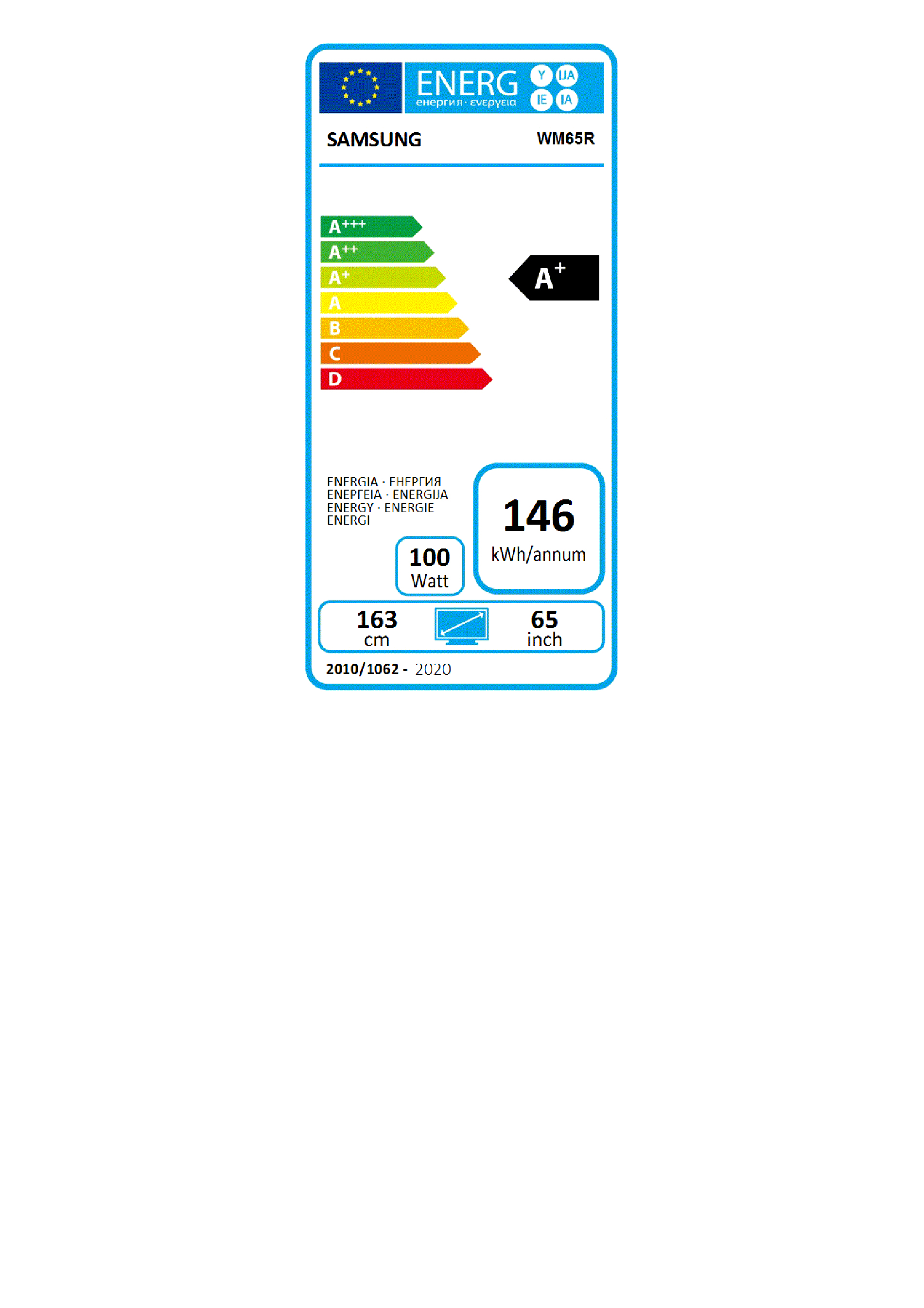
- Product information sheetEU Product Fiche ↗
- ManualUser manual ↗
Specifications
Key specifications
- Display diagonalSize of the display for this product, measured diagonally, usually in inches.
- 165.1 cm (65")
- Cables includedSpecifies the types and quantities of connection cables provided with the product (e.g., 3.5 mm to 3.5 mm or SATA).
- AC
- Quick start guideInstructions, either online, as a computer program or in paper form, to allow you to set up and start using the product quickly.
- Yes
- Operating temperature (T-T)The minimum and maximum temperatures at which the product can be safely operated.
- 0 - 40 °C
- Operating relative humidity (H-H)The range of relative humidity, expressed as a percentage, within which the device can function correctly without damage or performance loss.
- 10 - 80%
- Power consumption (typical)Amount of power consumed by this model, often expressed in watts (W). Typical values that manufacturers give are power consumption when off, standby/suspended mode, typical use, maximum usage.
- 181.5 W
- Power consumption (standby)The amount of electricity that is consumed when the product is on standby.
- 0.5 W
- AC input voltageThe voltage of the AC electricity that is inputted into the product.
- 100 - 240 V
- AC input frequencyThe range of alternating current frequencies the device can accept from the power source, measured in hertz (e.g., 45 - 65).
- 50-60 Hz
- Product colourThe colour e.g. red, blue, green, black, white.
- White
Show all 37 specificationsShow key specifications only
Display
- Display diagonalSize of the display for this product, measured diagonally, usually in inches.
- 165.1 cm (65")
- Display brightnessBrightness is the amount of radiating light emitted from the screen. The brightness rating is measured in candellas per square meter, commonly known as 'nits'.
- 350 cd/m²
- Display resolutionThe number of distinct pixels in each dimension that can be displayed. It is usually quoted as width × height, with the units in pixels: for example, "1024 × 768" means the width is 1024 pixels and the height is 768 pixels. The higher the number of pixels, the sharper the image.
- 3840 x 2160 pixels
- HD typeType of supported High Definition (e.g. Full HD, 4K Ultra HD).
- 4K Ultra HD
- Contrast ratio (typical)The difference in light intensity between the brightest white and the darkest black.
- 4000:1
- Response timeThe response time is the time difference between the moment that a source (for example a video card) sends a signal and that equipment (for example a monitor) receives or display the signal. (Used abbreviations: R/F = Rise and Fall.)
- 8 ms
- TouchscreenA screen of a laptop, smartphone, etc., that responds to touch so you can control the interface using your fingers.
- Yes
- Viewing angle, horizontalMaximum horizontal angle at which a display can be viewed with acceptable visual performance.
- 178°
- Viewing angle, verticalMaximum vertical angle at which a display can be viewed with acceptable visual performance.
- 178°
- Pixel pitchThis is the parameter of a picture tube, which specifies the shortest distance between two dots of the same colour. The principle is: the smaller the dot pitch, the better sharpness of image.
- 0.372 x 0.372 mm
- Horizontal scan rangeThe range of horizontal frequencies the device can process and display, measured in kHz.
- 30 - 81 kHz
- Vertical scan rangeThe range of vertical frequencies the device can process and display, measured in hertz (Hz).
- 48 - 75 Hz
Packaging content
- Cables includedSpecifies the types and quantities of connection cables provided with the product (e.g., 3.5 mm to 3.5 mm or SATA).
- AC
- Remote control includedComponent of an electronics device, most commonly a television set, DVD player and home theater systems originally used for operating the device wirelessly from a short line-of-sight distance.
- No
- Quick start guideInstructions, either online, as a computer program or in paper form, to allow you to set up and start using the product quickly.
- Yes
Weight & dimensions
- WidthThe measurement or extent of something from side to side.
- 1522.4 mm
- DepthThe distance from the front to the back of something.
- 62.9 mm
- HeightThe measurement of the product from head to foot or from base to top.
- 897.6 mm
- WeightWeight of the product without packaging (net weight). If possible, the net weight is given including standard accessories and supplies. Please note that sometimes the manufacturer leaves out the weight of accessories and/or supplies.
- 4 kg
Operational conditions
- Operating temperature (T-T)The minimum and maximum temperatures at which the product can be safely operated.
- 0 - 40 °C
- Operating relative humidity (H-H)The range of relative humidity, expressed as a percentage, within which the device can function correctly without damage or performance loss.
- 10 - 80%
Power
- Power consumption (typical)Amount of power consumed by this model, often expressed in watts (W). Typical values that manufacturers give are power consumption when off, standby/suspended mode, typical use, maximum usage.
- 181.5 W
- Power consumption (standby)The amount of electricity that is consumed when the product is on standby.
- 0.5 W
- AC input voltageThe voltage of the AC electricity that is inputted into the product.
- 100 - 240 V
- AC input frequencyThe range of alternating current frequencies the device can accept from the power source, measured in hertz (e.g., 45 - 65).
- 50-60 Hz
Design
- Product colourThe colour e.g. red, blue, green, black, white.
- White
- VESA mountingIndicates whether the product supports the VESA mounting standard for attachment to compatible arms, brackets, or wall mounts.
- Yes
- Panel mounting interfaceThe product can be used wih VESA mounting interfaces.
- 400 x 400 mm
Ports & interfaces
- HDMI ports quantityThe number of sockets (ports) for HDMI connections. HDMI (High-Definition Multimedia Interface) is a compact audio/video interface for transferring uncompressed video data and compressed/uncompressed digital audio data from a HDMI-compliant device ("the source device") to a compatible computer monitor, video projector, digital television, or digital audio device. HDMI is a digital replacement for…
- 2
- Ethernet LAN (RJ-45) portsNumber of Ethernet LAN (RJ-45) ports (connecting interfaces) in the device. Ethernet LAN (RJ-45) ports allow a computer to connect to the ethernet.
- 1
Network
- Wi-FiPopular technology that allows an electronic device to exchange data or connect to the internet wirelessly using radio waves.
- Yes
- Ethernet LANAn Ethernet LAN (Local Area Network) interface is present, for a wired conection via a cable.
- Yes
Audio
- Built-in speaker(s)The device contains speaker(s) to produce sound.
- Yes
Packaging data
- Package widthThe distance from one side of the packaging to the other.
- 1691 mm
- Package depthThe distance from the front to the back of the packaging.
- 198 mm
- Package heightThe distance from the top to the bottom of the packaging.
- 1055 mm
- Package weightWeight of the packaged product.
- 50.6 kg
Database Right data-sheet 2026 Icecat. All rights reserved. Provided “as is”, without warranty — check details with the store before buying.
Price history (90 days, best daily price)
Price history is still being collected for this product — check back soon.
Alternative models

Samsung LH75QBNWLGC/XY interactive whiteboard
190.5 cm (75") 3840 x 2160 pixels Touchscreen Black

Samsung WM55R-W interactive whiteboard
139.7 cm (55") 3840 x 2160 pixels Touchscreen White

Samsung LH55WMRWBGCXZA interactive whiteboard White

Samsung QB75N-W interactive whiteboard
190.5 cm (75") 3840 x 2160 pixels Black

Samsung WM85R interactive whiteboard 2.16 m
(85") 3840 x 2160 pixels Touchscreen Black
Samsung QB75N-W interactive whiteboard
190.5 cm (75") 3840 x 2160 pixels Black