
Samsung U32D970Q computer monitor 80 cm (31.5") 3840 x 2160 pixels 4K Ultra HD LED Black
- Screen: 80 cm (31.5"), 3840 x 2160 pixels, PLS
- Refresh rate: 8 ms response time
- Brightness: 350 cd/m²
- Ports: 1 × HDMI, 2 × DisplayPort
- Stand: height-adjustable, tilt, VESA 100 x 100,200 x 200 mm
- Colour: Black
Where to buy
We're not tracking prices for this product yet. Check current prices directly at:
We may earn a commission when you buy through links on this page — at no extra cost to you. Learn more
About this product
Unparalleled colour accuracy achieved through meticulous factory calibration
Samsung’s professional UD970 monitor is meticulously and individually calibrated right at the factory with an accuracy of △E<1, ensuring uniform colour across the whole screen, and precise greyscale colour gradation that is so much smoother than monitors that only undergo a simple software calibration. And with an embedded calibration chipset developed exclusively by Samsung and a 16-bit look-up table (LUT), you get more accurate colours across the entire screen, taking colour precision above and beyond other advanced monitors.
Incredibly uniform colour presentation across the entire screen
Every UD970 is individually calibrated for uniformity correction by splitting the display into 25 sections, and then adjusting the brightness of individual sections uniformly with the calibrator. This results in centre and peripheral areas that maintain an amazing calibration accuracy of △E<3. Samsung’s advanced hardware calibration chipset and precise tuning brings the uniformity up from 75% to 90%, delivering near-perfect uniformity values across the entire screen.
Colour details and clarity in every shade of grey
From the purest whites to the deepest blacks, the greyscale of the UD970 has been finely divided into 256 levels. Then, with an accuracy of △E<1, the UD970 is carefully and precisely calibrated from level to level using Gamma Curve and Grey Scale Correction. This ensures colour clarity in even the finest shade of grey, so you get lifelike pictures with just the right amount of light, shade and colour to express every detail.
White balance correction produces accurate and stunning images
Creating true-to-life images also depends on being able to fine-tune the colour temperature. Thanks to White Balance Correction and built-in calibration technology with an accuracy of △E<1, the UD970 knows the exact white balance needed and expertly corrects the temperature. It makes adjustments within a range of 4000K to 10000K degrees, finely tuning the colour temperature in precisely measured increments of 100K, giving you perfect white balance with the rich colours and vivid clarity your work demands
Vibrant colours with near-perfect Adobe RGB coverage and true 10-bit input
Samsung-developed BLU technology supports 99% of the Adobe RGB colour space, based on the CIE 1931 standard. With almost full coverage of the RGB spectrum, you get incredibly accurate colour with minimised colour disparity when printing, meaning the colours you see on the screen will be practically identical to the ones actually printed. And using the 10-bit supported panel, 10-bit input signals are transmitted and processed through a 16-bit LUT, enabling an amazing 1.07 billion colours to be represented.
Easy-to-use colour management software for your custom needs
The precise, factory-tuned colours delivered by the UD970 are just the beginning of an incredibly professional experience. You can also adjust colour modes and profiles to suit your specifications with easy-to-use, self-calibration software called Natural Colour Expert. Using the software wizard, you can easily make adjustments to bring out the precise colours that true professionals need.
Gorgeous design and stunningly efficient ergonomics for the perfectly professional choice
- From display to design, the UD970 provides the most sophisticated viewing experience available. With a matte black finish and metallic silver back, it will give your office the distinguished, luxurious, and professional look it deserves.
- The UD970 boasts advanced ergonomics designed to maximise your productivity. With Samsung’s unique HAS design, you can conveniently adjust the monitor height by 130 mm. It also pivots, swivels, and tilts, and provides full support for Auto OSD Rotation.
Experience ultimate details and the widest viewing angles
- The UD970 delivers best-in-class picture quality with 4x the resolution of FHD and the widest viewing angles.
- With a UHD resolution of 3840 x 2160, you get 4 times more pixels than Full HD displays, resulting in lifelike details and the ultimate picture quality. And the extremely high resolution of UHD helps professionals reduce unnecessary zooming and scrolling.
- Samsung’s Pane-to-Line Switching (PLS) Panel delivers a 178° wide viewing angle horizontally and vertically for optimal viewing experience from any angle.
A range of preset colour modes to suit various professional needs
- A total of 8 different factory preset colour modes, along with 3 colour modes that can be conveniently self-calibrated by the user, are supported to meet the demands of any professional project.
- Adobe RGB: Colour mode for printing and publishing industries that eliminates loss of colours in green and blue ranges •sRGB: Standard colour presentation of monitor and printer, for typical PC users
- High-Brightness: Maximises brightness, for gaming and bright room environments
- EBU, BT.709, SMPTE-C : Standard colour space for European Broadcasting Union, HD TV broadcast, Analog (SD) TV broadcast
- Digital Cinema Initiatives (DCI): Consistent and repeatable standards for obtaining colour image quality
- Digital Image Communication in Medicine (DICOM): Medical digital imaging and communications standards
Documents
Specifications
Key specifications
- Display diagonalSize of the display for this product, measured diagonally, usually in inches.
- 80 cm (31.5")
- Display resolutionThe number of distinct pixels in each dimension that can be displayed. It is usually quoted as width × height, with the units in pixels: for example, "1024 × 768" means the width is 1024 pixels and the height is 768 pixels. The higher the number of pixels, the sharper the image.
- 3840 x 2160 pixels
- Panel typeThe technology used to manufacture the panel, such as AMOLED or AH-IPS.
- PLS
- Response timeThe response time is the time difference between the moment that a source (for example a video card) sends a signal and that equipment (for example a monitor) receives or display the signal. (Used abbreviations: R/F = Rise and Fall.)
- 8 ms
- Display brightness (typical)Display brightness, measured by its Luminance, presented as a figure in nits. Typical brightness ratings for monitors range from 250 to 350 nits with a target value of between 80 to 120 nits being suitable for most displays in a normal viewing environment.
- 350 cd/m²
- HDMI ports quantityThe number of sockets (ports) for HDMI connections. HDMI (High-Definition Multimedia Interface) is a compact audio/video interface for transferring uncompressed video data and compressed/uncompressed digital audio data from a HDMI-compliant device ("the source device") to a compatible computer monitor, video projector, digital television, or digital audio device. HDMI is a digital replacement for…
- 1
- DisplayPorts quantityNumber of DisplayPorts. A DisplayPort is a digital display interface developed by the Video Electronics Standards Association (VESA). The interface is primarily used to connect a video source to a display device such as a computer monitor, though it can also be used to carry audio, USB, and other forms of data.
- 2
- Height adjustmentThe part of the device that can be adjusted to change the height.
- Yes
- Tilt adjustmentThe tilt, which means the angle at which the device is pointing (up or down), can be changed.
- Yes
- Panel mounting interfaceThe product can be used wih VESA mounting interfaces.
- 100 x 100,200 x 200 mm
- Product colourThe colour e.g. red, blue, green, black, white.
- Black
Show all 69 specificationsShow key specifications only
Design
- VESA mountingIndicates whether the product supports the VESA mounting standard for attachment to compatible arms, brackets, or wall mounts.
- Yes
- Product colourThe colour e.g. red, blue, green, black, white.
- Black
- Panel mounting interfaceThe product can be used wih VESA mounting interfaces.
- 100 x 100,200 x 200 mm
- LED indicatorsThe specific status lights available on the unit to provide visual feedback on its current state or connectivity (e.g., AC input, ACT, or Access).
- Power
Display
- Display diagonalSize of the display for this product, measured diagonally, usually in inches.
- 80 cm (31.5")
- Display resolutionThe number of distinct pixels in each dimension that can be displayed. It is usually quoted as width × height, with the units in pixels: for example, "1024 × 768" means the width is 1024 pixels and the height is 768 pixels. The higher the number of pixels, the sharper the image.
- 3840 x 2160 pixels
- Native aspect ratioThe aspect ratio is the ratio of the width of an image to its height. The native aspect ratio is the one which the projector/display is particularly designed for. Images shown in native aspect ratio will utilize the entire resolution of the display and achieve maximum brightness. Images shown in other than native aspect ratio will always have less resolution and less brightness than images shown…
- 16:9
- Display technologyThe technology used in the display e.g. plasma, LED.
- LED
- TouchscreenA screen of a laptop, smartphone, etc., that responds to touch so you can control the interface using your fingers.
- No
- HD typeType of supported High Definition (e.g. Full HD, 4K Ultra HD).
- 4K Ultra HD
- Panel typeThe technology used to manufacture the panel, such as AMOLED or AH-IPS.
- PLS
- Display brightness (typical)Display brightness, measured by its Luminance, presented as a figure in nits. Typical brightness ratings for monitors range from 250 to 350 nits with a target value of between 80 to 120 nits being suitable for most displays in a normal viewing environment.
- 350 cd/m²
- Display brightness (min)The minimum luminance level of the screen, measured in candelas per square metre (cd/m²).
- 280 cd/m²
- Response timeThe response time is the time difference between the moment that a source (for example a video card) sends a signal and that equipment (for example a monitor) receives or display the signal. (Used abbreviations: R/F = Rise and Fall.)
- 8 ms
- Display surfaceThe finish of the screen's outer layer, which determines how light reflects off the surface (e.g. Glossy, Matte, or Anti-glare).
- Matt
- Supported graphics resolutionsThe graphic resolutions that can be displayed by the device. The graphic resolution describes the width and height dimensions of a display, such as a computer monitor, measured in pixels.
- 3840 x 2160
- Aspect ratioThe aspect ratio is the ratio of the width of a shape to its height. For example, 4:3 is common for standard displays and 16:9 is the ratio for Widescreen TV.
- 16:9
- Contrast ratio (typical)The difference in light intensity between the brightest white and the darkest black.
- 1000:1
- Dynamic contrast ratio marketing nameThe proprietary brand name used by the manufacturer to describe the technology that automatically adjusts the backlight to improve the contrast ratio (e.g., ASUS Smart Contrast Ratio).
- Mega Contrast
- Viewing angle, horizontalMaximum horizontal angle at which a display can be viewed with acceptable visual performance.
- 178°
- Viewing angle, verticalMaximum vertical angle at which a display can be viewed with acceptable visual performance.
- 178°
- Display number of coloursThe total number of distinct colours that the device is capable of displaying (e.g. 1.07 billion colours).
- 1.073 billion colours
Thin Client
- Thin client installedThe product includes a thin client, which is a computer or a computer program which depends heavily on some other computer (its server) to fulfill its computational roles. This is different from the traditional fat client, which is a computer designed to take on these roles by itself. The specific roles assumed by the server may vary, from providing data persistence (for example, for diskless nod…
- No
Performance
- On/off switchThe button which is pressed to switch the device on or off.
- Yes
Other features
- Power consumption (DPMS)The amount of power the device consumes while in Display Power Management Signaling (DPMS) sleep mode, measured in W.
- 0.5 W
- TV tuner integratedDevice has an in-built TV tuner.
- No
- Supplied AC adapter typeThe type of power supply provided with the product to connect it to an alternating current source (e.g. AC).
- AC
Power
- Energy efficiency class (legacy scale)The energy efficiency rating of the product based on the previous labeling scale (e.g. A+++).
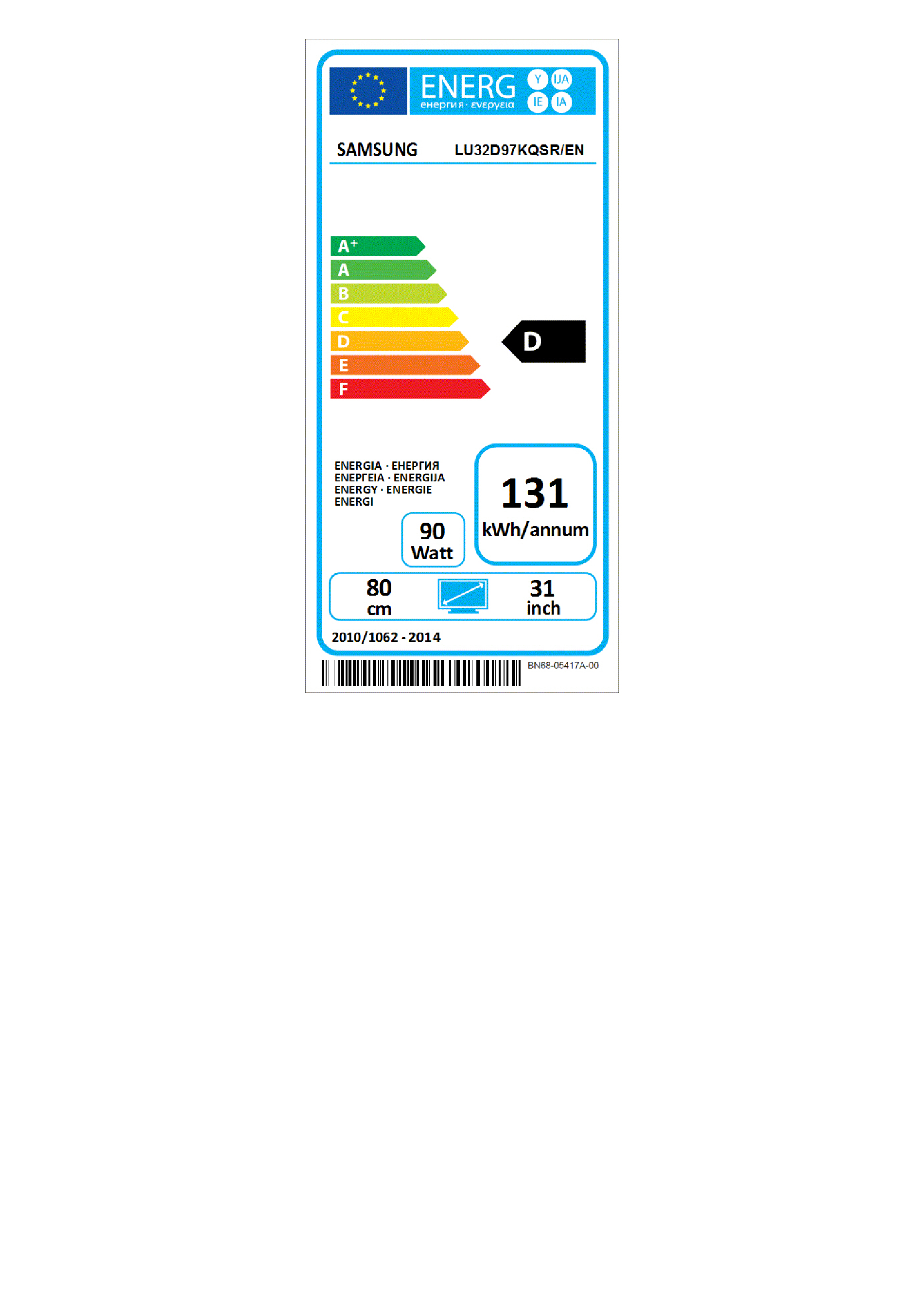
- D
- Power consumption (typical)Amount of power consumed by this model, often expressed in watts (W). Typical values that manufacturers give are power consumption when off, standby/suspended mode, typical use, maximum usage.
- 130 W
- Power consumption (standby)The amount of electricity that is consumed when the product is on standby.
- 0.5 W
- Power consumption (max)The maximum amount of power used by the device.
- 140 W
- AC input voltageThe voltage of the AC electricity that is inputted into the product.
- 100 - 240 V
- AC input frequencyThe range of alternating current frequencies the device can accept from the power source, measured in hertz (e.g., 45 - 65).
- 50 - 60 Hz
- Annual energy consumptionThe amount of energy used by the product per year.
- 131 kWh
Sustainability
- Sustainability certificatesThe environmental or ethical certifications the product has received to verify its sustainability standards (e.g., ASC or ACT Organic).
- ENERGY STAR
Packaging content
- Quick start guideInstructions, either online, as a computer program or in paper form, to allow you to set up and start using the product quickly.
- Yes
Weight & dimensions
- Width (with stand)The total horizontal measurement of the product when the supporting stand is attached, measured in millimetres.
- 727.8 mm
- Depth (with stand)The measurement of the product from front to back when any supporting accessory or base is attached, expressed in millimetres or centimetres.
- 280 mm
- Height (with stand)The total vertical measurement of the product including its base or support structure, expressed in millimetres or centimetres.
- 490.6 mm
- Weight (with stand)The total mass of the unit including its supporting base, measured in kilograms or grams.
- 13.7 kg
- Width (without stand)The horizontal measurement of the device excluding the base or support structure, expressed in millimetres.
- 727.8 mm
- Depth (without stand)The measurement of the product from front to back without its base or support, typically expressed in millimetres or centimetres.
- 62.1 mm
- Height (without stand)The vertical measurement of the device when the stand is removed, measured in mm.
- 427.3 mm
- Weight (without stand)The mass of the device excluding the support base, measured in g.
- 10.3 kg
Security
- Cable lock slotHoles on the edge of devices through which a cable lock can be passed, so the device can be locked to a desk etc.
- No
Ergonomics
- Height adjustmentThe part of the device that can be adjusted to change the height.
- Yes
- PivotIndicates whether the device can be rotated 90 degrees to switch between landscape and portrait orientation.
- Yes
- SwivellingIndicates whether the product has a mechanism that allows it to rotate horizontally.
- Yes
- Swivel angle rangeThe minimum and maximum degrees to which the unit can be rotated horizontally.
- -30 - 30°
- Tilt adjustmentThe tilt, which means the angle at which the device is pointing (up or down), can be changed.
- Yes
- Tilt angle rangeThe minimum and maximum angles at which the unit can be tilted, typically expressed in degrees.
- -5 - 20°
Management features
- Picture-in-PicturePicture-in-picture (PiP) is a feature of some television receivers and similar devices. One program (channel) is displayed on the full TV screen at the same time as one or more other programs are displayed in inset windows. Sound is usually from the main program only.
- Yes
- On Screen Display (OSD)Indicates whether the device can display a graphical menu or information directly on the screen for adjusting settings and viewing status.
- Yes
Features
- Plug and PlayIndicates whether this product supports is "plug and play". Plug and play is hardware or software that, after being installed ("plugged in"), can immediately be used ("played with"), as opposed to hardware or software which requires configuration.
- Yes
- Windows operating systems supportedWindows vesions wich can be used with the device.
- Windows 8.1, Windows 8.1 Enterprise, Windows 8.1 Enterprise x64, Windows 8.1 Pro, Windows 8.1 Pro x64, Windows 8.1 x64
Network
- Wi-FiPopular technology that allows an electronic device to exchange data or connect to the internet wirelessly using radio waves.
- No
- BluetoothBluetooth is a low-power radio technology developed to replace the cables and wires currently used to link or connect electronic devices such as personal computers, printers, and a wide variety of handheld devices including mobile phones. Because it uses radio-wave connectivity, a Bluetooth-enabled device has a constant, established connection to whatever browser it uses. This saves the user the…
- No
- Ethernet LANAn Ethernet LAN (Local Area Network) interface is present, for a wired conection via a cable.
- No
Ports & interfaces
- USB hub versionThe technical standard of the USB hub, if available, which determines the maximum data transfer speed (e.g., 3.2 Gen 1).
- 2.0
- USB Type-A downstream ports quantityThe number of USB Type-A ports available for connecting peripheral devices to the unit.
- 1
- DVI portDigital Visual Interface (DVI) is a video display interface to connect a video source to a display device, such as a computer monitor.
- Yes
- HDMI ports quantityThe number of sockets (ports) for HDMI connections. HDMI (High-Definition Multimedia Interface) is a compact audio/video interface for transferring uncompressed video data and compressed/uncompressed digital audio data from a HDMI-compliant device ("the source device") to a compatible computer monitor, video projector, digital television, or digital audio device. HDMI is a digital replacement for…
- 1
- DisplayPorts quantityNumber of DisplayPorts. A DisplayPort is a digital display interface developed by the Video Electronics Standards Association (VESA). The interface is primarily used to connect a video source to a display device such as a computer monitor, though it can also be used to carry audio, USB, and other forms of data.
- 2
Software
- Mac operating systems supportedMac operating systems e.g. OS X can be used with the device.
- Yes
Packaging data
- Package widthThe distance from one side of the packaging to the other.
- 795 mm
- Package depthThe distance from the front to the back of the packaging.
- 347 mm
- Package heightThe distance from the top to the bottom of the packaging.
- 556 mm
- Package weightWeight of the packaged product.
- 18.4 kg
- User Guide on CD-ROMIndicates whether a digital copy of the user manual is provided on an included CD-ROM.
- Yes
Database Right data-sheet 2026 Icecat. All rights reserved. Provided “as is”, without warranty — check details with the store before buying.
Expert reviews
- 80
techadvisor.co.uk2015
The Samsung UD970 is a pricey display which never feels too expensive for the phenomenal image quality it delivers. Its 4K UHD resolution, combined with almost impossibly accurate colour rendition and flexible display modes make it an excellent choice for...
Read the review at techadvisor.co.uk ↗ - 80
stuff.tv2015
Samsung UD970 This is an extremely pricey bit of kit that looks beautiful, has all the right ports in all the right places, and is certainly the best 4Ker we've seen so far. It may have been designed specifically for designers, but there's potential here...
- +
- Massive for a monitor, Lots of cool features, Well-designed and easy to use
- −
- Ridiculously, stupendously pricey, HDMI 1.4 rather than 2.0
- 90
trustedreviews.com2014
Samsung UD970 – Image Quality Samsung makes big claims about this factory-calibrated screen, and its benchmark results proved that the firm's confidence isn't misplaced. The average Delta E of 0.89 is stupendous, and the maximum Delta E of 2.75 isn't much...
Read the review at trustedreviews.com ↗ - 90
digitaltrends.com2014
Samsung's U32D970Q is easily the best display we've ever reviewed. Its out-of-the-box performance is practically perfect in every area besides contrast, which was mediocre. True professionals will love the controls, as well, as they allow precise calibra...
- +
- Sturdy and attractive, Lots of input options, Precise calibration controls, Huge screen, Excellent image quality
- −
- 4K on a 32-inch monitor isn't that sharp, Mediocre contrast, Expensive
Price history (90 days, best daily price)
Price history is still being collected for this product — check back soon.
Alternative models

Samsung U32E850R
computer monitor 80 cm (31.5") 3840 x 2160 pixels 4K Ultra HD LED Black

Samsung S32D850T
computer monitor 81.3 cm (32") 2560 x 1440 pixels Quad HD LED Black, Bronze

Samsung T22D390EX
computer monitor 54.6 cm (21.5") 1920 x 1080 pixels Full HD LED Black

Samsung S20D300H
computer monitor 49.5 cm (19.5") 1600 x 900 pixels LED Black, Red

Samsung T24D390EX
computer monitor 59.9 cm (23.6") 1920 x 1080 pixels Full HD LED Black, Blue

Samsung S19D300NY
computer monitor 47 cm (18.5") 1366 x 768 pixels HD LED Black