
Samsung U28D590D computer monitor 71.1 cm (28") 3840 x 2160 pixels 4K Ultra HD LED Black
- Screen: 71.1 cm (28"), 3840 x 2160 pixels, TN
- Refresh rate: 60 Hz, 1 ms response time
- Brightness: 370 cd/m²
- Ports: 2 × HDMI, 1 × DisplayPort
- Colour: Black
All 62 specificationsProduct page at samsung.com ↗
Versions
 Black
 Black, Silver
Where to buy
We're not tracking prices for this product yet. Check current prices directly at:
We may earn a commission when you buy through links on this page — at no extra cost to you. Learn more
About this product
The Samsung UHD monitor offers PC viewing, gaming and more with Ultra HD picture quality. A resolution 4 times higher than Full HD and an incredible 1 billion colours bring images to life with unparalleled realism. A superfast 1-millisecond response time handles even the fastest moving scenes in movies and games, and great connectivity and Game Mode mean it's equipped for a rich gaming experience. You can do more with multi-linking features like PIP 2.0 and PBP that keep the original source resolution. Thanks to elegant minimal design, there's nothing to distract you from amazing viewing.
Discover the detail of stunningly realistic UHD picture quality
You’ve never seen a picture this realistic before. Your UHD monitor has an ultra-high resolution that’s 4 times greater than Full HD, delivering stunning images that use a staggering 8 million pixels. With the highest brightness level of 370 cd/m², it’s also more vivid and brilliantly clear. See your 4K content the way it was meant to be seen, with a new level of lifelike detail that makes you feel like you’re really there. Experience the realism of glorious Ultra High Definition.
World best-in-class fast response time at 1ms!
Your Samsung UHD monitor can handle all the excitement of action movies, games and sports easily thanks to a faster response time of 1-millisecond. You can see even the fastest on-screen motion clearly and smoothly without any motion blur, judder or ghosting. There's no lag during gaming, so it won't let you down at a crucial moment. All the details are right there before your eyes in astonishing UHD clarity and realism.
Each and every colour richly detailed and truly brilliant
Get richer and more vivid colours that were meant to be seen in 4K. Many monitors only offer you 16.7 million colours, but a Samsung UHD monitor gives you 64 times more - for an incredible 1 billion colours. That means everything you see is accurate, detailed, natural-looking and so vivid that it will take your breath away. There's also a smoother transition between different tones, passing through more shades in between. Let the UHD monitor show you everything that there is to be seen.
16.7 Million Colours 1 Billion Colours The UD590 Samsung monitor supports 1 billion colors compared to 16.7 million colors of previous Samsung monitors. This abundance of colors provides more vibrant picture quality.
Sharpen your content with UHD upscaling
Bring out the best picture quality possible for all your favourite content and make them worthy of your UHD experience. Samsung's technology automatically detects the content's original resolution and improves it with noise reduction and up-conversion to create clearer, sharper images. Thanks to UHD upscaling, it brings all your entertainment and other content up to a new UHD-level.
The UD590 Samsung monitor is capable of upscaling the noisy FHD level picture quality to UHD-class picture quality, providing crisp and clear picture.
Multi-task and watch everything in its true glory
The latest Picture-in-Picture 2.0 technology lets you multi-task and watch videos that maintain 100% of the source resolution. Whether it's 1080p ,720p or 480p, PIP 2.0 doesn't downscale contents and maintains the exact same resolution as clear and crisp on its own. It supports resolutions up to Full HD and you can adjust the PIP resolution and position to fit your needs. There's no loss in quality, so you can really have everything you want with no compromises.
Native resolution With only one monitor, the user can simultaneously browse the web and view video image while displaying clearly the video in its native resolution.
Use only one UHD monitor to see 2 different contents
This advanced multitasking technology lets you do things you could never do before. With Picture-by-Picture, you can connect two PCs to the same monitor and see the desktops of both simultaneously on one screen that's divided into two. Thanks to PBP and the UHD resolution size you won't have to worry about losing any of the glorious picture quality and resolution. Plug in your laptop and your desktop and use both easily without needing to keep looking between different monitors - it's all there at a glance.
Enhance your gaming experience with just one button
Get perfect viewing for games with just one touch of a button. Game Mode adjusts your monitor's settings instantly to give you an optimised gaming experience. Game Mode smartly detects the changes in scenes, enhances the colour and alters the screen's contrast to make dark spots darker and light spots lighter so you can see all the action at all times. There is less lag thanks to a faster video response time that ensures that the picture keeps up with action and won't let you down.
OFF ON Displaying when the Game mode is turned on and off. When the Game mode is on, faraway objects can be seen clearly. On the right side of the monitor, One Touch area is displayed magnified.
Versatile connectivity for all your UHD-compatible devices
Your Samsung UHD monitor is perfect for your game consoles as well as your PC. Thanks to 2 HDMI ports, both your computer and your console can be connected simultaneously, so you don't have to unplug and plug in each time when you want to switch between them. That means less hassle and more time for entertainment. Thanks to DisplayPort connectivity, your monitor is also ready to connect to UHD-compatible devices and content.
*Supports HDMI 1.4 (3840 x 2160, 30Hz) and Display Port 1.2 (3840 x 2160, 60Hz)
2HDMI Display Port There are 2HDMI port and a DISPLAY port on the back of the monitor.
Documents
Specifications
Key specifications
- Display diagonalSize of the display for this product, measured diagonally, usually in inches.
- 71.1 cm (28")
- Display resolutionThe number of distinct pixels in each dimension that can be displayed. It is usually quoted as width × height, with the units in pixels: for example, "1024 × 768" means the width is 1024 pixels and the height is 768 pixels. The higher the number of pixels, the sharper the image.
- 3840 x 2160 pixels
- Panel typeThe technology used to manufacture the panel, such as AMOLED or AH-IPS.
- TN
- Maximum refresh rateThe highest number of times per second the image is updated, measured in hertz (Hz).
- 60 Hz
- Response timeThe response time is the time difference between the moment that a source (for example a video card) sends a signal and that equipment (for example a monitor) receives or display the signal. (Used abbreviations: R/F = Rise and Fall.)
- 1 ms
- Display brightness (typical)Display brightness, measured by its Luminance, presented as a figure in nits. Typical brightness ratings for monitors range from 250 to 350 nits with a target value of between 80 to 120 nits being suitable for most displays in a normal viewing environment.
- 370 cd/m²
- HDMI ports quantityThe number of sockets (ports) for HDMI connections. HDMI (High-Definition Multimedia Interface) is a compact audio/video interface for transferring uncompressed video data and compressed/uncompressed digital audio data from a HDMI-compliant device ("the source device") to a compatible computer monitor, video projector, digital television, or digital audio device. HDMI is a digital replacement for…
- 2
- DisplayPorts quantityNumber of DisplayPorts. A DisplayPort is a digital display interface developed by the Video Electronics Standards Association (VESA). The interface is primarily used to connect a video source to a display device such as a computer monitor, though it can also be used to carry audio, USB, and other forms of data.
- 1
- Product colourThe colour e.g. red, blue, green, black, white.
- Black
Show all 62 specificationsShow key specifications only
Design
- Product colourThe colour e.g. red, blue, green, black, white.
- Black
- LED indicatorsThe specific status lights available on the unit to provide visual feedback on its current state or connectivity (e.g., AC input, ACT, or Access).
- Power
Display
- Display diagonalSize of the display for this product, measured diagonally, usually in inches.
- 71.1 cm (28")
- Display resolutionThe number of distinct pixels in each dimension that can be displayed. It is usually quoted as width × height, with the units in pixels: for example, "1024 × 768" means the width is 1024 pixels and the height is 768 pixels. The higher the number of pixels, the sharper the image.
- 3840 x 2160 pixels
- Native aspect ratioThe aspect ratio is the ratio of the width of an image to its height. The native aspect ratio is the one which the projector/display is particularly designed for. Images shown in native aspect ratio will utilize the entire resolution of the display and achieve maximum brightness. Images shown in other than native aspect ratio will always have less resolution and less brightness than images shown…
- 16:9
- Display technologyThe technology used in the display e.g. plasma, LED.
- LED
- TouchscreenA screen of a laptop, smartphone, etc., that responds to touch so you can control the interface using your fingers.
- No
- HD typeType of supported High Definition (e.g. Full HD, 4K Ultra HD).
- 4K Ultra HD
- Panel typeThe technology used to manufacture the panel, such as AMOLED or AH-IPS.
- TN
- Display brightness (typical)Display brightness, measured by its Luminance, presented as a figure in nits. Typical brightness ratings for monitors range from 250 to 350 nits with a target value of between 80 to 120 nits being suitable for most displays in a normal viewing environment.
- 370 cd/m²
- Display brightness (min)The minimum luminance level of the screen, measured in candelas per square metre (cd/m²).
- 310 cd/m²
- Response timeThe response time is the time difference between the moment that a source (for example a video card) sends a signal and that equipment (for example a monitor) receives or display the signal. (Used abbreviations: R/F = Rise and Fall.)
- 1 ms
- Display surfaceThe finish of the screen's outer layer, which determines how light reflects off the surface (e.g. Glossy, Matte, or Anti-glare).
- Matt
- Supported graphics resolutionsThe graphic resolutions that can be displayed by the device. The graphic resolution describes the width and height dimensions of a display, such as a computer monitor, measured in pixels.
- 3840 x 2160
- Contrast ratio (typical)The difference in light intensity between the brightest white and the darkest black.
- 1000:1
- Dynamic contrast ratio marketing nameThe proprietary brand name used by the manufacturer to describe the technology that automatically adjusts the backlight to improve the contrast ratio (e.g., ASUS Smart Contrast Ratio).
- Mega Contrast
- Maximum refresh rateThe highest number of times per second the image is updated, measured in hertz (Hz).
- 60 Hz
- Viewing angle, horizontalMaximum horizontal angle at which a display can be viewed with acceptable visual performance.
- 170°
- Viewing angle, verticalMaximum vertical angle at which a display can be viewed with acceptable visual performance.
- 160°
Thin Client
- Thin client installedThe product includes a thin client, which is a computer or a computer program which depends heavily on some other computer (its server) to fulfill its computational roles. This is different from the traditional fat client, which is a computer designed to take on these roles by itself. The specific roles assumed by the server may vary, from providing data persistence (for example, for diskless nod…
- No
Brand-specific features
- Brand specific technologiesProprietary features or technical innovations developed by the manufacturer to enhance performance or functionality (e.g. AI Vision or 3DWave).
- MagicBright, MagicAngle
Performance
- On/off switchThe button which is pressed to switch the device on or off.
- Yes
Other features
- Power consumption (DPMS)The amount of power the device consumes while in Display Power Management Signaling (DPMS) sleep mode, measured in W.
- 0.3 W
- TV tuner integratedDevice has an in-built TV tuner.
- No
- Samsung Eye Saver ModeIndicates whether the device features a setting to reduce blue light emissions to minimize eye strain during prolonged use.
- Yes
- Supplied AC adapter typeThe type of power supply provided with the product to connect it to an alternating current source (e.g. AC).
- AC
Management features
- ECO modeIndicates whether the device features an energy-saving mode to reduce power consumption during operation.
- Yes
- Sleep timerIndicates whether the device has a function to automatically power off or enter standby mode after a predefined period of inactivity.
- Yes
Power
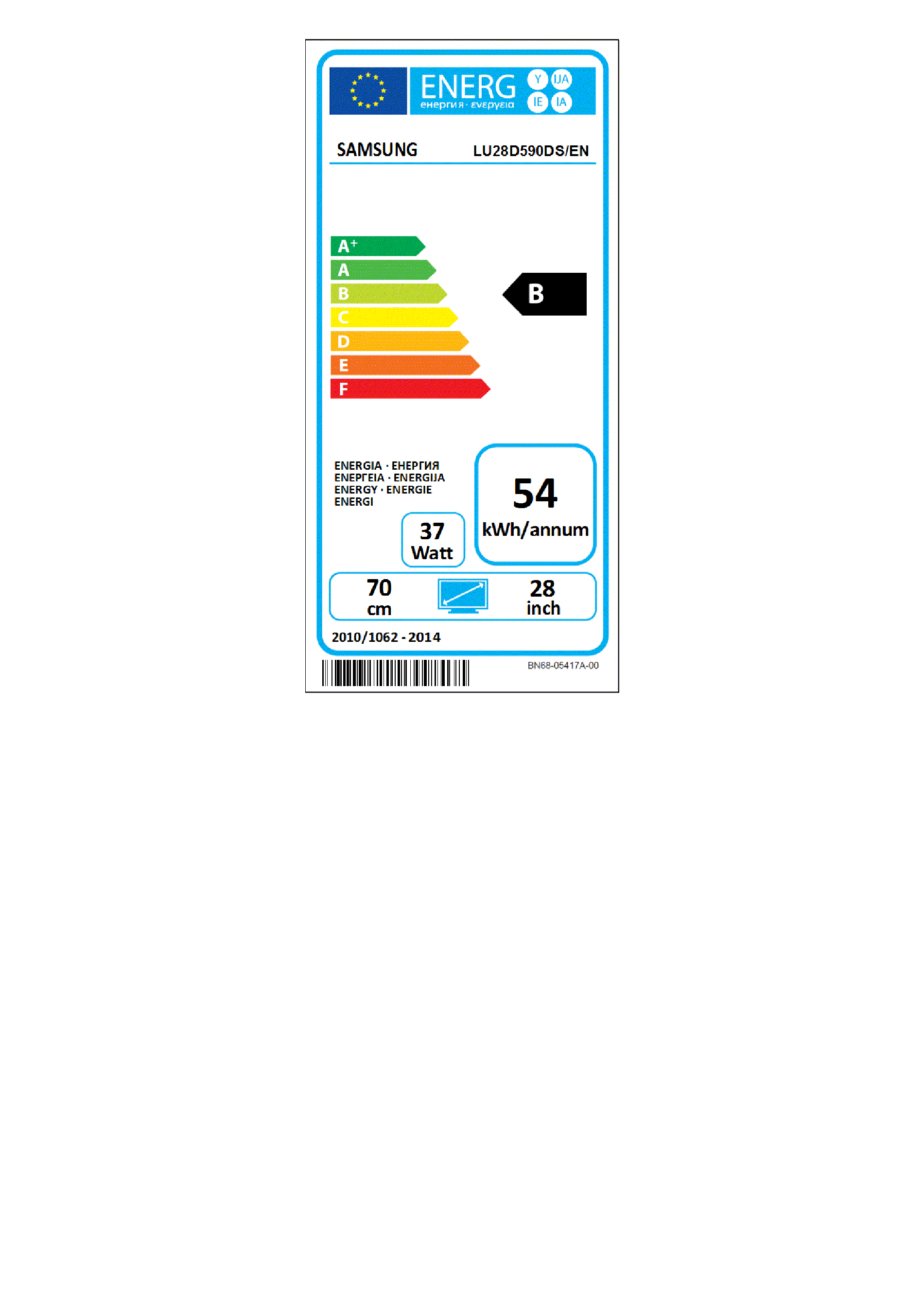
- Energy efficiency class (legacy scale)The energy efficiency rating of the product based on the previous labeling scale (e.g. A+++).
- B
- Power consumption (typical)Amount of power consumed by this model, often expressed in watts (W). Typical values that manufacturers give are power consumption when off, standby/suspended mode, typical use, maximum usage.
- 32 W
- Power consumption (standby)The amount of electricity that is consumed when the product is on standby.
- 0.3 W
- AC input voltageThe voltage of the AC electricity that is inputted into the product.
- 100 - 240 V
- AC input frequencyThe range of alternating current frequencies the device can accept from the power source, measured in hertz (e.g., 45 - 65).
- 50 - 60 Hz
Packaging content
- Stand includedIndicates whether a support stand is supplied with the product.
- Yes
- Cables includedSpecifies the types and quantities of connection cables provided with the product (e.g., 3.5 mm to 3.5 mm or SATA).
- DisplayPort, HDMI
- ManualIndicates whether a printed user manual is included in the package.
- Yes
- External power adapterIndicates whether the product requires or includes an external power adapter for operation.
- Yes
Weight & dimensions
- Width (with stand)The total horizontal measurement of the product when the supporting stand is attached, measured in millimetres.
- 660.9 mm
- Depth (with stand)The measurement of the product from front to back when any supporting accessory or base is attached, expressed in millimetres or centimetres.
- 169.4 mm
- Height (with stand)The total vertical measurement of the product including its base or support structure, expressed in millimetres or centimetres.
- 486.3 mm
- Weight (with stand)The total mass of the unit including its supporting base, measured in kilograms or grams.
- 5.65 kg
- Width (without stand)The horizontal measurement of the device excluding the base or support structure, expressed in millimetres.
- 660.9 mm
- Depth (without stand)The measurement of the product from front to back without its base or support, typically expressed in millimetres or centimetres.
- 64.7 mm
- Height (without stand)The vertical measurement of the device when the stand is removed, measured in mm.
- 410 mm
- Weight (without stand)The mass of the device excluding the support base, measured in g.
- 5.05 kg
Security
- Cable lock slotHoles on the edge of devices through which a cable lock can be passed, so the device can be locked to a desk etc.
- No
Ergonomics
- Height adjustmentThe part of the device that can be adjusted to change the height.
- No
Features
- Plug and PlayIndicates whether this product supports is "plug and play". Plug and play is hardware or software that, after being installed ("plugged in"), can immediately be used ("played with"), as opposed to hardware or software which requires configuration.
- Yes
- Windows operating systems supportedWindows vesions wich can be used with the device.
- Windows 8.1, Windows 8.1 Enterprise, Windows 8.1 Enterprise x64, Windows 8.1 Pro x64, Windows 8.1 x64
Network
- Wi-FiPopular technology that allows an electronic device to exchange data or connect to the internet wirelessly using radio waves.
- No
- BluetoothBluetooth is a low-power radio technology developed to replace the cables and wires currently used to link or connect electronic devices such as personal computers, printers, and a wide variety of handheld devices including mobile phones. Because it uses radio-wave connectivity, a Bluetooth-enabled device has a constant, established connection to whatever browser it uses. This saves the user the…
- No
- Ethernet LANAn Ethernet LAN (Local Area Network) interface is present, for a wired conection via a cable.
- No
Ports & interfaces
- DVI portDigital Visual Interface (DVI) is a video display interface to connect a video source to a display device, such as a computer monitor.
- No
- HDMI ports quantityThe number of sockets (ports) for HDMI connections. HDMI (High-Definition Multimedia Interface) is a compact audio/video interface for transferring uncompressed video data and compressed/uncompressed digital audio data from a HDMI-compliant device ("the source device") to a compatible computer monitor, video projector, digital television, or digital audio device. HDMI is a digital replacement for…
- 2
- DisplayPorts quantityNumber of DisplayPorts. A DisplayPort is a digital display interface developed by the Video Electronics Standards Association (VESA). The interface is primarily used to connect a video source to a display device such as a computer monitor, though it can also be used to carry audio, USB, and other forms of data.
- 1
- Headphone outThe socket for connecting headphones to the device.
- Yes
Software
- Mac operating systems supportedMac operating systems e.g. OS X can be used with the device.
- Yes
Packaging data
- Package widthThe distance from one side of the packaging to the other.
- 794 mm
- Package depthThe distance from the front to the back of the packaging.
- 109 mm
- Package heightThe distance from the top to the bottom of the packaging.
- 452 mm
- Package weightWeight of the packaged product.
- 7.4 kg
- User Guide on CD-ROMIndicates whether a digital copy of the user manual is provided on an included CD-ROM.
- Yes
Database Right data-sheet 2026 Icecat. All rights reserved. Provided “as is”, without warranty — check details with the store before buying.
Expert reviews
- –
tomshardware.com2015
Supply and demand has created numerous choices in the Ultra HD monitor category. Even though five different brands all use the same panel part, they do not perform the same. Samsung stands out from the pack with accurate color and an image enhancement fea...
- +
- Value, brightness, excellent calibrated performance, MagicAngle improves off-axis viewing
- −
- No height or swivel adjustment, no VESA mount, no USB hub
- 70
trustedreviews.com2014
Samsung's latest bolsters good default performance with even better results once tweaked, but its lack of versatility and poor input times put paid to its prospects as a gaming monitor. The Asus PB287Q offers similar quality and improved versatility and s...
- +
- Solid image quality, 60Hz over DisplayPort, Stylish design
- −
- Poor input lag, No USB ports, Lack of stand versatility
- –
tftcentral.co.uk2014
The Samsung U28D590D was an interesting first test for us of one of the new 28" 4k screens on the market. It's clear to see why these relatively affordable screens are attracting a lot of interest as the jump in resolution and support for 4k content is a...
- +
- Low cost screen offering 4k resolution, Decent response times from TN Film panel and support for 60Hz refresh rate, Decent enough default setup
- −
- 4k resolution arguably too high for this size screen for some uses and systems, PWM used for lower brightness adjustment range, Limited stand adjustments
- –
bit-tech.net2014
Gaming Monitor Roundup 2014 Introduction If you're considering getting a proper display to get your gaming on, you're probably looking at response time above all else. There's certainly good reason for that, but it's important to realize that faster does ...
Read the review at bit-tech.net ↗
Price history (90 days, best daily price)
Price history is still being collected for this product — check back soon.
Alternative models

Samsung U24E850R
computer monitor 59.7 cm (23.5") 3840 x 2160 pixels 4K Ultra HD LED Black

Samsung S22D300HY
computer monitor 54.6 cm (21.5") 1920 x 1080 pixels Full HD LED Black

Samsung S27D590P
computer monitor 68.6 cm (27") 1920 x 1080 pixels LED Black

Samsung S22D390Q
computer monitor 54.6 cm (21.5") 1920 x 1080 pixels Full HD LED Black

Samsung S24D391HL
computer monitor 61 cm (24") 1920 x 1080 pixels LED White

Samsung S24D300HL
computer monitor 59.9 cm (23.6") 1920 x 1080 pixels Full HD LED Black