
Samsung T24E390EX computer monitor 61 cm (24") 1920 x 1080 pixels Full HD LED Black
- Screen: 61 cm (24"), 1920 x 1080 pixels, PLS, Flat
- Refresh rate: 5 ms response time
- Brightness: 250 cd/m²
- Ports: 2 × HDMI
- Stand: tilt, VESA 75 x 75 mm
- Extras: speakers
- Colour: Black
Where to buy
We're not tracking prices for this product yet. Check current prices directly at:
We may earn a commission when you buy through links on this page — at no extra cost to you. Learn more
About this product
The perfect monitor doubles as the perfect personal TV
View amazingly immersive TV broadcasts and get some work done, all on one beautiful device. The TE390 makes multitasking a breeze as you can quickly and easily switch between using it as a PC monitor or a TV, or even view both simultaneously on a split screen. Why have two when you can do more with just one?
Define your space with a stylish new design accentuated by slim bezels and soft blue light
• New Slim ToC: With a beautiful new semi-transparent blue finish, Samsung’s innovative Touch of Color technology optimizes your living space and completely sets it apart. • Slim Narrow Bezel: The bezels on all four sides are super slim, especially the one running along the bottom. Not only does it deliver a clean and modern look, it naturally draws your eyes to the screen. • T-Shaped Stand: Using Touch of Color for the T-shape stand completes the ensemble with a refined, minimal finish. * The Super Narrow Bezel is not available on the 21.5 inch model.
See your screen from the best angle possible
The TE390 features a 178° wide viewing angle both horizontally and vertically for an optimal and more comfortable viewing experience. The wider angle enables the same great picture quality from any front angle view, making it the perfect display for watching movies and viewing pictures.
Multitask with ease and enjoy your content instantly
• PIP+: Multitask and watch videos with Picture-in-Picture Plus. You can resize the second picture to cover up to 25% of the screen and position it anywhere you please. • ConnectShare: Enjoy your movies, pictures or music directly on screen without even having to turn on your PC. Simply plug your memory devices (HDD or USB) into the monitor’s USB port and you’re good to go. • 2 HDMI ports: Connect to various devices such as game consoles, Blu-ray players and AV devices.
Enjoy enhanced sports viewing
Made just for sports fans, Sports Mode lets you watch your favorite sports in the best way possible. Enhanced picture quality ensures that you’ll see every hit and goal with super clarity. You can even split the screen into 9 sections and zoom in on your favorite athlete’s footwork and the game’s most controversial plays. And with optimized sound, the electric atmosphere of the stadium is brought right into your room. See, hear and feel all the action more realistically than ever before.
Documents
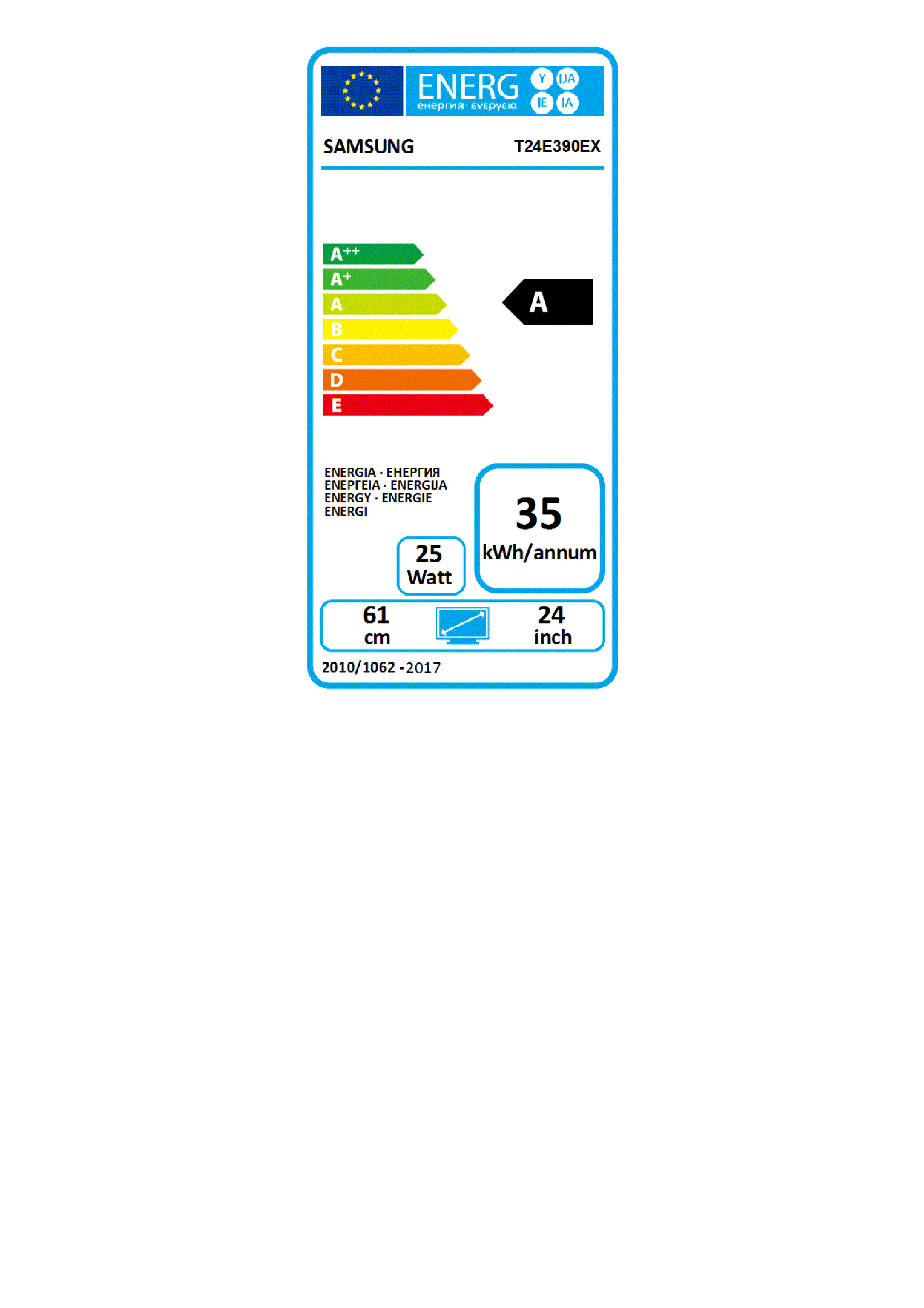
- Product information sheetEU Product Fiche ↗
Specifications
Key specifications
- Display diagonalSize of the display for this product, measured diagonally, usually in inches.
- 61 cm (24")
- Display resolutionThe number of distinct pixels in each dimension that can be displayed. It is usually quoted as width × height, with the units in pixels: for example, "1024 × 768" means the width is 1024 pixels and the height is 768 pixels. The higher the number of pixels, the sharper the image.
- 1920 x 1080 pixels
- Panel typeThe technology used to manufacture the panel, such as AMOLED or AH-IPS.
- PLS
- Screen shapeDescribes the physical curvature of the display panel, such as whether it is flat or curved.
- Flat
- Response timeThe response time is the time difference between the moment that a source (for example a video card) sends a signal and that equipment (for example a monitor) receives or display the signal. (Used abbreviations: R/F = Rise and Fall.)
- 5 ms
- Display brightness (typical)Display brightness, measured by its Luminance, presented as a figure in nits. Typical brightness ratings for monitors range from 250 to 350 nits with a target value of between 80 to 120 nits being suitable for most displays in a normal viewing environment.
- 250 cd/m²
- HDMI ports quantityThe number of sockets (ports) for HDMI connections. HDMI (High-Definition Multimedia Interface) is a compact audio/video interface for transferring uncompressed video data and compressed/uncompressed digital audio data from a HDMI-compliant device ("the source device") to a compatible computer monitor, video projector, digital television, or digital audio device. HDMI is a digital replacement for…
- 2
- Tilt adjustmentThe tilt, which means the angle at which the device is pointing (up or down), can be changed.
- Yes
- Panel mounting interfaceThe product can be used wih VESA mounting interfaces.
- 75 x 75 mm
- Built-in speaker(s)The device contains speaker(s) to produce sound.
- Yes
- Product colourThe colour e.g. red, blue, green, black, white.
- Black
Show all 71 specificationsShow key specifications only
Design
- VESA mountingIndicates whether the product supports the VESA mounting standard for attachment to compatible arms, brackets, or wall mounts.
- Yes
- Product colourThe colour e.g. red, blue, green, black, white.
- Black
- Panel mounting interfaceThe product can be used wih VESA mounting interfaces.
- 75 x 75 mm
Audio
- Built-in speaker(s)The device contains speaker(s) to produce sound.
- Yes
- Number of speakersThe quantity of speakers included in/with the product.
- 2
- RMS rated powerRMS (Root mean square) is a measure of the continuous power required by a device, in particular audio amplifiers and loudspeakers.
- 10 W
Display
- Display diagonalSize of the display for this product, measured diagonally, usually in inches.
- 61 cm (24")
- Display resolutionThe number of distinct pixels in each dimension that can be displayed. It is usually quoted as width × height, with the units in pixels: for example, "1024 × 768" means the width is 1024 pixels and the height is 768 pixels. The higher the number of pixels, the sharper the image.
- 1920 x 1080 pixels
- Native aspect ratioThe aspect ratio is the ratio of the width of an image to its height. The native aspect ratio is the one which the projector/display is particularly designed for. Images shown in native aspect ratio will utilize the entire resolution of the display and achieve maximum brightness. Images shown in other than native aspect ratio will always have less resolution and less brightness than images shown…
- 16:9
- Display technologyThe technology used in the display e.g. plasma, LED.
- LED
- TouchscreenA screen of a laptop, smartphone, etc., that responds to touch so you can control the interface using your fingers.
- No
- HD typeType of supported High Definition (e.g. Full HD, 4K Ultra HD).
- Full HD
- Panel typeThe technology used to manufacture the panel, such as AMOLED or AH-IPS.
- PLS
- Display brightness (typical)Display brightness, measured by its Luminance, presented as a figure in nits. Typical brightness ratings for monitors range from 250 to 350 nits with a target value of between 80 to 120 nits being suitable for most displays in a normal viewing environment.
- 250 cd/m²
- Display brightness (min)The minimum luminance level of the screen, measured in candelas per square metre (cd/m²).
- 200 cd/m²
- Response timeThe response time is the time difference between the moment that a source (for example a video card) sends a signal and that equipment (for example a monitor) receives or display the signal. (Used abbreviations: R/F = Rise and Fall.)
- 5 ms
- Screen shapeDescribes the physical curvature of the display panel, such as whether it is flat or curved.
- Flat
- Supported graphics resolutionsThe graphic resolutions that can be displayed by the device. The graphic resolution describes the width and height dimensions of a display, such as a computer monitor, measured in pixels.
- 1920 x 1080 (HD 1080)
- Supported video modesThe video modes that can be displayed by the device.
- 1080p
- Aspect ratioThe aspect ratio is the ratio of the width of a shape to its height. For example, 4:3 is common for standard displays and 16:9 is the ratio for Widescreen TV.
- 16:9
- Contrast ratio (typical)The difference in light intensity between the brightest white and the darkest black.
- 1000:1
- Dynamic contrast ratio marketing nameThe proprietary brand name used by the manufacturer to describe the technology that automatically adjusts the backlight to improve the contrast ratio (e.g., ASUS Smart Contrast Ratio).
- Mega Contrast
- Viewing angle, horizontalMaximum horizontal angle at which a display can be viewed with acceptable visual performance.
- 178°
- Viewing angle, verticalMaximum vertical angle at which a display can be viewed with acceptable visual performance.
- 178°
- Display number of coloursThe total number of distinct colours that the device is capable of displaying (e.g. 1.07 billion colours).
- 16.78 million colours
Other features
- Power consumption (DPMS)The amount of power the device consumes while in Display Power Management Signaling (DPMS) sleep mode, measured in W.
- 1 W
- TV tuner integratedDevice has an in-built TV tuner.
- Yes
- Supplied AC adapter typeThe type of power supply provided with the product to connect it to an alternating current source (e.g. AC).
- AC
- 3DThe device can be used with 3D technology.
- No
Management features
- Auto power offThe device switches itself off automatically after a certain activity, or after a certain time of inactivity.
- Yes
- On Screen Display (OSD)Indicates whether the device can display a graphical menu or information directly on the screen for adjusting settings and viewing status.
- Yes
- Number of OSD languagesThe total number of different languages available for the on-screen display menu (e.g. 15).
- 27
- Electronic Programme Guide (EPG)An Electronic Programme Guide (EPG) allows device users to navigate scheduling information menus interactively, selecting and discovering programming by time, title, station, or genre using an input device such as a keypad, computer keyboard, or TV remote control. Its interactive menus are generated entirely within local receiving or display equipment using raw scheduling data sent by individual…
- Yes
Power
- Energy efficiency class (legacy scale)The energy efficiency rating of the product based on the previous labeling scale (e.g. A+++).
- A
- Power consumption (typical)Amount of power consumed by this model, often expressed in watts (W). Typical values that manufacturers give are power consumption when off, standby/suspended mode, typical use, maximum usage.
- 25 W
- Power consumption (standby)The amount of electricity that is consumed when the product is on standby.
- 0.3 W
- Power consumption (max)The maximum amount of power used by the device.
- 35 W
- Annual energy consumptionThe amount of energy used by the product per year.
- 35 kWh
Weight & dimensions
- Width (with stand)The total horizontal measurement of the product when the supporting stand is attached, measured in millimetres.
- 548.3 mm
- Depth (with stand)The measurement of the product from front to back when any supporting accessory or base is attached, expressed in millimetres or centimetres.
- 181.9 mm
- Height (with stand)The total vertical measurement of the product including its base or support structure, expressed in millimetres or centimetres.
- 411.7 mm
- Weight (with stand)The total mass of the unit including its supporting base, measured in kilograms or grams.
- 4.21 kg
- Width (without stand)The horizontal measurement of the device excluding the base or support structure, expressed in millimetres.
- 548.3 mm
- Depth (without stand)The measurement of the product from front to back without its base or support, typically expressed in millimetres or centimetres.
- 40.6 mm
- Height (without stand)The vertical measurement of the device when the stand is removed, measured in mm.
- 333.3 mm
- Weight (without stand)The mass of the device excluding the support base, measured in g.
- 3.6 kg
Ergonomics
- Height adjustmentThe part of the device that can be adjusted to change the height.
- No
- PivotIndicates whether the device can be rotated 90 degrees to switch between landscape and portrait orientation.
- No
- SwivellingIndicates whether the product has a mechanism that allows it to rotate horizontally.
- No
- Tilt adjustmentThe tilt, which means the angle at which the device is pointing (up or down), can be changed.
- Yes
- Tilt angle rangeThe minimum and maximum angles at which the unit can be tilted, typically expressed in degrees.
- -2 - 15°
Network
- Ethernet LANAn Ethernet LAN (Local Area Network) interface is present, for a wired conection via a cable.
- No
Ports & interfaces
- VGA (D-Sub) ports quantityNumber of VGA (D-Sub) ports (connecting interfaces) in the device. The VGA (D-Sub) connector is a 15 pin connector between a computer and a monitor. It was first introduced in 1987 by IBM.
- 1
- DVI portDigital Visual Interface (DVI) is a video display interface to connect a video source to a display device, such as a computer monitor.
- No
- HDMI ports quantityThe number of sockets (ports) for HDMI connections. HDMI (High-Definition Multimedia Interface) is a compact audio/video interface for transferring uncompressed video data and compressed/uncompressed digital audio data from a HDMI-compliant device ("the source device") to a compatible computer monitor, video projector, digital television, or digital audio device. HDMI is a digital replacement for…
- 2
- Audio inputThe type of audio input that the device requires, and the connection needed.
- Yes
- Audio outputThe type of audio output that the device produces, and the connector(s).
- No
- Headphone outThe socket for connecting headphones to the device.
- Yes
- Headphone outputsNumber of sockets /ports where headphones are connected.
- 1
- Composite video inThe socket (port) for the composite video input (white cable).
- 1
- SCART ports quantityThe number of sockets (ports) for SCART connections.
- 1
- RF ports quantityThe number of sockets (ports) for RF (radio frequency) connections.
- 1
- Component video (YPbPr/YCbCr) inThe number of sockets (ports) for RF (radio frequency) connections into the product.
- 1
- Common interface Plus (CI+)In Digital Video Broadcasting, the Common Interface (CI) is a technology which allows separation of conditional access functionality from a digital TV receiver-decoder (Host) into a removable conditional access module (CAM). CI+ or Common Interface Plus implements a form of copy protection between a Conditional Access Module (CAM) and the television receiver (Host). CI+ is backward compatible wit…
- Yes
- Common interface (CI)Technology which allows separation of conditional access functionality from a digital TV receiver-decoder (Host) into a removable conditional access module (CAM). It is also referenced as DVB-CI for Digital Video Broadcast - Common Interface. The host is responsible for tuning to pay TV channels and demodulation of the RF signal, while CAM is responsible for CA descrambling. The Common Interface…
- Yes
- Mobile High-Definition Link (MHL)Indicates whether the product supports the Mobile High-Definition Link standard for mirroring a mobile device's screen to a display.
- Yes
Performance
- Game modeIndicates whether the device has a dedicated preset that optimizes performance, such as reducing input lag or enhancing contrast, for gaming.
- Yes
Packaging data
- Package widthThe distance from one side of the packaging to the other.
- 610 mm
- Package depthThe distance from the front to the back of the packaging.
- 139 mm
- Package heightThe distance from the top to the bottom of the packaging.
- 410 mm
- Package weightWeight of the packaged product.
- 5.54 kg
Database Right data-sheet 2026 Icecat. All rights reserved. Provided “as is”, without warranty — check details with the store before buying.
Price history (90 days, best daily price)
Price history is still being collected for this product — check back soon.
Alternative models

Samsung TE310
computer monitor 71.1 cm (28") 1366 x 768 pixels WXGA LED Black

Samsung TE310
computer monitor 61 cm (24") 1366 x 768 pixels WXGA LED Black

Samsung LT32E310EXQ
computer monitor 80 cm (31.5") 1920 x 1080 pixels Full HD LED Black

Samsung LS19D300HY
computer monitor 47 cm (18.5") 1366 x 768 pixels WXGA LED Black

Samsung LV27F390FEW
computer monitor 68.6 cm (27") 1920 x 1080 pixels Full HD LED Black

Samsung S22F350FHL
computer monitor 55.9 cm (22") 1920 x 1080 pixels Full HD LED Black