
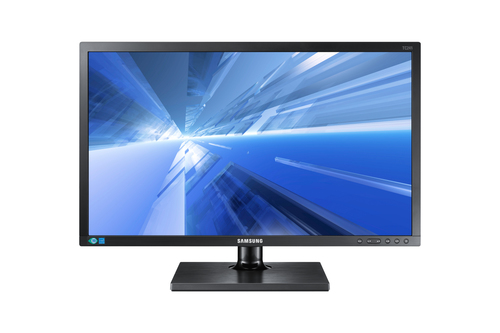
Samsung S27B971D computer monitor 68.6 cm (27") 2560 x 1440 pixels Quad HD LED Black, Silver
- Screen: 68.6 cm (27"), 2560 x 1440 pixels, PLS
- Refresh rate: 5 ms response time
- Brightness: 300 cd/m²
- Ports: 1 × HDMI, 1 × DisplayPort
- Stand: height-adjustable, VESA N
- Extras: speakers
- Colour: Black, Silver
Where to buy
We're not tracking prices for this product yet. Check current prices directly at:
We may earn a commission when you buy through links on this page — at no extra cost to you. Learn more
About this product
Built-in calibration technology. Accurate colour you can trust.
The Samsung Premium Monitor Series 9 is a superior creative tool that allows you to be creative with a new level of professionalism thanks to high picture quality and colour expression.
Accurate colour with a built-in calibration engine
With a truly professional built-in calibration engine, take your photography and design to the next level. Samsung Premium Monitor Series 9 boasts exceptional calibration technology and delivers incredibly accurate colours, with visuals simply coming to life. Your monitor’s hardware calibration achieves stunningly realistic and vivid colour that just isn’t possible with software calibration, using a 16-bit RGB look-up table to express accurate and lifelike colours that are unbelievable. Now it’s easier to achieve an expert level of work.
Expertly-calibrated colour. Ready to use straight away
From the moment it leaves the factory, your Samsung Premium Monitor Series 9 is calibrated to deliver incredible colour. Its built-in hardware calibration engine has been inspected and fine-tuned by experts during production, with careful testing to achieve unbelievably accurate White Balance Correction, Gamma Correction and Non-uniformity Correction. This means that your Samsung Premium Monitor Series 9 has already been primed to deliver stunning image quality before you even open the box.
Consistent picture quality across the screen
To ensure that you get the most from your monitor experience, the Samsung Premium Monitor Series 9 delivers outstanding screen uniformity. Prior to the calibration, the monitor usually provides 75% uniformity. But with a combination of the built-in calibration engine and factory tuning, the monitor performs at over 90%, delivering perfect uniformity values across the entire screen. The monitor’s strict Non-Uniformity Correction during production ensures that each of the screen sectors reproduce expert-level colours and brightness. The Samsung Premium Monitor Series 9 provides users with professional-level uniformity for more accurate imagery.
Specifications
Key specifications
- Display diagonalSize of the display for this product, measured diagonally, usually in inches.
- 68.6 cm (27")
- Display resolutionThe number of distinct pixels in each dimension that can be displayed. It is usually quoted as width × height, with the units in pixels: for example, "1024 × 768" means the width is 1024 pixels and the height is 768 pixels. The higher the number of pixels, the sharper the image.
- 2560 x 1440 pixels
- Panel typeThe technology used to manufacture the panel, such as AMOLED or AH-IPS.
- PLS
- Response timeThe response time is the time difference between the moment that a source (for example a video card) sends a signal and that equipment (for example a monitor) receives or display the signal. (Used abbreviations: R/F = Rise and Fall.)
- 5 ms
- Display brightness (typical)Display brightness, measured by its Luminance, presented as a figure in nits. Typical brightness ratings for monitors range from 250 to 350 nits with a target value of between 80 to 120 nits being suitable for most displays in a normal viewing environment.
- 300 cd/m²
- HDMI ports quantityThe number of sockets (ports) for HDMI connections. HDMI (High-Definition Multimedia Interface) is a compact audio/video interface for transferring uncompressed video data and compressed/uncompressed digital audio data from a HDMI-compliant device ("the source device") to a compatible computer monitor, video projector, digital television, or digital audio device. HDMI is a digital replacement for…
- 1
- DisplayPorts quantityNumber of DisplayPorts. A DisplayPort is a digital display interface developed by the Video Electronics Standards Association (VESA). The interface is primarily used to connect a video source to a display device such as a computer monitor, though it can also be used to carry audio, USB, and other forms of data.
- 1
- Height adjustmentThe part of the device that can be adjusted to change the height.
- Yes
- Panel mounting interfaceThe product can be used wih VESA mounting interfaces.
- N
- Built-in speaker(s)The device contains speaker(s) to produce sound.
- Yes
- Product colourThe colour e.g. red, blue, green, black, white.
- Black, Silver
Show all 58 specificationsShow key specifications only
Design
- VESA mountingIndicates whether the product supports the VESA mounting standard for attachment to compatible arms, brackets, or wall mounts.
- No
- Product colourThe colour e.g. red, blue, green, black, white.
- Black, Silver
- Panel mounting interfaceThe product can be used wih VESA mounting interfaces.
- N
Audio
- Built-in speaker(s)The device contains speaker(s) to produce sound.
- Yes
Multimedia
- Built-in cameraThe product has an integrated camera.
- No
Display
- Display diagonalSize of the display for this product, measured diagonally, usually in inches.
- 68.6 cm (27")
- Display resolutionThe number of distinct pixels in each dimension that can be displayed. It is usually quoted as width × height, with the units in pixels: for example, "1024 × 768" means the width is 1024 pixels and the height is 768 pixels. The higher the number of pixels, the sharper the image.
- 2560 x 1440 pixels
- Native aspect ratioThe aspect ratio is the ratio of the width of an image to its height. The native aspect ratio is the one which the projector/display is particularly designed for. Images shown in native aspect ratio will utilize the entire resolution of the display and achieve maximum brightness. Images shown in other than native aspect ratio will always have less resolution and less brightness than images shown…
- 16:9
- Display technologyThe technology used in the display e.g. plasma, LED.
- LED
- TouchscreenA screen of a laptop, smartphone, etc., that responds to touch so you can control the interface using your fingers.
- No
- HD typeType of supported High Definition (e.g. Full HD, 4K Ultra HD).
- Quad HD
- Panel typeThe technology used to manufacture the panel, such as AMOLED or AH-IPS.
- PLS
- Display brightness (typical)Display brightness, measured by its Luminance, presented as a figure in nits. Typical brightness ratings for monitors range from 250 to 350 nits with a target value of between 80 to 120 nits being suitable for most displays in a normal viewing environment.
- 300 cd/m²
- Response timeThe response time is the time difference between the moment that a source (for example a video card) sends a signal and that equipment (for example a monitor) receives or display the signal. (Used abbreviations: R/F = Rise and Fall.)
- 5 ms
- Supported graphics resolutionsThe graphic resolutions that can be displayed by the device. The graphic resolution describes the width and height dimensions of a display, such as a computer monitor, measured in pixels.
- 2560 x 1440
- Aspect ratioThe aspect ratio is the ratio of the width of a shape to its height. For example, 4:3 is common for standard displays and 16:9 is the ratio for Widescreen TV.
- 16:9
- Contrast ratio (typical)The difference in light intensity between the brightest white and the darkest black.
- 1000:1
- Dynamic contrast ratio marketing nameThe proprietary brand name used by the manufacturer to describe the technology that automatically adjusts the backlight to improve the contrast ratio (e.g., ASUS Smart Contrast Ratio).
- Mega Contrast
- Viewing angle, horizontalMaximum horizontal angle at which a display can be viewed with acceptable visual performance.
- 178°
- Viewing angle, verticalMaximum vertical angle at which a display can be viewed with acceptable visual performance.
- 178°
- Display number of coloursThe total number of distinct colours that the device is capable of displaying (e.g. 1.07 billion colours).
- 16.78 million colours
Other features
- TV tuner integratedDevice has an in-built TV tuner.
- No
- Supplied AC adapter typeThe type of power supply provided with the product to connect it to an alternating current source (e.g. AC).
- LED
- 3DThe device can be used with 3D technology.
- No
Packaging content
- Cables includedSpecifies the types and quantities of connection cables provided with the product (e.g., 3.5 mm to 3.5 mm or SATA).
- DisplayPort, DVI, MHL, USB
- Quick start guideInstructions, either online, as a computer program or in paper form, to allow you to set up and start using the product quickly.
- Yes
- ManualIndicates whether a printed user manual is included in the package.
- Yes
Weight & dimensions
- Width (with stand)The total horizontal measurement of the product when the supporting stand is attached, measured in millimetres.
- 645 mm
- Depth (with stand)The measurement of the product from front to back when any supporting accessory or base is attached, expressed in millimetres or centimetres.
- 247 mm
- Height (with stand)The total vertical measurement of the product including its base or support structure, expressed in millimetres or centimetres.
- 467 mm
- Weight (with stand)The total mass of the unit including its supporting base, measured in kilograms or grams.
- 7.5 kg
- Width (without stand)The horizontal measurement of the device excluding the base or support structure, expressed in millimetres.
- 654 mm
- Depth (without stand)The measurement of the product from front to back without its base or support, typically expressed in millimetres or centimetres.
- 23.2 mm
- Height (without stand)The vertical measurement of the device when the stand is removed, measured in mm.
- 402 mm
- Weight (without stand)The mass of the device excluding the support base, measured in g.
- 5.3 kg
Power
- Power consumption (typical)Amount of power consumed by this model, often expressed in watts (W). Typical values that manufacturers give are power consumption when off, standby/suspended mode, typical use, maximum usage.
- 53 W
- Power consumption (standby)The amount of electricity that is consumed when the product is on standby.
- 0.5 W
- Power consumption (max)The maximum amount of power used by the device.
- 63 W
- Power consumption (off)The amount of electrical energy consumed by the device when it is switched off, measured in watts.
- 0.5 W
- AC input voltageThe voltage of the AC electricity that is inputted into the product.
- 100 - 240 V
- AC input frequencyThe range of alternating current frequencies the device can accept from the power source, measured in hertz (e.g., 45 - 65).
- 50 - 60 Hz
Security
- Cable lock slotHoles on the edge of devices through which a cable lock can be passed, so the device can be locked to a desk etc.
- No
Ergonomics
- Height adjustmentThe part of the device that can be adjusted to change the height.
- Yes
Network
- Wi-FiPopular technology that allows an electronic device to exchange data or connect to the internet wirelessly using radio waves.
- No
Ports & interfaces
- USB hub versionThe technical standard of the USB hub, if available, which determines the maximum data transfer speed (e.g., 3.2 Gen 1).
- 2.0
- USB Type-A downstream ports quantityThe number of USB Type-A ports available for connecting peripheral devices to the unit.
- 1
- DVI portDigital Visual Interface (DVI) is a video display interface to connect a video source to a display device, such as a computer monitor.
- Yes
- DVI-D ports quantityThis is the amount of DVI-I interfaces. Digital Visual Interface (DVI) is a video display interface developed by the Digital Display Working Group (DDWG). The digital interface is used to connect a video source to a display device, such as a computer monitor. DVI-D means DVI digital, which means it can only support digital, but not analog.
- 1
- HDMI ports quantityThe number of sockets (ports) for HDMI connections. HDMI (High-Definition Multimedia Interface) is a compact audio/video interface for transferring uncompressed video data and compressed/uncompressed digital audio data from a HDMI-compliant device ("the source device") to a compatible computer monitor, video projector, digital television, or digital audio device. HDMI is a digital replacement for…
- 1
- DisplayPorts quantityNumber of DisplayPorts. A DisplayPort is a digital display interface developed by the Video Electronics Standards Association (VESA). The interface is primarily used to connect a video source to a display device such as a computer monitor, though it can also be used to carry audio, USB, and other forms of data.
- 1
- Mobile High-Definition Link (MHL)Indicates whether the product supports the Mobile High-Definition Link standard for mirroring a mobile device's screen to a display.
- Yes
Features
- Windows operating systems supportedWindows vesions wich can be used with the device.
- Windows 7 Home Basic, Windows 7 Home Basic x64, Windows 7 Home Premium, Windows 7 Home Premium x64, Windows 7 Professional, Windows 7 Professional x64, Windows 7 Starter, Windows 7 Starter x64, Windows 7 Ultimate, Windows 7 Ultimate x64, Windows 8, Windows 8 Enterprise, Windows 8 Enterprise x64, Windows 8 Pro, Windows 8 Pro x64, Windows 8 x64, Windows Vista Business, Windows Vista Business x64, Windows Vista Enterprise, Windows Vista Enterprise x64, Windows Vista Home Basic, Windows Vista Home Basic x64, Windows Vista Home Premium, Windows Vista Home Premium x64, Windows Vista Ultimate, Windows Vista Ultimate x64, Windows XP Home, Windows XP Home x64, Windows XP Professional, Windows XP Professional x64
Software
- Mac operating systems supportedMac operating systems e.g. OS X can be used with the device.
- Yes
Packaging data
- Package widthThe distance from one side of the packaging to the other.
- 741 mm
- Package depthThe distance from the front to the back of the packaging.
- 312 mm
- Package heightThe distance from the top to the bottom of the packaging.
- 563 mm
- Package weightWeight of the packaged product.
- 10.3 kg
- User Guide on CD-ROMIndicates whether a digital copy of the user manual is provided on an included CD-ROM.
- Yes
Database Right data-sheet 2026 Icecat. All rights reserved. Provided “as is”, without warranty — check details with the store before buying.
Expert reviews
- –
tomshardware.com2014
Most of us don't upgrade our monitors very often. If you already own an S27B970D, there is nothing about the newer model that warrants shelling out another $1000. The two main improvements are that contrast, while lower, is more consistent, and the screen...
Read the review at tomshardware.com ↗ - 97
reviewed.com2013
At an MSRP of $1199, the S9 is not super affordable. It's clearly engineered and calibrated for the needs of professionals, though it's certainly elegant-looking enough to sit on more than a few receptionists' desks. It's simply too well-tooled to be used...
Read the review at reviewed.com ↗
Price history (90 days, best daily price)
Price history is still being collected for this product — check back soon.
Alternative models

Samsung TC191W
computer monitor 48.3 cm (19") 1280 x 1024 pixels Black

Samsung T27C370EW
computer monitor 68.6 cm (27") 1920 x 1080 pixels LED Black
Samsung TC241W
computer monitor 59.9 cm (23.6") 1920 x 1080 pixels Full HD Black

Samsung T28C570EW
computer monitor 71.1 cm (28") 1920 x 1080 pixels Full HD Black

Samsung S19B420M
computer monitor 47 cm (18.5") 1366 x 768 pixels LED Black

Samsung T24C370EW
computer monitor 61 cm (24") 1920 x 1080 pixels Full HD LED Black