
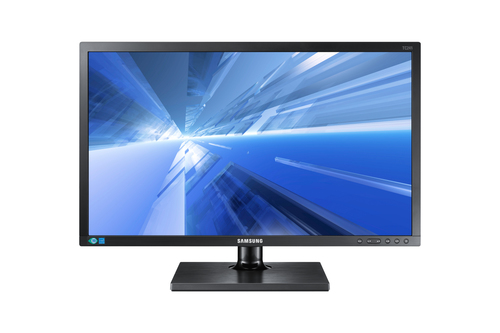
Samsung S22A450UW computer monitor 55.9 cm (22") 1680 x 1050 pixels LED Black
- Screen: 55.9 cm (22"), 1680 x 1050 pixels, Flat
- Refresh rate: 5 ms response time
- Stand: tilt, VESA 100 x 100 mm
- Extras: speakers, USB hub
- Colour: Black
Where to buy
We're not tracking prices for this product yet. Check current prices directly at:
We may earn a commission when you buy through links on this page — at no extra cost to you. Learn more
About this product
Conveniently adjust monitor height, tilt and perspective
The Samsung LED Business Monitor SA450 has been designed to help boost work efficiency, delivering a tailored experience with its choice of viewer settings. The height-adjustable stand ensures that the screen can always be set at the optimal eye level, which enhances the visual experience while also helping maintain the viewer’s body posture. Other features include the tilt and pivot capabilities, which not only increase comfort levels but also introduce new ways of working. The SA450 Monitor can rotate 90̊̊̊ degrees, allowing for more appropriate view depending on the work. So, now you can take convenience and efficiency to amazing heights with the Samsung LED Business Monitor SA450.
Maximise workspace with an efficient detachable adaptor
If you need a work monitor that uses office space efficiently, then Samsung LED Business Monitor SA450 is the perfect choice. It features an innovative new detachable adaptor, which allows the monitor to be easily moved and installed. From physically moving the monitor with the carrying handle to quickly installing, the SA450 is ready to deliver an efficient and clean work space. The SA450 is also equipped and prepared for you as a VESA Wall mount, providing a multi-screen or wall mounted monitor. Optimising your office space is now easily achieved with the Samsung LED Business Monitor SA450.
Enjoy energy savings with the lightweight LED display
Samsung’s lightweight LED Business Monitor SA450 provides another energy saving option through its low consumption levels. This reduction in energy helps both financial and environmental aspects of the business, and is an important part of any work operation. The LED Business Monitor SA450 is also remarkably lightweight and reduces the hassles associated with transporting monitors, and is just one more way that Samsung is helping enhance the working environment.
Go green with Samsung’s Adaptor On Off 0W
The ultimate energy saving measure has been created by Samsung with the new Adaptor On Of mode. By simply flicking the mechanical switch found on the Samsung LED Business monitor SA450, you can cut energy output while not using the monitor down to an amazing 0 Watts. Conventional standby modes reduce energy output to about 1 Watt, but the SA450 goes one stop further for greater results. This helps minimises both environmental impact and operating costs, and is just one more step by Samsung in creating a greener environment.
Clear your desk with Samsung’s Cable Arrangement
A tidy and clean workspace is paramount when it comes to showing professionalism at work. That’s why the Samsung LED Business Monitor SA450 comes with a Cable Arrangement. It conveniently organises the cables coming from the monitor into a simple bundle along the stand and helps minimise clutter around the screen. With the Samsung LED Business Monitor SA450, you can finally enjoy a neat workspace, where annoying cables are kept out of sight.
Upgrade to the next level with Mega Dynamic Contrast
Experience amazing new levels of colour, brilliance and picture quality through the very latest in Mega Dynamic Contrast Ratio. The Samsung LED Business monitor SA450 delivers images so real-to-life that it will transform your whole viewing experience. Packed with breathtaking 5000:1 contrast ratio, the highest level currently available, the SA450 ensures that blacks are at their absolute darkest and (with pristine whites) colours are at their brightest. You will immediately notice the crystal clear picture and its unbelievable intensity. It is like an explosion of colours and leaves other screens seeming dull in comparison.
A monitor design to match business needs
The Samsung LED Business Monitor SA450 has been designed to enhance work conditions and efficiency. Featuring Front Tactile Buttons, the SA450 minimises costly errors found with high usage, which is a common problem with touch type button monitors. Furthermore, with its smarter design, users can still access these buttons when wall mounted, which can be an issue when monitors feature side panel buttons. Adding to the visual experience, the SA450 features a Narrow Matt Bezel. This reduces distraction around display area and delivers an experience that is immersive and engaging.
Magic Angle Vertical delivers perfection every time
The Samsung LED Business monitor SA450 feature the Magic Angle Vertical to deliver a picture-perfect screen even when not viewed from directly in front. This means that you can watch your monitor sitting down, standing up or lying on the couch and still enjoy a great view. And with 20 different angle steps (10 up and 10 down) you will always have a choice to match your position. So, when watching with Magic Angle Vertical, which is even also specialised for LED Business monitor, it feels like you’re always standing right in front of the screen… even if you aren’t.
Specifications
Key specifications
- Display diagonalSize of the display for this product, measured diagonally, usually in inches.
- 55.9 cm (22")
- Display resolutionThe number of distinct pixels in each dimension that can be displayed. It is usually quoted as width × height, with the units in pixels: for example, "1024 × 768" means the width is 1024 pixels and the height is 768 pixels. The higher the number of pixels, the sharper the image.
- 1680 x 1050 pixels
- Screen shapeDescribes the physical curvature of the display panel, such as whether it is flat or curved.
- Flat
- Response timeThe response time is the time difference between the moment that a source (for example a video card) sends a signal and that equipment (for example a monitor) receives or display the signal. (Used abbreviations: R/F = Rise and Fall.)
- 5 ms
- Tilt adjustmentThe tilt, which means the angle at which the device is pointing (up or down), can be changed.
- Yes
- Panel mounting interfaceThe product can be used wih VESA mounting interfaces.
- 100 x 100 mm
- Built-in speaker(s)The device contains speaker(s) to produce sound.
- Yes
- Built-in USB hubWhether or not the device features a USB hub to connect more than one other device via USB.
- Yes
- Product colourThe colour e.g. red, blue, green, black, white.
- Black
Show all 47 specificationsShow key specifications only
Design
- VESA mountingIndicates whether the product supports the VESA mounting standard for attachment to compatible arms, brackets, or wall mounts.
- Yes
- Product colourThe colour e.g. red, blue, green, black, white.
- Black
- Panel mounting interfaceThe product can be used wih VESA mounting interfaces.
- 100 x 100 mm
- LED indicatorsThe specific status lights available on the unit to provide visual feedback on its current state or connectivity (e.g., AC input, ACT, or Access).
- Yes
Ports & interfaces
- Built-in USB hubWhether or not the device features a USB hub to connect more than one other device via USB.
- Yes
- Number of upstream portsThe total number of available ports used to connect the device to a computer or another network source.
- 1
- USB Type-A downstream ports quantityThe number of USB Type-A ports available for connecting peripheral devices to the unit.
- 2
- DVI portDigital Visual Interface (DVI) is a video display interface to connect a video source to a display device, such as a computer monitor.
- Yes
- HDCPHigh-bandwidth Digital Content Protection (HDCP) is a form of digital copy protection to prevent copying of digital audio and video content as it travels across connections.
- No
Audio
- Built-in speaker(s)The device contains speaker(s) to produce sound.
- Yes
Display
- Display diagonalSize of the display for this product, measured diagonally, usually in inches.
- 55.9 cm (22")
- Display resolutionThe number of distinct pixels in each dimension that can be displayed. It is usually quoted as width × height, with the units in pixels: for example, "1024 × 768" means the width is 1024 pixels and the height is 768 pixels. The higher the number of pixels, the sharper the image.
- 1680 x 1050 pixels
- Display technologyThe technology used in the display e.g. plasma, LED.
- LED
- TouchscreenA screen of a laptop, smartphone, etc., that responds to touch so you can control the interface using your fingers.
- No
- Response timeThe response time is the time difference between the moment that a source (for example a video card) sends a signal and that equipment (for example a monitor) receives or display the signal. (Used abbreviations: R/F = Rise and Fall.)
- 5 ms
- Screen shapeDescribes the physical curvature of the display panel, such as whether it is flat or curved.
- Flat
- Supported graphics resolutionsThe graphic resolutions that can be displayed by the device. The graphic resolution describes the width and height dimensions of a display, such as a computer monitor, measured in pixels.
- 1680 x 1050 (WSXGA+)
- Contrast ratio (typical)The difference in light intensity between the brightest white and the darkest black.
- 1000:1
- Viewing angle, horizontalMaximum horizontal angle at which a display can be viewed with acceptable visual performance.
- 170°
- Viewing angle, verticalMaximum vertical angle at which a display can be viewed with acceptable visual performance.
- 160°
- Display number of coloursThe total number of distinct colours that the device is capable of displaying (e.g. 1.07 billion colours).
- 16.78 million colours
- Pixel pitchThis is the parameter of a picture tube, which specifies the shortest distance between two dots of the same colour. The principle is: the smaller the dot pitch, the better sharpness of image.
- 0.282 x 0.282 mm
- Digital horizontal frequencyThe range of horizontal scanning frequencies the device can support, measured in kHz.
- 30 - 81 kHz
- Digital vertical frequencyThe range of refresh rates the device can support when operating in digital mode, measured in Hertz (Hz).
- 56 - 75 Hz
- Sync-on-green (SOG)Combines composite sync with the green signal in RGB. Only three signals are sent (Red, Green with Sync, Blue).
- Yes
- Separate H/V syncDevice has separate horizontal and vertical synchronization.
- Yes
- Composite syncCombines horizontal and vertical synchronization onto one pair of wires. When used in RGB connections, four separate signals are sent (Red, Green, Blue, Sync).
- Yes
Performance
- On/off switchThe button which is pressed to switch the device on or off.
- Yes
Certificates
- CertificationSpecifies the official standards, safety approvals, or regulatory certifications the product has received.
- TCO5.0, Energy Star, Epeat Gold
Sustainability
- Sustainability certificatesThe environmental or ethical certifications the product has received to verify its sustainability standards (e.g., ASC or ACT Organic).
- EPEAT Gold, ENERGY STAR
Weight & dimensions
- Width (with stand)The total horizontal measurement of the product when the supporting stand is attached, measured in millimetres.
- 508 mm
- Depth (with stand)The measurement of the product from front to back when any supporting accessory or base is attached, expressed in millimetres or centimetres.
- 201 mm
- Height (with stand)The total vertical measurement of the product including its base or support structure, expressed in millimetres or centimetres.
- 380 mm
- Weight (with stand)The total mass of the unit including its supporting base, measured in kilograms or grams.
- 4.6 kg
- Width (without stand)The horizontal measurement of the device excluding the base or support structure, expressed in millimetres.
- 508 mm
- Depth (without stand)The measurement of the product from front to back without its base or support, typically expressed in millimetres or centimetres.
- 50 mm
- Height (without stand)The vertical measurement of the device when the stand is removed, measured in mm.
- 344 mm
Operational conditions
- Operating temperature (T-T)The minimum and maximum temperatures at which the product can be safely operated.
- 10 - 40 °C
- Storage temperature (T-T)The minimum and maximum temperatures at which the product can be safely stored.
- -20 - 60 °C
- Operating relative humidity (H-H)The range of relative humidity, expressed as a percentage, within which the device can function correctly without damage or performance loss.
- 10 - 80%
- Storage relative humidity (H-H)The permissible range of relative humidity, expressed as a percentage, within which the product can be stored without damage.
- 5 - 95%
Power
- Power consumption (typical)Amount of power consumed by this model, often expressed in watts (W). Typical values that manufacturers give are power consumption when off, standby/suspended mode, typical use, maximum usage.
- 22 W
- Power consumption (standby)The amount of electricity that is consumed when the product is on standby.
- 0.3 W
Ergonomics
- Tilt adjustmentThe tilt, which means the angle at which the device is pointing (up or down), can be changed.
- Yes
- Tilt angle rangeThe minimum and maximum angles at which the unit can be tilted, typically expressed in degrees.
- -3 - 25°
Features
- Plug and PlayIndicates whether this product supports is "plug and play". Plug and play is hardware or software that, after being installed ("plugged in"), can immediately be used ("played with"), as opposed to hardware or software which requires configuration.
- Yes
Network
- Ethernet LANAn Ethernet LAN (Local Area Network) interface is present, for a wired conection via a cable.
- No
Database Right data-sheet 2026 Icecat. All rights reserved. Provided “as is”, without warranty — check details with the store before buying.
Price history (90 days, best daily price)
Price history is still being collected for this product — check back soon.
Alternative models

Samsung S24A850DW
computer monitor 61 cm (24") 1920 x 1200 pixels LED Black

Samsung S19B420M
computer monitor 47 cm (18.5") 1366 x 768 pixels LED Black

Samsung S24C450DL
computer monitor 59.9 cm (23.6") 1920 x 1080 pixels Full HD LED Black
Samsung TC241W
computer monitor 59.9 cm (23.6") 1920 x 1080 pixels Full HD Black

Samsung S27A850D
computer monitor 68.6 cm (27") 2560 x 1440 pixels 4K Ultra HD LED Black

Samsung TC191W
computer monitor 48.3 cm (19") 1280 x 1024 pixels Black