
Samsung M50A computer monitor 68.6 cm (27") 1920 x 1080 pixels Full HD Black
- Screen: 68.6 cm (27"), 1920 x 1080 pixels, VA, Flat
- Refresh rate: 60 Hz, 8 ms response time
- Brightness: 250 cd/m²
- Ports: 2 × HDMI
- Stand: tilt, VESA 100 x 100 mm
- Extras: speakers, USB hub
- Colour: Black
Where to buy
We're not tracking prices for this product yet. Check current prices directly at:
We may earn a commission when you buy through links on this page — at no extra cost to you. Learn more
About this product
The World's 1st Do-It-All Screen
The monitor for every side of life. Get work done without a PC, with the installed Microsoft Office 365, or by remote access to your office computer. Then switch to pure entertainment with the on-board one-stop entertainment system.
Stream endless entertainment
Smart TV Apps
Binge watching got even easier. Access a bunch of entertainment apps, such as Netflix, YouTube, and HBO, without switching on your PC or laptop. The remote control and built-in speakers simplify your chill time.
Explore a world of entertainment effortlessly
Samsung TV Plus & Universal Guide
Free TV, no strings attached. Just tune in to Samsung TV Plus on the Smart Monitor to enjoy 100% free live and on demand content with no downloads or sign-up required. Universal Guide offers content recommendations on top apps such as Netflix and Prime Video so you can spend more time watching.
Mobile meets big screen
Mobile Connectivity
Wireless DeX unlocks a full PC experience, without any PC. Use mobile productivity apps, such as video conferencing, documents, and browsers, through just your monitor and phone. To see photos or watch movies on the big screen, just tap it with your phone using Tap View.
Connect with AirPlay 2
AirPlay 2
With integrated AirPlay 2, use Apple devices to work and play on the big screen. Improve your workflow by creating a wireless dual monitor setup with your MacBook and Smart Monitor. When it's time to relax, effortlessly enjoy videos, music, photos and more from your iPhone or iPad.
Work and learn from a distance
Remote Access
Work seamlessly from anywhere. Boost your productivity with Remote Access features. Using the Office 365 suite, view and edit documents, and conveniently save them all on the cloud. Even while at home, Remote Access lets you work remotely on your school or office desktop.
Optimal brightness for any ambience
Adaptive Picture
Sensational picture, day or night. Surrounding light is detected by a sensor to adjust brightness automatically with Adaptive Picture. Even in broad daylight, watch dark, gritty dramas without squinting and straining your eyes to see the picture.
Just say "play" to play
Voice Assistant
Your monitor listens to what you tell it. Switch between apps, control videos and more through the Voice Assistant or SmartThings app.
Plug and see
Auto Source Switch +
No more switching around. With Automatic Source Switch Plus, your monitor detects newly connected devices as soon they're plugged in and displays the correct signal. No more searching for the right input on the menu.
Reveal the game's hidden sides
Ultrawide Game View
Keep your eye on the win. Adjust your screen to 21:9 to discover hidden areas in game scenes with Ultrawide Game View. Now when you play soccer games, see more of the pitch right up to the goalposts. And in driving games, get a natural and encompassing view of the road ahead.
Mobile meets big screen
Mobile Connectivity
Wireless DeX unlocks a full PC experience, without any PC. Use mobile productivity apps, such as video conferencing, documents, and browsers, through just your monitor and phone. To see photos or watch movies on the big screen, just tap it with your phone using Tap view.
Stream endless entertainment
Smart TV Apps Binge watching got even easier. Access a bunch of entertainment apps, such as Netflix, YouTube, and HBO, without switching on your PC or laptop. The remote control and built-in speakers simplify your chill time.
Explore a world of entertainment effortlessly
Samsung TV Plus & Universal Guide Free TV, no strings attached. Just tune in to Samsung TV Plus on the Smart Monitor to enjoy 100% free live and on demand content with no downloads or sign-up required. Universal Guide offers content recommendations on top apps such as Netflix and Prime Video so you can spend more time watching.
Mobile meets big screen
Mobile Connectivity Wireless DeX unlocks a full PC experience, without any PC. Use mobile productivity apps, such as video conferencing, documents, and browsers, through just your monitor and phone. To see photos or watch movies on the big screen, just tap it with your phone using Tap View.
Connect with AirPlay 2
AirPlay 2 With integrated AirPlay 2, use Apple devices to work and play on the big screen. Improve your workflow by creating a wireless dual monitor setup with your MacBook and Smart Monitor. When it's time to relax, effortlessly enjoy videos, music, photos and more from your iPhone or iPad.
Work and learn from a distance
Remote Access Work seamlessly from anywhere. Boost your productivity with Remote Access features. Using the Office 365 suite, view and edit documents, and conveniently save them all on the cloud. Even while at home, Remote Access lets you work remotely on your school or office desktop.
Optimal brightness for any ambience
Adaptive Picture Sensational picture, day or night. Surrounding light is detected by a sensor to adjust brightness automatically with Adaptive Picture. Even in broad daylight, watch dark, gritty dramas without squinting and straining your eyes to see the picture.
Just say "play" to play
Voice Assistant Your monitor listens to what you tell it. Switch between apps, control videos and more through the Voice Assistant or SmartThings app.
Plug and see
Auto Source Switch + No more switching around. With Automatic Source Switch Plus, your monitor detects newly connected devices as soon they're plugged in and displays the correct signal. No more searching for the right input on the menu.
Documents
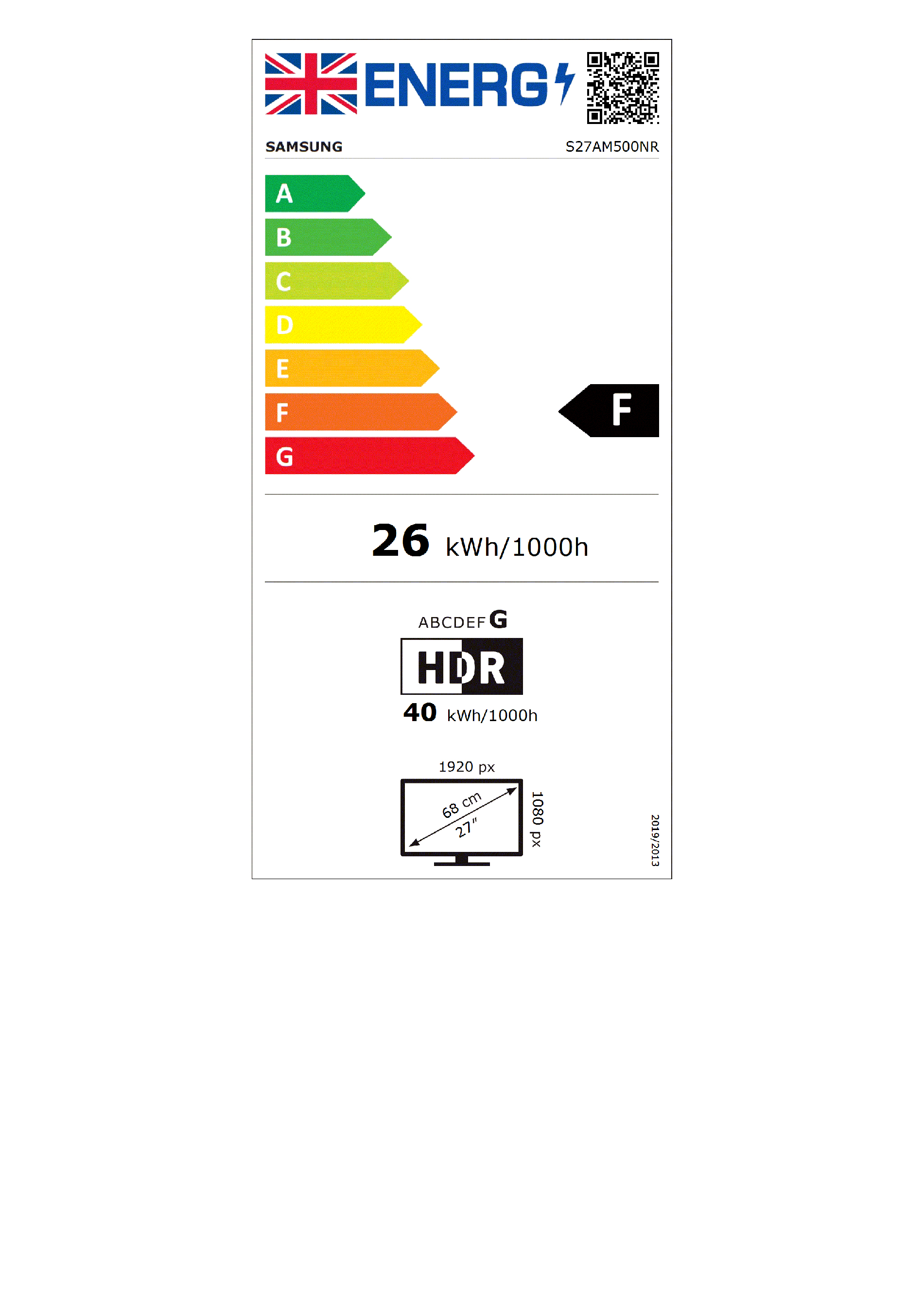
- Product information sheetEU Product Fiche ↗
Specifications
Key specifications
- Display diagonalSize of the display for this product, measured diagonally, usually in inches.
- 68.6 cm (27")
- Display resolutionThe number of distinct pixels in each dimension that can be displayed. It is usually quoted as width × height, with the units in pixels: for example, "1024 × 768" means the width is 1024 pixels and the height is 768 pixels. The higher the number of pixels, the sharper the image.
- 1920 x 1080 pixels
- Panel typeThe technology used to manufacture the panel, such as AMOLED or AH-IPS.
- VA
- Screen shapeDescribes the physical curvature of the display panel, such as whether it is flat or curved.
- Flat
- Maximum refresh rateThe highest number of times per second the image is updated, measured in hertz (Hz).
- 60 Hz
- Response timeThe response time is the time difference between the moment that a source (for example a video card) sends a signal and that equipment (for example a monitor) receives or display the signal. (Used abbreviations: R/F = Rise and Fall.)
- 8 ms
- Display brightness (typical)Display brightness, measured by its Luminance, presented as a figure in nits. Typical brightness ratings for monitors range from 250 to 350 nits with a target value of between 80 to 120 nits being suitable for most displays in a normal viewing environment.
- 250 cd/m²
- HDMI ports quantityThe number of sockets (ports) for HDMI connections. HDMI (High-Definition Multimedia Interface) is a compact audio/video interface for transferring uncompressed video data and compressed/uncompressed digital audio data from a HDMI-compliant device ("the source device") to a compatible computer monitor, video projector, digital television, or digital audio device. HDMI is a digital replacement for…
- 2
- Tilt adjustmentThe tilt, which means the angle at which the device is pointing (up or down), can be changed.
- Yes
- Panel mounting interfaceThe product can be used wih VESA mounting interfaces.
- 100 x 100 mm
- Built-in speaker(s)The device contains speaker(s) to produce sound.
- Yes
- Built-in USB hubWhether or not the device features a USB hub to connect more than one other device via USB.
- Yes
- Product colourThe colour e.g. red, blue, green, black, white.
- Black
Show all 98 specificationsShow key specifications only
Design
- VESA mountingIndicates whether the product supports the VESA mounting standard for attachment to compatible arms, brackets, or wall mounts.
- Yes
- Product colourThe colour e.g. red, blue, green, black, white.
- Black
- Panel mounting interfaceThe product can be used wih VESA mounting interfaces.
- 100 x 100 mm
- Wall mountableThe product can be mounted on (attached to ) a wall.
- Yes
Ports & interfaces
- Built-in USB hubWhether or not the device features a USB hub to connect more than one other device via USB.
- Yes
- DVI portDigital Visual Interface (DVI) is a video display interface to connect a video source to a display device, such as a computer monitor.
- No
- HDMIHDMI (High-Definition Multimedia Interface) is a compact audio/video interface for transferring uncompressed video data and compressed/uncompressed digital audio data from a HDMI-compliant device ("the source device") to a compatible computer monitor, video projector, digital television, or digital audio device. HDMI is a digital replacement for existing analog video standards.
- Yes
- HDMI ports quantityThe number of sockets (ports) for HDMI connections. HDMI (High-Definition Multimedia Interface) is a compact audio/video interface for transferring uncompressed video data and compressed/uncompressed digital audio data from a HDMI-compliant device ("the source device") to a compatible computer monitor, video projector, digital television, or digital audio device. HDMI is a digital replacement for…
- 2
- HDMI versionThe specific release version of the High-Definition Multimedia Interface standard supported by the device (e.g. 1.3 or 2.0).
- 2.0
- Audio inputThe type of audio input that the device requires, and the connection needed.
- No
- Headphone outThe socket for connecting headphones to the device.
- No
Audio
- Built-in speaker(s)The device contains speaker(s) to produce sound.
- Yes
Display
- Display diagonalSize of the display for this product, measured diagonally, usually in inches.
- 68.6 cm (27")
- Display resolutionThe number of distinct pixels in each dimension that can be displayed. It is usually quoted as width × height, with the units in pixels: for example, "1024 × 768" means the width is 1024 pixels and the height is 768 pixels. The higher the number of pixels, the sharper the image.
- 1920 x 1080 pixels
- Native aspect ratioThe aspect ratio is the ratio of the width of an image to its height. The native aspect ratio is the one which the projector/display is particularly designed for. Images shown in native aspect ratio will utilize the entire resolution of the display and achieve maximum brightness. Images shown in other than native aspect ratio will always have less resolution and less brightness than images shown…
- 16:9
- TouchscreenA screen of a laptop, smartphone, etc., that responds to touch so you can control the interface using your fingers.
- No
- HD typeType of supported High Definition (e.g. Full HD, 4K Ultra HD).
- Full HD
- Panel typeThe technology used to manufacture the panel, such as AMOLED or AH-IPS.
- VA
- Display brightness (typical)Display brightness, measured by its Luminance, presented as a figure in nits. Typical brightness ratings for monitors range from 250 to 350 nits with a target value of between 80 to 120 nits being suitable for most displays in a normal viewing environment.
- 250 cd/m²
- Display brightness (min)The minimum luminance level of the screen, measured in candelas per square metre (cd/m²).
- 200 cd/m²
- Response timeThe response time is the time difference between the moment that a source (for example a video card) sends a signal and that equipment (for example a monitor) receives or display the signal. (Used abbreviations: R/F = Rise and Fall.)
- 8 ms
- Response time measurement typeThe method used to measure the time it takes for a pixel to change colors, such as GTG (Gray to Gray) or BwB (Black-white-Black).
- GTG (Gray to Gray)
- Screen shapeDescribes the physical curvature of the display panel, such as whether it is flat or curved.
- Flat
- Supported graphics resolutionsThe graphic resolutions that can be displayed by the device. The graphic resolution describes the width and height dimensions of a display, such as a computer monitor, measured in pixels.
- 1920 x 1080 (HD 1080)
- Aspect ratioThe aspect ratio is the ratio of the width of a shape to its height. For example, 4:3 is common for standard displays and 16:9 is the ratio for Widescreen TV.
- 16:9
- Contrast ratio (typical)The difference in light intensity between the brightest white and the darkest black.
- 3000:1
- Maximum refresh rateThe highest number of times per second the image is updated, measured in hertz (Hz).
- 60 Hz
- Viewing angle, horizontalMaximum horizontal angle at which a display can be viewed with acceptable visual performance.
- 178°
- Viewing angle, verticalMaximum vertical angle at which a display can be viewed with acceptable visual performance.
- 178°
- Display number of coloursThe total number of distinct colours that the device is capable of displaying (e.g. 1.07 billion colours).
- 16.7 million colours
- Viewable size, horizontalThe viewable size is often somewhat smaller than the actual size of a monitor, because there is a border around the image.
- 59.8 cm
- Viewable size, verticalThe height of the screen area that can actually display an image, measured in millimetres or inches.
- 33.6 cm
- Display diagonal (metric)This is the size of the display screen, measured diagonally.
- 68 cm
- High Dynamic Range (HDR) technologyThe specific standard or version of high contrast and color reproduction used to enhance the detail in the darkest and brightest areas of an image (e.g. DisplayHDR 600).
- High Dynamic Range 10 (HDR10)
Brand-specific features
- Brand specific technologiesProprietary features or technical innovations developed by the manufacturer to enhance performance or functionality (e.g. AI Vision or 3DWave).
- Eye Saver, Ultrawide GameView
Smart TV
- Sound mirroringIndicates whether the device can duplicate audio from a connected source to its own speakers or an external output.
- Yes
- Screen mirroringIndicates whether the device supports the wireless duplication of a screen from another source onto its own display.
- Yes
- Universal guideIndicates whether the product includes a versatile mounting bracket or stand that is compatible with various setups.
- Yes
- Smart modesPredefined performance profiles that automatically adjust settings for specific use cases (e.g., Cinema, Animation, or CAD/CAM).
- Game
Other features
- TV PlusIndicates whether the device includes integrated TV tuner functionality and television services.
- Yes
- Anynet + (HDMI-CEC)Indicates whether the device supports HDMI-CEC, allowing it to be controlled by a single remote control shared with other connected HDMI devices.
- Yes
- Wireless displayIndicates whether the device supports the wireless transmission of video and audio signals from a source to the screen.
- No
- Auto source switch+Indicates whether the device can automatically detect and switch to the active input signal source.
- Yes
Performance
- SmartThings app supportIndicates whether the product can be controlled and managed via the Samsung SmartThings application.
- Yes
- Wireless Dex supportIndicates whether the product supports wireless connection to a compatible mobile device for a desktop-like experience.
- Yes
- Tap viewIndicates whether the device supports a specialized viewing mode designed to optimize the image for a specific perspective or interaction.
- Yes
- Adaptive pictureIndicates whether the device can automatically adjust image settings based on the content being displayed to optimize visual quality.
- Yes
- DisplayPort outputThe device features a DisplayPort (DP) output to accomodate a standardized digital display interface used to connect a video source to a display device such as a computer monitor, and it can also carry audio, USB, and other forms of data.
- No
- ConnectShare (USB)Indicates whether the device supports the sharing of content from a connected USB source to other compatible screens or devices.
- Yes
- Flicker-free technologyIndicates whether the device employs technology to reduce or eliminate screen flickering to decrease eye strain during prolonged use.
- Yes
- Game modeIndicates whether the device has a dedicated preset that optimizes performance, such as reducing input lag or enhancing contrast, for gaming.
- Yes
- Smart featuresThe advanced software capabilities and automated functions integrated into the unit (e.g. Energy monitoring or Diagnosis & Troubleshooting).
- Mobile to screen
- High Dynamic Range (HDR) supportedIndicates whether the device supports High Dynamic Range for improved contrast and a wider range of colours and luminosity.
- Yes
Management features
- Works with Samsung BixbyIndicates whether the product supports voice control and integration with the Samsung Bixby virtual assistant.
- Yes
Network
- AirPlayAirPlay (previously called AirTunes when it was for audio only) is a proprietary protocol stack/suite developed by Apple Inc. that allows wireless streaming of audio, video, and photos, together with related metadata between devices. Originally only implemented in Apple's software and devices, Apple has licensed the AirPlay protocol stack as a third-party software component technology to manufact…
- Yes
- Wi-FiPopular technology that allows an electronic device to exchange data or connect to the internet wirelessly using radio waves.
- Yes
- Wi-Fi standardsThe type of wireless local area network (LAN). It can be ad-hoc, where units in a network communicate peer-to-peer, or Infrastructure, where units communicate with each other via an access point A LAN interconnects computers in a small area e.g. home, school or office.
- Wi-Fi 5 (802.11ac)
- BluetoothBluetooth is a low-power radio technology developed to replace the cables and wires currently used to link or connect electronic devices such as personal computers, printers, and a wide variety of handheld devices including mobile phones. Because it uses radio-wave connectivity, a Bluetooth-enabled device has a constant, established connection to whatever browser it uses. This saves the user the…
- Yes
- Bluetooth versionThe type of bluetooth technology in the product e.g. Bluetooth Smart (v4.0).
- 4.2
Certificates
- CertificationSpecifies the official standards, safety approvals, or regulatory certifications the product has received.
- Windows 10
Sustainability
- Sustainability certificatesThe environmental or ethical certifications the product has received to verify its sustainability standards (e.g., ASC or ACT Organic).
- ENERGY STAR
Packaging content
- Cables includedSpecifies the types and quantities of connection cables provided with the product (e.g., 3.5 mm to 3.5 mm or SATA).
- HDMI
- Remote control includedComponent of an electronics device, most commonly a television set, DVD player and home theater systems originally used for operating the device wirelessly from a short line-of-sight distance.
- Yes
- Installation CDIndicates whether the product is supplied with a CD containing the necessary installation software and drivers.
- Yes
- Power cable lengthThe total length of the electrical power cord, typically measured in metres or centimetres.
- 1.5 m
Weight & dimensions
- Width (with stand)The total horizontal measurement of the product when the supporting stand is attached, measured in millimetres.
- 615.5 mm
- Depth (with stand)The measurement of the product from front to back when any supporting accessory or base is attached, expressed in millimetres or centimetres.
- 193.5 mm
- Height (with stand)The total vertical measurement of the product including its base or support structure, expressed in millimetres or centimetres.
- 455.4 mm
- Weight (with stand)The total mass of the unit including its supporting base, measured in kilograms or grams.
- 5 kg
- Width (without stand)The horizontal measurement of the device excluding the base or support structure, expressed in millimetres.
- 615.5 mm
- Depth (without stand)The measurement of the product from front to back without its base or support, typically expressed in millimetres or centimetres.
- 41.8 mm
- Height (without stand)The vertical measurement of the device when the stand is removed, measured in mm.
- 367.9 mm
- Weight (without stand)The mass of the device excluding the support base, measured in g.
- 3.6 kg
Operational conditions
- Operating temperature (T-T)The minimum and maximum temperatures at which the product can be safely operated.
- 10 - 40 °C
- Operating relative humidity (H-H)The range of relative humidity, expressed as a percentage, within which the device can function correctly without damage or performance loss.
- 10 - 80%
- Non-operating relative humidity (non-condensing)Range of relative humidity (non-condensing) in which a non-operating product can be stored.
- 10 - 80%
Power
- Energy efficiency class (SDR)The energy efficiency rating of the device when operating in Standard Dynamic Range (SDR) mode, categorized from A to G.
- F
- Energy efficiency class (HDR)The energy efficiency rating of the device when High Dynamic Range (HDR) mode is active, ranging from A to G.
- G
- Energy consumption (SDR) per 1000 hoursThe amount of electric energy consumed by the device during standard dynamic range (SDR) operation over a period of 1000 hours, measured in kilowatt-hours (kWh).
- 26 kWh
- Energy consumption (HDR) per 1000 hoursThe amount of electrical energy consumed by the device when displaying High Dynamic Range (HDR) content over a period of 1000 hours, measured in kilowatt-hours (kWh).
- 40 kWh
- Power consumption (typical)Amount of power consumed by this model, often expressed in watts (W). Typical values that manufacturers give are power consumption when off, standby/suspended mode, typical use, maximum usage.
- 26 W
- Power consumption (standby)The amount of electricity that is consumed when the product is on standby.
- 0.5 W
- Power consumption (max)The maximum amount of power used by the device.
- 50 W
- Power consumption (off)The amount of electrical energy consumed by the device when it is switched off, measured in watts.
- 0.5 W
- AC input voltageThe voltage of the AC electricity that is inputted into the product.
- 100 - 240 V
- AC adapter output voltageThe electrical potential difference supplied by the power adapter to the device, measured in volts (e.g. 19).
- 100-240 V
- Power supply typeThe type of power supply which this product uses.
- Internal
- Energy efficiency scaleThe range of energy efficiency classes used to rate the product's power consumption, such as A to G.
- A to G
- Annual energy consumptionThe amount of energy used by the product per year.
- 38 kWh
- USB Power Delivery (USB PD)Indicates whether the device supports the USB Power Delivery standard for faster charging and higher power levels.
- No
Ergonomics
- Tilt adjustmentThe tilt, which means the angle at which the device is pointing (up or down), can be changed.
- Yes
- Tilt angle rangeThe minimum and maximum angles at which the unit can be tilted, typically expressed in degrees.
- -2 - 22°
Features
- Plug and PlayIndicates whether this product supports is "plug and play". Plug and play is hardware or software that, after being installed ("plugged in"), can immediately be used ("played with"), as opposed to hardware or software which requires configuration.
- Yes
Software
- Operating system installedType of operating system on a device e.g. IOS on Apple devices, Android for mobile devices.
- Tizen
Packaging data
- Package widthThe distance from one side of the packaging to the other.
- 738 mm
- Package depthThe distance from the front to the back of the packaging.
- 428 mm
- Package heightThe distance from the top to the bottom of the packaging.
- 126 mm
- Package weightWeight of the packaged product.
- 6.2 kg
Database Right data-sheet 2026 Icecat. All rights reserved. Provided “as is”, without warranty — check details with the store before buying.
Expert reviews
- 80
t3.com2021
The Samsung M70A Smart Monitor aims to fulfil two needs at once, serving as both a 4K computer monitor with a USB-C port, and a 32-inch smart TV with streaming apps and HDMI ports for when the working day is over. Can it do this and earn a place in T3's b...
Read the review at t3.com ↗
Price history (90 days, best daily price)
Price history is still being collected for this product — check back soon.
Alternative models
Samsung F27T450FZN
computer monitor

Samsung LS49AG954NU
computer monitor 124.5 cm (49") 5120 x 1440 pixels 5K Ultra HD LCD Black, White

Samsung F24T450FZN
computer monitor 60.5 cm (23.8") 1920 x 1080 pixels Full HD Black

Samsung S60UA
computer monitor 68.6 cm (27") 2560 x 1440 pixels Quad HD LCD Black

Samsung S28AG700NU
computer monitor 71.1 cm (28") 3840 x 2160 pixels 4K Ultra HD LED Black

Samsung LF24T370FWEXXY
computer monitor 61 cm (24") 1920 x 1080 pixels Full HD LED Black
Accessories & compatible products

R-Go Tools Monitor arm R-Go Zepher Single, fully adjustable, 0-8 Kg load capacity, 100% circular, black

R-Go Tools Monitor arm R-Go Caparo Single, fully adjustable with gas spring, 3-9 kg load capacity, 100% circular, black

R-Go Tools Monitor arm R-Go Zepher Dual, for two monitors, fully adjustable, 0
8 kg load capacity, 100% circular, black
