
Samsung LS34C652VAU computer monitor 86.4 cm (34") 3440 x 1440 pixels UltraWide Quad HD LED Black
- Screen: 86.4 cm (34"), 3440 x 1440 pixels, VA, Curved
- Refresh rate: 100 Hz, 5 ms response time
- Brightness: 350 cd/m²
- Adaptive sync: AMD FreeSync
- Ports: 1 × HDMI, 1 × DisplayPort
- Stand: height-adjustable, tilt, VESA 100 x 100 mm
- Extras: speakers, camera, USB hub
- Colour: Black
Where to buy
We're not tracking prices for this product yet. Check current prices directly at:
We may earn a commission when you buy through links on this page — at no extra cost to you. Learn more
About this product
Ultra Wide immersion
Ultra-WQHD in 1000R curvature
Immerse yourself in games, movies or design projects. A 34" 1000R curved display surrounds you with a 21:9 aspect ratio. The curve closely matches the human field of sight, so you can maximise your screen real estate and reach new levels of productivity with less eye strain.
Enhanced realism through more colour
1 billion colours with HDR10
See a wider gamut of colours for stunning accuracy and detail. HDR10 provide near limitless hues and true-to-life colour representation, with darker darks and the brighter brights. Every piece of content becomes a joy to look at and can be experienced exactly as intended.
Pop up the camera to stay connected
A built-in camera and Windows Hello
Stay connected through video calls and streaming without any extra devices. When it's not needed, the camera can be pushed down into the monitor to keep a sleek profile. Windows Hello uses the camera and biometrics to securely sign you into any Windows 11 device, app or website without a password.
Sound without taking up space
Built-in speaker
Work, learn and play without the need for additional peripherals. With built-in speakers, you can free up desk space by minimising the connections needed for a more efficient working environment, while ensuring you can listen to any content with ease.
Master multiple sources in harmony
Built-in KVM Switch
A built-in KVM switch lets you connect and control two sources to your monitor at once, with just one keyboard and mouse. You choose: split screen, Picture in Picture or Picture by Picture are all possible. Be more efficient and remove multi-device hassle with easy input switching and multitasking.
Connect and adjust to meet your needs
USB-C and LAN ports in an ergonomic design
A USB-C port lets you power up your device and transmit data with just one cable, and a LAN port lets you connect to a LAN-less laptop for ethernet use. Clean cable management combines with the adjustable height on the screen that tilts and swivels for comfortable and attractive all-day use.
Relieve your eyes from strain
TUV certified Intelligent Eye Care
Keep your eyes fresh with less screen strain. For those late-night projects, brightness and colour temperature automatically optimise for your environment. TUV-certified for intelligent eye care, Samsung reduces screen flickering and protects eyes against excessive blue light with eye saver mode.
Smooth, stutterless gameplay
100HZ refresh rate and AMD FreeSync
A 100Hz refresh rate and AMD FreeSync work together to keep your screen smooth in any application, so you can forget about screen stuttering and image tearing. See everything and perform your best without missing a single thing.
A more sustainable monitor
Eco-friendly materials
Sustainable and recycled materials mean a more environmentally-friendly monitor, with 5% of the rear cover made with recycled plastic(OBP). Plus, a manufacturing process that reduces the amount of plastics and emissions delivers a monitor you can feel good about using.
Reduced environmental impact
Eco-Packaging
Eco-friendly packaging is used to reduce waste, and give packaging a life beyond its first use. You can transform your packaging into practical tools for your home, or recycle it for enhanced sustainability.
Ultra Wide immersion
Ultra-WQHD in 1000R curvature Immerse yourself in games, movies or design projects. A 34" 1000R curved display surrounds you with a 21:9 aspect ratio. The curve closely matches the human field of sight, so you can maximise your screen real estate and reach new levels of productivity with less eye strain.
Enhanced realism through more colour
1 billion colours with HDR10 See a wider gamut of colours for stunning accuracy and detail. HDR10 provide near limitless hues and true-to-life colour representation, with darker darks and the brighter brights. Every piece of content becomes a joy to look at and can be experienced exactly as intended.
Pop up the camera to stay connected
A built-in camera and Windows Hello Stay connected through video calls and streaming without any extra devices. When it's not needed, the camera can be pushed down into the monitor to keep a sleek profile. Windows Hello uses the camera and biometrics to securely sign you into any Windows 11 device, app or website without a password.
Sound without taking up space
Built-in speaker Work, learn and play without the need for additional peripherals. With built-in speakers, you can free up desk space by minimising the connections needed for a more efficient working environment, while ensuring you can listen to any content with ease.
Master multiple sources in harmony
Built-in KVM Switch A built-in KVM switch lets you connect and control two sources to your monitor at once, with just one keyboard and mouse. You choose: split screen, Picture in Picture or Picture by Picture are all possible. Be more efficient and remove multi-device hassle with easy input switching and multitasking.
Connect and adjust to meet your needs
USB-C and LAN ports in an ergonomic design A USB-C port lets you power up your device and transmit data with just one cable, and a LAN port lets you connect to a LAN-less laptop for ethernet use. Clean cable management combines with the adjustable height on the screen that tilts and swivels for comfortable and attractive all-day use.
Relieve your eyes from strain
TUV certified Intelligent Eye Care Keep your eyes fresh with less screen strain. For those late-night projects, brightness and colour temperature automatically optimise for your environment. TUV-certified for intelligent eye care, Samsung reduces screen flickering and protects eyes against excessive blue light with eye saver mode.
Smooth, stutterless gameplay
100HZ refresh rate and AMD FreeSyncTM A 100Hz refresh rate and AMD FreeSyncTM work together to keep your screen smooth in any application, so you can forget about screen stuttering and image tearing. See everything and perform your best without missing a single thing.
Documents
- Product information sheetEU Product Fiche ↗
Specifications
Key specifications
- Display diagonalSize of the display for this product, measured diagonally, usually in inches.
- 86.4 cm (34")
- Display resolutionThe number of distinct pixels in each dimension that can be displayed. It is usually quoted as width × height, with the units in pixels: for example, "1024 × 768" means the width is 1024 pixels and the height is 768 pixels. The higher the number of pixels, the sharper the image.
- 3440 x 1440 pixels
- Panel typeThe technology used to manufacture the panel, such as AMOLED or AH-IPS.
- VA
- Screen shapeDescribes the physical curvature of the display panel, such as whether it is flat or curved.
- Curved
- Maximum refresh rateThe highest number of times per second the image is updated, measured in hertz (Hz).
- 100 Hz
- Response timeThe response time is the time difference between the moment that a source (for example a video card) sends a signal and that equipment (for example a monitor) receives or display the signal. (Used abbreviations: R/F = Rise and Fall.)
- 5 ms
- Display brightness (typical)Display brightness, measured by its Luminance, presented as a figure in nits. Typical brightness ratings for monitors range from 250 to 350 nits with a target value of between 80 to 120 nits being suitable for most displays in a normal viewing environment.
- 350 cd/m²
- AMD FreeSyncThe product includes AMD Freesync Technology for the dynamic synchronization of the graphic card and the monitor in order to avoid screen tearing.
- Yes
- HDMI ports quantityThe number of sockets (ports) for HDMI connections. HDMI (High-Definition Multimedia Interface) is a compact audio/video interface for transferring uncompressed video data and compressed/uncompressed digital audio data from a HDMI-compliant device ("the source device") to a compatible computer monitor, video projector, digital television, or digital audio device. HDMI is a digital replacement for…
- 1
- DisplayPorts quantityNumber of DisplayPorts. A DisplayPort is a digital display interface developed by the Video Electronics Standards Association (VESA). The interface is primarily used to connect a video source to a display device such as a computer monitor, though it can also be used to carry audio, USB, and other forms of data.
- 1
- Height adjustmentThe part of the device that can be adjusted to change the height.
- Yes
- Tilt adjustmentThe tilt, which means the angle at which the device is pointing (up or down), can be changed.
- Yes
- Panel mounting interfaceThe product can be used wih VESA mounting interfaces.
- 100 x 100 mm
- Built-in speaker(s)The device contains speaker(s) to produce sound.
- Yes
Show all 104 specificationsShow key specifications only
Design
- VESA mountingIndicates whether the product supports the VESA mounting standard for attachment to compatible arms, brackets, or wall mounts.
- Yes
- Market positioningUnder which category can the device be positioned in the market, e.g. camera phone.
- Business
- Product colourThe colour e.g. red, blue, green, black, white.
- Black
- Panel mounting interfaceThe product can be used wih VESA mounting interfaces.
- 100 x 100 mm
- Wall mountableThe product can be mounted on (attached to ) a wall.
- Yes
- Front bezel colourThe colour of the frame surrounding the front of the display (e.g. Black, Silver).
- Black
- Feet colourThe colour of the feet, which are the projecting part on which a device/piece of furniture, or each of its legs, stands.
- Black
Ports & interfaces
- Built-in USB hubWhether or not the device features a USB hub to connect more than one other device via USB.
- Yes
- USB hub versionThe technical standard of the USB hub, if available, which determines the maximum data transfer speed (e.g., 3.2 Gen 1).
- 3.2 Gen 1 (3.1 Gen 1)
- Number of upstream portsThe total number of available ports used to connect the device to a computer or another network source.
- 2
- Number of USB Type-C upstream ports quantityThe total number of USB Type-C ports available to connect the device to a host computer or source.
- 1
- USB Power Delivery up toThe maximum amount of power the device can provide or receive via a USB connection, measured in watts.
- 90 W
- HDMIHDMI (High-Definition Multimedia Interface) is a compact audio/video interface for transferring uncompressed video data and compressed/uncompressed digital audio data from a HDMI-compliant device ("the source device") to a compatible computer monitor, video projector, digital television, or digital audio device. HDMI is a digital replacement for existing analog video standards.
- Yes
- HDMI ports quantityThe number of sockets (ports) for HDMI connections. HDMI (High-Definition Multimedia Interface) is a compact audio/video interface for transferring uncompressed video data and compressed/uncompressed digital audio data from a HDMI-compliant device ("the source device") to a compatible computer monitor, video projector, digital television, or digital audio device. HDMI is a digital replacement for…
- 1
- HDMI versionThe specific release version of the High-Definition Multimedia Interface standard supported by the device (e.g. 1.3 or 2.0).
- 2.0
- DisplayPorts quantityNumber of DisplayPorts. A DisplayPort is a digital display interface developed by the Video Electronics Standards Association (VESA). The interface is primarily used to connect a video source to a display device such as a computer monitor, though it can also be used to carry audio, USB, and other forms of data.
- 1
- DisplayPort versionThe specific release version of the DisplayPort standard supported by the device (e.g., 1.2 or 1.4).
- 1.2
- Headphone outThe socket for connecting headphones to the device.
- Yes
- Headphone outputsNumber of sockets /ports where headphones are connected.
- 1
- Built-in KVM switchIndicates whether the product includes an integrated keyboard, video, and mouse switch to control multiple computers with a single set of peripherals.
- Yes
- HDCPHigh-bandwidth Digital Content Protection (HDCP) is a form of digital copy protection to prevent copying of digital audio and video content as it travels across connections.
- Yes
- HDCP versionThe version of the High-bandwidth Digital Content Protection standard supported by the device to prevent the unauthorized copying of digital audio and video content (e.g. 2.2).
- 2.2
Audio
- Built-in speaker(s)The device contains speaker(s) to produce sound.
- Yes
- Number of speakersThe quantity of speakers included in/with the product.
- 1
- RMS rated powerRMS (Root mean square) is a measure of the continuous power required by a device, in particular audio amplifiers and loudspeakers.
- 5 W
Multimedia
- Built-in cameraThe product has an integrated camera.
- Yes
Performance
- NVIDIA G-SYNCIndicates whether the product supports NVIDIA G-SYNC technology to synchronize the display refresh rate with the GPU to eliminate screen tearing.
- No
- AMD FreeSyncThe product includes AMD Freesync Technology for the dynamic synchronization of the graphic card and the monitor in order to avoid screen tearing.
- Yes
- Adaptive pictureIndicates whether the device can automatically adjust image settings based on the content being displayed to optimize visual quality.
- Yes
- Flicker-free technologyIndicates whether the device employs technology to reduce or eliminate screen flickering to decrease eye strain during prolonged use.
- Yes
- High Dynamic Range (HDR) supportedIndicates whether the device supports High Dynamic Range for improved contrast and a wider range of colours and luminosity.
- Yes
Display
- Display diagonalSize of the display for this product, measured diagonally, usually in inches.
- 86.4 cm (34")
- Display resolutionThe number of distinct pixels in each dimension that can be displayed. It is usually quoted as width × height, with the units in pixels: for example, "1024 × 768" means the width is 1024 pixels and the height is 768 pixels. The higher the number of pixels, the sharper the image.
- 3440 x 1440 pixels
- Native aspect ratioThe aspect ratio is the ratio of the width of an image to its height. The native aspect ratio is the one which the projector/display is particularly designed for. Images shown in native aspect ratio will utilize the entire resolution of the display and achieve maximum brightness. Images shown in other than native aspect ratio will always have less resolution and less brightness than images shown…
- 21:9
- Display technologyThe technology used in the display e.g. plasma, LED.
- LED
- TouchscreenA screen of a laptop, smartphone, etc., that responds to touch so you can control the interface using your fingers.
- No
- HD typeType of supported High Definition (e.g. Full HD, 4K Ultra HD).
- UltraWide Quad HD
- Panel typeThe technology used to manufacture the panel, such as AMOLED or AH-IPS.
- VA
- Display brightness (typical)Display brightness, measured by its Luminance, presented as a figure in nits. Typical brightness ratings for monitors range from 250 to 350 nits with a target value of between 80 to 120 nits being suitable for most displays in a normal viewing environment.
- 350 cd/m²
- Display brightness (min)The minimum luminance level of the screen, measured in candelas per square metre (cd/m²).
- 280 cd/m²
- Response timeThe response time is the time difference between the moment that a source (for example a video card) sends a signal and that equipment (for example a monitor) receives or display the signal. (Used abbreviations: R/F = Rise and Fall.)
- 5 ms
- Screen shapeDescribes the physical curvature of the display panel, such as whether it is flat or curved.
- Curved
- Screen curvature ratingThe radius of the curve of the screen, expressed in millimetres (e.g. 1500R), where a smaller number indicates a more pronounced curve.
- 1000R
- Contrast ratio (typical)The difference in light intensity between the brightest white and the darkest black.
- 3000:1
- Dynamic contrast ratio marketing nameThe proprietary brand name used by the manufacturer to describe the technology that automatically adjusts the backlight to improve the contrast ratio (e.g., ASUS Smart Contrast Ratio).
- Mega Infinity DCR
- Maximum refresh rateThe highest number of times per second the image is updated, measured in hertz (Hz).
- 100 Hz
- Viewing angle, horizontalMaximum horizontal angle at which a display can be viewed with acceptable visual performance.
- 178°
- Viewing angle, verticalMaximum vertical angle at which a display can be viewed with acceptable visual performance.
- 178°
- Display number of coloursThe total number of distinct colours that the device is capable of displaying (e.g. 1.07 billion colours).
- 1.07 billion colours
- Viewable size, horizontalThe viewable size is often somewhat smaller than the actual size of a monitor, because there is a border around the image.
- 79.7 cm
- Viewable size, verticalThe height of the screen area that can actually display an image, measured in millimetres or inches.
- 33.4 cm
- Display diagonal (metric)This is the size of the display screen, measured diagonally.
- 86 cm
- High Dynamic Range (HDR) technologyThe specific standard or version of high contrast and color reproduction used to enhance the detail in the darkest and brightest areas of an image (e.g. DisplayHDR 600).
- High Dynamic Range 10 (HDR10)
- Colour gamut standardThe specific color space standard the device is designed to reproduce, such as Adobe RGB or DCI-P3.
- sRGB
- sRGB coverage (typical)The percentage of the sRGB color space that the device is capable of reproducing.
- 1.15%
Power
- Energy efficiency classThe energy efficiency of the appliance is rated in terms of a set of energy efficiency classes from A+++ to G on the label, A+++ being the most energy efficient, G the least efficient.
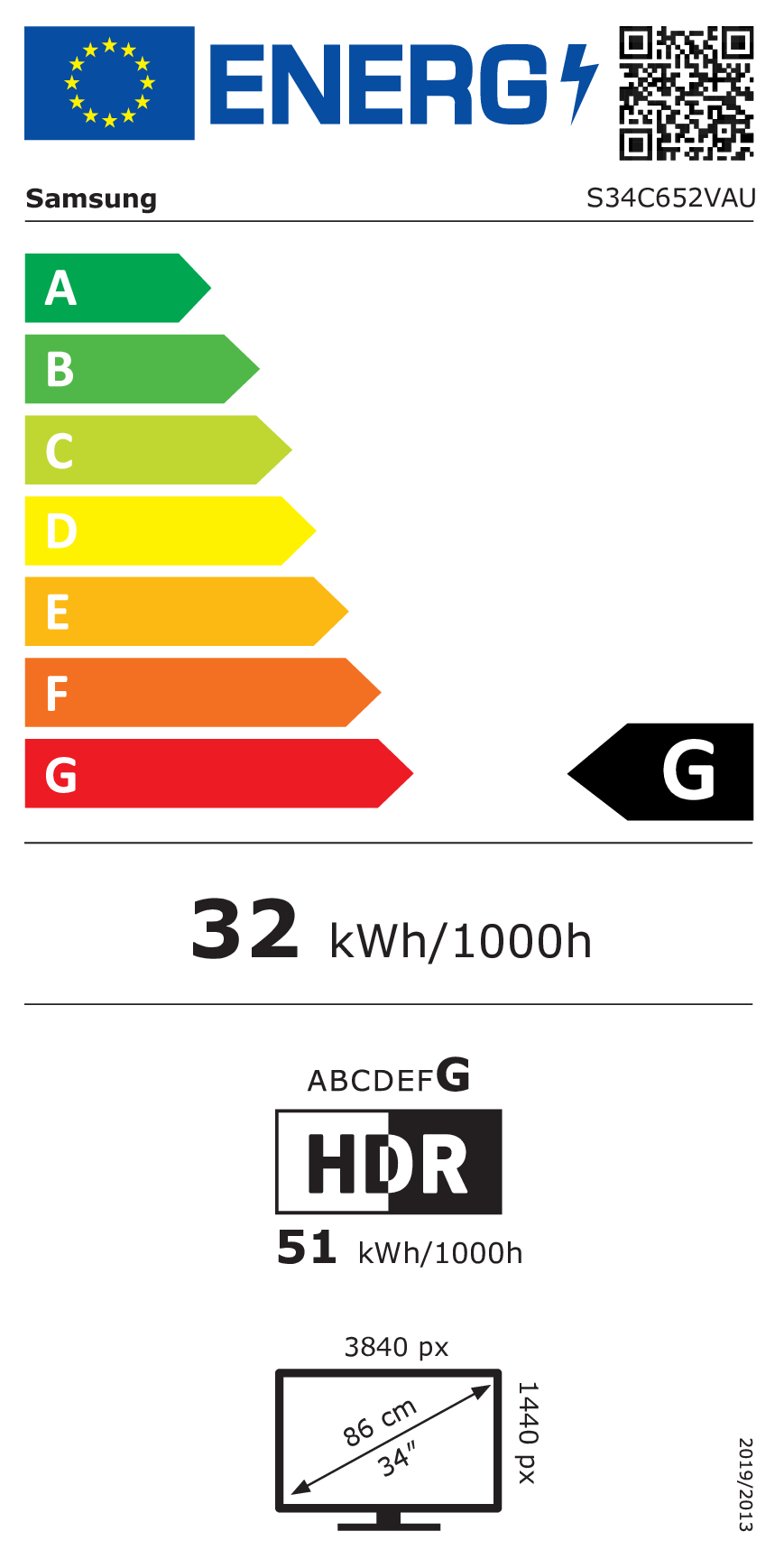
- G
- Energy efficiency class (SDR)The energy efficiency rating of the device when operating in Standard Dynamic Range (SDR) mode, categorized from A to G.
- G
- Energy efficiency class (HDR)The energy efficiency rating of the device when High Dynamic Range (HDR) mode is active, ranging from A to G.
- G
- Energy consumption (SDR) per 1000 hoursThe amount of electric energy consumed by the device during standard dynamic range (SDR) operation over a period of 1000 hours, measured in kilowatt-hours (kWh).
- 32 kWh
- Energy consumption (HDR) per 1000 hoursThe amount of electrical energy consumed by the device when displaying High Dynamic Range (HDR) content over a period of 1000 hours, measured in kilowatt-hours (kWh).
- 51 kWh
- Power consumption (typical)Amount of power consumed by this model, often expressed in watts (W). Typical values that manufacturers give are power consumption when off, standby/suspended mode, typical use, maximum usage.
- 32 W
- Power consumption (standby)The amount of electricity that is consumed when the product is on standby.
- 0.5 W
- Power consumption (max)The maximum amount of power used by the device.
- 200 W
- Power consumption (average)The typical amount of electrical power used by the device during standard operation, measured in watts.
- 47 W
- Power consumption (off)The amount of electrical energy consumed by the device when it is switched off, measured in watts.
- 0.3 W
- AC input voltageThe voltage of the AC electricity that is inputted into the product.
- 100 - 240 V
- Power supply typeThe type of power supply which this product uses.
- Internal
- Energy efficiency scaleThe range of energy efficiency classes used to rate the product's power consumption, such as A to G.
- A to G
- Annual energy consumptionThe amount of energy used by the product per year.
- 47 kWh
- USB Power Delivery (USB PD)Indicates whether the device supports the USB Power Delivery standard for faster charging and higher power levels.
- Yes
Brand-specific features
- Brand specific technologiesProprietary features or technical innovations developed by the manufacturer to enhance performance or functionality (e.g. AI Vision or 3DWave).
- Eye Saver
Other features
- Picture-by-Picture (PbP)Indicates whether the screen can display content from two different input sources side-by-side simultaneously.
- Yes
- Off Timer PlusIndicates whether the device features an advanced automatic power-off function to reduce energy consumption.
- Yes
Certificates
- CertificationSpecifies the official standards, safety approvals, or regulatory certifications the product has received.
- Windows10
Sustainability
- Sustainability certificatesThe environmental or ethical certifications the product has received to verify its sustainability standards (e.g., ASC or ACT Organic).
- TCO
Packaging content
- Stand includedIndicates whether a support stand is supplied with the product.
- Yes
- Cables includedSpecifies the types and quantities of connection cables provided with the product (e.g., 3.5 mm to 3.5 mm or SATA).
- HDMI, DisplayPort, USB Type-C, USB
- ManualIndicates whether a printed user manual is included in the package.
- Yes
- Power cable lengthThe total length of the electrical power cord, typically measured in metres or centimetres.
- 1.5 m
Weight & dimensions
- Width (with stand)The total horizontal measurement of the product when the supporting stand is attached, measured in millimetres.
- 806.6 mm
- Depth (with stand)The measurement of the product from front to back when any supporting accessory or base is attached, expressed in millimetres or centimetres.
- 241 mm
- Height (with stand)The total vertical measurement of the product including its base or support structure, expressed in millimetres or centimetres.
- 561.5 mm
- Weight (with stand)The total mass of the unit including its supporting base, measured in kilograms or grams.
- 8.1 kg
- Width (without stand)The horizontal measurement of the device excluding the base or support structure, expressed in millimetres.
- 806.6 mm
- Depth (without stand)The measurement of the product from front to back without its base or support, typically expressed in millimetres or centimetres.
- 125 mm
- Height (without stand)The vertical measurement of the device when the stand is removed, measured in mm.
- 369.4 mm
- Weight (without stand)The mass of the device excluding the support base, measured in g.
- 5.3 kg
Operational conditions
- Operating temperature (T-T)The minimum and maximum temperatures at which the product can be safely operated.
- 10 - 40 °C
- Non-operating relative humidity (non-condensing)Range of relative humidity (non-condensing) in which a non-operating product can be stored.
- 10 - 80%
Ergonomics
- Height adjustmentThe part of the device that can be adjusted to change the height.
- Yes
- Adjustable height (max)The maximum distance the unit can be raised vertically from its lowest position, measured in millimetres.
- 12 cm
- SwivellingIndicates whether the product has a mechanism that allows it to rotate horizontally.
- Yes
- Swivel angle rangeThe minimum and maximum degrees to which the unit can be rotated horizontally.
- -30 - 30°
- Tilt adjustmentThe tilt, which means the angle at which the device is pointing (up or down), can be changed.
- Yes
- Tilt angle rangeThe minimum and maximum angles at which the unit can be tilted, typically expressed in degrees.
- -2 - 20°
Management features
- Picture-in-PicturePicture-in-picture (PiP) is a feature of some television receivers and similar devices. One program (channel) is displayed on the full TV screen at the same time as one or more other programs are displayed in inset windows. Sound is usually from the main program only.
- Yes
Network
- Ethernet LANAn Ethernet LAN (Local Area Network) interface is present, for a wired conection via a cable.
- Yes
Picture quality
- Megapixel (approx.)The number (in millions) of light-sensitive picture elements known as pixels actually used by the camera's image sensor (CCD) to record light, and which are reflected to the final number of recorded pixels stored on the memory card.
- 5 MP
Smart TV
- Smart modesPredefined performance profiles that automatically adjust settings for specific use cases (e.g., Cinema, Animation, or CAD/CAM).
- Sports, Custom, Eco, FPS, Game, Graphics, RPG, RTS
Packaging data
- Package widthThe distance from one side of the packaging to the other.
- 807 mm
- Package depthThe distance from the front to the back of the packaging.
- 367 mm
- Package heightThe distance from the top to the bottom of the packaging.
- 125 mm
- Package weightWeight of the packaged product.
- 10.1 kg
- Package typeThe type of product package e.g. box.
- Box
Database Right data-sheet 2026 Icecat. All rights reserved. Provided “as is”, without warranty — check details with the store before buying.
Price history (90 days, best daily price)
Price history is still being collected for this product — check back soon.
Alternative models

Samsung LS27A600NANXGO
computer monitor 68.6 cm (27") 2560 x 1440 pixels Wide Quad HD LED Black

Samsung LS34C652UAU
computer monitor 86.4 cm (34") 3440 x 1440 pixels UltraWide Quad HD LED Black

Samsung S32B804PXN
computer monitor 81.3 cm (32") 3840 x 2160 pixels 4K Ultra HD LED Black

Samsung LS27C360EAEXXY
computer monitor 68.6 cm (27") 1920 x 1080 pixels Full HD LED Black

Samsung LS34C504GANXZA
computer monitor 86.4 cm (34") 3440 x 1440 pixels UltraWide Quad HD LED Black

Samsung LS24A336NH
computer monitor 61 cm (24") 1920 x 1080 pixels Full HD LED Black
Accessories & compatible products

R-Go Tools Monitor arm R-Go Zepher Single, fully adjustable, 0-8 Kg load capacity, 100% circular, black

R-Go Tools Monitor arm R-Go Caparo Single, fully adjustable with gas spring, 3-9 kg load capacity, 100% circular, black

R-Go Tools Monitor arm R-Go Zepher Dual, for two monitors, fully adjustable, 0
8 kg load capacity, 100% circular, black
