
Samsung LS27R750QEUXEN computer monitor 68.6 cm (27") 2560 x 1440 pixels Quad HD Black
- Screen: 68.6 cm (27"), 2560 x 1440 pixels, Flat
- Refresh rate: 144 Hz, 4 ms response time
- Brightness: 250 cd/m²
- Ports: 1 × HDMI
- Stand: height-adjustable, tilt
- Colour: Black
Where to buy
We're not tracking prices for this product yet. Check current prices directly at:
We may earn a commission when you buy through links on this page — at no extra cost to you. Learn more
About this product
Space-Saving Design
When not in use, the Samsung Space Monitor pushes back to sit flat against a back wall and leave your entire work surface clear. When it’s time for use, simply pull the Space Monitor towards you and adjust to your preferred viewing position.
Maximised Desk Space
The Samsung Space Monitor lets you use more of your workspace. In a side-by-side comparison on a 47.2 inch x 19.7 inch (120cm x 50cm) desk, the Space Monitor provides up to 40 percent more usable surface area than a conventional monitor of equivalent size (Samsung SD850).
WQHD Resolution
With nearly 1.7 x the pixel density of Full HD, the 27” Space Monitor’s WQHD (2560 x 1440) resolution, not only delivers incredibly detailed, pin-sharp images – it also creates a wider workspace that lets you see more of documents and webpages on the screen with less scrolling and zooming.
Concealed Cables
The Samsung Space Monitor stand neatly conceals its power/HDMI Y–cable in recessed chases. This prevents tangling and keeps your workspace clear and free from clutter.
Stylish Design
With its slim panel featuring a 3-sided bezel-less screen, the Samsung Space Monitor offers an understated stylish solution for any workplace or home interior.
Robust Hinge
The Samsung Space Monitor’s stand employs a robust hinge that ensures consistent and reliable performance. Developed using Samsung technology and tested internally to withstand over 5,000 movements, the durable hinge assures smooth and precise screen positioning time after time.
Zero-Level HAS
Samsung Space Monitor’s zero-level HAS (Height Adjustable Stand) allows easy positioning of the screen for optimum comfort and convenience. Its best-in-class adjustment span allows viewing from a height of 8.4 inches (213 mm) above the desk top (27-inch screen) all the way down to surface level.
Adjustable Eye Level
The Samsung Space Monitor can be quickly and easily raised or lowered to the optimum viewing height for any user and any purpose, making it a versatile solution for use at home or in public spaces such as libraries.
Easy Installation
The Samsung Space Monitor’s stand features an integrated clamp for quick and easy installation. Adjustable up to 3.54 inches (90 mm), the clamp allows the Space Monitor to be securely attached to desks and tables with a wide range of thicknesses.
144 Hz Refresh Rate
The 27” Space Monitor’s fast 144 Hz screen refresh rate ensures flawlessly smooth action scenes even in games with high frame rates. And you can adjust the refresh rate to 60 Hz/120 Hz when necessary.
Documents
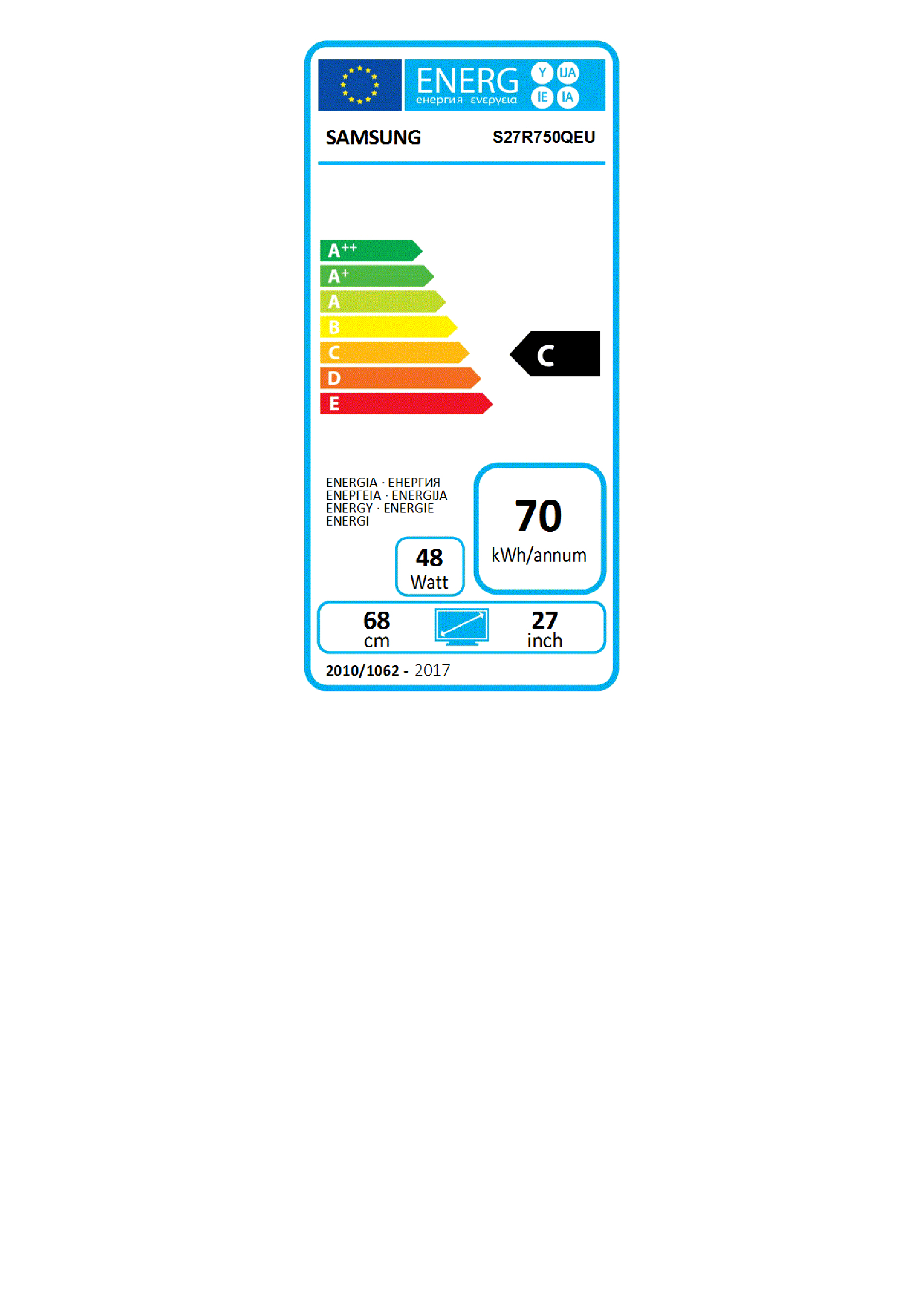
- Product information sheetEU Product Fiche ↗
Specifications
Key specifications
- Display diagonalSize of the display for this product, measured diagonally, usually in inches.
- 68.6 cm (27")
- Display resolutionThe number of distinct pixels in each dimension that can be displayed. It is usually quoted as width × height, with the units in pixels: for example, "1024 × 768" means the width is 1024 pixels and the height is 768 pixels. The higher the number of pixels, the sharper the image.
- 2560 x 1440 pixels
- Screen shapeDescribes the physical curvature of the display panel, such as whether it is flat or curved.
- Flat
- Maximum refresh rateThe highest number of times per second the image is updated, measured in hertz (Hz).
- 144 Hz
- Response timeThe response time is the time difference between the moment that a source (for example a video card) sends a signal and that equipment (for example a monitor) receives or display the signal. (Used abbreviations: R/F = Rise and Fall.)
- 4 ms
- Display brightness (typical)Display brightness, measured by its Luminance, presented as a figure in nits. Typical brightness ratings for monitors range from 250 to 350 nits with a target value of between 80 to 120 nits being suitable for most displays in a normal viewing environment.
- 250 cd/m²
- HDMI ports quantityThe number of sockets (ports) for HDMI connections. HDMI (High-Definition Multimedia Interface) is a compact audio/video interface for transferring uncompressed video data and compressed/uncompressed digital audio data from a HDMI-compliant device ("the source device") to a compatible computer monitor, video projector, digital television, or digital audio device. HDMI is a digital replacement for…
- 1
- Height adjustmentThe part of the device that can be adjusted to change the height.
- Yes
- Tilt adjustmentThe tilt, which means the angle at which the device is pointing (up or down), can be changed.
- Yes
- Product colourThe colour e.g. red, blue, green, black, white.
- Black
Show all 45 specificationsShow key specifications only
Ports & interfaces
- Built-in USB hubWhether or not the device features a USB hub to connect more than one other device via USB.
- No
- HDMIHDMI (High-Definition Multimedia Interface) is a compact audio/video interface for transferring uncompressed video data and compressed/uncompressed digital audio data from a HDMI-compliant device ("the source device") to a compatible computer monitor, video projector, digital television, or digital audio device. HDMI is a digital replacement for existing analog video standards.
- Yes
- HDMI ports quantityThe number of sockets (ports) for HDMI connections. HDMI (High-Definition Multimedia Interface) is a compact audio/video interface for transferring uncompressed video data and compressed/uncompressed digital audio data from a HDMI-compliant device ("the source device") to a compatible computer monitor, video projector, digital television, or digital audio device. HDMI is a digital replacement for…
- 1
- HDMI versionThe specific release version of the High-Definition Multimedia Interface standard supported by the device (e.g. 1.3 or 2.0).
- 2.0
Design
- Market positioningUnder which category can the device be positioned in the market, e.g. camera phone.
- Business
- Product colourThe colour e.g. red, blue, green, black, white.
- Black
Audio
- Built-in speaker(s)The device contains speaker(s) to produce sound.
- No
Display
- Display diagonalSize of the display for this product, measured diagonally, usually in inches.
- 68.6 cm (27")
- Display resolutionThe number of distinct pixels in each dimension that can be displayed. It is usually quoted as width × height, with the units in pixels: for example, "1024 × 768" means the width is 1024 pixels and the height is 768 pixels. The higher the number of pixels, the sharper the image.
- 2560 x 1440 pixels
- Native aspect ratioThe aspect ratio is the ratio of the width of an image to its height. The native aspect ratio is the one which the projector/display is particularly designed for. Images shown in native aspect ratio will utilize the entire resolution of the display and achieve maximum brightness. Images shown in other than native aspect ratio will always have less resolution and less brightness than images shown…
- 16:9
- TouchscreenA screen of a laptop, smartphone, etc., that responds to touch so you can control the interface using your fingers.
- No
- HD typeType of supported High Definition (e.g. Full HD, 4K Ultra HD).
- Quad HD
- Display brightness (typical)Display brightness, measured by its Luminance, presented as a figure in nits. Typical brightness ratings for monitors range from 250 to 350 nits with a target value of between 80 to 120 nits being suitable for most displays in a normal viewing environment.
- 250 cd/m²
- Response timeThe response time is the time difference between the moment that a source (for example a video card) sends a signal and that equipment (for example a monitor) receives or display the signal. (Used abbreviations: R/F = Rise and Fall.)
- 4 ms
- Screen shapeDescribes the physical curvature of the display panel, such as whether it is flat or curved.
- Flat
- Supported graphics resolutionsThe graphic resolutions that can be displayed by the device. The graphic resolution describes the width and height dimensions of a display, such as a computer monitor, measured in pixels.
- 2560 x 1440
- Aspect ratioThe aspect ratio is the ratio of the width of a shape to its height. For example, 4:3 is common for standard displays and 16:9 is the ratio for Widescreen TV.
- 16:9
- Contrast ratio (typical)The difference in light intensity between the brightest white and the darkest black.
- 3000:1
- Dynamic contrast ratio marketing nameThe proprietary brand name used by the manufacturer to describe the technology that automatically adjusts the backlight to improve the contrast ratio (e.g., ASUS Smart Contrast Ratio).
- Mega Contrast
- Maximum refresh rateThe highest number of times per second the image is updated, measured in hertz (Hz).
- 144 Hz
- Viewing angle, horizontalMaximum horizontal angle at which a display can be viewed with acceptable visual performance.
- 178°
- Viewing angle, verticalMaximum vertical angle at which a display can be viewed with acceptable visual performance.
- 178°
- Display number of coloursThe total number of distinct colours that the device is capable of displaying (e.g. 1.07 billion colours).
- 1.073 billion colours
- Viewable size, horizontalThe viewable size is often somewhat smaller than the actual size of a monitor, because there is a border around the image.
- 59.7 cm
- Viewable size, verticalThe height of the screen area that can actually display an image, measured in millimetres or inches.
- 33.6 cm
- Colour gamut standardThe specific color space standard the device is designed to reproduce, such as Adobe RGB or DCI-P3.
- sRGB
- Colour gamutThe range of colours that the display can accurately reproduce, typically expressed as a percentage of a standard colour space (e.g. sRGB or Adobe RGB).
- 72%
- sRGB coverage (typical)The percentage of the sRGB color space that the device is capable of reproducing.
- 100%
Packaging content
- Cables includedSpecifies the types and quantities of connection cables provided with the product (e.g., 3.5 mm to 3.5 mm or SATA).
- HDMI
- Quick start guideInstructions, either online, as a computer program or in paper form, to allow you to set up and start using the product quickly.
- Yes
Weight & dimensions
- Width (with stand)The total horizontal measurement of the product when the supporting stand is attached, measured in millimetres.
- 614.8 mm
- Depth (with stand)The measurement of the product from front to back when any supporting accessory or base is attached, expressed in millimetres or centimetres.
- 115.5 mm
- Height (with stand)The total vertical measurement of the product including its base or support structure, expressed in millimetres or centimetres.
- 730.3 mm
- Weight (with stand)The total mass of the unit including its supporting base, measured in kilograms or grams.
- 5.8 kg
Operational conditions
- Operating temperature (T-T)The minimum and maximum temperatures at which the product can be safely operated.
- 10 - 40 °C
- Operating relative humidity (H-H)The range of relative humidity, expressed as a percentage, within which the device can function correctly without damage or performance loss.
- 10 - 80%
Power
- Energy efficiency class (SDR)The energy efficiency rating of the device when operating in Standard Dynamic Range (SDR) mode, categorized from A to G.
- C
- Energy consumption (SDR) per 1000 hoursThe amount of electric energy consumed by the device during standard dynamic range (SDR) operation over a period of 1000 hours, measured in kilowatt-hours (kWh).
- 70 kWh
- Power consumption (typical)Amount of power consumed by this model, often expressed in watts (W). Typical values that manufacturers give are power consumption when off, standby/suspended mode, typical use, maximum usage.
- 48 W
- AC input voltageThe voltage of the AC electricity that is inputted into the product.
- 100 - 240 V
- Energy efficiency scaleThe range of energy efficiency classes used to rate the product's power consumption, such as A to G.
- A++ to E
Ergonomics
- Height adjustmentThe part of the device that can be adjusted to change the height.
- Yes
- Adjustable height (max)The maximum distance the unit can be raised vertically from its lowest position, measured in millimetres.
- 21.4 cm
- Tilt adjustmentThe tilt, which means the angle at which the device is pointing (up or down), can be changed.
- Yes
- Tilt angle rangeThe minimum and maximum angles at which the unit can be tilted, typically expressed in degrees.
- -5 - 20°
Database Right data-sheet 2026 Icecat. All rights reserved. Provided “as is”, without warranty — check details with the store before buying.
Expert reviews
- 80
techadvisor.co.uk2019
We'd contest that this screen is 10% about the panel and 90% about the support arm. As you might reasonably expect with one of the largest manufacturers of thin display panels, the resolution and colour gamut of this one is top notch. With the possible ex...
Read the review at techadvisor.co.uk ↗ - 80
trustedreviews.com2019
The Samsung Space Monitor S32R750U has a marvelous space-saving design, which is a real drawing point for those who can't stand clutter. It's important to acknowledge this specific model is a lifestyle and office monitor though, as it doesn't quite have t...
- +
- Space-efficient design, Flexible mount is sturdy and easy to set up, Incredible contrast, Punchy picture
- −
- Lack of ports, Disappointing Delta E score means this isn't suited for creatives
- 60
expertreviews.co.uk2019
Samsung's attempt to rekindle interest in space-saving monitors is commendable and it excels at that particular task. It's quite simply the best-looking solution for those wanting to declutter their desks.Other than its innovative design, however, I'm not...
- +
- Stand reduces clutter on your desk, Unobtrusive design, Runs up to UHD resolution
- −
- Sub-par colour accuracy, Clamp style stand won't fit all desks, Expensive
Price history (90 days, best daily price)
Price history is still being collected for this product — check back soon.
Alternative models

Samsung LC49RG90
computer monitor 124 cm (48.8") 5120 x 1440 pixels UltraWide Dual Quad HD QLED Grey

Samsung C32JG53FDU
computer monitor 80 cm (31.5") 1920 x 1080 pixels Full HD LED White

Samsung S22F352
computer monitor 54.6 cm (21.5") 1920 x 1080 pixels Full HD LED Black

Samsung LS27F350FHLXZS
computer monitor 68.6 cm (27") 1920 x 1080 pixels Full HD LED Black

Samsung LC24RG50FQU
computer monitor 59.7 cm (23.5") 1920 x 1080 pixels Full HD Black

Samsung CFG73
computer monitor 68.6 cm (27") 1920 x 1080 pixels Full HD QLED Black