
Samsung LS22E390HS computer monitor 54.6 cm (21.5") 1920 x 1080 pixels Full HD LED Black
- Screen: 54.6 cm (21.5"), 1920 x 1080 pixels, PLS, Flat
- Refresh rate: 4 ms response time
- Brightness: 250 cd/m²
- Ports: 1 × HDMI
- Stand: tilt
- Colour: Black
Where to buy
We're not tracking prices for this product yet. Check current prices directly at:
We may earn a commission when you buy through links on this page — at no extra cost to you. Learn more
About this product
Define your space with a stylish new design accentuated by slim bezels and soft blue light
New Slim ToC: With a beautiful new semi-transparent blue finish, Samsungs innovative Touch of Colour technology optimizes your living space and completely sets it apart.
Slim Narrow Bezel: The bezels on all four sides are super slim, especially the one running along the bottom. Not only does it deliver a clean and modern look, it naturally draws your eyes to the screen.
T-Shaped Stand: Using Touch of Colour for the T-shape stand completes the ensemble with a refined, minimal finish.
The Super Narrow Bezel is not available on the 21.5 inch model.
Brilliant picture quality for the optimal viewing experience
Wide Viewing Angle: Delivers a 178° wide viewing angle horizontally and vertically for an optimal and comfortable viewing experience from any angle.
FHD: Provides clean and crisp picture quality in 1920x1080 resolution.
Easy on the eyes for a more comfortable viewing experience
Eye Saver Mode: Unlike other colours emitted from screens, blue light wavelengths have a more stimulating effect on the retina, causing eye fatigue.
Eye Saver Mode optimizes your viewing comfort by smartly reducing blue light emissions at the touch of a button.
Flicker Free: Flicker Free technology reduces screen flickering for a more comfortable viewing experience.
Save energy and the environment with this eco-friendly monitor
Eco Saving Plus: Eco-saving technology reduces screen brightness for increased energy efficiency. In addition to the two standard manual settings (Minimum at 25% and Maximum at 50%),
there is now a brand new Auto Setting that reduces energy up about 10%, based on the luminescence of the screens black sections.
The screen brightness transitions fluidly while simultaneously saving energy.
PVC Free: Monitor mechanisms and circuits are constructed without PVC making for an eco-friendly device, lessening environmental impact.
Based on internal testing
Some cabling contains PVC
Documents
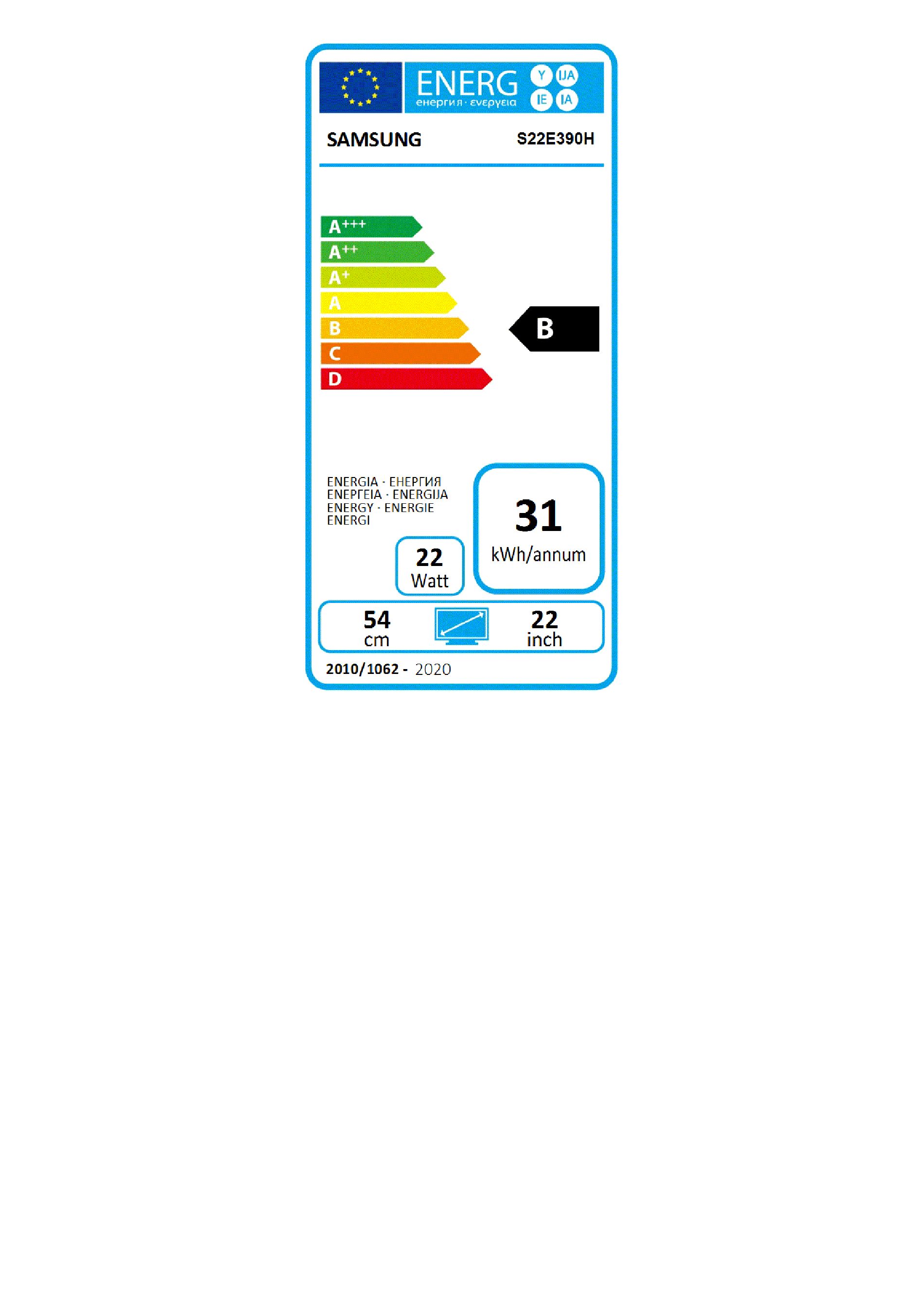
- Product information sheetEU Product Fiche ↗
Specifications
Key specifications
- Display diagonalSize of the display for this product, measured diagonally, usually in inches.
- 54.6 cm (21.5")
- Display resolutionThe number of distinct pixels in each dimension that can be displayed. It is usually quoted as width × height, with the units in pixels: for example, "1024 × 768" means the width is 1024 pixels and the height is 768 pixels. The higher the number of pixels, the sharper the image.
- 1920 x 1080 pixels
- Panel typeThe technology used to manufacture the panel, such as AMOLED or AH-IPS.
- PLS
- Screen shapeDescribes the physical curvature of the display panel, such as whether it is flat or curved.
- Flat
- Response timeThe response time is the time difference between the moment that a source (for example a video card) sends a signal and that equipment (for example a monitor) receives or display the signal. (Used abbreviations: R/F = Rise and Fall.)
- 4 ms
- Display brightness (typical)Display brightness, measured by its Luminance, presented as a figure in nits. Typical brightness ratings for monitors range from 250 to 350 nits with a target value of between 80 to 120 nits being suitable for most displays in a normal viewing environment.
- 250 cd/m²
- HDMI ports quantityThe number of sockets (ports) for HDMI connections. HDMI (High-Definition Multimedia Interface) is a compact audio/video interface for transferring uncompressed video data and compressed/uncompressed digital audio data from a HDMI-compliant device ("the source device") to a compatible computer monitor, video projector, digital television, or digital audio device. HDMI is a digital replacement for…
- 1
- Tilt adjustmentThe tilt, which means the angle at which the device is pointing (up or down), can be changed.
- Yes
- Product colourThe colour e.g. red, blue, green, black, white.
- Black
Show all 70 specificationsShow key specifications only
Design
- Market positioningUnder which category can the device be positioned in the market, e.g. camera phone.
- Business
- Product colourThe colour e.g. red, blue, green, black, white.
- Black
Display
- Display diagonalSize of the display for this product, measured diagonally, usually in inches.
- 54.6 cm (21.5")
- Display resolutionThe number of distinct pixels in each dimension that can be displayed. It is usually quoted as width × height, with the units in pixels: for example, "1024 × 768" means the width is 1024 pixels and the height is 768 pixels. The higher the number of pixels, the sharper the image.
- 1920 x 1080 pixels
- Native aspect ratioThe aspect ratio is the ratio of the width of an image to its height. The native aspect ratio is the one which the projector/display is particularly designed for. Images shown in native aspect ratio will utilize the entire resolution of the display and achieve maximum brightness. Images shown in other than native aspect ratio will always have less resolution and less brightness than images shown…
- 16:9
- Display technologyThe technology used in the display e.g. plasma, LED.
- LED
- TouchscreenA screen of a laptop, smartphone, etc., that responds to touch so you can control the interface using your fingers.
- No
- HD typeType of supported High Definition (e.g. Full HD, 4K Ultra HD).
- Full HD
- Panel typeThe technology used to manufacture the panel, such as AMOLED or AH-IPS.
- PLS
- Display brightness (typical)Display brightness, measured by its Luminance, presented as a figure in nits. Typical brightness ratings for monitors range from 250 to 350 nits with a target value of between 80 to 120 nits being suitable for most displays in a normal viewing environment.
- 250 cd/m²
- Display brightness (min)The minimum luminance level of the screen, measured in candelas per square metre (cd/m²).
- 200 cd/m²
- Response timeThe response time is the time difference between the moment that a source (for example a video card) sends a signal and that equipment (for example a monitor) receives or display the signal. (Used abbreviations: R/F = Rise and Fall.)
- 4 ms
- Response time measurement typeThe method used to measure the time it takes for a pixel to change colors, such as GTG (Gray to Gray) or BwB (Black-white-Black).
- GTG (Gray to Gray)
- Screen shapeDescribes the physical curvature of the display panel, such as whether it is flat or curved.
- Flat
- Contrast ratio (typical)The difference in light intensity between the brightest white and the darkest black.
- 1000:1
- Dynamic contrast ratio marketing nameThe proprietary brand name used by the manufacturer to describe the technology that automatically adjusts the backlight to improve the contrast ratio (e.g., ASUS Smart Contrast Ratio).
- Mega DCR
- Viewing angle, horizontalMaximum horizontal angle at which a display can be viewed with acceptable visual performance.
- 178°
- Viewing angle, verticalMaximum vertical angle at which a display can be viewed with acceptable visual performance.
- 178°
- Display number of coloursThe total number of distinct colours that the device is capable of displaying (e.g. 1.07 billion colours).
- 16.7 million colours
- Pixel pitchThis is the parameter of a picture tube, which specifies the shortest distance between two dots of the same colour. The principle is: the smaller the dot pitch, the better sharpness of image.
- 0.24825 x 0.24825 mm
- Viewable size, horizontalThe viewable size is often somewhat smaller than the actual size of a monitor, because there is a border around the image.
- 47.7 cm
- Viewable size, verticalThe height of the screen area that can actually display an image, measured in millimetres or inches.
- 26.8 cm
- Display diagonal (metric)This is the size of the display screen, measured diagonally.
- 54 cm
- Peak luminance ratioThe ratio between the maximum brightness of the product and its typical brightness, expressed as a percentage (%).
- 98%
Brand-specific features
- Brand specific technologiesProprietary features or technical innovations developed by the manufacturer to enhance performance or functionality (e.g. AI Vision or 3DWave).
- Eye Saver, MagicBright, MagicUpscale
Other features
- Eco Saving PlusIndicates whether the device features an energy-saving mode designed to reduce power consumption during operation.
- Yes
Certificates
- CertificationSpecifies the official standards, safety approvals, or regulatory certifications the product has received.
- Windows 10
Sustainability
- Doesn't containSpecifies the harmful or restricted substances that are not present in the product (e.g. Acetone, Alcohol, or Aluminium).
- PVC
Packaging content
- Cables includedSpecifies the types and quantities of connection cables provided with the product (e.g., 3.5 mm to 3.5 mm or SATA).
- VGA
- Quick start guideInstructions, either online, as a computer program or in paper form, to allow you to set up and start using the product quickly.
- Yes
- Installation CDIndicates whether the product is supplied with a CD containing the necessary installation software and drivers.
- Yes
Weight & dimensions
- Width (with stand)The total horizontal measurement of the product when the supporting stand is attached, measured in millimetres.
- 519.1 mm
- Depth (with stand)The measurement of the product from front to back when any supporting accessory or base is attached, expressed in millimetres or centimetres.
- 167.5 mm
- Height (with stand)The total vertical measurement of the product including its base or support structure, expressed in millimetres or centimetres.
- 391.7 mm
- Weight (with stand)The total mass of the unit including its supporting base, measured in kilograms or grams.
- 3.55 kg
- Width (without stand)The horizontal measurement of the device excluding the base or support structure, expressed in millimetres.
- 519.1 mm
- Depth (without stand)The measurement of the product from front to back without its base or support, typically expressed in millimetres or centimetres.
- 70.1 mm
- Height (without stand)The vertical measurement of the device when the stand is removed, measured in mm.
- 327.7 mm
- Weight (without stand)The mass of the device excluding the support base, measured in g.
- 3.05 kg
Operational conditions
- Operating temperature (T-T)The minimum and maximum temperatures at which the product can be safely operated.
- 10 - 40 °C
- Operating relative humidity (H-H)The range of relative humidity, expressed as a percentage, within which the device can function correctly without damage or performance loss.
- 10 - 80%
- Non-operating relative humidity (non-condensing)Range of relative humidity (non-condensing) in which a non-operating product can be stored.
- 10 - 80%
Power
- Energy efficiency class (SDR)The energy efficiency rating of the device when operating in Standard Dynamic Range (SDR) mode, categorized from A to G.
- B
- Power consumption (typical)Amount of power consumed by this model, often expressed in watts (W). Typical values that manufacturers give are power consumption when off, standby/suspended mode, typical use, maximum usage.
- 21 W
- Power consumption (standby)The amount of electricity that is consumed when the product is on standby.
- 0.3 W
- Power consumption (max)The maximum amount of power used by the device.
- 25 W
- Power consumption (off)The amount of electrical energy consumed by the device when it is switched off, measured in watts.
- 0.3 W
- AC input voltageThe voltage of the AC electricity that is inputted into the product.
- 100 - 240 V
- Power supply typeThe type of power supply which this product uses.
- External
- Energy efficiency scaleThe range of energy efficiency classes used to rate the product's power consumption, such as A to G.
- A+++ to D
- Annual energy consumptionThe amount of energy used by the product per year.
- 31 kWh
- DC-in jackThe socket/plug where the DC electricity supply connects to the device.
- Yes
Ergonomics
- Tilt adjustmentThe tilt, which means the angle at which the device is pointing (up or down), can be changed.
- Yes
- Tilt angle rangeThe minimum and maximum angles at which the unit can be tilted, typically expressed in degrees.
- -2 - 15°
Ports & interfaces
- VGA (D-Sub) ports quantityNumber of VGA (D-Sub) ports (connecting interfaces) in the device. The VGA (D-Sub) connector is a 15 pin connector between a computer and a monitor. It was first introduced in 1987 by IBM.
- 1
- DVI portDigital Visual Interface (DVI) is a video display interface to connect a video source to a display device, such as a computer monitor.
- No
- HDMIHDMI (High-Definition Multimedia Interface) is a compact audio/video interface for transferring uncompressed video data and compressed/uncompressed digital audio data from a HDMI-compliant device ("the source device") to a compatible computer monitor, video projector, digital television, or digital audio device. HDMI is a digital replacement for existing analog video standards.
- Yes
- HDMI ports quantityThe number of sockets (ports) for HDMI connections. HDMI (High-Definition Multimedia Interface) is a compact audio/video interface for transferring uncompressed video data and compressed/uncompressed digital audio data from a HDMI-compliant device ("the source device") to a compatible computer monitor, video projector, digital television, or digital audio device. HDMI is a digital replacement for…
- 1
- Audio inputThe type of audio input that the device requires, and the connection needed.
- No
- Headphone outThe socket for connecting headphones to the device.
- Yes
- Headphone outputsNumber of sockets /ports where headphones are connected.
- 1
Performance
- Flicker-free technologyIndicates whether the device employs technology to reduce or eliminate screen flickering to decrease eye strain during prolonged use.
- Yes
- Game modeIndicates whether the device has a dedicated preset that optimizes performance, such as reducing input lag or enhancing contrast, for gaming.
- Yes
Smart TV
- Smart modesPredefined performance profiles that automatically adjust settings for specific use cases (e.g., Cinema, Animation, or CAD/CAM).
- Game
Features
- Windows operating systems supportedWindows vesions wich can be used with the device.
- Yes
Software
- Mac operating systems supportedMac operating systems e.g. OS X can be used with the device.
- Yes
Packaging data
- Package widthThe distance from one side of the packaging to the other.
- 583 mm
- Package depthThe distance from the front to the back of the packaging.
- 391 mm
- Package heightThe distance from the top to the bottom of the packaging.
- 140 mm
- Package weightWeight of the packaged product.
- 4.75 kg
Database Right data-sheet 2026 Icecat. All rights reserved. Provided “as is”, without warranty — check details with the store before buying.
Price history (90 days, best daily price)
Price history is still being collected for this product — check back soon.
Alternative models

Samsung S19E450BW
computer monitor 48.3 cm (19") 1440 x 900 pixels Full HD LED Black

Samsung LS27E391HS
computer monitor 68.6 cm (27") 1920 x 1080 pixels Full HD LCD Blue, White

Samsung LS24E65UDW
computer monitor 61 cm (24") 1920 x 1200 pixels WUXGA LED Black

Samsung LS32E590CS
computer monitor 81.3 cm (32") 1920 x 1080 pixels Full HD LED Black

Samsung LS23E45KBS
computer monitor 58.4 cm (23") 1920 x 1080 pixels Full HD LED Black

Samsung LS27E510CS
computer monitor 68.6 cm (27") 1920 x 1080 pixels Full HD Black