
Samsung C34F791WQU computer monitor 86.4 cm (34") 3440 x 1440 pixels UltraWide Quad HD LED Grey
- Screen: 86.4 cm (34"), 3440 x 1440 pixels, VA, Curved
- Refresh rate: 100 Hz, 4 ms response time
- Brightness: 250 cd/m²
- Adaptive sync: AMD FreeSync
- Ports: 2 × HDMI, 1 × DisplayPort
- Stand: height-adjustable, tilt
- Extras: speakers, USB hub
- Colour: Grey
Where to buy
We're not tracking prices for this product yet. Check current prices directly at:
We may earn a commission when you buy through links on this page — at no extra cost to you. Learn more
About this product
Multitask to the max on a single monitor
Forget about the inconvenience of dual monitors — with the 21:9 ultra-wide screen you can experience truly seamless multitasking on a single monitor. For total flexibility, Samsung’s Picture-by-Picture (PBP) function lets you connect two input sources using HDMI and DP while maintaining the original image quality. And with Picture-in-Picture (PIP) you can resize the second image to cover up to 25% of the screen and position it anywhere.
Curved like your eyes for proven viewing comfort
Samsung’s 1500R curved screen, with the deepest curvature of all its competitors, is precision engineered to match the natural curvature of your eyes more closely than any other monitor. In a study conducted by the Department of Ophthalmology at Seoul National University Hospital, the deeper curve resulted in reduced eyestrain among viewers compared to flat-screens or other less curved monitors. With Samsung Flicker Free technology and Eye Saver Mode reducing fatigue-inducing blue light emissions, you simply can’t get a more comfortable viewing experience.
Ultra WQHD for incredible image detail and a wider workspace
Ultra WQHD enables a screen resolution of 3440x1440 — 2.5 times the pixel density of Full HD — that delivers razor-sharp images. The greater pixel density also creates a wider screen workspace, so you see more content at once without having to scroll and zoom excessively when surfing the web or viewing large files.
More accurate and life-like colours with Quantum Dot Technology
Supporting up to 125% sRGB colour space, Quantum Dot technology delivers not only more colours than conventional monitors, but colours that are brighter, crisper, and more natural — particularly reds and greens. And because every monitor is factory calibrated, you can be sure you always see the most accurate and life-like images.
An immersive viewing experience like no other
The 34” ultra-wide curved monitor gives you an immersive widescreen viewing experience like no other monitor. With its deeper curve enveloping your field of vision like an iMax theater screen with the deepest curvature amongst all other competitive products, the 1500R screen lets you enjoy the full cinematic beauty of movies and puts you right at the heart of all gaming action.
Best in class 3000:1 contrast ratio and minimal light leakage
Samsung’s advanced VA panel technology minimises light leakage across the entire screen - right up to the corners - and delivers a best-in-class 3000:1 contrast ratio for deep blacks. And with factory-calibrated gamma values and 6500K white balance, you can be sure of lifelike colours from black to white.
Flawless game play
Packed with features to satisfy the most dedicated gamers, this premium curved monitor boasts a 100hz screen refresh rate for minimal stutter, a 4ms response time for blur-free action scenes, and AMD Freesync for silky smooth gameplay. And with Game Mode letting you instantly optimise screen brightness and contrast ratios, you’ll also enjoy spotting your enemies faster in any kind of game.
Unparalleled sophisticated design
Effortlessly combining function and style, the 34” ultra-wide curved screen is bezeless on three sides enhancing its classy figure and seamless viewing. The glossy white rear casing, curving horizontally and vertically, incorporates a hatch to keep cables neatly stowed. And the anti-glare panel is supported on a functional swing-and-tilt, height adjustable stand, which allows precise positioning for enhanced viewing comfort.
Built-In Speakers and Multiple Ports For All Your Entertainment Needs
Dual 7-watt speakers embedded into the display let you enjoy movies, games, and online content without cluttering your desktop with auxiliary speakers or cables. And 2 HDMI, DP, and 2 USB ports provide a high-performance multiple connection interface that lets you hook up PCs, game consoles, additional monitors, and other devices with ease.
Videos & documents
Specifications
Key specifications
- Display diagonalSize of the display for this product, measured diagonally, usually in inches.
- 86.4 cm (34")
- Display resolutionThe number of distinct pixels in each dimension that can be displayed. It is usually quoted as width × height, with the units in pixels: for example, "1024 × 768" means the width is 1024 pixels and the height is 768 pixels. The higher the number of pixels, the sharper the image.
- 3440 x 1440 pixels
- Panel typeThe technology used to manufacture the panel, such as AMOLED or AH-IPS.
- VA
- Screen shapeDescribes the physical curvature of the display panel, such as whether it is flat or curved.
- Curved
- Maximum refresh rateThe highest number of times per second the image is updated, measured in hertz (Hz).
- 100 Hz
- Response timeThe response time is the time difference between the moment that a source (for example a video card) sends a signal and that equipment (for example a monitor) receives or display the signal. (Used abbreviations: R/F = Rise and Fall.)
- 4 ms
- Display brightness (typical)Display brightness, measured by its Luminance, presented as a figure in nits. Typical brightness ratings for monitors range from 250 to 350 nits with a target value of between 80 to 120 nits being suitable for most displays in a normal viewing environment.
- 250 cd/m²
- AMD FreeSyncThe product includes AMD Freesync Technology for the dynamic synchronization of the graphic card and the monitor in order to avoid screen tearing.
- Yes
- HDMI ports quantityThe number of sockets (ports) for HDMI connections. HDMI (High-Definition Multimedia Interface) is a compact audio/video interface for transferring uncompressed video data and compressed/uncompressed digital audio data from a HDMI-compliant device ("the source device") to a compatible computer monitor, video projector, digital television, or digital audio device. HDMI is a digital replacement for…
- 2
- DisplayPorts quantityNumber of DisplayPorts. A DisplayPort is a digital display interface developed by the Video Electronics Standards Association (VESA). The interface is primarily used to connect a video source to a display device such as a computer monitor, though it can also be used to carry audio, USB, and other forms of data.
- 1
- Height adjustmentThe part of the device that can be adjusted to change the height.
- Yes
- Tilt adjustmentThe tilt, which means the angle at which the device is pointing (up or down), can be changed.
- Yes
- Built-in speaker(s)The device contains speaker(s) to produce sound.
- Yes
- Built-in USB hubWhether or not the device features a USB hub to connect more than one other device via USB.
- Yes
Show all 79 specificationsShow key specifications only
Ports & interfaces
- Built-in USB hubWhether or not the device features a USB hub to connect more than one other device via USB.
- Yes
- USB Type-A downstream ports quantityThe number of USB Type-A ports available for connecting peripheral devices to the unit.
- 2
- DVI portDigital Visual Interface (DVI) is a video display interface to connect a video source to a display device, such as a computer monitor.
- No
- HDMI ports quantityThe number of sockets (ports) for HDMI connections. HDMI (High-Definition Multimedia Interface) is a compact audio/video interface for transferring uncompressed video data and compressed/uncompressed digital audio data from a HDMI-compliant device ("the source device") to a compatible computer monitor, video projector, digital television, or digital audio device. HDMI is a digital replacement for…
- 2
- DisplayPorts quantityNumber of DisplayPorts. A DisplayPort is a digital display interface developed by the Video Electronics Standards Association (VESA). The interface is primarily used to connect a video source to a display device such as a computer monitor, though it can also be used to carry audio, USB, and other forms of data.
- 1
- Headphone outputsNumber of sockets /ports where headphones are connected.
- 1
- Headphone connectivityHow headphones connect to a device e.g. wirelessly or via a cable and connector.
- 3.5 mm
Design
- Product colourThe colour e.g. red, blue, green, black, white.
- Grey
- Stand typeThe design or mechanism of the support structure used to hold the unit in place (e.g., articulating or center).
- HAS stand
Audio
- Built-in speaker(s)The device contains speaker(s) to produce sound.
- Yes
Multimedia
- Built-in cameraThe product has an integrated camera.
- No
Performance
- AMD FreeSyncThe product includes AMD Freesync Technology for the dynamic synchronization of the graphic card and the monitor in order to avoid screen tearing.
- Yes
- VESA Adaptive Sync supportIndicates whether the device supports the VESA Adaptive-Sync standard to synchronize the refresh rate with the GPU to reduce screen tearing.
- Yes
- Game modeIndicates whether the device has a dedicated preset that optimizes performance, such as reducing input lag or enhancing contrast, for gaming.
- Yes
Display
- Display diagonalSize of the display for this product, measured diagonally, usually in inches.
- 86.4 cm (34")
- Display resolutionThe number of distinct pixels in each dimension that can be displayed. It is usually quoted as width × height, with the units in pixels: for example, "1024 × 768" means the width is 1024 pixels and the height is 768 pixels. The higher the number of pixels, the sharper the image.
- 3440 x 1440 pixels
- Native aspect ratioThe aspect ratio is the ratio of the width of an image to its height. The native aspect ratio is the one which the projector/display is particularly designed for. Images shown in native aspect ratio will utilize the entire resolution of the display and achieve maximum brightness. Images shown in other than native aspect ratio will always have less resolution and less brightness than images shown…
- 21:9
- Display technologyThe technology used in the display e.g. plasma, LED.
- LED
- TouchscreenA screen of a laptop, smartphone, etc., that responds to touch so you can control the interface using your fingers.
- No
- HD typeType of supported High Definition (e.g. Full HD, 4K Ultra HD).
- UltraWide Quad HD
- Panel typeThe technology used to manufacture the panel, such as AMOLED or AH-IPS.
- VA
- Display brightness (typical)Display brightness, measured by its Luminance, presented as a figure in nits. Typical brightness ratings for monitors range from 250 to 350 nits with a target value of between 80 to 120 nits being suitable for most displays in a normal viewing environment.
- 250 cd/m²
- Display brightness (min)The minimum luminance level of the screen, measured in candelas per square metre (cd/m²).
- 250 cd/m²
- Response timeThe response time is the time difference between the moment that a source (for example a video card) sends a signal and that equipment (for example a monitor) receives or display the signal. (Used abbreviations: R/F = Rise and Fall.)
- 4 ms
- Screen shapeDescribes the physical curvature of the display panel, such as whether it is flat or curved.
- Curved
- Screen curvature ratingThe radius of the curve of the screen, expressed in millimetres (e.g. 1500R), where a smaller number indicates a more pronounced curve.
- 1500R
- Supported graphics resolutionsThe graphic resolutions that can be displayed by the device. The graphic resolution describes the width and height dimensions of a display, such as a computer monitor, measured in pixels.
- 3440 x 1440
- Aspect ratioThe aspect ratio is the ratio of the width of a shape to its height. For example, 4:3 is common for standard displays and 16:9 is the ratio for Widescreen TV.
- 21:9
- Contrast ratio (typical)The difference in light intensity between the brightest white and the darkest black.
- 3000:1
- Dynamic contrast ratio marketing nameThe proprietary brand name used by the manufacturer to describe the technology that automatically adjusts the backlight to improve the contrast ratio (e.g., ASUS Smart Contrast Ratio).
- Mega Contrast
- Maximum refresh rateThe highest number of times per second the image is updated, measured in hertz (Hz).
- 100 Hz
- Viewing angle, horizontalMaximum horizontal angle at which a display can be viewed with acceptable visual performance.
- 178°
- Viewing angle, verticalMaximum vertical angle at which a display can be viewed with acceptable visual performance.
- 178°
- Display number of coloursThe total number of distinct colours that the device is capable of displaying (e.g. 1.07 billion colours).
- 16.78 million colours
- Viewable size, horizontalThe viewable size is often somewhat smaller than the actual size of a monitor, because there is a border around the image.
- 79.7 cm
- Viewable size, verticalThe height of the screen area that can actually display an image, measured in millimetres or inches.
- 33.4 cm
- Colour gamutThe range of colours that the display can accurately reproduce, typically expressed as a percentage of a standard colour space (e.g. sRGB or Adobe RGB).
- 88%
- sRGB coverage (typical)The percentage of the sRGB color space that the device is capable of reproducing.
- 125%
- Adobe RGB coverageThe percentage of the Adobe RGB color space that the device is capable of displaying.
- 92%
- Screen curvatureThe radius of the arc formed by the curved panel, measured in mm.
- 150 cm
Thin Client
- Thin client installedThe product includes a thin client, which is a computer or a computer program which depends heavily on some other computer (its server) to fulfill its computational roles. This is different from the traditional fat client, which is a computer designed to take on these roles by itself. The specific roles assumed by the server may vary, from providing data persistence (for example, for diskless nod…
- No
Brand-specific features
- Brand specific technologiesProprietary features or technical innovations developed by the manufacturer to enhance performance or functionality (e.g. AI Vision or 3DWave).
- MagicBright, MagicUpscale
Other features
- sRGB coverage (min)The minimum percentage of the sRGB color space that the device is capable of reproducing, measured in %.
- 120%
- TV tuner integratedDevice has an in-built TV tuner.
- No
- No flickeringIndicates whether the device is equipped with technology to reduce or eliminate the rapid fluctuations in brightness that can cause eye strain.
- Yes
- Samsung Eye Saver ModeIndicates whether the device features a setting to reduce blue light emissions to minimize eye strain during prolonged use.
- Yes
- Supplied AC adapter typeThe type of power supply provided with the product to connect it to an alternating current source (e.g. AC).
- AC
Management features
- ECO modeIndicates whether the device features an energy-saving mode to reduce power consumption during operation.
- Yes
Power
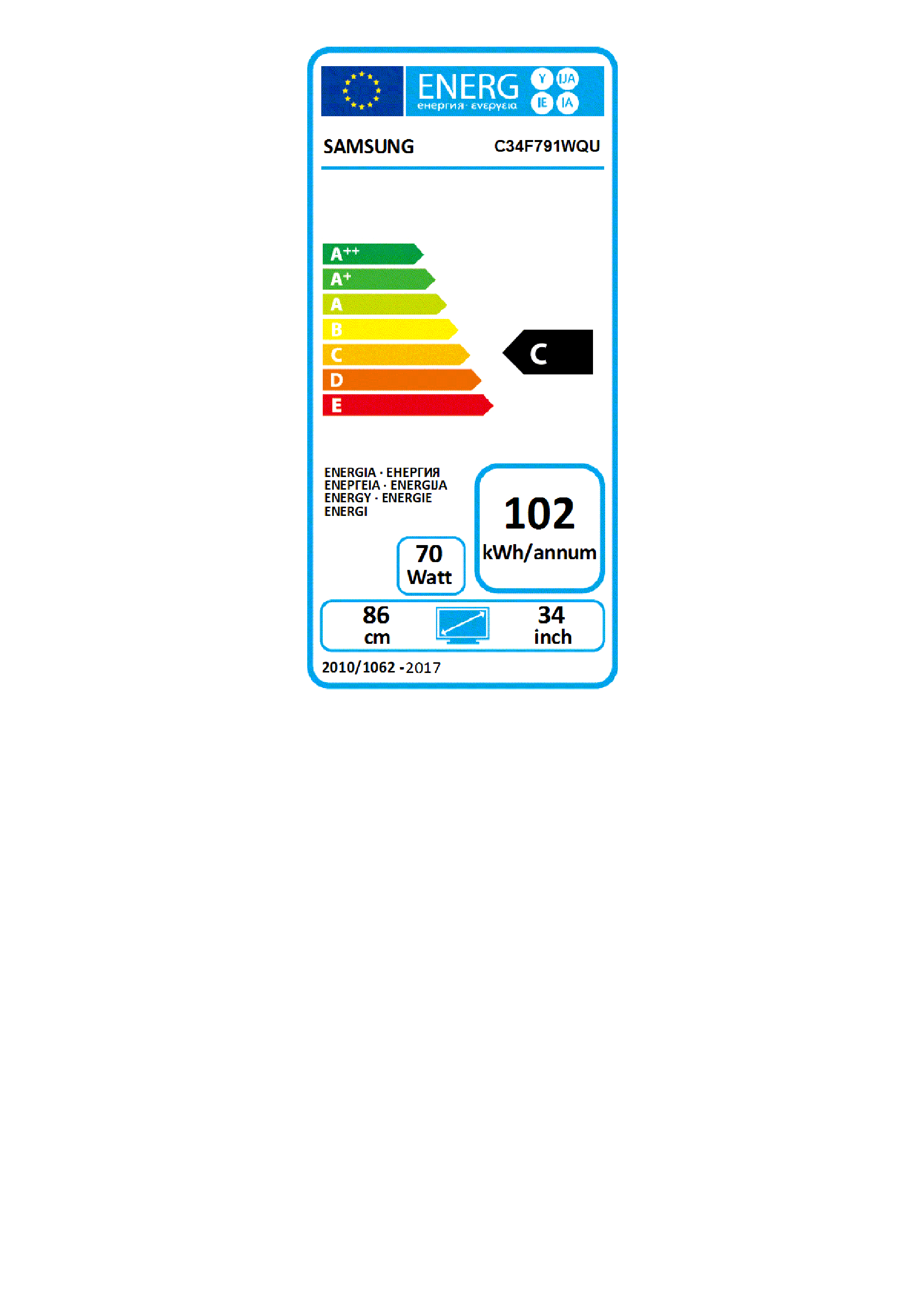
- Energy efficiency class (legacy scale)The energy efficiency rating of the product based on the previous labeling scale (e.g. A+++).
- C
- Power consumption (typical)Amount of power consumed by this model, often expressed in watts (W). Typical values that manufacturers give are power consumption when off, standby/suspended mode, typical use, maximum usage.
- 70 W
- Power consumption (max)The maximum amount of power used by the device.
- 73 W
- Power consumption (off)The amount of electrical energy consumed by the device when it is switched off, measured in watts.
- 0.3 W
- AC input voltageThe voltage of the AC electricity that is inputted into the product.
- 100 - 240 V
- Annual energy consumptionThe amount of energy used by the product per year.
- 102 kWh
Sustainability
- Sustainability certificatesThe environmental or ethical certifications the product has received to verify its sustainability standards (e.g., ASC or ACT Organic).
- ENERGY STAR
Packaging content
- Stand includedIndicates whether a support stand is supplied with the product.
- Yes
- Cables includedSpecifies the types and quantities of connection cables provided with the product (e.g., 3.5 mm to 3.5 mm or SATA).
- DisplayPort, HDMI
- Quick start guideInstructions, either online, as a computer program or in paper form, to allow you to set up and start using the product quickly.
- Yes
- Power cable lengthThe total length of the electrical power cord, typically measured in metres or centimetres.
- 1.5 m
Weight & dimensions
- Width (with stand)The total horizontal measurement of the product when the supporting stand is attached, measured in millimetres.
- 808.7 mm
- Depth (with stand)The measurement of the product from front to back when any supporting accessory or base is attached, expressed in millimetres or centimetres.
- 309.4 mm
- Height (with stand)The total vertical measurement of the product including its base or support structure, expressed in millimetres or centimetres.
- 516 mm
- Weight (with stand)The total mass of the unit including its supporting base, measured in kilograms or grams.
- 7.6 kg
- Width (without stand)The horizontal measurement of the device excluding the base or support structure, expressed in millimetres.
- 808.7 mm
- Depth (without stand)The measurement of the product from front to back without its base or support, typically expressed in millimetres or centimetres.
- 167 mm
- Height (without stand)The vertical measurement of the device when the stand is removed, measured in mm.
- 362.8 mm
- Weight (without stand)The mass of the device excluding the support base, measured in g.
- 6.1 kg
Operational conditions
- Operating temperature (T-T)The minimum and maximum temperatures at which the product can be safely operated.
- 10 - 40 °C
Security
- Cable lock slotHoles on the edge of devices through which a cable lock can be passed, so the device can be locked to a desk etc.
- No
Ergonomics
- Height adjustmentThe part of the device that can be adjusted to change the height.
- Yes
- Adjustable height (max)The maximum distance the unit can be raised vertically from its lowest position, measured in millimetres.
- 10 cm
- Tilt adjustmentThe tilt, which means the angle at which the device is pointing (up or down), can be changed.
- Yes
Features
- Windows operating systems supportedWindows vesions wich can be used with the device.
- Windows 10 Education, Windows 10 Education x64, Windows 10 Enterprise, Windows 10 Enterprise x64, Windows 10 Home, Windows 10 Home x64, Windows 10 Pro, Windows 10 Pro x64
Software
- Mac operating systems supportedMac operating systems e.g. OS X can be used with the device.
- Yes
Projector
- UniformityDefines in percentage the harmonious spread of the projection
- 75%
Packaging data
- Package widthThe distance from one side of the packaging to the other.
- 896 mm
- Package depthThe distance from the front to the back of the packaging.
- 371 mm
- Package heightThe distance from the top to the bottom of the packaging.
- 589 mm
- Package weightWeight of the packaged product.
- 13.6 kg
Database Right data-sheet 2026 Icecat. All rights reserved. Provided “as is”, without warranty — check details with the store before buying.
Expert reviews
- 80
itpro.co.uk2018
The Samsung CF791 might be expensive, but there's a reason behind its price tag. It's simply a fantastic all-rounder. Its dramatically curved 21:9 ultrawide panel provides an immersive, cinematic experience. In short, Samsung has produced yet another g...
- +
- Good colour accuracy and contrast ratio, Dramatic 1500R curvature, Impressive integrated speakers
- −
- Expensive
- –
expertreviews.co.uk2018
Factoring in a budget is always important when it comes to PC monitors, and for that reason, we've picked out a few sub-£200 monitors that'll offer the best value for money.Price when reviewed: £120 - Buy now from AmazonThe Asus VC239H is a brilliant 23.6...
Read the review at expertreviews.co.uk ↗ - 85
kitguru.net2017
The Samsung CF791 is a quality screen, and a commendable first look at Quantum Dot technology. Picture performance is excellent without the need for adjustment. The resolution, size, aspect and curvature make for a viewing experience that is well beyond t...
- +
- Excellent factory-calibrated colour accuracy, Good colour uniformity, 100Hz refresh, FreeSync support, 3,440 x 1,440 resolution, 21:9 wide aspect, 34in curved screen, Decent level of adjustments in OSD
- −
- Relatively expensive, 4ms response rate, USB hub only has two downstream ports, Slightly complicated OSD menu, Kitguru Says: The Samsung CF791 is pricey, but image quality is excellent and there are features to offer both work and entertainment, including...
- 90
digitaltrends.com2017
Yes, you should. It's expensive, but for what you get, it's a good deal. The Samsung CF791 will outlast your current gaming rig, and if you're buying it for a general use PC, it'll last even longer — as a workspace, 21:9 is fairly cutting edge.Samsung has...
- +
- Stellar contrast ratio, Slick design, Luxuriantly large display, Excellent picture quality, Extremely accurate color after calibration
- −
- Video content can be hard to find, Speakers are sub-par
Price history (90 days, best daily price)
Price history is still being collected for this product — check back soon.
Alternative models

Samsung C27F591FDU
computer monitor 68.6 cm (27") 1920 x 1080 pixels Full HD LED Silver, White
Samsung SyncMaster C27H711QEU
computer monitor 68.6 cm (27") 2560 x 1440 pixels Quad HD LED White

Samsung LC32H711QEU
computer monitor 81.3 cm (32") 2560 x 1440 pixels Quad HD LED White

Samsung C32F391FWU
computer monitor 81.3 cm (32") 1920 x 1080 pixels Full HD LED White

Samsung LC34H890WJU
computer monitor 86.4 cm (34") 3440 x 1440 pixels UltraWide Quad HD LED Black

Samsung C27F581FDU
computer monitor 68.6 cm (27") 1920 x 1080 pixels Full HD LED Silver