
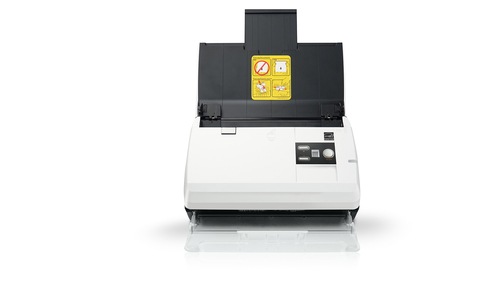
Plustek SmartOffice PS3060U 600 x 600 DPI Black, Silver
- Built-in display
- Maximum scan size: 216 x 5080 mm
- Minimum storage drive space: 2048 MB
- Minimum RAM: 1024 MB
- Minimum processor: PentiumR IV 2.4 GHz
- Windows operating systems supported
Where to buy
We're not tracking prices for this product yet. Check current prices directly at:
We may earn a commission when you buy through links on this page — at no extra cost to you. Learn more
About this product
The Plustek SmartOffice PS3060U is a 30 page per minute, duplex grayscale document scanner. Using ultrasonic misfeed detection, it ensures all of your critical documents are imaged correctly. The SmartOffice PS3060U document scanner is designed to provide the image quality, paper handling and reliability required by the most demanding business users, but at a price point attractive to SMB and SOHO users. The small size and footprint of the PS3060U make it appropriate for small business, office, front desk or portable scanning tasks.
Intelligent Misfeed Function
A redesigned 50 page Automatic Document Feeder with a 4000 page per day duty cycle enable the PS3060U to be used in any application requiring frequent document or rigid card scanning. With the built-in ultrasonic multi-feed detection capability, the SmartOffice PS3060U scanner prevents multi-feeds by checking the thickness of documents and detecting overlapping pages. When a multi-feed is detected, the scan halts and a warning message is displayed. This feature is turned on by default so that it automatically improves the scanning experience and results.
Versatile Document Handling
Combining fast document feeding with the advantage of robust paper handling, the SmartOffice PS3060U is an ideal choice for workgroups who have a demanding workload and limited budget. Plastic and other rigid cards such as ID cards, Drivers Licenses, Membership Cards and Insurance Cards as well as long documents up to 200” are scanned without additional adjustments or additional set up. Mixed batches of documents can also be scanned without sorting, thanks to the class-leading paper handling and image processing of the PS3060U.
Easy to Use
With Plustek’s exclusive software application DocAction, users need only to properly place the document on the scanner and press the “Scan” button. What’s best is that the scanned image can then be sent directly to your desired destination application. The features allow you to access programs such as Excel, Word, and your Email client and OCR and BCR seamlessly, as well as scan directly to searchable PDF, PDF/A, Copy and Save to File.
Exceptional Productivity
The SmartOffice PS3060U features one of the most advanced document feeding and separation system in the industry. Advanced Image Processing automatically detects color documents, adjusts, straightens and crops documents with no operator intervention. There is no need to separate documents by size or type, resulting in higher OCR accuracy and fewer rescans. Industry standard TWAIN and WIA drivers ensure compatibility with thousands of image enabled applications.
Specifications
Key specifications
- Built-in displayA display which is part of the product, so you do not need to attach another display.
- Yes
- Maximum scan sizeThe maximum dimensions of a document that can be digitized in a single pass, measured in mm.
- 216 x 5080 mm
- Minimum storage drive spaceThe minimum hard disk space required to store or run a computer program or operating system.
- 2048 MB
- Minimum RAMThe lowest RAM (memory) required to run a computer program or operating system.
- 1024 MB
- Minimum processorThe lowest speed that the computer processor can run at, or the minimum amount of processing capacity that can be used, for the computer and particular program(s) to function.
- PentiumR IV 2.4 GHz
- Windows operating systems supportedWindows vesions wich can be used with the device.
- Yes
- Mac operating systems supportedMac operating systems e.g. OS X can be used with the device.
- Yes
- Linux operating systems supported8 RT. Linux (9.4, 9.5), Red Hat Enterprise Linux 5.0 (supported with a pre-built package); SUSE Linux (10.3, 11.0, 11, 11.1, 11.2), Fedora (9, 9.0, 10, 10.0, 11.0, 11, 12, 12.0), Ubuntu (8.04, 8.04.1, 8.04.2, 8.10, 9.04, 9.10, 10.04), Debian (5.0, 5.0.1, 5.0.2, 5.0.3)
- Yes
- Power supply typeThe type of power supply which this product uses.
- DC
- Input voltageThe voltage (V) which is required to power the product.
- 24 V
Show all 41 specificationsShow key specifications only
Design
- Built-in displayA display which is part of the product, so you do not need to attach another display.
- Yes
- Product colourThe colour e.g. red, blue, green, black, white.
- Black, Silver
Scanning
- Maximum scan sizeThe maximum dimensions of a document that can be digitized in a single pass, measured in mm.
- 216 x 5080 mm
- Scan driversThe scanning interfaces and software protocols supported by the device for communication with computer applications (e.g. TWAIN, WIA).
- TWAIN
- Optical scanning resolutionHow many pixels a scanner can see. Most commonly, this is measured in dots per inch (dpi).For example, a typical flatbed scanner will use a scanning head with 300 sensors per inch, so it can sample 300 dots per inch (dpi) in one direction. To scan in the other direction, it will move the scanning head along the page, stopping 300 times per inch, so it can scan 300 dpi in the other direction as we…
- 600 x 600 DPI
- Colour scanningIndicates whether this product scans in colour.
- Yes
- Input colour depthColour depth of the input into the product. The colour depth is either the number of bits used to indicate the color of a single pixel, in a bitmapped image or video frame buffer, or the number of bits used for each color component of a single pixel. High-end laptops have 24-bit colour depth.
- 48 bit
- Output colour depthThe number of bits used to represent the colour of a single pixel in the output, which determines the total number of possible colours (e.g., 24 or 32).
- 24 bit
- Input greyscale depthThe number of bits used to represent each pixel in a greyscale image, which determines the number of available shades of grey (e.g. 16).
- 16 bit
- Output greyscale depthThe number of bits used to represent each pixel in a greyscale image, which determines the number of available shades of grey (e.g. 8 or 24).
- 8 bit
- Output monochrome depthThe bit depth of the monochrome output, which determines the number of shades of grey that can be captured, measured in bit (e.g., 8).
- 1 bit
- ADF scan speed (b/w, A4)The number of black and white A4 pages the automatic document feeder can scan per minute, measured in ppm.
- 30 ppm
- ADF scan speed (greyscale, A4)The number of A4 pages the automatic document feeder can scan per minute when operating in greyscale mode, measured in ppm.
- 30 ppm
- ADF scan speed (colour, A4)The number of A4 colour pages the automatic document feeder can scan per minute, measured in ppm.
- 20 ppm
- Duplex ADF scan speed (b/w, A4)The number of black and white A4 pages the automatic document feeder can scan per minute when scanning both sides of the page, measured in ipm.
- 60 ipm
- Duplex ADF scan speed (colour, A4)The number of images per minute the device can scan in colour on both sides of an A4 page using the automatic document feeder, measured in ipm.
- 40 ipm
- Daily battery lifeThe estimated number of documents that can be processed on a single full battery charge, measured in pages.
- 4000 pages
- Roller lifetimeThe estimated number of pages that can be processed before the roller requires replacement, measured in pages.
- 300000 pages
- Pad lifetimeThe estimated number of pages that can be scanned before the roller pad requires replacement, measured in pages.
- 50000 pages
System requirements
- Minimum storage drive spaceThe minimum hard disk space required to store or run a computer program or operating system.
- 2048 MB
- Minimum RAMThe lowest RAM (memory) required to run a computer program or operating system.
- 1024 MB
- Minimum processorThe lowest speed that the computer processor can run at, or the minimum amount of processing capacity that can be used, for the computer and particular program(s) to function.
- PentiumR IV 2.4 GHz
Features
- Windows operating systems supportedWindows vesions wich can be used with the device.
- Yes
Software
- Mac operating systems supportedMac operating systems e.g. OS X can be used with the device.
- Yes
- Linux operating systems supported8 RT. Linux (9.4, 9.5), Red Hat Enterprise Linux 5.0 (supported with a pre-built package); SUSE Linux (10.3, 11.0, 11, 11.1, 11.2), Fedora (9, 9.0, 10, 10.0, 11.0, 11, 12, 12.0), Ubuntu (8.04, 8.04.1, 8.04.2, 8.10, 9.04, 9.10, 10.04), Debian (5.0, 5.0.1, 5.0.2, 5.0.3)
- Yes
Packaging content
- Quantity per packThe number of individual units contained within a single sales package, measured in pc(s).
- 1 pc(s)
Weight & dimensions
- WidthThe measurement or extent of something from side to side.
- 263 mm
- DepthThe distance from the front to the back of something.
- 128 mm
- HeightThe measurement of the product from head to foot or from base to top.
- 148 mm
- WeightWeight of the product without packaging (net weight). If possible, the net weight is given including standard accessories and supplies. Please note that sometimes the manufacturer leaves out the weight of accessories and/or supplies.
- 1.66 kg
Power
- Power supply typeThe type of power supply which this product uses.
- DC
- Input voltageThe voltage (V) which is required to power the product.
- 24 V
- CurrentThe amount of electrical current flowing through the device, measured in amperes (A).
- 0.75 A
Ports & interfaces
- USB portThe device features a socket into which a USB cable can be plugged.
- Yes
- USB versionUniversal Serial Bus (USB) is an industry standard developed in the mid-1990s that defines the interface used for connection, communication and power supply between computers and electronic devices. Every new version - for example 1.1, 2.0, 3.0 - is much faster than the previous one.
- 2.0
- Standard interfacesMost common industry-standard communication protocols ranging from RS-232, RS-422, RS-423, RS-485, and LVDS to USB.
- USB 2.0
Paper handling
- Scanning media types supportedSpecifies the various types of materials that can be processed by the device, such as plain paper, photo paper, or plastic cards.
- Plain paper, Plastic Card
- Card thickness (max)The maximum thickness of the card that the device can process, measured in millimetres.
- 1.2 mm
Image sensor
- Sensor typeA sensor is a convertor than measures a physical quality (light, temperature etc.) and displays this electronically on a device.
- CCD
Performance
- Light sourceThe type of technology or material used to generate light (e.g., LED, Halogen lamp, or CCFL).
- LED
- Daily duty cycle (max)The maximum percentage of time a machine or piece of equipment can be in operation for in one day in relation to the time it must remain out of operation. For instance, a max daily duty cycle of 30 percent means it will operate for a maximum 30 percent of the day and then not be used for the other 70 percent of the day.
- 4000 pages
Database Right data-sheet 2026 Icecat. All rights reserved. Provided “as is”, without warranty — check details with the store before buying.
Price history (90 days, best daily price)
Price history is still being collected for this product — check back soon.
Alternative models

Plustek SmartOffice PS406U ADF scanner 600 x 600 DPI A4 Black, White

Plustek SmartOffice PS456U Plus ADF scanner 600 x 600 DPI A4 Grey, White

Plustek OpticSlim 2610 Plus 1200 x 1200 DPI A4

Plustek SmartOffice PS3140U ADF scanner 600 x 600 DPI A4 Grey, White
Plustek SmartOffice PN30U ADF scanner 600 x 600 DPI A4 Black, White
