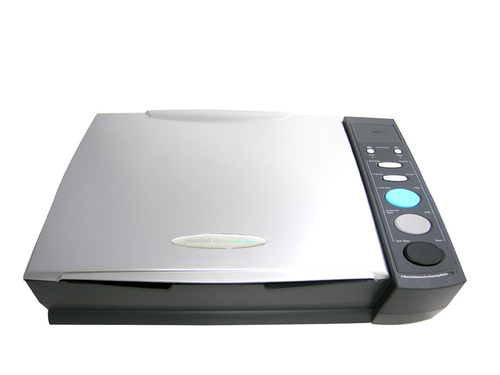
Plustek OpticBook 3600 Flatbed scanner 1200 x 1200 DPI A4 Black
- Maximum ISO A-series paper size: A4
- Scanner type: Flatbed scanner
- Maximum scan size: 216 x 297 mm
- Dimensions (WxDxH): 450 x 283.5 x 93.8 mm
- Certification: CE, FCC, UL/cUL, TUV
- Minimum system requirements: USB
Where to buy
We're not tracking prices for this product yet. Check current prices directly at:
We may earn a commission when you buy through links on this page — at no extra cost to you. Learn more
About this product
The Plustek OpticBook 3600 is “Comic Book Collectors’ Heaven”
Have you ever bought two identical comic books just because you wanted to be able to enjoy while keep them in mint condition? Have you ever contemplated on re-living the moments when Captain America holds off yet another devastating attack from Red Skull but you’re concerned that the comics’ value would just depreciate? What is the fun of collecting comic books if you can’t go back and enjoy the thrills and excitement anytime you want right? Well, Plustek has just the right answer for every hardcore comics collectors/ enthusiasts around the world—The Plustek OpticBook 3600. It is a unique scanner catered to anyone who wishes to keep their comic books or even old magazines in pristine condition for financial gain. The special edge of the OpticBook 3600 that allows users to easily scan all the way to the book spine is designed to protect the value of your most precious collections. With this innovative technology, you only have to scan your comics once and you can go back and read any back issues on electronic files yet watching the value of your comic books appreciates over time! The OpticBook 3600 also has an amazing scanning speed of 9 second per page that really shortens the time that need to be scanning a book. With the speed and the ability to look after the value of your favorite collections, the OpticBook 3600 is definitely a value added investment that’s worth every penny of it.
Image Produces by Regular Scanners
How’s the quality of the image once the content is digitalized? Is it like the image you see on the right? It is certainly not impressive.
Image Produces by OpticBook 3600
If the purpose of scanning is not for sharing purposes but for personal use, the quality of the scanned images won’t matter as much. However, if you intend to share it to your boss, colleagues or friends, you’d prefer to have a better quality of image. Something like this….
Innovative Technology
The OpticBook 3600 is a simple and innovative solution to book scanning. The special edge will not only protect your books it will also give you a perfectly scanned image. To all the hardcore comic books collectors out there, get this magnificent machine from any of our etailers today to enjoy and preserve your comics at the same time!
Specifications
Paper handling
- Maximum ISO A-series paper sizeThe maximum paper size the device can handle, defined by ISO A-series.
- A4
Scanning
- Scanner typeIndicates the type of scanner this product is.
- Flatbed scanner
- Maximum scan sizeThe maximum dimensions of a document that can be digitized in a single pass, measured in mm.
- 216 x 297 mm
- Optical scanning resolutionHow many pixels a scanner can see. Most commonly, this is measured in dots per inch (dpi).For example, a typical flatbed scanner will use a scanning head with 300 sensors per inch, so it can sample 300 dots per inch (dpi) in one direction. To scan in the other direction, it will move the scanning head along the page, stopping 300 times per inch, so it can scan 300 dpi in the other direction as we…
- 1200 x 1200 DPI
- Colour scanningIndicates whether this product scans in colour.
- Yes
- Input colour depthColour depth of the input into the product. The colour depth is either the number of bits used to indicate the color of a single pixel, in a bitmapped image or video frame buffer, or the number of bits used for each color component of a single pixel. High-end laptops have 24-bit colour depth.
- 48 bit
- Film scanningDevice made for scanning photographic film directly into a computer without the use of any intermediate printmaking. It provides several benefits over using a flatbed scanner to scan in a print of any size: the photographer has direct control over cropping and aspect ratio from the original, unmolested image on film; and many film scanners have special software or hardware that removes scratches…
- No
Other features
- Dimensions (WxDxH)Dimensions of the product (Width x Depth x Height).
- 450 x 283.5 x 93.8 mm
- Minimum system requirementsThe lowest hardware and software specifications required for the product to function correctly.
- USB
- Compatible operating systemsList of desktop operating systems tested as compatible with this product.
- Microsoft Windows 2000 / XP / Vista
Certificates
- CertificationSpecifies the official standards, safety approvals, or regulatory certifications the product has received.
- CE, FCC, UL/cUL, TUV
System requirements
- Minimum storage drive spaceThe minimum hard disk space required to store or run a computer program or operating system.
- 500 MB
- Minimum RAMThe lowest RAM (memory) required to run a computer program or operating system.
- 128 MB
- Minimum processorThe lowest speed that the computer processor can run at, or the minimum amount of processing capacity that can be used, for the computer and particular program(s) to function.
- Pentium II
Weight & dimensions
- WeightWeight of the product without packaging (net weight). If possible, the net weight is given including standard accessories and supplies. Please note that sometimes the manufacturer leaves out the weight of accessories and/or supplies.
- 3.4 kg
Power
- Power consumption (typical)Amount of power consumed by this model, often expressed in watts (W). Typical values that manufacturers give are power consumption when off, standby/suspended mode, typical use, maximum usage.
- 18 W
- Power consumption (standby)The amount of electricity that is consumed when the product is on standby.
- 4.3 W
Ports & interfaces
- USB portThe device features a socket into which a USB cable can be plugged.
- Yes
- USB versionUniversal Serial Bus (USB) is an industry standard developed in the mid-1990s that defines the interface used for connection, communication and power supply between computers and electronic devices. Every new version - for example 1.1, 2.0, 3.0 - is much faster than the previous one.
- 2.0
- Standard interfacesMost common industry-standard communication protocols ranging from RS-232, RS-422, RS-423, RS-485, and LVDS to USB.
- USB 2.0
Image sensor
- Sensor typeA sensor is a convertor than measures a physical quality (light, temperature etc.) and displays this electronically on a device.
- CCD
Mouse
- Button functionsSpecifies the assigned actions or commands triggered by the physical buttons on the device.
- Scan
Design
- Product colourThe colour e.g. red, blue, green, black, white.
- Black
Database Right data-sheet 2026 Icecat. All rights reserved. Provided “as is”, without warranty — check details with the store before buying.
Expert reviews
- 94
justechn.com2004
For a long time now, scanners have been a great way to make copies of photos and documents. On the other hand, books have always presented a unique problem for scanners. They are not flat, and therefore they do not fit well and always leave a black sh...
Read the review at justechn.com ↗
Price history (90 days, best daily price)
Price history is still being collected for this product — check back soon.
Alternative models

Plustek MobileOffice S420 Sheet-fed scanner 600 x 600 DPI A4 Black, Silver

Plustek SmartOffice PL806 scanner Flatbed & ADF scanner 600 x 600 DPI A4 White

Plustek MobileOffice S400 Sheet-fed scanner 600 x 600 DPI A4 Black

Plustek SmartOffice PL3000 scanner Flatbed & ADF scanner 1200 x 1200 DPI White

Plustek SmartOffice PS286 scanner ADF scanner 600 x 600 DPI Grey
