
Philips Brilliance 272P4QPJKES/93 computer monitor 68.6 cm (27") 2560 x 1440 pixels Quad HD Silver
- Screen: 68.6 cm (27"), 2560 x 1440 pixels, IPS
- Refresh rate: 12 ms response time
- Brightness: 300 cd/m²
- Ports: 2 × HDMI, 1 × DisplayPort
- Stand: height-adjustable, tilt, VESA 100 x 100 mm
- Extras: speakers, camera
- Colour: Silver
Where to buy
We're not tracking prices for this product yet. Check current prices directly at:
We may earn a commission when you buy through links on this page — at no extra cost to you. Learn more
About this product
This professional Philips display delivers Crystalclear Quad HD 2560x1440 images. MultiView enhances productivity with active dual connect and view. Webcam enables collaboration saving time and money
USB 3.0 enables fast data transfers and smart phone charging
Super Speed USB 3.0 deploys 5.0 gbit/s transfer rate, which is about 10 times faster than USB 2.0 standard significantly reducing data transfer time saving you time and money. With more bandwidth, super speed transfer rates, better power management and superior overall performance, USB 3.0 sets the global standard allowing you to use the large capacity storage devices. Sync-N-Go technology ensures you don't have to wait anymore for bandwidth to be freed up. Your investment in USB 2.0 devices is protected as it is backward compatible.
SmartConnect with HDMI, Display port and Dual link DVI
With a plethora of connectivity, these Philips displays come equipped with multi connections like Dual link DVI, Display Port, universal HDMI connector, enabling you to enjoy high resolution uncompressed video and audio content. USB 3.0 option ensures that you can have super speed data transfers while having global connectivity. Regardless of what source you use, you can rest assured that this Philips display will ensure your investment is not made obsolete any time soon!
IPS technology for full colors and wide viewing angles
IPS displays use an advanced technology which gives you extra wide viewing angles of 178/178 degree, making it possible to view the display from almost any angle - even in 90 degree Pivot mode! Unlike standard TN panels, IPS displays gives you remarkably crisp images with vivid colors, making it ideal not only for Photos, movies and web browsing, but also for professional applications which demand color accuracy and consistent brightness at all times.
Display Port for daisy chain multi-display usage
This Philips display employs Display port 1.2a Multi Stream Transport (MST) technology with HBR2, which doubles the data throughput to 21.6 Gbps. This enables it to daisy chain multiple monitors, thereby increasing your efficiency dramatically. This daisy chain, multi-monitor capability makes this Philips display especially suitable for use in Finance, Banking, control room and other similar environment. To make use of this feature, your PC Graphics Card must be certified to DP1.2 with MST option. For detailed information, please visit http://www.displayport.org/
MultiView enables simultaneous dual connection and view
With the ultra-high resolution Philips MultiView display, you can now experience a world of connectivity. MultiView enables active dual connect and view so that you can work with multiple devices like a PC and notebook simultaneously, for complex multitasking.
Webcam with mic to connect and collaborate
Embedded webcam and microphone enables you to view and communicate with your colleagues and clients. This simple solution allows you to collaborate and share, saving precious time and travel related costs.
PowerSensor saves up to 80% energy costs
PowerSensor is a built-in 'people sensor' that transmits and receives harmless infrared signals to determine if user is present and automatically reduces monitor brightness when user steps away from the desk, cutting energy costs by up to 80 percent and prolonging monitor life
Documents
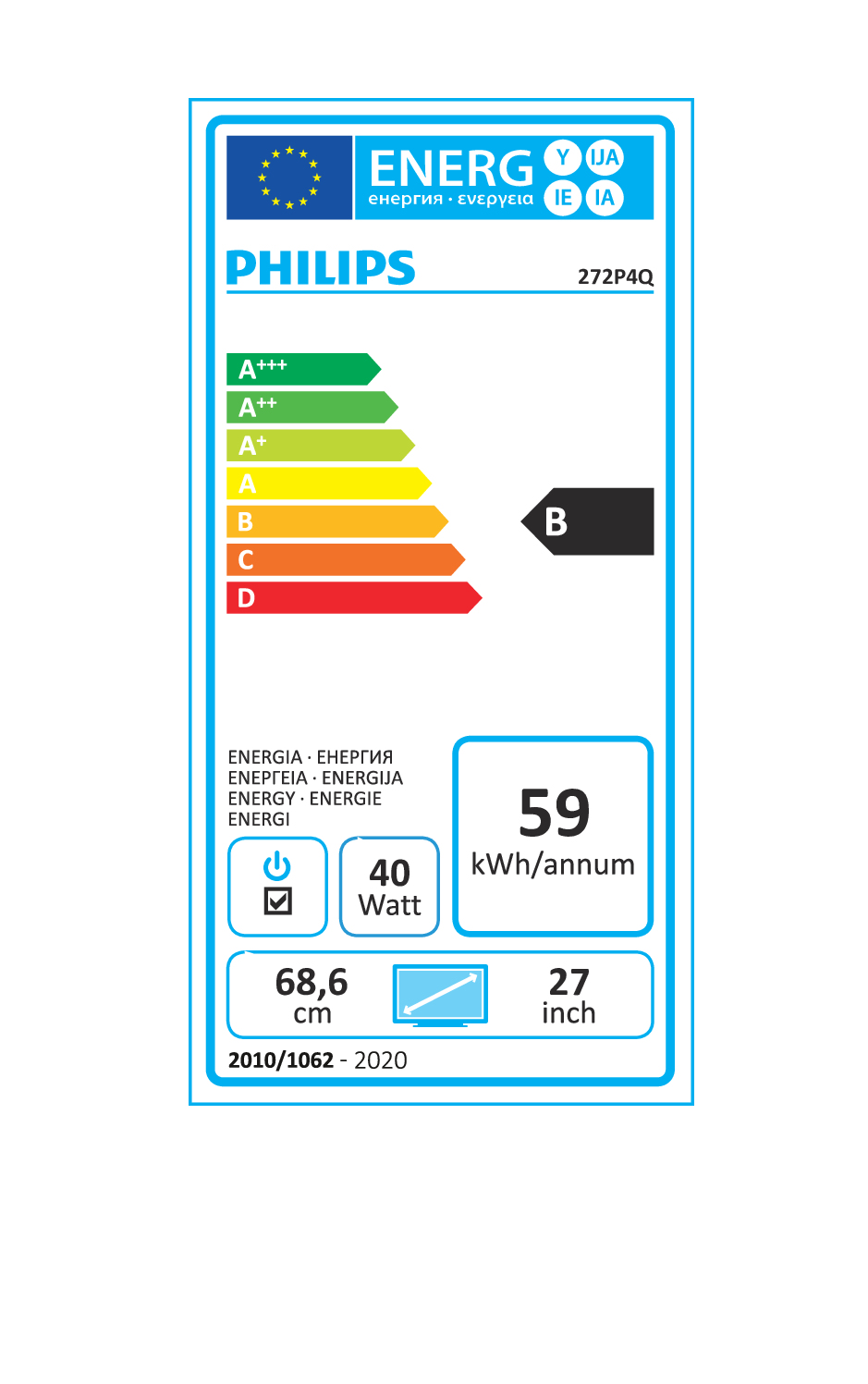
Specifications
Key specifications
- Display diagonalSize of the display for this product, measured diagonally, usually in inches.
- 68.6 cm (27")
- Display resolutionThe number of distinct pixels in each dimension that can be displayed. It is usually quoted as width × height, with the units in pixels: for example, "1024 × 768" means the width is 1024 pixels and the height is 768 pixels. The higher the number of pixels, the sharper the image.
- 2560 x 1440 pixels
- Panel typeThe technology used to manufacture the panel, such as AMOLED or AH-IPS.
- IPS
- Response timeThe response time is the time difference between the moment that a source (for example a video card) sends a signal and that equipment (for example a monitor) receives or display the signal. (Used abbreviations: R/F = Rise and Fall.)
- 12 ms
- Display brightness (typical)Display brightness, measured by its Luminance, presented as a figure in nits. Typical brightness ratings for monitors range from 250 to 350 nits with a target value of between 80 to 120 nits being suitable for most displays in a normal viewing environment.
- 300 cd/m²
- HDMI ports quantityThe number of sockets (ports) for HDMI connections. HDMI (High-Definition Multimedia Interface) is a compact audio/video interface for transferring uncompressed video data and compressed/uncompressed digital audio data from a HDMI-compliant device ("the source device") to a compatible computer monitor, video projector, digital television, or digital audio device. HDMI is a digital replacement for…
- 2
- DisplayPorts quantityNumber of DisplayPorts. A DisplayPort is a digital display interface developed by the Video Electronics Standards Association (VESA). The interface is primarily used to connect a video source to a display device such as a computer monitor, though it can also be used to carry audio, USB, and other forms of data.
- 1
- Height adjustmentThe part of the device that can be adjusted to change the height.
- Yes
- Tilt adjustmentThe tilt, which means the angle at which the device is pointing (up or down), can be changed.
- Yes
- Panel mounting interfaceThe product can be used wih VESA mounting interfaces.
- 100 x 100 mm
- Built-in speaker(s)The device contains speaker(s) to produce sound.
- Yes
- Built-in cameraThe product has an integrated camera.
- Yes
- Product colourThe colour e.g. red, blue, green, black, white.
- Silver
Show all 118 specificationsShow key specifications only
Design
- VESA mountingIndicates whether the product supports the VESA mounting standard for attachment to compatible arms, brackets, or wall mounts.
- Yes
- Product colourThe colour e.g. red, blue, green, black, white.
- Silver
- Panel mounting interfaceThe product can be used wih VESA mounting interfaces.
- 100 x 100 mm
- LED indicatorsThe specific status lights available on the unit to provide visual feedback on its current state or connectivity (e.g., AC input, ACT, or Access).
- Power
- Front bezel colourThe colour of the frame surrounding the front of the display (e.g. Black, Silver).
- Silver
- Feet colourThe colour of the feet, which are the projecting part on which a device/piece of furniture, or each of its legs, stands.
- Black
Audio
- Built-in speaker(s)The device contains speaker(s) to produce sound.
- Yes
- Number of speakersThe quantity of speakers included in/with the product.
- 2
- RMS rated powerRMS (Root mean square) is a measure of the continuous power required by a device, in particular audio amplifiers and loudspeakers.
- 4 W
- Built-in microphoneMicrophone that is found inside the product.
- Yes
Multimedia
- Built-in cameraThe product has an integrated camera.
- Yes
Display
- Display diagonalSize of the display for this product, measured diagonally, usually in inches.
- 68.6 cm (27")
- Display resolutionThe number of distinct pixels in each dimension that can be displayed. It is usually quoted as width × height, with the units in pixels: for example, "1024 × 768" means the width is 1024 pixels and the height is 768 pixels. The higher the number of pixels, the sharper the image.
- 2560 x 1440 pixels
- Native aspect ratioThe aspect ratio is the ratio of the width of an image to its height. The native aspect ratio is the one which the projector/display is particularly designed for. Images shown in native aspect ratio will utilize the entire resolution of the display and achieve maximum brightness. Images shown in other than native aspect ratio will always have less resolution and less brightness than images shown…
- 16:9
- TouchscreenA screen of a laptop, smartphone, etc., that responds to touch so you can control the interface using your fingers.
- No
- HD typeType of supported High Definition (e.g. Full HD, 4K Ultra HD).
- Quad HD
- Panel typeThe technology used to manufacture the panel, such as AMOLED or AH-IPS.
- IPS
- LED backlightA backlight is a form of illumination used in liquid crystal displays (LCDs). One type of backlight is made by LEDs, which can be either white or RGB (red green blue). White LEDs are used most often in notebooks and desktop screens, and in virtually all mobile LCD screens. RGB LEDs for backlighting are found in high-end color proofing displays such as HP DreamColor LP2480zx monitor or selected HP…
- Yes
- Backlight typeThe technology used to illuminate the display panel, such as CCFL or various LED configurations (e.g., Edge LED, Full-Array).
- W-LED
- Display brightness (typical)Display brightness, measured by its Luminance, presented as a figure in nits. Typical brightness ratings for monitors range from 250 to 350 nits with a target value of between 80 to 120 nits being suitable for most displays in a normal viewing environment.
- 300 cd/m²
- Response timeThe response time is the time difference between the moment that a source (for example a video card) sends a signal and that equipment (for example a monitor) receives or display the signal. (Used abbreviations: R/F = Rise and Fall.)
- 12 ms
- Supported graphics resolutionsThe graphic resolutions that can be displayed by the device. The graphic resolution describes the width and height dimensions of a display, such as a computer monitor, measured in pixels.
- 2560 x 1440
- Aspect ratioThe aspect ratio is the ratio of the width of a shape to its height. For example, 4:3 is common for standard displays and 16:9 is the ratio for Widescreen TV.
- 16:9
- Contrast ratio (typical)The difference in light intensity between the brightest white and the darkest black.
- 1000:1
- Contrast ratio (dynamic)A property of a display system, defined as the ratio of the luminance of the brightest color (white) to that of the darkest color (black) that the system is capable of producing.
- 20000000:1
- Viewing angle, horizontalMaximum horizontal angle at which a display can be viewed with acceptable visual performance.
- 178°
- Viewing angle, verticalMaximum vertical angle at which a display can be viewed with acceptable visual performance.
- 178°
- Display number of coloursThe total number of distinct colours that the device is capable of displaying (e.g. 1.07 billion colours).
- 16.7 million colours
- SmartResponseThe time it takes for a pixel to change from one color to another to reduce motion blur, measured in milliseconds.
- 6 ms
- Pixel pitchThis is the parameter of a picture tube, which specifies the shortest distance between two dots of the same colour. The principle is: the smaller the dot pitch, the better sharpness of image.
- 0.233 x 0.233 mm
- Horizontal scan rangeThe range of horizontal frequencies the device can process and display, measured in kHz.
- 30 - 90 kHz
- Vertical scan rangeThe range of vertical frequencies the device can process and display, measured in hertz (Hz).
- 56 - 75 Hz
- Viewable size, horizontalThe viewable size is often somewhat smaller than the actual size of a monitor, because there is a border around the image.
- 59.7 cm
- Viewable size, verticalThe height of the screen area that can actually display an image, measured in millimetres or inches.
- 33.6 cm
- Digital horizontal frequencyThe range of horizontal scanning frequencies the device can support, measured in kHz.
- 30 - 90 kHz
- Digital vertical frequencyThe range of refresh rates the device can support when operating in digital mode, measured in Hertz (Hz).
- 56 - 75 Hz
- Sync-on-green (SOG)Combines composite sync with the green signal in RGB. Only three signals are sent (Red, Green with Sync, Blue).
- Yes
- Display diagonal (metric)This is the size of the display screen, measured diagonally.
- 68.6 cm
- DDC/CIIndicates whether the product supports the Display Data Channel Command Interface for controlling device settings via software.
- Yes
- Colour gamut standardThe specific color space standard the device is designed to reproduce, such as Adobe RGB or DCI-P3.
- sRGB
- Separate H/V syncDevice has separate horizontal and vertical synchronization.
- Yes
- Display sRGBIndicates whether the device supports the sRGB color space standard for consistent color reproduction.
- Yes
- Display panel sizeThe diagonal length of the screen area, typically measured in inches (e.g. 24 inch).
- 27 inch / 68.6 cm
Recycling data
- Overall recyclability rateThe combined percentage of materials that can be effectively recycled at end-of-life, relative to the total weight of the product and its packaging together.
- 65%
- Packaging recyclability rateThe percentage of the packaging's total weight that consists of materials which can be effectively recycled at end-of-life through established recycling processes.
- 100%
- Product post-consumer recycled plasticThe percentage of post-consumer recycled plastic relative to the total weight of all plastic used in the product.
- 65%
Other features
- Compatible operating systemsList of desktop operating systems tested as compatible with this product.
- Mac OS X; Windows 8/7/XP
- TV tuner integratedDevice has an in-built TV tuner.
- No
- Picture-by-Picture (PbP)Indicates whether the screen can display content from two different input sources side-by-side simultaneously.
- Yes
- Exterior finish typeThe material or surface treatment applied to the outer casing of the unit (e.g. brushed steel, matt, or painted).
- Textured
- Monitor sync input signalThe specific signal format or standard used to synchronize the display's refresh rate with the incoming video source to prevent screen tearing.
- Separate Sync; Sync on Green
- User controlsThe available physical or digital interfaces used to adjust settings and operate the device.
- SmartImage; Menu; Multiview; Power On/Off; User
- Picture enhancementSpecifies the technologies or software algorithms used to improve visual quality, such as noise reduction or contrast optimization.
- SmartImage
- Signal inputThe type or standard of the electrical signal the device is designed to receive from an external source.
- DVI-Dual Link (digital, HDCP); DisplayPort x 1; HDMI x 2
- MultiViewIndicates the specific technology or mode that allows the screen to be divided into multiple sections to display content from different sources simultaneously.
- PIP/PBP mode; 2x devices
- Regulatory ApprovalsLists the official certifications and compliance standards the product has met for legal sale and operation in various regions.
- BSMI; CCC; CE Mark; FCC Class B; GOST; SASO; SEMKO; TUV Ergo; TUV/GS; UL/cUL; WEEE
- Heavy metals freeIndicates which hazardous heavy metals, such as lead or mercury, are not present in the product.
- Hg (mercury), Pb (lead)
- Supplied AC adapter typeThe type of power supply provided with the product to connect it to an alternating current source (e.g. AC).
- LCD
- 3DThe device can be used with 3D technology.
- No
Performance
- On/off switchThe button which is pressed to switch the device on or off.
- Yes
Power
- Power consumption (economy mode)The amount of electrical energy consumed by the unit when operating in a power-saving or economy mode, typically measured in Watts.
- 23 W
- Power consumption (typical)Amount of power consumed by this model, often expressed in watts (W). Typical values that manufacturers give are power consumption when off, standby/suspended mode, typical use, maximum usage.
- 49.8 W
- Power consumption (standby)The amount of electricity that is consumed when the product is on standby.
- 0.3 W
- Power consumption (off)The amount of electrical energy consumed by the device when it is switched off, measured in watts.
- 0 W
- Power consumption (PowerSave)The amount of electrical energy consumed by the device when it is operating in a power-saving mode, measured in Watts.
- 23 W
- AC input voltageThe voltage of the AC electricity that is inputted into the product.
- 100 - 240 V
- AC input frequencyThe range of alternating current frequencies the device can accept from the power source, measured in hertz (e.g., 45 - 65).
- 50/60 Hz
- Power supply typeThe type of power supply which this product uses.
- Internal
Features
- Mean time between failures (MTBF)Statistical model used to indicate product/mechanism reliability; expressed in hours and percentage of duty cycle. This number (in hours) does not indicate the mean time before failure for a single unit/mechanism.
- 30000 h
- Plug and PlayIndicates whether this product supports is "plug and play". Plug and play is hardware or software that, after being installed ("plugged in"), can immediately be used ("played with"), as opposed to hardware or software which requires configuration.
- Yes
- Windows operating systems supportedWindows vesions wich can be used with the device.
- Yes
Certificates
- CertificationSpecifies the official standards, safety approvals, or regulatory certifications the product has received.
- BSMI, CCC, CE Mark, FCC Class B, GOST, SASO, SEMKO, TCO 6.0, TUV Ergo, TUV/GS, UL/cUL, WEEE
Sustainability
- Sustainability certificatesThe environmental or ethical certifications the product has received to verify its sustainability standards (e.g., ASC or ACT Organic).
- EPEAT Gold, ENERGY STAR
- Doesn't containSpecifies the harmful or restricted substances that are not present in the product (e.g. Acetone, Alcohol, or Aluminium).
- Mercury, PVC/BFR
Software
- Bundled softwareSoftware distributed with another product such as a piece of computer hardware or other electronic device, or a group of software packages which are sold together. A software suite is an example of bundled software, as is software which is pre-installed on a new computer.
- SmartControl Premium
- Mac operating systems supportedMac operating systems e.g. OS X can be used with the device.
- Yes
Weight & dimensions
- Width (with stand)The total horizontal measurement of the product when the supporting stand is attached, measured in millimetres.
- 639 mm
- Depth (with stand)The measurement of the product from front to back when any supporting accessory or base is attached, expressed in millimetres or centimetres.
- 242 mm
- Height (with stand)The total vertical measurement of the product including its base or support structure, expressed in millimetres or centimetres.
- 580 mm
- Weight (with stand)The total mass of the unit including its supporting base, measured in kilograms or grams.
- 8.5 kg
- Width (without stand)The horizontal measurement of the device excluding the base or support structure, expressed in millimetres.
- 639 mm
- Depth (without stand)The measurement of the product from front to back without its base or support, typically expressed in millimetres or centimetres.
- 64 mm
- Height (without stand)The vertical measurement of the device when the stand is removed, measured in mm.
- 405 mm
- Weight (without stand)The mass of the device excluding the support base, measured in g.
- 5.7 kg
Operational conditions
- Operating temperature (T-T)The minimum and maximum temperatures at which the product can be safely operated.
- 0 - 40 °C
- Storage temperature (T-T)The minimum and maximum temperatures at which the product can be safely stored.
- -20 - 60 °C
- Operating relative humidity (H-H)The range of relative humidity, expressed as a percentage, within which the device can function correctly without damage or performance loss.
- 20 - 80%
- Operating altitudeThe maximum and minimum height above sea level at which the device can function correctly, measured in m.
- 0 - 3658 m
- Non-operating altitudeThe maximum and minimum altitude at which the unit can be stored or transported without sustaining damage, measured in metres.
- 0 - 12192 m
- Relative humidityThe range of ambient moisture levels in the air, expressed as a percentage, within which the unit operates reliably.
- 20 - 80%
Security
- Cable lock slotHoles on the edge of devices through which a cable lock can be passed, so the device can be locked to a desk etc.
- Yes
- Cable lock slot typeThe standard of the security slot used to attach a physical locking cable to the device (e.g. Kensington or Noble).
- Kensington
Ergonomics
- Height adjustmentThe part of the device that can be adjusted to change the height.
- Yes
- Adjustable height (max)The maximum distance the unit can be raised vertically from its lowest position, measured in millimetres.
- 15 cm
- PivotIndicates whether the device can be rotated 90 degrees to switch between landscape and portrait orientation.
- Yes
- Pivot angleThe range of motion available for rotating the unit around its vertical axis, typically measured in degrees.
- 0 - 90°
- SwivellingIndicates whether the product has a mechanism that allows it to rotate horizontally.
- Yes
- Swivel angle rangeThe minimum and maximum degrees to which the unit can be rotated horizontally.
- -65 - 65°
- Tilt adjustmentThe tilt, which means the angle at which the device is pointing (up or down), can be changed.
- Yes
- Tilt angle rangeThe minimum and maximum angles at which the unit can be tilted, typically expressed in degrees.
- -5 - 20°
- On Screen Display (OSD) languagesThe list of available languages for the device's display interface (e.g., AFR for Afrikaans, ARA for Arabic).
- Portuguese, Czech, Dutch, English, Finnish, French, German, Greek, Hungarian, Italian, Japanese, Polish, Russian, Simplified Chinese, Spanish, Swedish, Traditional Chinese, Turkish, Ukrainian
Management features
- Picture-in-PicturePicture-in-picture (PiP) is a feature of some television receivers and similar devices. One program (channel) is displayed on the full TV screen at the same time as one or more other programs are displayed in inset windows. Sound is usually from the main program only.
- Yes
- On Screen Display (OSD)Indicates whether the device can display a graphical menu or information directly on the screen for adjusting settings and viewing status.
- Yes
Ports & interfaces
- USB hub versionThe technical standard of the USB hub, if available, which determines the maximum data transfer speed (e.g., 3.2 Gen 1).
- 3.2 Gen 1 (3.1 Gen 1)
- USB Type-A downstream ports quantityThe number of USB Type-A ports available for connecting peripheral devices to the unit.
- 2
- DVI portDigital Visual Interface (DVI) is a video display interface to connect a video source to a display device, such as a computer monitor.
- Yes
- DVI-D ports quantityThis is the amount of DVI-I interfaces. Digital Visual Interface (DVI) is a video display interface developed by the Digital Display Working Group (DDWG). The digital interface is used to connect a video source to a display device, such as a computer monitor. DVI-D means DVI digital, which means it can only support digital, but not analog.
- 1
- HDMI ports quantityThe number of sockets (ports) for HDMI connections. HDMI (High-Definition Multimedia Interface) is a compact audio/video interface for transferring uncompressed video data and compressed/uncompressed digital audio data from a HDMI-compliant device ("the source device") to a compatible computer monitor, video projector, digital television, or digital audio device. HDMI is a digital replacement for…
- 2
- DisplayPorts quantityNumber of DisplayPorts. A DisplayPort is a digital display interface developed by the Video Electronics Standards Association (VESA). The interface is primarily used to connect a video source to a display device such as a computer monitor, though it can also be used to carry audio, USB, and other forms of data.
- 1
- Headphone outThe socket for connecting headphones to the device.
- Yes
- Headphone outputsNumber of sockets /ports where headphones are connected.
- 1
- PC Audio inThe socket (port) for the PC audio input.
- Yes
- HDCPHigh-bandwidth Digital Content Protection (HDCP) is a form of digital copy protection to prevent copying of digital audio and video content as it travels across connections.
- Yes
Picture quality
- Megapixel (approx.)The number (in millions) of light-sensitive picture elements known as pixels actually used by the camera's image sensor (CCD) to record light, and which are reflected to the final number of recorded pixels stored on the memory card.
- 2 MP
Packaging data
- Package widthThe distance from one side of the packaging to the other.
- 750 mm
- Package depthThe distance from the front to the back of the packaging.
- 490 mm
- Package heightThe distance from the top to the bottom of the packaging.
- 234 mm
- Package weightWeight of the packaged product.
- 11.3 kg
Database Right data-sheet 2026 Icecat. All rights reserved. Provided “as is”, without warranty — check details with the store before buying.
Expert reviews
- 60
techradar.com2014
The Philips Brilliance 272P is a monitor that produces sharp images that suffers from slightly off-balance colour out of the box, though this was easily solved with a colour calibration tool. If you don't own one, you may find yourself hunting around in ...
- +
- Resolution, Build quality, Features
- −
- Requires calibration, Fiddly controls
Price history (90 days, best daily price)
Price history is still being collected for this product — check back soon.
Alternative models

Philips 237E4QHSD/61
computer monitor 58.4 cm (23") 1920 x 1080 pixels Full HD LED Black, Cherry (fruit)

Philips Brilliance LCD monitor with PowerSensor 240S4LPSB/00

Philips LCD monitor with SmartImage lite 274E5QHAB/00

Philips Brilliance LCD monitor, LED backlight 220S4LSS/00

Philips Brilliance 278C4QHSN/61
computer monitor 68.6 cm (27") 1920 x 1080 pixels Full HD LED Bronze

Philips LCD monitor with SmartControl Lite 246V5LAB/00
Accessories & compatible products

Neomounts FPMA-C050BLACK Monitor/TV mount ceiling 10-30" - h 60-85 cm

Neomounts FPMA-W25 Monitor/TV mount wall 10-30" - ultra-flat

Neomounts FPMA-C100 Monitor/TV mount ceiling 10-30" - h 79-129 cm

Neomounts FPMA-D700D3 Monitor arm 10-27"

Neomounts FPMA-D700DD3 Monitor stand 10-27"
