
NEC EX341R computer monitor 86.4 cm (34") 3440 x 1440 pixels LCD Black
- Screen: 86.4 cm (34"), 3440 x 1440 pixels
- Refresh rate: 4 ms response time
- Ports: 2 × HDMI
- Stand: tilt, VESA 100 x 100 mm
- Colour: Black
All 31 specificationsProduct page at nec-display-solutions.com ↗
Where to buy
We're not tracking prices for this product yet. Check current prices directly at:
We may earn a commission when you buy through links on this page — at no extra cost to you. Learn more
About this product
The new EX341R desktop monitor delivers the best ergonomic viewing experience. With its curved surface, the user is consistently benefitting from the best viewing angle, no matter where the content is positioned.
With a huge 34” wide format screen, the EX341R is the ideal replacement for a multi-desktop scenario, delivering the same real-estate but without any interrupting bezels or mismatched alignments for a seamless viewing experience. Maintain control over multiple connected PCs with just one keyboard and mouse, managed via the display.
The EX341R curved wide format display reduces the display footprint and maximises viewing ergonomics whilst bringing a professional cutting-edge design, targeting applications in financial trading floors and high-end offices.
Videos & documents
- VideoNEC MultiSync EX341R ↗
- BrochureProduct Brochure ↗
- ManualUser manual ↗
Specifications
Key specifications
- Display diagonalSize of the display for this product, measured diagonally, usually in inches.
- 86.4 cm (34")
- Display resolutionThe number of distinct pixels in each dimension that can be displayed. It is usually quoted as width × height, with the units in pixels: for example, "1024 × 768" means the width is 1024 pixels and the height is 768 pixels. The higher the number of pixels, the sharper the image.
- 3440 x 1440 pixels
- Response timeThe response time is the time difference between the moment that a source (for example a video card) sends a signal and that equipment (for example a monitor) receives or display the signal. (Used abbreviations: R/F = Rise and Fall.)
- 4 ms
- HDMI ports quantityThe number of sockets (ports) for HDMI connections. HDMI (High-Definition Multimedia Interface) is a compact audio/video interface for transferring uncompressed video data and compressed/uncompressed digital audio data from a HDMI-compliant device ("the source device") to a compatible computer monitor, video projector, digital television, or digital audio device. HDMI is a digital replacement for…
- 2
- Tilt adjustmentThe tilt, which means the angle at which the device is pointing (up or down), can be changed.
- Yes
- Panel mounting interfaceThe product can be used wih VESA mounting interfaces.
- 100 x 100 mm
- Product colourThe colour e.g. red, blue, green, black, white.
- Black
Show all 31 specificationsShow key specifications only
Design
- VESA mountingIndicates whether the product supports the VESA mounting standard for attachment to compatible arms, brackets, or wall mounts.
- Yes
- Product colourThe colour e.g. red, blue, green, black, white.
- Black
- Panel mounting interfaceThe product can be used wih VESA mounting interfaces.
- 100 x 100 mm
Display
- Display diagonalSize of the display for this product, measured diagonally, usually in inches.
- 86.4 cm (34")
- Display resolutionThe number of distinct pixels in each dimension that can be displayed. It is usually quoted as width × height, with the units in pixels: for example, "1024 × 768" means the width is 1024 pixels and the height is 768 pixels. The higher the number of pixels, the sharper the image.
- 3440 x 1440 pixels
- Display technologyThe technology used in the display e.g. plasma, LED.
- LCD
- TouchscreenA screen of a laptop, smartphone, etc., that responds to touch so you can control the interface using your fingers.
- No
- Response timeThe response time is the time difference between the moment that a source (for example a video card) sends a signal and that equipment (for example a monitor) receives or display the signal. (Used abbreviations: R/F = Rise and Fall.)
- 4 ms
- Supported graphics resolutionsThe graphic resolutions that can be displayed by the device. The graphic resolution describes the width and height dimensions of a display, such as a computer monitor, measured in pixels.
- 3440 x 1440
- Contrast ratio (typical)The difference in light intensity between the brightest white and the darkest black.
- 3000:1
- Viewing angle, horizontalMaximum horizontal angle at which a display can be viewed with acceptable visual performance.
- 178°
- Viewing angle, verticalMaximum vertical angle at which a display can be viewed with acceptable visual performance.
- 178°
- Display number of coloursThe total number of distinct colours that the device is capable of displaying (e.g. 1.07 billion colours).
- 16.78 million colours
- Pixel pitchThis is the parameter of a picture tube, which specifies the shortest distance between two dots of the same colour. The principle is: the smaller the dot pitch, the better sharpness of image.
- 0.2318 x 0.2318 mm
- Colour gamutThe range of colours that the display can accurately reproduce, typically expressed as a percentage of a standard colour space (e.g. sRGB or Adobe RGB).
- 99.5%
Certificates
- Compliance certificatesIndicates which regulatory, safety, and environmental standards the product complies with, as verified by recognized authorities or certification bodies.
- RoHS
Sustainability
- Sustainability certificatesThe environmental or ethical certifications the product has received to verify its sustainability standards (e.g., ASC or ACT Organic).
- ENERGY STAR
Weight & dimensions
- Width (without stand)The horizontal measurement of the device excluding the base or support structure, expressed in millimetres.
- 808 mm
- Depth (without stand)The measurement of the product from front to back without its base or support, typically expressed in millimetres or centimetres.
- 419 mm
- Height (without stand)The vertical measurement of the device when the stand is removed, measured in mm.
- 230 mm
- Weight (without stand)The mass of the device excluding the support base, measured in g.
- 10.5 kg
Operational conditions
- Operating temperature (T-T)The minimum and maximum temperatures at which the product can be safely operated.
- 5 - 35 °C
- Operating relative humidity (H-H)The range of relative humidity, expressed as a percentage, within which the device can function correctly without damage or performance loss.
- 20 - 80%
- Storage relative humidity (H-H)The permissible range of relative humidity, expressed as a percentage, within which the product can be stored without damage.
- 10 - 85%
Power
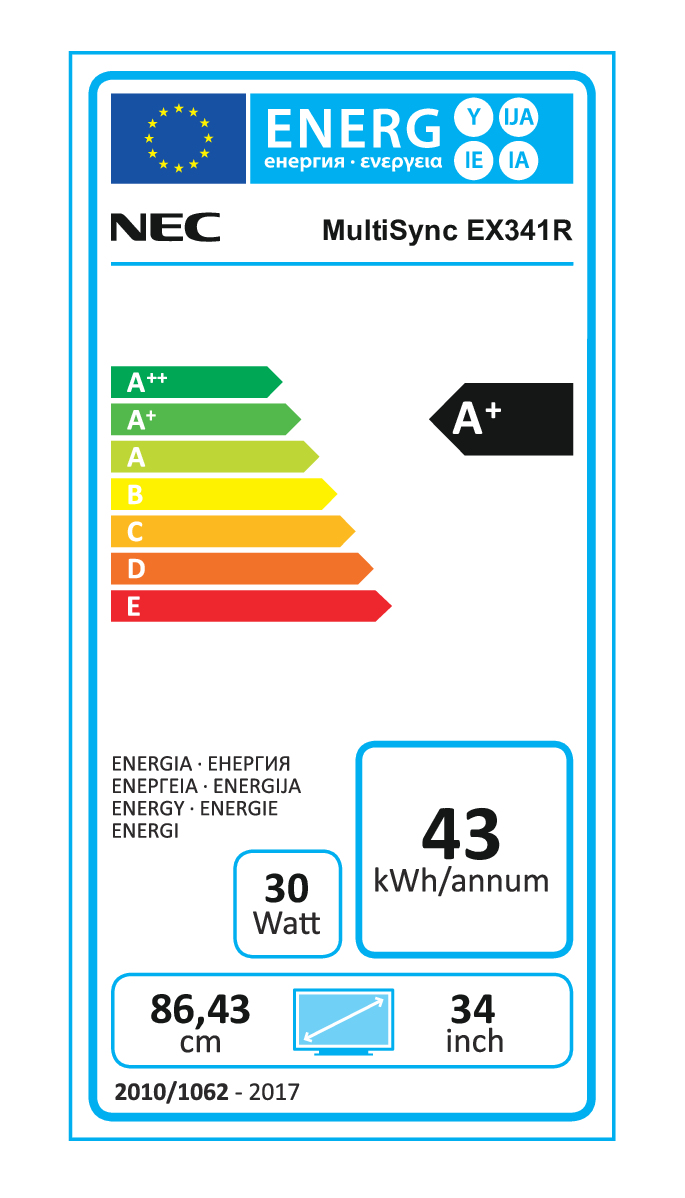
- Power consumption (typical)Amount of power consumed by this model, often expressed in watts (W). Typical values that manufacturers give are power consumption when off, standby/suspended mode, typical use, maximum usage.
- 29 W
Ergonomics
- Tilt adjustmentThe tilt, which means the angle at which the device is pointing (up or down), can be changed.
- Yes
- Tilt angle rangeThe minimum and maximum angles at which the unit can be tilted, typically expressed in degrees.
- -5 - 30°
Network
- Ethernet LANAn Ethernet LAN (Local Area Network) interface is present, for a wired conection via a cable.
- No
Ports & interfaces
- DVI portDigital Visual Interface (DVI) is a video display interface to connect a video source to a display device, such as a computer monitor.
- No
- HDMI ports quantityThe number of sockets (ports) for HDMI connections. HDMI (High-Definition Multimedia Interface) is a compact audio/video interface for transferring uncompressed video data and compressed/uncompressed digital audio data from a HDMI-compliant device ("the source device") to a compatible computer monitor, video projector, digital television, or digital audio device. HDMI is a digital replacement for…
- 2
- HDMI versionThe specific release version of the High-Definition Multimedia Interface standard supported by the device (e.g. 1.3 or 2.0).
- 2.0
Database Right data-sheet 2026 Icecat. All rights reserved. Provided “as is”, without warranty — check details with the store before buying.
Expert reviews
- –
tomshardware.com2017
If you need a monitor that is reliable and well-built, any NEC product, including the EX341R, will fill the bill. They aren't cheap but with their potential for extended service life, the price becomes amortized over a longer period than most. Curved ultr...
- +
- High contrast, Rugged build, ControlSync, Connection options, KVM switch, Support software
- −
- Out-of-box accuracy, Tricky to calibrate, No FreeSync
Price history (90 days, best daily price)
Price history is still being collected for this product — check back soon.
Alternative models

NEC AccuSync AS222WMi
computer monitor 54.6 cm (21.5") 1920 x 1080 pixels Full HD LED Black

NEC MultiSync EX341R-BK-SV
computer monitor 86.4 cm (34") 3440 x 1440 pixels UltraWide Quad HD Black

NEC MultiSync E233WMI-BK
computer monitor 58.4 cm (23") 1920 x 1080 pixels Full HD LED Black

NEC SpectraView EX341R-BK
computer monitor 86.4 cm (34") 3440 x 1440 pixels 4K Ultra HD Black

NEC MultiSync E233WMi
computer monitor 58.4 cm (23") 1920 x 1080 pixels Full HD LED Black

NEC MultiSync E241N
computer monitor 60.5 cm (23.8") 1920 x 1080 pixels Full HD LED Black