
NEC MultiSync EA274WMi computer monitor 68.6 cm (27") 2560 x 1440 pixels Quad HD LED White
- Screen: 68.6 cm (27"), 2560 x 1440 pixels, IPS, Flat
- Refresh rate: 6 ms response time
- Brightness: 350 cd/m²
- Ports: 1 × HDMI, 1 × DisplayPort
- Stand: height-adjustable, tilt, VESA 100 x 100 mm
- Extras: speakers, USB hub
- Colour: White
All 80 specificationsProduct page at nec-display-solutions.com ↗
Versions
 Black
 White
Where to buy
We're not tracking prices for this product yet. Check current prices directly at:
We may earn a commission when you buy through links on this page — at no extra cost to you. Learn more
About this product
The NEC MultiSync EA274WMi features an extremely thin 27" IPS LED backlight panel with a resolution of 2560x1440 which results in an ultra-modern and slim design. Ambient Light and Human Sensors enforce the sustainable product concept while offering improved ergonomics with 130 mm height adjustability. The ergonomic performance of this display is further enhanced by the excellent IPS image quality. Finally, the display offers future-proof connectivity with four inputs: DisplayPort, DVI-D (Dual Link), HDMI and D-Sub.
Ideal for the corporate office that values personal productivity, demands stylish products and insists on the best future proof technology.
- Ambient Light Sensor - with Auto Brightness function always sets optimised brightness level according to ambient light and content conditions.
- Ergonomic Office - full height adjustability (130 mm), swivel, tilt and pivot functionality ensures perfect individual ergonomic set-up.
- Feature Set for Perfect Office Use - Integrated Speakers, headphone jack and USB Hub provide excellent options for office communication.
- Green Product Concept - Eco Mode and Carbon Footprint Meter / Carbon Savings Meter, Ambient Light Sensor.
- Human Sensor - detects the presence of a person in front of the screen; display switches on/off automatically depending on the presence of the user.
- Image display - 27inch 16:9 IPS with LED backlight.
- DICOM Simulation - for straightforward radiological review applications.
- Free Download of Multi-Display Management Software - with NaViSet Administrator 2 you can manage all your connected display devices from a centralized location.
- Special Characteristics - Ambient light sensor for optimized brightness levels; Auto Contrast; Carbon Footprint Meter ; Carbon Savings Meter ; ControlSync ; Customize Setting ; DICOM Simulation ; EcoModes ; Energy Star 6.0; ErgoDesign : Height adjustable stand (130 mm) with 90° Pivot features; Human Sensor; LED Backlight Technology; Picture-by-Picture; Versatile and easy installation (VESA standard) with NaViSet and NaViKey; Windows 8 compatible
Documents
Specifications
Key specifications
- Display diagonalSize of the display for this product, measured diagonally, usually in inches.
- 68.6 cm (27")
- Display resolutionThe number of distinct pixels in each dimension that can be displayed. It is usually quoted as width × height, with the units in pixels: for example, "1024 × 768" means the width is 1024 pixels and the height is 768 pixels. The higher the number of pixels, the sharper the image.
- 2560 x 1440 pixels
- Panel typeThe technology used to manufacture the panel, such as AMOLED or AH-IPS.
- IPS
- Screen shapeDescribes the physical curvature of the display panel, such as whether it is flat or curved.
- Flat
- Response timeThe response time is the time difference between the moment that a source (for example a video card) sends a signal and that equipment (for example a monitor) receives or display the signal. (Used abbreviations: R/F = Rise and Fall.)
- 6 ms
- Display brightness (typical)Display brightness, measured by its Luminance, presented as a figure in nits. Typical brightness ratings for monitors range from 250 to 350 nits with a target value of between 80 to 120 nits being suitable for most displays in a normal viewing environment.
- 350 cd/m²
- HDMI ports quantityThe number of sockets (ports) for HDMI connections. HDMI (High-Definition Multimedia Interface) is a compact audio/video interface for transferring uncompressed video data and compressed/uncompressed digital audio data from a HDMI-compliant device ("the source device") to a compatible computer monitor, video projector, digital television, or digital audio device. HDMI is a digital replacement for…
- 1
- DisplayPorts quantityNumber of DisplayPorts. A DisplayPort is a digital display interface developed by the Video Electronics Standards Association (VESA). The interface is primarily used to connect a video source to a display device such as a computer monitor, though it can also be used to carry audio, USB, and other forms of data.
- 1
- Height adjustmentThe part of the device that can be adjusted to change the height.
- Yes
- Tilt adjustmentThe tilt, which means the angle at which the device is pointing (up or down), can be changed.
- Yes
- Panel mounting interfaceThe product can be used wih VESA mounting interfaces.
- 100 x 100 mm
- Built-in speaker(s)The device contains speaker(s) to produce sound.
- Yes
- Built-in USB hubWhether or not the device features a USB hub to connect more than one other device via USB.
- Yes
- Product colourThe colour e.g. red, blue, green, black, white.
- White
Show all 80 specificationsShow key specifications only
Design
- VESA mountingIndicates whether the product supports the VESA mounting standard for attachment to compatible arms, brackets, or wall mounts.
- Yes
- Product colourThe colour e.g. red, blue, green, black, white.
- White
- Panel mounting interfaceThe product can be used wih VESA mounting interfaces.
- 100 x 100 mm
- LED indicatorsThe specific status lights available on the unit to provide visual feedback on its current state or connectivity (e.g., AC input, ACT, or Access).
- Power
Ports & interfaces
- Built-in USB hubWhether or not the device features a USB hub to connect more than one other device via USB.
- Yes
- USB versionUniversal Serial Bus (USB) is an industry standard developed in the mid-1990s that defines the interface used for connection, communication and power supply between computers and electronic devices. Every new version - for example 1.1, 2.0, 3.0 - is much faster than the previous one.
- 2.0/3.2 Gen 1 (3.1 Gen 1)
- Number of upstream portsThe total number of available ports used to connect the device to a computer or another network source.
- 1
- USB Type-A downstream ports quantityThe number of USB Type-A ports available for connecting peripheral devices to the unit.
- 4
- VGA (D-Sub) ports quantityNumber of VGA (D-Sub) ports (connecting interfaces) in the device. The VGA (D-Sub) connector is a 15 pin connector between a computer and a monitor. It was first introduced in 1987 by IBM.
- 1
- DVI portDigital Visual Interface (DVI) is a video display interface to connect a video source to a display device, such as a computer monitor.
- Yes
- DVI-D ports quantityThis is the amount of DVI-I interfaces. Digital Visual Interface (DVI) is a video display interface developed by the Digital Display Working Group (DDWG). The digital interface is used to connect a video source to a display device, such as a computer monitor. DVI-D means DVI digital, which means it can only support digital, but not analog.
- 1
- HDMI ports quantityThe number of sockets (ports) for HDMI connections. HDMI (High-Definition Multimedia Interface) is a compact audio/video interface for transferring uncompressed video data and compressed/uncompressed digital audio data from a HDMI-compliant device ("the source device") to a compatible computer monitor, video projector, digital television, or digital audio device. HDMI is a digital replacement for…
- 1
- DisplayPorts quantityNumber of DisplayPorts. A DisplayPort is a digital display interface developed by the Video Electronics Standards Association (VESA). The interface is primarily used to connect a video source to a display device such as a computer monitor, though it can also be used to carry audio, USB, and other forms of data.
- 1
- Headphone outputsNumber of sockets /ports where headphones are connected.
- 1
Audio
- Built-in speaker(s)The device contains speaker(s) to produce sound.
- Yes
- Number of speakersThe quantity of speakers included in/with the product.
- 2
- RMS rated powerRMS (Root mean square) is a measure of the continuous power required by a device, in particular audio amplifiers and loudspeakers.
- 2 W
Multimedia
- Built-in cameraThe product has an integrated camera.
- No
Display
- Display diagonalSize of the display for this product, measured diagonally, usually in inches.
- 68.6 cm (27")
- Display resolutionThe number of distinct pixels in each dimension that can be displayed. It is usually quoted as width × height, with the units in pixels: for example, "1024 × 768" means the width is 1024 pixels and the height is 768 pixels. The higher the number of pixels, the sharper the image.
- 2560 x 1440 pixels
- Native aspect ratioThe aspect ratio is the ratio of the width of an image to its height. The native aspect ratio is the one which the projector/display is particularly designed for. Images shown in native aspect ratio will utilize the entire resolution of the display and achieve maximum brightness. Images shown in other than native aspect ratio will always have less resolution and less brightness than images shown…
- 16:9
- Display technologyThe technology used in the display e.g. plasma, LED.
- LED
- TouchscreenA screen of a laptop, smartphone, etc., that responds to touch so you can control the interface using your fingers.
- No
- HD typeType of supported High Definition (e.g. Full HD, 4K Ultra HD).
- Quad HD
- Panel typeThe technology used to manufacture the panel, such as AMOLED or AH-IPS.
- IPS
- Backlight typeThe technology used to illuminate the display panel, such as CCFL or various LED configurations (e.g., Edge LED, Full-Array).
- W-LED
- Display brightness (typical)Display brightness, measured by its Luminance, presented as a figure in nits. Typical brightness ratings for monitors range from 250 to 350 nits with a target value of between 80 to 120 nits being suitable for most displays in a normal viewing environment.
- 350 cd/m²
- Response timeThe response time is the time difference between the moment that a source (for example a video card) sends a signal and that equipment (for example a monitor) receives or display the signal. (Used abbreviations: R/F = Rise and Fall.)
- 6 ms
- Screen shapeDescribes the physical curvature of the display panel, such as whether it is flat or curved.
- Flat
- Supported graphics resolutionsThe graphic resolutions that can be displayed by the device. The graphic resolution describes the width and height dimensions of a display, such as a computer monitor, measured in pixels.
- 832 x 624, 1920 x 1440, 2560 x 1440, 1024 x 768 (XGA), 1152 x 864 (XGA+), 1280 x 1024 (SXGA), 1600 x 1200 (UXGA), 1920 x 1080 (HD 1080), 640 x 480 (VGA), 800 x 600 (SVGA)
- Aspect ratioThe aspect ratio is the ratio of the width of a shape to its height. For example, 4:3 is common for standard displays and 16:9 is the ratio for Widescreen TV.
- 16:9
- Contrast ratio (typical)The difference in light intensity between the brightest white and the darkest black.
- 1000:1
- Contrast ratio (dynamic)A property of a display system, defined as the ratio of the luminance of the brightest color (white) to that of the darkest color (black) that the system is capable of producing.
- 25000:1
- Viewing angle, horizontalMaximum horizontal angle at which a display can be viewed with acceptable visual performance.
- 178°
- Viewing angle, verticalMaximum vertical angle at which a display can be viewed with acceptable visual performance.
- 178°
- Display number of coloursThe total number of distinct colours that the device is capable of displaying (e.g. 1.07 billion colours).
- 16.78 million colours
- Pixel pitchThis is the parameter of a picture tube, which specifies the shortest distance between two dots of the same colour. The principle is: the smaller the dot pitch, the better sharpness of image.
- 0.233 x 0.233 mm
- Horizontal scan rangeThe range of horizontal frequencies the device can process and display, measured in kHz.
- 31.5 - 83 kHz
- Vertical scan rangeThe range of vertical frequencies the device can process and display, measured in hertz (Hz).
- 56 - 75 Hz
- DDC/CIIndicates whether the product supports the Display Data Channel Command Interface for controlling device settings via software.
- Yes
Thin Client
- Thin client installedThe product includes a thin client, which is a computer or a computer program which depends heavily on some other computer (its server) to fulfill its computational roles. This is different from the traditional fat client, which is a computer designed to take on these roles by itself. The specific roles assumed by the server may vary, from providing data persistence (for example, for diskless nod…
- No
Performance
- On/off switchThe button which is pressed to switch the device on or off.
- Yes
Other features
- TV tuner integratedDevice has an in-built TV tuner.
- No
- Light sensorIndicates whether the device has an integrated sensor to detect ambient light levels for automatic mode adjustments.
- Yes
- Power managementIndicates whether the device includes features to monitor or control power consumption to improve energy efficiency.
- Yes
- Supplied AC adapter typeThe type of power supply provided with the product to connect it to an alternating current source (e.g. AC).
- LED
- 3DThe device can be used with 3D technology.
- No
Power
- Power consumption (economy mode)The amount of electrical energy consumed by the unit when operating in a power-saving or economy mode, typically measured in Watts.
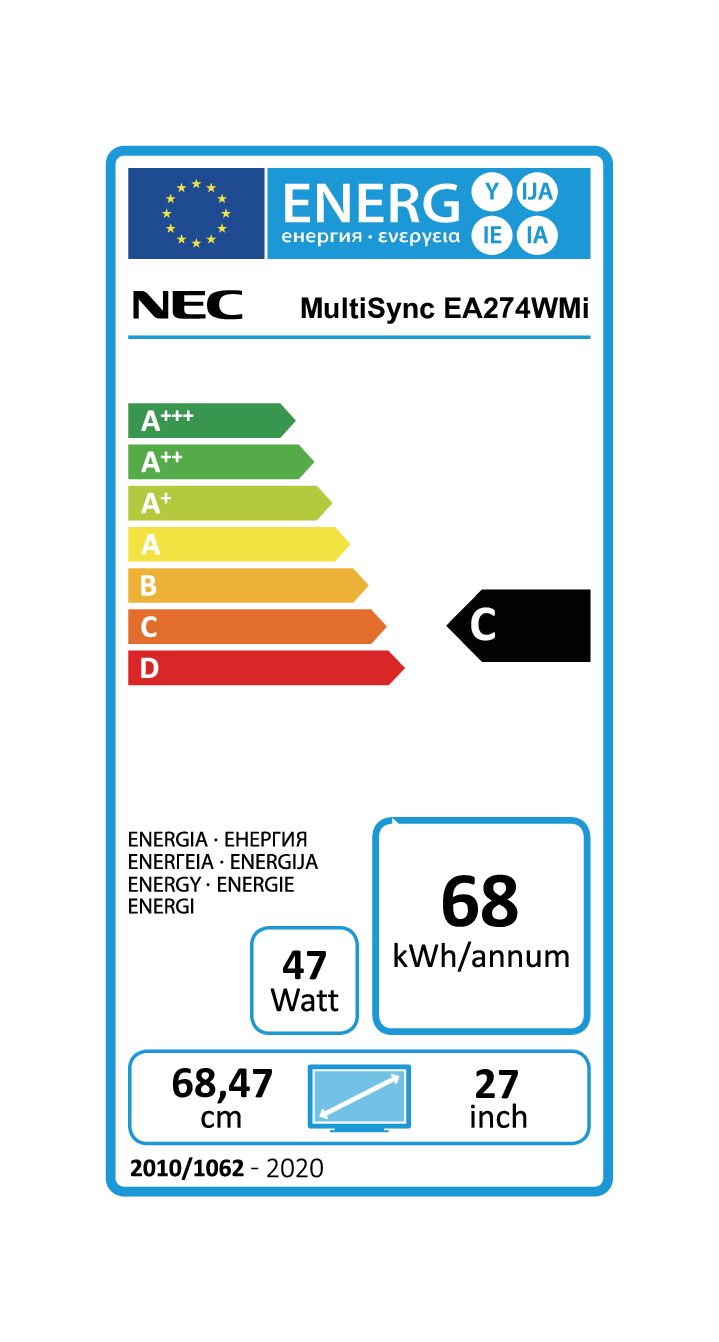
- 35 W
- Energy efficiency class (legacy scale)The energy efficiency rating of the product based on the previous labeling scale (e.g. A+++).
- C
- Power consumption (typical)Amount of power consumed by this model, often expressed in watts (W). Typical values that manufacturers give are power consumption when off, standby/suspended mode, typical use, maximum usage.
- 47 W
- Power consumption (max)The maximum amount of power used by the device.
- 57 W
- Power consumption (PowerSave)The amount of electrical energy consumed by the device when it is operating in a power-saving mode, measured in Watts.
- 0.5 W
- AC input frequencyThe range of alternating current frequencies the device can accept from the power source, measured in hertz (e.g., 45 - 65).
- 50 - 60 Hz
- Annual energy consumptionThe amount of energy used by the product per year.
- 68 kWh
Management features
- ECO modeIndicates whether the device features an energy-saving mode to reduce power consumption during operation.
- Yes
- On Screen Display (OSD)Indicates whether the device can display a graphical menu or information directly on the screen for adjusting settings and viewing status.
- Yes
Certificates
- CertificationSpecifies the official standards, safety approvals, or regulatory certifications the product has received.
- CE; Energy Star 6.0; ErP; FCC Class B; ISO 9241-307 (pixel failure class I); MPR II/ MPR III; PCT/Gost; RoHS; TCO 6.0; TÜV Ergonomics; TÜV GS; UL/C-UL or CSA
Sustainability
- Sustainability certificatesThe environmental or ethical certifications the product has received to verify its sustainability standards (e.g., ASC or ACT Organic).
- EPEAT Gold, ENERGY STAR
Packaging content
- Quick start guideInstructions, either online, as a computer program or in paper form, to allow you to set up and start using the product quickly.
- Yes
Weight & dimensions
- Width (with stand)The total horizontal measurement of the product when the supporting stand is attached, measured in millimetres.
- 639.2 mm
- Depth (with stand)The measurement of the product from front to back when any supporting accessory or base is attached, expressed in millimetres or centimetres.
- 230 mm
- Height (with stand)The total vertical measurement of the product including its base or support structure, expressed in millimetres or centimetres.
- 417.9 mm
- Weight (with stand)The total mass of the unit including its supporting base, measured in kilograms or grams.
- 8.7 kg
- Width (without stand)The horizontal measurement of the device excluding the base or support structure, expressed in millimetres.
- 639.2 mm
Operational conditions
- Operating temperature (T-T)The minimum and maximum temperatures at which the product can be safely operated.
- 5 - 35 °C
- Operating relative humidity (H-H)The range of relative humidity, expressed as a percentage, within which the device can function correctly without damage or performance loss.
- 20 - 80%
Security
- Cable lock slotHoles on the edge of devices through which a cable lock can be passed, so the device can be locked to a desk etc.
- Yes
- Cable lock slot typeThe standard of the security slot used to attach a physical locking cable to the device (e.g. Kensington or Noble).
- Kensington
Ergonomics
- Height adjustmentThe part of the device that can be adjusted to change the height.
- Yes
- Adjustable height (max)The maximum distance the unit can be raised vertically from its lowest position, measured in millimetres.
- 13 cm
- PivotIndicates whether the device can be rotated 90 degrees to switch between landscape and portrait orientation.
- Yes
- Pivot angleThe range of motion available for rotating the unit around its vertical axis, typically measured in degrees.
- 0 - 90°
- SwivellingIndicates whether the product has a mechanism that allows it to rotate horizontally.
- Yes
- Swivel angle rangeThe minimum and maximum degrees to which the unit can be rotated horizontally.
- 170 - 170°
- Tilt adjustmentThe tilt, which means the angle at which the device is pointing (up or down), can be changed.
- Yes
- Tilt angle rangeThe minimum and maximum angles at which the unit can be tilted, typically expressed in degrees.
- 5 - 30°
Features
- Plug and PlayIndicates whether this product supports is "plug and play". Plug and play is hardware or software that, after being installed ("plugged in"), can immediately be used ("played with"), as opposed to hardware or software which requires configuration.
- Yes
Network
- Wi-FiPopular technology that allows an electronic device to exchange data or connect to the internet wirelessly using radio waves.
- No
- BluetoothBluetooth is a low-power radio technology developed to replace the cables and wires currently used to link or connect electronic devices such as personal computers, printers, and a wide variety of handheld devices including mobile phones. Because it uses radio-wave connectivity, a Bluetooth-enabled device has a constant, established connection to whatever browser it uses. This saves the user the…
- No
- Ethernet LANAn Ethernet LAN (Local Area Network) interface is present, for a wired conection via a cable.
- No
Database Right data-sheet 2026 Icecat. All rights reserved. Provided “as is”, without warranty — check details with the store before buying.
Expert reviews
- –
tomshardware.com2014
It is unfortunate that LCD panel prices aren't dropping as quickly as they have in the past. Not only are QHD (2560x1440) screens still positioned at premium levels, but the newest and most capable Ultra HD monitors are even more expensive. Without questi...
Read the review at tomshardware.com ↗
Price history (90 days, best daily price)
Price history is still being collected for this product — check back soon.
Alternative models

NEC MDVIEW 243
computer monitor 61 cm (24") 1920 x 1200 pixels WUXGA LED Black

NEC MultiSync PA302W
computer monitor 75.7 cm (29.8") 2560 x 1600 pixels Quad HD LED Black

NEC MultiSync E224Wi
computer monitor 54.6 cm (21.5") 1920 x 1080 pixels Full HD LED White

NEC PA272W-SV
computer monitor 68.6 cm (27") 2560 x 1440 pixels White

NEC MD210C2
computer monitor 54.1 cm (21.3") 1600 x 1200 pixels Black

NEC PA272W-BK-SV
computer monitor 68.6 cm (27") 2560 x 1440 pixels Black