
NEC MultiSync EA245WMi computer monitor 61 cm (24") 1920 x 1200 pixels WUXGA LED Black
- Screen: 61 cm (24"), 1920 x 1200 pixels, AH-IPS, Flat
- Refresh rate: 6 ms response time
- Brightness: 300 cd/m²
- Ports: 1 × HDMI, 1 × DisplayPort
- Stand: height-adjustable, tilt, VESA 100 x 100 mm
- Extras: speakers, USB hub
- Colour: Black
All 61 specificationsProduct page at necdisplay.com ↗
Versions
 1
 2
Where to buy
We're not tracking prices for this product yet. Check current prices directly at:
We may earn a commission when you buy through links on this page — at no extra cost to you. Learn more
About this product
The 24” NEC MultiSync EA245WMi is an ultra-narrow bezel IPS desktop monitor ideal for corporate environments. Designed to enhance work performance, this widescreen model features IPS panel technology with wide viewing angles (178° horizontal/vertical) and ergonomic adjustability. The LED backlighting of the EA245WMi allows for a slimmer profile, lighter weight and increased power savings compared to previous generation models.ControlSync echnology allows users to control up to six EA245WMi displays in a multi-monitor configuration. Upon establishing one unit as the master, users are able to control many performance attributes of the multi-monitor setup in unison through the single monitor. Smart sensing technology automatically detects your work conditions to determine the proper display brightness with ambient light and human sensors. Full-featured connectivity including HDMI, DisplayPort 1.2 in / out, DVI-D, VGA and 3-port USB 3.0 hub, connects users to the latest peripherals and future-proofs the investment.
- LED backlight technology provides for industry-leading low power consumption and less hazardous materials
- Height-adjust, pivot, tilt and swivel capabilities add flexibility and comfort to your viewing preferences
- Full connectivity, including DisplayPort 1.2 in / out, HDMI, DVI-D and VGA
- Touch-sensitive OSD controls are integrated into the bezel, making display adjustments easier than ever
- Human and ambient light sensors automatically detect your work conditions to determine the proper display brightness, thereby conserving power
- ECO Mode allows you to manually adjust the display’s brightness to your liking, saving power and reducing your energy costs
- ENERGY STAR 7.0 and TCO 7.0
- NaViSet Administrator 2: Free software solution that greatly eases administration and management of larger display device installations
- Compatible with SpectraViewII calibration software and the SVII-EA-KIT calibration kit.
Specifications
Key specifications
- Display diagonalSize of the display for this product, measured diagonally, usually in inches.
- 61 cm (24")
- Display resolutionThe number of distinct pixels in each dimension that can be displayed. It is usually quoted as width × height, with the units in pixels: for example, "1024 × 768" means the width is 1024 pixels and the height is 768 pixels. The higher the number of pixels, the sharper the image.
- 1920 x 1200 pixels
- Panel typeThe technology used to manufacture the panel, such as AMOLED or AH-IPS.
- AH-IPS
- Screen shapeDescribes the physical curvature of the display panel, such as whether it is flat or curved.
- Flat
- Response timeThe response time is the time difference between the moment that a source (for example a video card) sends a signal and that equipment (for example a monitor) receives or display the signal. (Used abbreviations: R/F = Rise and Fall.)
- 6 ms
- Display brightness (typical)Display brightness, measured by its Luminance, presented as a figure in nits. Typical brightness ratings for monitors range from 250 to 350 nits with a target value of between 80 to 120 nits being suitable for most displays in a normal viewing environment.
- 300 cd/m²
- HDMI ports quantityThe number of sockets (ports) for HDMI connections. HDMI (High-Definition Multimedia Interface) is a compact audio/video interface for transferring uncompressed video data and compressed/uncompressed digital audio data from a HDMI-compliant device ("the source device") to a compatible computer monitor, video projector, digital television, or digital audio device. HDMI is a digital replacement for…
- 1
- DisplayPorts quantityNumber of DisplayPorts. A DisplayPort is a digital display interface developed by the Video Electronics Standards Association (VESA). The interface is primarily used to connect a video source to a display device such as a computer monitor, though it can also be used to carry audio, USB, and other forms of data.
- 1
- Height adjustmentThe part of the device that can be adjusted to change the height.
- Yes
- Tilt adjustmentThe tilt, which means the angle at which the device is pointing (up or down), can be changed.
- Yes
- Panel mounting interfaceThe product can be used wih VESA mounting interfaces.
- 100 x 100 mm
- Built-in speaker(s)The device contains speaker(s) to produce sound.
- Yes
- Built-in USB hubWhether or not the device features a USB hub to connect more than one other device via USB.
- Yes
- Product colourThe colour e.g. red, blue, green, black, white.
- Black
Show all 61 specificationsShow key specifications only
Design
- VESA mountingIndicates whether the product supports the VESA mounting standard for attachment to compatible arms, brackets, or wall mounts.
- Yes
- Product colourThe colour e.g. red, blue, green, black, white.
- Black
- Panel mounting interfaceThe product can be used wih VESA mounting interfaces.
- 100 x 100 mm
Ports & interfaces
- Built-in USB hubWhether or not the device features a USB hub to connect more than one other device via USB.
- Yes
- USB versionUniversal Serial Bus (USB) is an industry standard developed in the mid-1990s that defines the interface used for connection, communication and power supply between computers and electronic devices. Every new version - for example 1.1, 2.0, 3.0 - is much faster than the previous one.
- 3.2 Gen 1 (3.1 Gen 1)
- USB Type-A downstream ports quantityThe number of USB Type-A ports available for connecting peripheral devices to the unit.
- 3
- VGA (D-Sub) ports quantityNumber of VGA (D-Sub) ports (connecting interfaces) in the device. The VGA (D-Sub) connector is a 15 pin connector between a computer and a monitor. It was first introduced in 1987 by IBM.
- 1
- DVI portDigital Visual Interface (DVI) is a video display interface to connect a video source to a display device, such as a computer monitor.
- No
- DVI-D ports quantityThis is the amount of DVI-I interfaces. Digital Visual Interface (DVI) is a video display interface developed by the Digital Display Working Group (DDWG). The digital interface is used to connect a video source to a display device, such as a computer monitor. DVI-D means DVI digital, which means it can only support digital, but not analog.
- 1
- HDMI ports quantityThe number of sockets (ports) for HDMI connections. HDMI (High-Definition Multimedia Interface) is a compact audio/video interface for transferring uncompressed video data and compressed/uncompressed digital audio data from a HDMI-compliant device ("the source device") to a compatible computer monitor, video projector, digital television, or digital audio device. HDMI is a digital replacement for…
- 1
- DisplayPorts quantityNumber of DisplayPorts. A DisplayPort is a digital display interface developed by the Video Electronics Standards Association (VESA). The interface is primarily used to connect a video source to a display device such as a computer monitor, though it can also be used to carry audio, USB, and other forms of data.
- 1
Audio
- Built-in speaker(s)The device contains speaker(s) to produce sound.
- Yes
Multimedia
- Built-in cameraThe product has an integrated camera.
- No
Display
- Display diagonalSize of the display for this product, measured diagonally, usually in inches.
- 61 cm (24")
- Display resolutionThe number of distinct pixels in each dimension that can be displayed. It is usually quoted as width × height, with the units in pixels: for example, "1024 × 768" means the width is 1024 pixels and the height is 768 pixels. The higher the number of pixels, the sharper the image.
- 1920 x 1200 pixels
- Display technologyThe technology used in the display e.g. plasma, LED.
- LED
- TouchscreenA screen of a laptop, smartphone, etc., that responds to touch so you can control the interface using your fingers.
- No
- HD typeType of supported High Definition (e.g. Full HD, 4K Ultra HD).
- WUXGA
- Panel typeThe technology used to manufacture the panel, such as AMOLED or AH-IPS.
- AH-IPS
- Backlight typeThe technology used to illuminate the display panel, such as CCFL or various LED configurations (e.g., Edge LED, Full-Array).
- W-LED
- Display brightness (typical)Display brightness, measured by its Luminance, presented as a figure in nits. Typical brightness ratings for monitors range from 250 to 350 nits with a target value of between 80 to 120 nits being suitable for most displays in a normal viewing environment.
- 300 cd/m²
- Response timeThe response time is the time difference between the moment that a source (for example a video card) sends a signal and that equipment (for example a monitor) receives or display the signal. (Used abbreviations: R/F = Rise and Fall.)
- 6 ms
- Screen shapeDescribes the physical curvature of the display panel, such as whether it is flat or curved.
- Flat
- Aspect ratioThe aspect ratio is the ratio of the width of a shape to its height. For example, 4:3 is common for standard displays and 16:9 is the ratio for Widescreen TV.
- 16:10
- Contrast ratio (typical)The difference in light intensity between the brightest white and the darkest black.
- 1000:1
- Viewing angle, horizontalMaximum horizontal angle at which a display can be viewed with acceptable visual performance.
- 178°
- Viewing angle, verticalMaximum vertical angle at which a display can be viewed with acceptable visual performance.
- 178°
- Display number of coloursThe total number of distinct colours that the device is capable of displaying (e.g. 1.07 billion colours).
- 16.78 million colours
- Pixel pitchThis is the parameter of a picture tube, which specifies the shortest distance between two dots of the same colour. The principle is: the smaller the dot pitch, the better sharpness of image.
- 0.27 x 0.27 mm
- Horizontal scan rangeThe range of horizontal frequencies the device can process and display, measured in kHz.
- 31.5 - 95 kHz
- Colour gamutThe range of colours that the display can accurately reproduce, typically expressed as a percentage of a standard colour space (e.g. sRGB or Adobe RGB).
- 72%
Performance
- On/off switchThe button which is pressed to switch the device on or off.
- Yes
Ergonomics
- RotatingCapability to rotate device.
- Yes
- Height adjustmentThe part of the device that can be adjusted to change the height.
- Yes
- Adjustable height (max)The maximum distance the unit can be raised vertically from its lowest position, measured in millimetres.
- 10 cm
- PivotIndicates whether the device can be rotated 90 degrees to switch between landscape and portrait orientation.
- Yes
- SwivellingIndicates whether the product has a mechanism that allows it to rotate horizontally.
- Yes
- Tilt adjustmentThe tilt, which means the angle at which the device is pointing (up or down), can be changed.
- Yes
Other features
- TV tuner integratedDevice has an in-built TV tuner.
- No
- Supplied AC adapter typeThe type of power supply provided with the product to connect it to an alternating current source (e.g. AC).
- LED
- 3DThe device can be used with 3D technology.
- No
Certificates
- CertificationSpecifies the official standards, safety approvals, or regulatory certifications the product has received.
- TCO
Sustainability
- Sustainability certificatesThe environmental or ethical certifications the product has received to verify its sustainability standards (e.g., ASC or ACT Organic).
- ENERGY STAR
Packaging content
- Cables includedSpecifies the types and quantities of connection cables provided with the product (e.g., 3.5 mm to 3.5 mm or SATA).
- AC, DisplayPort, USB
- Quick start guideInstructions, either online, as a computer program or in paper form, to allow you to set up and start using the product quickly.
- Yes
- ManualIndicates whether a printed user manual is included in the package.
- Yes
Weight & dimensions
- Width (with stand)The total horizontal measurement of the product when the supporting stand is attached, measured in millimetres.
- 531.5 mm
- Depth (with stand)The measurement of the product from front to back when any supporting accessory or base is attached, expressed in millimetres or centimetres.
- 204.3 mm
- Height (with stand)The total vertical measurement of the product including its base or support structure, expressed in millimetres or centimetres.
- 497.6 mm
- Weight (with stand)The total mass of the unit including its supporting base, measured in kilograms or grams.
- 6 kg
- Width (without stand)The horizontal measurement of the device excluding the base or support structure, expressed in millimetres.
- 531.5 mm
- Depth (without stand)The measurement of the product from front to back without its base or support, typically expressed in millimetres or centimetres.
- 47.6 mm
- Height (without stand)The vertical measurement of the device when the stand is removed, measured in mm.
- 347.8 mm
- Weight (without stand)The mass of the device excluding the support base, measured in g.
- 4.2 kg
Operational conditions
- Operating temperature (T-T)The minimum and maximum temperatures at which the product can be safely operated.
- 5 - 35 °C
- Storage temperature (T-T)The minimum and maximum temperatures at which the product can be safely stored.
- -10 - 60 °C
- Operating relative humidity (H-H)The range of relative humidity, expressed as a percentage, within which the device can function correctly without damage or performance loss.
- 20 - 80%
- Storage relative humidity (H-H)The permissible range of relative humidity, expressed as a percentage, within which the product can be stored without damage.
- 10 - 85%
Power
- Power consumption (typical)Amount of power consumed by this model, often expressed in watts (W). Typical values that manufacturers give are power consumption when off, standby/suspended mode, typical use, maximum usage.
- 22 W
- Power consumption (standby)The amount of electricity that is consumed when the product is on standby.
- 0.3 W
Security
- Cable lock slotHoles on the edge of devices through which a cable lock can be passed, so the device can be locked to a desk etc.
- No
Database Right data-sheet 2026 Icecat. All rights reserved. Provided “as is”, without warranty — check details with the store before buying.
Expert reviews
- –
tomshardware.com2017
The 1610 category is a shadow of its former self, but a few manufacturers have kept the format alive. The EA245WMi is a great way to utilize those extra pixels without devoting a lot of desk space to a large 30-inch panel. Coupled with ControlSync, S...
- +
- 16:10 aspect ratio, Build quality, Offaxis performance, Outofbox accuracy, Bright picture, ControlSync, Large enterprise featureset
- −
- Contrast, Needs software calibration to reach full potential, Native gamma tracking
Price history (90 days, best daily price)
Price history is still being collected for this product — check back soon.
Alternative models

NEC MultiSync E245WMi
computer monitor 61 cm (24") 1920 x 1200 pixels WUXGA LED White

NEC MultiSync E245WMi
computer monitor 61 cm (24") 1920 x 1200 pixels WUXGA LED Black

NEC MultiSync EX241UN
computer monitor 61 cm (24") 1920 x 1080 pixels Full HD LCD White

NEC MultiSync E245WMI-BK
computer monitor 61 cm (24") 1920 x 1200 pixels WUXGA LED Black

NEC MultiSync EX241UN
computer monitor 61 cm (24") 1920 x 1080 pixels Full HD LCD Black
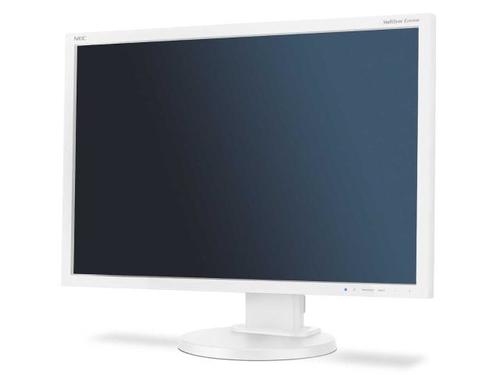
NEC MultiSync E245WMi
computer monitor 61 cm (24") 1920 x 1200 pixels WUXGA LED White