
NEC MultiSync EA244UHD-BK computer monitor 61 cm (24") 3840 x 2160 pixels 4K Ultra HD LED Black
- Screen: 61 cm (24"), 3840 x 2160 pixels, AH-IPS
- Refresh rate: 6 ms response time
- Brightness: 350 cd/m²
- Ports: 1 × HDMI, 2 × DisplayPort
- Stand: height-adjustable, tilt, VESA 100 x 100 mm
- Extras: speakers
- Colour: Black
Where to buy
We're not tracking prices for this product yet. Check current prices directly at:
We may earn a commission when you buy through links on this page — at no extra cost to you. Learn more
About this product
The 4K 24” NEC MultiSync EA244UHD is a 3840 x 2160 widescreen LCD for enterprise users that demand a huge workspace and the most advanced technologies. Designed to deliver stunning images and impeccable work performance, this high resolution display features IPS panel technology with wide viewing angles (178° horizontal/vertical) and ergonomic adjustability. The LED backlighting of the EA2444UHD allows for a slimmer profile, lighter weight and increased power savings. This model also boasts a height-adjustable stand (130mm) and full connectivity with DisplayPort, HDMI / MHL and DVI-D inputs. The EA244UHD includes touch-sensitive On Screen Display controls, a Picture by Picture (PBP) mode for two inputs onscreen at the same time, streamlined cable management and ControlSync technology, which allows users to control up to six units in a multi-monitor configuration.
- 4K resolution (3840 x 2160) offers a massive amount desktop space, four times full HD resolution
- LED backlight technology provides for industry-leading low power consumption and less hazardous materials
- Fully adjustable quick-release stand, including height-adjust (130mm), pivot, tilt and swivel capabilities, adds flexibility and comfort to your viewing preferences
- Full connectivity, including DisplayPort, HDMI and DVI-D inputs
- Touch-sensitive OSD controls are integrated into the bezel, making display adjustments easier than ever
- Human sensor and ambient light sensor automatically detect your work conditions to determine the proper display brightness, thereby conserving power
- ECO Mode allows for up to 56% more power conservation (vs. typical power settings), reducing your energy costs
Documents
Specifications
Key specifications
- Display diagonalSize of the display for this product, measured diagonally, usually in inches.
- 61 cm (24")
- Display resolutionThe number of distinct pixels in each dimension that can be displayed. It is usually quoted as width × height, with the units in pixels: for example, "1024 × 768" means the width is 1024 pixels and the height is 768 pixels. The higher the number of pixels, the sharper the image.
- 3840 x 2160 pixels
- Panel typeThe technology used to manufacture the panel, such as AMOLED or AH-IPS.
- AH-IPS
- Response timeThe response time is the time difference between the moment that a source (for example a video card) sends a signal and that equipment (for example a monitor) receives or display the signal. (Used abbreviations: R/F = Rise and Fall.)
- 6 ms
- Display brightness (typical)Display brightness, measured by its Luminance, presented as a figure in nits. Typical brightness ratings for monitors range from 250 to 350 nits with a target value of between 80 to 120 nits being suitable for most displays in a normal viewing environment.
- 350 cd/m²
- HDMI ports quantityThe number of sockets (ports) for HDMI connections. HDMI (High-Definition Multimedia Interface) is a compact audio/video interface for transferring uncompressed video data and compressed/uncompressed digital audio data from a HDMI-compliant device ("the source device") to a compatible computer monitor, video projector, digital television, or digital audio device. HDMI is a digital replacement for…
- 1
- DisplayPorts quantityNumber of DisplayPorts. A DisplayPort is a digital display interface developed by the Video Electronics Standards Association (VESA). The interface is primarily used to connect a video source to a display device such as a computer monitor, though it can also be used to carry audio, USB, and other forms of data.
- 2
- Height adjustmentThe part of the device that can be adjusted to change the height.
- Yes
- Tilt adjustmentThe tilt, which means the angle at which the device is pointing (up or down), can be changed.
- Yes
- Panel mounting interfaceThe product can be used wih VESA mounting interfaces.
- 100 x 100 mm
- Built-in speaker(s)The device contains speaker(s) to produce sound.
- Yes
- Product colourThe colour e.g. red, blue, green, black, white.
- Black
Show all 67 specificationsShow key specifications only
Design
- VESA mountingIndicates whether the product supports the VESA mounting standard for attachment to compatible arms, brackets, or wall mounts.
- Yes
- Product colourThe colour e.g. red, blue, green, black, white.
- Black
- Panel mounting interfaceThe product can be used wih VESA mounting interfaces.
- 100 x 100 mm
- Feet colourThe colour of the feet, which are the projecting part on which a device/piece of furniture, or each of its legs, stands.
- Black
Audio
- Built-in speaker(s)The device contains speaker(s) to produce sound.
- Yes
Display
- Display diagonalSize of the display for this product, measured diagonally, usually in inches.
- 61 cm (24")
- Display resolutionThe number of distinct pixels in each dimension that can be displayed. It is usually quoted as width × height, with the units in pixels: for example, "1024 × 768" means the width is 1024 pixels and the height is 768 pixels. The higher the number of pixels, the sharper the image.
- 3840 x 2160 pixels
- Native aspect ratioThe aspect ratio is the ratio of the width of an image to its height. The native aspect ratio is the one which the projector/display is particularly designed for. Images shown in native aspect ratio will utilize the entire resolution of the display and achieve maximum brightness. Images shown in other than native aspect ratio will always have less resolution and less brightness than images shown…
- 16:9
- Display technologyThe technology used in the display e.g. plasma, LED.
- LED
- TouchscreenA screen of a laptop, smartphone, etc., that responds to touch so you can control the interface using your fingers.
- No
- HD typeType of supported High Definition (e.g. Full HD, 4K Ultra HD).
- 4K Ultra HD
- Panel typeThe technology used to manufacture the panel, such as AMOLED or AH-IPS.
- AH-IPS
- Display brightness (typical)Display brightness, measured by its Luminance, presented as a figure in nits. Typical brightness ratings for monitors range from 250 to 350 nits with a target value of between 80 to 120 nits being suitable for most displays in a normal viewing environment.
- 350 cd/m²
- Response timeThe response time is the time difference between the moment that a source (for example a video card) sends a signal and that equipment (for example a monitor) receives or display the signal. (Used abbreviations: R/F = Rise and Fall.)
- 6 ms
- Supported graphics resolutionsThe graphic resolutions that can be displayed by the device. The graphic resolution describes the width and height dimensions of a display, such as a computer monitor, measured in pixels.
- 3840 x 2160
- Aspect ratioThe aspect ratio is the ratio of the width of a shape to its height. For example, 4:3 is common for standard displays and 16:9 is the ratio for Widescreen TV.
- 16:9
- Contrast ratio (typical)The difference in light intensity between the brightest white and the darkest black.
- 1000:1
- Contrast ratio (dynamic)A property of a display system, defined as the ratio of the luminance of the brightest color (white) to that of the darkest color (black) that the system is capable of producing.
- 25000:1
- Viewing angle, horizontalMaximum horizontal angle at which a display can be viewed with acceptable visual performance.
- 178°
- Viewing angle, verticalMaximum vertical angle at which a display can be viewed with acceptable visual performance.
- 178°
- Display number of coloursThe total number of distinct colours that the device is capable of displaying (e.g. 1.07 billion colours).
- 1.073 billion colours
- Pixel pitchThis is the parameter of a picture tube, which specifies the shortest distance between two dots of the same colour. The principle is: the smaller the dot pitch, the better sharpness of image.
- 0.14 x 0.14 mm
- Horizontal scan rangeThe range of horizontal frequencies the device can process and display, measured in kHz.
- 31.5 - 134 kHz
- Vertical scan rangeThe range of vertical frequencies the device can process and display, measured in hertz (Hz).
- 30 - 75 Hz
- Viewable size diagonalThe diagonal length of the screen area that can actually display an image, measured in mm.
- 60.5 cm
Packaging content
- AC adapter includedIndicates whether a power supply unit for connecting the device to an AC outlet is provided in the package.
- Yes
- Cables includedSpecifies the types and quantities of connection cables provided with the product (e.g., 3.5 mm to 3.5 mm or SATA).
- AC, DisplayPort, USB
Other features
- TV tuner integratedDevice has an in-built TV tuner.
- No
- Supplied AC adapter typeThe type of power supply provided with the product to connect it to an alternating current source (e.g. AC).
- LED
- 3DThe device can be used with 3D technology.
- No
Certificates
- CertificationSpecifies the official standards, safety approvals, or regulatory certifications the product has received.
- RoHS
Sustainability
- Sustainability certificatesThe environmental or ethical certifications the product has received to verify its sustainability standards (e.g., ASC or ACT Organic).
- ENERGY STAR
Weight & dimensions
- Width (with stand)The total horizontal measurement of the product when the supporting stand is attached, measured in millimetres.
- 558.2 mm
- Depth (with stand)The measurement of the product from front to back when any supporting accessory or base is attached, expressed in millimetres or centimetres.
- 218 mm
- Height (with stand)The total vertical measurement of the product including its base or support structure, expressed in millimetres or centimetres.
- 516.7 mm
- Weight (with stand)The total mass of the unit including its supporting base, measured in kilograms or grams.
- 8.7 kg
- Width (without stand)The horizontal measurement of the device excluding the base or support structure, expressed in millimetres.
- 558.2 mm
- Depth (without stand)The measurement of the product from front to back without its base or support, typically expressed in millimetres or centimetres.
- 72 mm
- Height (without stand)The vertical measurement of the device when the stand is removed, measured in mm.
- 334.3 mm
- Weight (without stand)The mass of the device excluding the support base, measured in g.
- 5 kg
Operational conditions
- Operating temperature (T-T)The minimum and maximum temperatures at which the product can be safely operated.
- 5 - 35 °C
- Storage temperature (T-T)The minimum and maximum temperatures at which the product can be safely stored.
- -10 - 60 °C
- Operating relative humidity (H-H)The range of relative humidity, expressed as a percentage, within which the device can function correctly without damage or performance loss.
- 20 - 80%
- Storage relative humidity (H-H)The permissible range of relative humidity, expressed as a percentage, within which the product can be stored without damage.
- 10 - 85%
- Operating altitudeThe maximum and minimum height above sea level at which the device can function correctly, measured in m.
- 0 - 2000 m
- Non-operating altitudeThe maximum and minimum altitude at which the unit can be stored or transported without sustaining damage, measured in metres.
- 0 - 12192 m
Power
- Power consumption (typical)Amount of power consumed by this model, often expressed in watts (W). Typical values that manufacturers give are power consumption when off, standby/suspended mode, typical use, maximum usage.
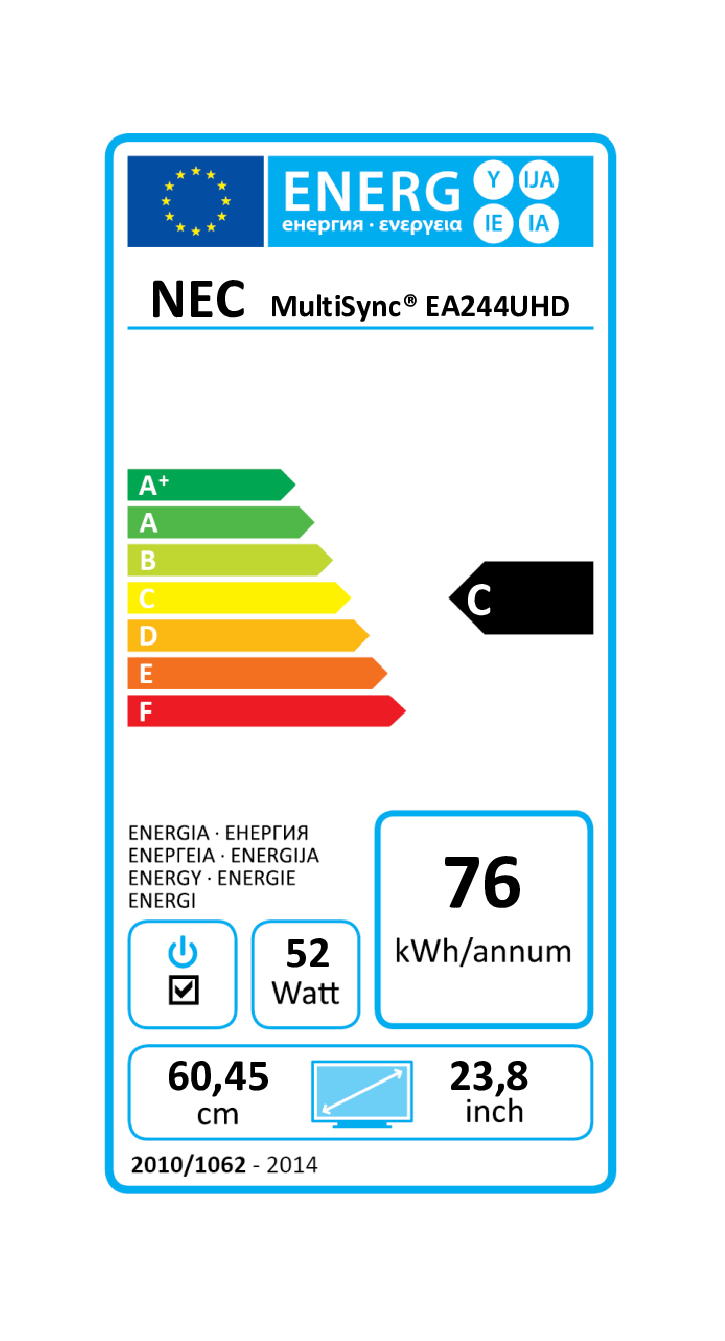
- 52 W
- Power consumption (standby)The amount of electricity that is consumed when the product is on standby.
- 0.33 W
- Energy efficiency scaleThe range of energy efficiency classes used to rate the product's power consumption, such as A to G.
- A+ to F
- DC-in jackThe socket/plug where the DC electricity supply connects to the device.
- Yes
Security
- Cable lock slotHoles on the edge of devices through which a cable lock can be passed, so the device can be locked to a desk etc.
- No
Ergonomics
- Height adjustmentThe part of the device that can be adjusted to change the height.
- Yes
- PivotIndicates whether the device can be rotated 90 degrees to switch between landscape and portrait orientation.
- Yes
- SwivellingIndicates whether the product has a mechanism that allows it to rotate horizontally.
- Yes
- Tilt adjustmentThe tilt, which means the angle at which the device is pointing (up or down), can be changed.
- Yes
Management features
- On Screen Display (OSD)Indicates whether the device can display a graphical menu or information directly on the screen for adjusting settings and viewing status.
- Yes
Features
- Plug and PlayIndicates whether this product supports is "plug and play". Plug and play is hardware or software that, after being installed ("plugged in"), can immediately be used ("played with"), as opposed to hardware or software which requires configuration.
- Yes
Ports & interfaces
- USB versionUniversal Serial Bus (USB) is an industry standard developed in the mid-1990s that defines the interface used for connection, communication and power supply between computers and electronic devices. Every new version - for example 1.1, 2.0, 3.0 - is much faster than the previous one.
- 3.2 Gen 1 (3.1 Gen 1)
- USB hub versionThe technical standard of the USB hub, if available, which determines the maximum data transfer speed (e.g., 3.2 Gen 1).
- 3.2 Gen 1 (3.1 Gen 1)
- USB Type-A downstream ports quantityThe number of USB Type-A ports available for connecting peripheral devices to the unit.
- 4
- DVI portDigital Visual Interface (DVI) is a video display interface to connect a video source to a display device, such as a computer monitor.
- Yes
- DVI-D ports quantityThis is the amount of DVI-I interfaces. Digital Visual Interface (DVI) is a video display interface developed by the Digital Display Working Group (DDWG). The digital interface is used to connect a video source to a display device, such as a computer monitor. DVI-D means DVI digital, which means it can only support digital, but not analog.
- 2
- HDMI ports quantityThe number of sockets (ports) for HDMI connections. HDMI (High-Definition Multimedia Interface) is a compact audio/video interface for transferring uncompressed video data and compressed/uncompressed digital audio data from a HDMI-compliant device ("the source device") to a compatible computer monitor, video projector, digital television, or digital audio device. HDMI is a digital replacement for…
- 1
- DisplayPorts quantityNumber of DisplayPorts. A DisplayPort is a digital display interface developed by the Video Electronics Standards Association (VESA). The interface is primarily used to connect a video source to a display device such as a computer monitor, though it can also be used to carry audio, USB, and other forms of data.
- 2
- HDCPHigh-bandwidth Digital Content Protection (HDCP) is a form of digital copy protection to prevent copying of digital audio and video content as it travels across connections.
- Yes
- AC (power) inIndicates whether the device can be powered directly via an alternating current (AC) power source.
- Yes
- Mobile High-Definition Link (MHL)Indicates whether the product supports the Mobile High-Definition Link standard for mirroring a mobile device's screen to a display.
- Yes
Database Right data-sheet 2026 Icecat. All rights reserved. Provided “as is”, without warranty — check details with the store before buying.
Expert reviews
- 90
trustedreviews.com2015
If you're looking to upgrade the monitor in your professional image editing rig, there can be few features as eye-catching as a move to a 4K resolution. The NEC EA244UHD delivers this in a compact 24in package and still has the image quality and masses o...
- +
- Exceptional colour accuracy, Incredibly sharp 4k resolution, Compact yet feature-packed, Has every feature a pro could want
- −
- Input lag a little high for gaming, Colour and brightness uniformity could be better, High resolution not that useful for desktop work
- –
tomshardware.com2014
Color performance is pretty much perfect without calibration. Just unpack, plug in, set brightness to taste and go. In terms of accuracy, it can't get much better than the EA244UHD.Review$1362.32 Amazon...
- +
- Out-of-box performance, bright saturated image, excellent clarity, high pixel density, PA-series features at an EA-series price
- −
- Pricier than Dell's UP2414Q, could use a little more contrast
Price history (90 days, best daily price)
Price history is still being collected for this product — check back soon.
Alternative models

NEC MultiSync EA304WMI-BK
computer monitor 76.2 cm (30") 2560 x 1600 pixels LED Black

NEC MultiSync EA304WMi
computer monitor 76.2 cm (30") 2560 x 1600 pixels LED Black

NEC MultiSync MD302C6
computer monitor 76.2 cm (30") 3280 x 2048 pixels LCD Black

NEC MultiSync EA304WMi
computer monitor 76.2 cm (30") 2560 x 1600 pixels LED White

NEC MultiSync PA322UHD-SV2
computer monitor 80 cm (31.5") 3840 x 2160 pixels 4K Ultra HD LED Black

NEC MultiSync MD302C4
computer monitor 75.7 cm (29.8") 2560 x 1600 pixels HD Black