
MSI PRO MP341CQPHG E12 computer monitor 86.4 cm (34") 3440 x 1440 pixels UltraWide Quad HD Black
- Screen: 86.4 cm (34"), 3440 x 1440 pixels, VA, Curved
- Refresh rate: 120 Hz, 4 ms response time
- Brightness: 300 cd/m²
- Ports: 2 × HDMI, 1 × DisplayPort
- Stand: tilt, VESA 100 x 100 mm
- Extras: speakers
- Colour: Black
Where to buy
We're not tracking prices for this product yet. Check current prices directly at:
We may earn a commission when you buy through links on this page — at no extra cost to you. Learn more
About this product
Efficiency by Day,
Dominance by Night
The PRO MP341CQPH Series monitor combines a 120Hz refresh rate and Adaptive-Sync for smooth gaming and work. Its ergonomic design, PerfectEdge display, and HDR Ready feature enhance comfort and immersion, making it the perfect all-in-one solution.
Be the PRO of life and work with Ultra-Wide Panel
Broaden your horizons with the ultra-wide 21:9 PRO MP341CQ Series and enjoy every detail of your movie.
One-Cable
Display & 98W
Power Delivery
Unlock the full potential of USB Type-C with a single port that handles data transfer, video output via DisplayPort Alt Mode, and 98W charging.
120Hz High Refresh Rate
A 120Hz refresh rate delivers smoother visuals, reduces motion blur, and enhances gaming responsiveness. For work, it ensures smoother scrolling and transitions, improving comfort and efficiency. Additionally, it's perfect for AIGC (Artificial Intelligence Generated Content) and AI-driven image and text generation, further enhancing creative workflows and making it a versatile tool for modern professionals.
Enjoy Two Devices with One
Set of Monitor & KB/MS
Streamline your workflow with integrated KVM and PIP/PBP modes. Control two systems with a single keyboard and mouse, and view them simultaneously on one stunning screen. It’s not just multitasking—it’s total command.
Sleek Integration with Mini PC Mountable
Experience the flexibility of a 3-way adjustable monitor and the convenience of a tidy desk with our mini-PC mountable stand.
MSI Power Link Support
The standard Mini-PC mountable design allows the Cubi Series to be mounted on the stand of the monitor, tidying up the workspace. MSI Power Link with HDMI CEC lets the mini-PC be powered on by the monitor's button, enhancing efficiency and user experience.
Ergonomics for
All-Day Productivity
Working in a suitable position not only has a positive impact on job satisfaction and productivity but can also contribute to overall health and well-being.
Experience Stunning Visuals
with HDR Ready
HDR Ready technology delivers richer colors, deeper contrast, and vivid details for a lifelike viewing experience. Whether for work, movies, or gaming, it enhances screen performance to new heights.
Accessory Slot Design
The accessory slot offers convenient storage for small peripherals, keeping your workspace organized and clutter-free. Ideal for cables, adapters, or other essentials, it enhances efficiency and maintains a tidy environment.
Built-in Speakers
Experience clear, powerful audio with built-in speakers, enhancing your multimedia without cluttering your workspace.
Firmware Update
PRO MP341CQPH Series can update the firmware through DP connector, which is simple and easy to use. This allows users to update the firmware on their own at any time when the latest version is released by MSI. This ensures that the screen is always in the best-optimized state.
Simplicity At Your Fingertips - Display Kit App
The MSI exclusive software Display Kit provides the most convenient tool, the proper display that allows you to read and enjoy the image at the same time & color mode to you while working or everyday.
Crafted for the Modern Professional.
Inspired by the younger generation's pursuit of simplicity and efficiency, the monitor's back cover features refined engravings. This elegant design symbolizes limitless possibilities, making it the perfect companion for young professionals.
Power Saving Product
It is our responsibility to promote sustainable development and we proudly offer an eco-friendly product, contributing to a greener environment.
Sustainable Packing Solutions
Reduce the environmental impact with our sustainable solutions.
A Better Future with EPEAT Registered MSI Monitors.
EPEAT is the world’s premier global ecolabel for electronics. MSI monitors provide sustainable products inside out and participate in EPEAT/EPEAT ecolabel. Let’s protect the earth with actions.
TCO Certified:
Proven Sustainability and Quality
With TCO Certification, our products deliver proven sustainability and reliability you can trust.
From responsible manufacturing to extended product life, every detail is designed for a greener future.
Documents
- BrochureProduct Brochure ↗
- Product information sheetEU Product Fiche ↗
Specifications
Key specifications
- Display diagonalSize of the display for this product, measured diagonally, usually in inches.
- 86.4 cm (34")
- Display resolutionThe number of distinct pixels in each dimension that can be displayed. It is usually quoted as width × height, with the units in pixels: for example, "1024 × 768" means the width is 1024 pixels and the height is 768 pixels. The higher the number of pixels, the sharper the image.
- 3440 x 1440 pixels
- Panel typeThe technology used to manufacture the panel, such as AMOLED or AH-IPS.
- VA
- Screen shapeDescribes the physical curvature of the display panel, such as whether it is flat or curved.
- Curved
- Maximum refresh rateThe highest number of times per second the image is updated, measured in hertz (Hz).
- 120 Hz
- Response timeThe response time is the time difference between the moment that a source (for example a video card) sends a signal and that equipment (for example a monitor) receives or display the signal. (Used abbreviations: R/F = Rise and Fall.)
- 4 ms
- Display brightness (typical)Display brightness, measured by its Luminance, presented as a figure in nits. Typical brightness ratings for monitors range from 250 to 350 nits with a target value of between 80 to 120 nits being suitable for most displays in a normal viewing environment.
- 300 cd/m²
- HDMI ports quantityThe number of sockets (ports) for HDMI connections. HDMI (High-Definition Multimedia Interface) is a compact audio/video interface for transferring uncompressed video data and compressed/uncompressed digital audio data from a HDMI-compliant device ("the source device") to a compatible computer monitor, video projector, digital television, or digital audio device. HDMI is a digital replacement for…
- 2
- DisplayPorts quantityNumber of DisplayPorts. A DisplayPort is a digital display interface developed by the Video Electronics Standards Association (VESA). The interface is primarily used to connect a video source to a display device such as a computer monitor, though it can also be used to carry audio, USB, and other forms of data.
- 1
- Tilt adjustmentThe tilt, which means the angle at which the device is pointing (up or down), can be changed.
- Yes
- Panel mounting interfaceThe product can be used wih VESA mounting interfaces.
- 100 x 100 mm
- Built-in speaker(s)The device contains speaker(s) to produce sound.
- Yes
- Product colourThe colour e.g. red, blue, green, black, white.
- Black
Show all 76 specificationsShow key specifications only
Design
- VESA mountingIndicates whether the product supports the VESA mounting standard for attachment to compatible arms, brackets, or wall mounts.
- Yes
- Market positioningUnder which category can the device be positioned in the market, e.g. camera phone.
- Business
- Product colourThe colour e.g. red, blue, green, black, white.
- Black
- Panel mounting interfaceThe product can be used wih VESA mounting interfaces.
- 100 x 100 mm
- Front bezel colourThe colour of the frame surrounding the front of the display (e.g. Black, Silver).
- Black
- Feet colourThe colour of the feet, which are the projecting part on which a device/piece of furniture, or each of its legs, stands.
- Black
Ports & interfaces
- Built-in USB hubWhether or not the device features a USB hub to connect more than one other device via USB.
- No
- DVI portDigital Visual Interface (DVI) is a video display interface to connect a video source to a display device, such as a computer monitor.
- Yes
- HDMIHDMI (High-Definition Multimedia Interface) is a compact audio/video interface for transferring uncompressed video data and compressed/uncompressed digital audio data from a HDMI-compliant device ("the source device") to a compatible computer monitor, video projector, digital television, or digital audio device. HDMI is a digital replacement for existing analog video standards.
- Yes
- HDMI ports quantityThe number of sockets (ports) for HDMI connections. HDMI (High-Definition Multimedia Interface) is a compact audio/video interface for transferring uncompressed video data and compressed/uncompressed digital audio data from a HDMI-compliant device ("the source device") to a compatible computer monitor, video projector, digital television, or digital audio device. HDMI is a digital replacement for…
- 2
- HDMI versionThe specific release version of the High-Definition Multimedia Interface standard supported by the device (e.g. 1.3 or 2.0).
- 2.0b
- DisplayPorts quantityNumber of DisplayPorts. A DisplayPort is a digital display interface developed by the Video Electronics Standards Association (VESA). The interface is primarily used to connect a video source to a display device such as a computer monitor, though it can also be used to carry audio, USB, and other forms of data.
- 1
- DisplayPort versionThe specific release version of the DisplayPort standard supported by the device (e.g., 1.2 or 1.4).
- 1.4a
- Audio inputThe type of audio input that the device requires, and the connection needed.
- Yes
- Headphone outThe socket for connecting headphones to the device.
- Yes
- Headphone outputsNumber of sockets /ports where headphones are connected.
- 1
Audio
- Built-in speaker(s)The device contains speaker(s) to produce sound.
- Yes
- Number of speakersThe quantity of speakers included in/with the product.
- 2
- RMS rated powerRMS (Root mean square) is a measure of the continuous power required by a device, in particular audio amplifiers and loudspeakers.
- 4 W
Multimedia
- Built-in cameraThe product has an integrated camera.
- No
Performance
- NVIDIA G-SYNCIndicates whether the product supports NVIDIA G-SYNC technology to synchronize the display refresh rate with the GPU to eliminate screen tearing.
- No
- AMD FreeSyncThe product includes AMD Freesync Technology for the dynamic synchronization of the graphic card and the monitor in order to avoid screen tearing.
- No
- Flicker-free technologyIndicates whether the device employs technology to reduce or eliminate screen flickering to decrease eye strain during prolonged use.
- Yes
- Low Blue Light technologyIndicates whether the product features technology designed to reduce the amount of harmful short-wave blue light emitted by the screen to decrease eye strain.
- Yes
Display
- Display diagonalSize of the display for this product, measured diagonally, usually in inches.
- 86.4 cm (34")
- Display resolutionThe number of distinct pixels in each dimension that can be displayed. It is usually quoted as width × height, with the units in pixels: for example, "1024 × 768" means the width is 1024 pixels and the height is 768 pixels. The higher the number of pixels, the sharper the image.
- 3440 x 1440 pixels
- Native aspect ratioThe aspect ratio is the ratio of the width of an image to its height. The native aspect ratio is the one which the projector/display is particularly designed for. Images shown in native aspect ratio will utilize the entire resolution of the display and achieve maximum brightness. Images shown in other than native aspect ratio will always have less resolution and less brightness than images shown…
- 21:9
- TouchscreenA screen of a laptop, smartphone, etc., that responds to touch so you can control the interface using your fingers.
- No
- Native refresh rateThe number of times per second the hardware updates, measured in hertz (Hz).
- 60 Hz
- HD typeType of supported High Definition (e.g. Full HD, 4K Ultra HD).
- UltraWide Quad HD
- Panel typeThe technology used to manufacture the panel, such as AMOLED or AH-IPS.
- VA
- Display brightness (typical)Display brightness, measured by its Luminance, presented as a figure in nits. Typical brightness ratings for monitors range from 250 to 350 nits with a target value of between 80 to 120 nits being suitable for most displays in a normal viewing environment.
- 300 cd/m²
- Response timeThe response time is the time difference between the moment that a source (for example a video card) sends a signal and that equipment (for example a monitor) receives or display the signal. (Used abbreviations: R/F = Rise and Fall.)
- 4 ms
- Response time measurement typeThe method used to measure the time it takes for a pixel to change colors, such as GTG (Gray to Gray) or BwB (Black-white-Black).
- GTG (Gray to Gray)
- Response time (MPRT)The time it takes for a pixel to change from one color to another, measured in ms.
- 1 ms
- Anti-glare screenAlways gives an optimal view, even in direct sunlight.
- Yes
- Screen shapeDescribes the physical curvature of the display panel, such as whether it is flat or curved.
- Curved
- Screen curvature ratingThe radius of the curve of the screen, expressed in millimetres (e.g. 1500R), where a smaller number indicates a more pronounced curve.
- 1500R
- Supported graphics resolutionsThe graphic resolutions that can be displayed by the device. The graphic resolution describes the width and height dimensions of a display, such as a computer monitor, measured in pixels.
- 3440 x 1440
- Contrast ratio (typical)The difference in light intensity between the brightest white and the darkest black.
- 3500:1
- Contrast ratio (dynamic)A property of a display system, defined as the ratio of the luminance of the brightest color (white) to that of the darkest color (black) that the system is capable of producing.
- 100000000:1
- Maximum refresh rateThe highest number of times per second the image is updated, measured in hertz (Hz).
- 120 Hz
- Viewing angle, horizontalMaximum horizontal angle at which a display can be viewed with acceptable visual performance.
- 178°
- Viewing angle, verticalMaximum vertical angle at which a display can be viewed with acceptable visual performance.
- 178°
- Display number of coloursThe total number of distinct colours that the device is capable of displaying (e.g. 1.07 billion colours).
- 1.07 billion colours
- Pixel pitchThis is the parameter of a picture tube, which specifies the shortest distance between two dots of the same colour. The principle is: the smaller the dot pitch, the better sharpness of image.
- 0.23175 x 0.23175 mm
- Horizontal scan rangeThe range of horizontal frequencies the device can process and display, measured in kHz.
- 70.73 - 178.8 kHz
- Vertical scan rangeThe range of vertical frequencies the device can process and display, measured in hertz (Hz).
- 48 - 120 Hz
- Viewable size, horizontalThe viewable size is often somewhat smaller than the actual size of a monitor, because there is a border around the image.
- 79.7 cm
- Viewable size, verticalThe height of the screen area that can actually display an image, measured in millimetres or inches.
- 33.4 cm
- Display diagonal (metric)This is the size of the display screen, measured diagonally.
- 86.36 cm
- Colour depthThe number of bits used to represent the colour of a single pixel, which determines the total number of possible colours that can be displayed.
- 10 bit
- Colour gamut standardThe specific color space standard the device is designed to reproduce, such as Adobe RGB or DCI-P3.
- DCI-P3
- Colour gamutThe range of colours that the display can accurately reproduce, typically expressed as a percentage of a standard colour space (e.g. sRGB or Adobe RGB).
- 91%
- sRGB coverage (typical)The percentage of the sRGB color space that the device is capable of reproducing.
- 114%
- DCI-P3 coverageThe percentage of the DCI-P3 color gamut that the device is capable of displaying.
- 91%
Weight & dimensions
- Width (without stand)The horizontal measurement of the device excluding the base or support structure, expressed in millimetres.
- 809.3 mm
- Depth (without stand)The measurement of the product from front to back without its base or support, typically expressed in millimetres or centimetres.
- 112.8 mm
- Height (without stand)The vertical measurement of the device when the stand is removed, measured in mm.
- 365.8 mm
- Weight (without stand)The mass of the device excluding the support base, measured in g.
- 9 kg
Power
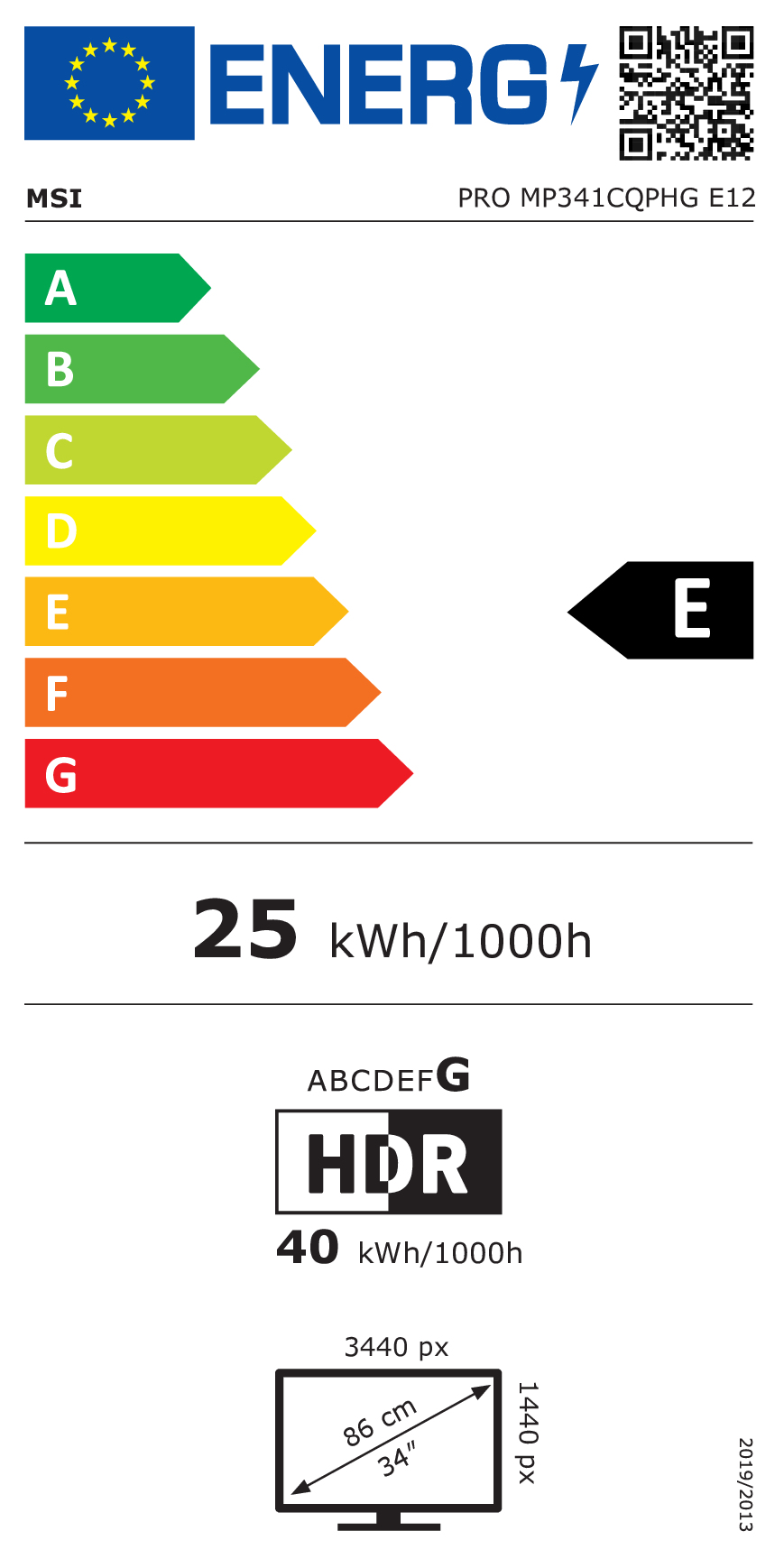
- Energy efficiency class (SDR)The energy efficiency rating of the device when operating in Standard Dynamic Range (SDR) mode, categorized from A to G.
- E
- Energy efficiency class (HDR)The energy efficiency rating of the device when High Dynamic Range (HDR) mode is active, ranging from A to G.
- G
- Energy consumption (SDR) per 1000 hoursThe amount of electric energy consumed by the device during standard dynamic range (SDR) operation over a period of 1000 hours, measured in kilowatt-hours (kWh).
- 25 kWh
- Energy consumption (HDR) per 1000 hoursThe amount of electrical energy consumed by the device when displaying High Dynamic Range (HDR) content over a period of 1000 hours, measured in kilowatt-hours (kWh).
- 50 kWh
- Power consumption (standby)The amount of electricity that is consumed when the product is on standby.
- 0.5 W
- Power consumption (off)The amount of electrical energy consumed by the device when it is switched off, measured in watts.
- 0.3 W
- AC input voltageThe voltage of the AC electricity that is inputted into the product.
- 100 - 240 V
- AC input frequencyThe range of alternating current frequencies the device can accept from the power source, measured in hertz (e.g., 45 - 65).
- 50/60 Hz
- Power supply typeThe type of power supply which this product uses.
- Internal
- Energy efficiency scaleThe range of energy efficiency classes used to rate the product's power consumption, such as A to G.
- A to G
Security
- Cable lock slotHoles on the edge of devices through which a cable lock can be passed, so the device can be locked to a desk etc.
- Yes
- Cable lock slot typeThe standard of the security slot used to attach a physical locking cable to the device (e.g. Kensington or Noble).
- Kensington
Ergonomics
- Tilt adjustmentThe tilt, which means the angle at which the device is pointing (up or down), can be changed.
- Yes
- Tilt angle rangeThe minimum and maximum angles at which the unit can be tilted, typically expressed in degrees.
- -3.5 - 21.5°
Packaging data
- Package weightWeight of the packaged product.
- 12.3 kg
- Package typeThe type of product package e.g. box.
- Box
Database Right data-sheet 2026 Icecat. All rights reserved. Provided “as is”, without warranty — check details with the store before buying.
Price history (90 days, best daily price)
Price history is still being collected for this product — check back soon.
Alternative models

MSI PRO MP275PHG E14
computer monitor 68.6 cm (27") 1920 x 1080 pixels Full HD Black

MSI Pro MP273 E14A
computer monitor 68.6 cm (27") 1920 x 1080 pixels Full HD LCD Black

MSI Pro MP273Q E7
computer monitor 68.6 cm (27") 2560 x 1440 pixels Wide Quad HD LCD Black

MSI Pro MP273W E14A
computer monitor 68.6 cm (27") 1920 x 1080 pixels Full HD LCD White

MSI Pro MP245 E14VL
computer monitor 60.5 cm (23.8") 1920 x 1080 pixels Full HD LCD Black

MSI Pro MP275PHG E14
computer monitor 68.6 cm (27") 1920 x 1080 pixels Full HD LCD Black
Accessories & compatible products

R-Go Tools Monitor arm R-Go Zepher Single, fully adjustable, 0-8 Kg load capacity, 100% circular, black

R-Go Tools Monitor arm R-Go Caparo Single, fully adjustable with gas spring, 3-9 kg load capacity, 100% circular, black

R-Go Tools Monitor arm R-Go Zepher Dual, for two monitors, fully adjustable, 0
8 kg load capacity, 100% circular, black
