
Mousetrapper Prime Mouse Black USB-C + Bluetooth
- Connection: Bluetooth + USB Type-A
- Sensor: 2000 DPI
- Buttons: 8, Buttons
- Made for: Office
- Colour: Black, Grey
Where to buy
We're not tracking prices for this product yet. Check current prices directly at:
We may earn a commission when you buy through links on this page — at no extra cost to you. Learn more
About this product
Everything you want from a Mousetrapper and more. A total of eight programmable buttons give you more options for configuring your Mousetrapper exactly as you want it. Prime lets you work wirelessly via a USB-dongle, and two separate buttons make it easy to scroll and zoom in and out. Download the MT Keys software, which lets you easily reconfigure all the button functions, add standard texts, create user profiles and much more. MT Keys is available for both Mac and PC.
The replaceable and wipeable wrist supports on Prime make it easy to keep the product clean. Prime also has a foldable keyboard pad, allowing you to adjust the height to your keyboard. Our Type keyboard is designed to fit perfectly with all Mousetrapper devices.
Wireless
Option to work wirelessly. Rechargeable battery with 4 months of battery life.
8 buttons
Programmable buttons for customization to your needs with our app.
2000
Allows precise and effective work with a DPI of 2000. Change the sensitivity and speed with MT Keys.
Why use a centrally positioned mouse?
A centered position for your hands is essential to prevent RSI. Overstretching the arm to reach for the mouse beyond the keyboard is a common trap. By using an ergonomic mouse like Mousetrapper you get an ergonomically healthy position that keeps your arms and hands relaxed. It has been found that a centered mouse, often after only a couple of weeks, provides a noticeable improvement.
Mousetrapper Control Pad
The Mousetrapper Control Pad is not a touch pad, it’s a mechanical control pad with a very unique tactile feeling. By placing your index, middle and ring fingers on the control pad you can control the cursor with simple movements as the control pad moves smoothly in two dimensions. It is easy to use and gives the user maximum flexibility with the option of clicking directly on the Control Pad.
Videos & documents
Mousetrapper Central Working
Specifications
Key specifications
- Device interfaceThe ports (sockets) where the device connects with other devices.
- Bluetooth + USB Type-A
- Movement resolutionThe sensitivity of the sensor, measured as the number of dots per inch (DPI) that the device detects during movement (e.g. 1600).
- 2000 DPI
- Buttons quantityThe number of buttons that there are in/on the product.
- 8
- Scroll typeType of scroll in computer input device, e.g. wheel, touch.
- Buttons
- PurposeWhat the product is used for.
- Office
- Product colourThe colour e.g. red, blue, green, black, white.
- Black, Grey
Show all 29 specificationsShow key specifications only
Features
- PurposeWhat the product is used for.
- Office
- Windows operating systems supportedWindows vesions wich can be used with the device.
- Windows 10, Windows 10 Education, Windows 10 Education x64, Windows 10 Enterprise, Windows 10 Enterprise x64, Windows 10 Home, Windows 10 Home x64, Windows 10 IOT Core, Windows 10 IoT Enterprise, Windows 10 Pro, Windows 10 Pro x64, Windows 10 x64, Windows 11, Windows 11 x64
- Surface colorationType of surface coloration e.g. monotone, image.
- Monochromatic
- MaterialThe material from which a thing is or can be made e.g. wood, plastic.
- Acrylonitrile butadiene styrene (ABS), Leather, Silicone
Ports & interfaces
- Connectivity technologyThe technology that enables connectivity of the device, e.g. wired or wireless.
- Wireless
Keyboard
- Device interfaceThe ports (sockets) where the device connects with other devices.
- Bluetooth + USB Type-A
Mouse
- Movement resolutionThe sensitivity of the sensor, measured as the number of dots per inch (DPI) that the device detects during movement (e.g. 1600).
- 2000 DPI
- Scroll typeType of scroll in computer input device, e.g. wheel, touch.
- Buttons
- Buttons quantityThe number of buttons that there are in/on the product.
- 8
- Scrolling directionsSpecifies the axis along which the scrolling function operates, such as vertical or horizontal.
- Vertical
- Buttons typeThe type of the buttons.
- Pressed buttons
- Programmable mouse buttonsIndicates whether the device has buttons that can be customized to perform specific functions or macros.
- Yes
- Number of programmable buttonsThe total count of buttons on the device that can be customized to perform specific actions or macros via software.
- 8
Design
- Wrist restA padded cushion placed in front of a computer keyboard to rest your wrists on when typing.
- Yes
- Ergonomic designIndicates whether the product has been designed to optimize comfort, efficiency, and safety for the user.
- Yes
- Product colourThe colour e.g. red, blue, green, black, white.
- Black, Grey
Packaging content
- User guideIndicates whether a user manual or instructional guide is included with the product.
- Yes
- Quantity per packThe number of individual units contained within a single sales package, measured in pc(s).
- 1 pc(s)
- Cables includedSpecifies the types and quantities of connection cables provided with the product (e.g., 3.5 mm to 3.5 mm or SATA).
- USB
Weight & dimensions
- WidthThe measurement or extent of something from side to side.
- 478 mm
- DepthThe distance from the front to the back of something.
- 110 mm
- HeightThe measurement of the product from head to foot or from base to top.
- 109 mm
- WeightWeight of the product without packaging (net weight). If possible, the net weight is given including standard accessories and supplies. Please note that sometimes the manufacturer leaves out the weight of accessories and/or supplies.
- 680 g
Software
- Mac operating systems supportedMac operating systems e.g. OS X can be used with the device.
- Mac OS X 10.15 Catalina, Mac OS X 10.15.3 Catalina, Mac OS X 11.0 Big Sur, Mac OS X 12.0 Monterey
- Linux operating systems supported8 RT. Linux (9.4, 9.5), Red Hat Enterprise Linux 5.0 (supported with a pre-built package); SUSE Linux (10.3, 11.0, 11, 11.1, 11.2), Fedora (9, 9.0, 10, 10.0, 11.0, 11, 12, 12.0), Ubuntu (8.04, 8.04.1, 8.04.2, 8.10, 9.04, 9.10, 10.04), Debian (5.0, 5.0.1, 5.0.2, 5.0.3)
- Yes
System requirements
- Mobile operating systems supportedThe operating systems e.g. Android, iOS, that can be used with the mobile device.
- Android, iOS
Power
- Power sourceWhat is providing power for the product e.g. mains electricity.
- Batteries/Cable
- RechargeableThe device can be connected to a power supply in order to restore electrical energy in the battery.
- Yes
Network
- Bluetooth versionThe type of bluetooth technology in the product e.g. Bluetooth Smart (v4.0).
- 4.1
Database Right data-sheet 2026 Icecat. All rights reserved. Provided “as is”, without warranty — check details with the store before buying.
Price history (90 days, best daily price)
Price history is still being collected for this product — check back soon.
Alternative models
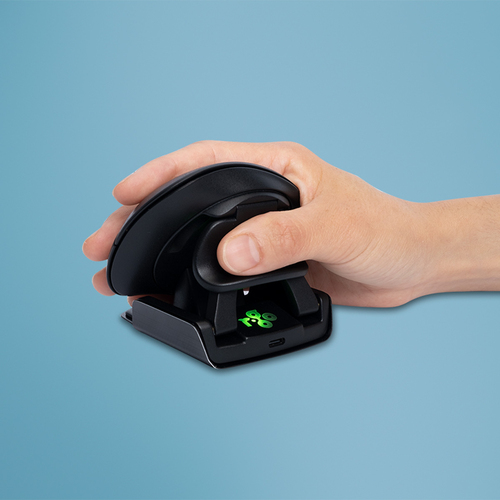
R-Go Tools Ergonomic
mouse R-Go Twister, with break software, ambidextrous mouse for both hands, foldable, bluetooth and wired

R-Go Tools Vertical
mouse R-Go HE Basic, ergonomic mouse, medium (hand size ≥ 185 mm), right-handed, Bluetooth, grey

R-Go Tools Ergonomic
mouse R-Go HE Break with break software, medium (hand size 165-185 mm), right-handed, Bluetooth, black

Mousetrapper Delta
Mouse Grey Regular USB-A
Mousetrapper Prime & Armrest Asymmetric

Mousetrapper Delta
Mouse Black Extended USB-A