
LG 65TC3D-B interactive whiteboard 165.1 cm (65") 1920 x 1080 pixels Touchscreen Black USB
- Display diagonal: 165.1 cm (65")
- Cables included: AC, HDMI
- Remote control included
- Quick start guide
- Stylus included
- Operating temperature (T-T): 0 - 40 °C
Where to buy
We're not tracking prices for this product yet. Check current prices directly at:
We may earn a commission when you buy through links on this page — at no extra cost to you. Learn more
About this product
Experience Intuitive
Touch and Writing
With the most advanced built-in touch technology, LG’s TC3D/TR3D series enables precise screen touch responses and a sleek design.
Floating Toor Bar
While using the writing function in IDB app mode, the user can place a floating toolbar anywhere on the screen by pressing and holding a touch point. Users can also drag it around using their fingertip or open and minimize it with a single tap, enabling comfortable and intuitive writing on the screen.
No Need For a PC
LG webOS 3.0+ is powered by high-performance SoC and can execute several tasks at the same time without the need for a separate media player or PC. Especially when combined with the IDB app, the LG IDB offers both interactive collaboration as well as an intuitive writing application, meaning additional licenses for IDB solution are not required.
Optimized Work-flow for Efficient Collaboration
Incredibly, a virtual meeting space can be created in the IDB, with participation access limited to users who enter a pin number generated by the IDB. Once the participants are in, the meeting session is ready to start.
Drawing Overlay on top of HDMI/DP and Save
HDMI or DP cables are still preferred among users when connecting their digital devices to IDB. LG IDB enables screen sharing using these cables. Shared screens are shown on a list on the IDB, so that a presenter can select the desired material to be displayed in full screen mode. Also, the presenter can write notes on the shared screen and save the notes with the screen, which reduces unnecessary time spent wrapping-up or announcing meeting minutes.
Annotate on Mirrored Screen and Save
The whole process mentioned above is also available using wireless connection. The only difference is that screens can be shared with an IDB via wireless connection. Whether using cables or wireless connection, all mirrored screens are shown as a list on the IDB, so the presenter is able to choose from among them. LG IDB will be key to building an environment optimized for both efficient collaboration and effective meetings.
Ensure the Best Picture Quality
LG IDB provides the best picture quality regardless of content type and viewer position. The UHD resolution allows users to view details without distortion, even when zooming in on the display. Moreover, the LG IPS panel has a wide viewing angle that delivers clear content, no matter where attendees are in the room.
Auto Signal/Touch Switching
LG has eliminated many elements that adversely affect user experience. The LG IDB is designed to connect signals from the side interface first, so that a display on notebooks connected to the side is immediately shown on the IDB screen and support touch functions. The original IDB display and the touch function are restored without any separate action when the notebook is disconnected from the side interface.
Editable Assistive Touch Menu
LG IDB users can run the desired function or change the setting from anywhere by softly pressing the screen to call up the Touch Menu. Moreover, it is possible to edit the menu to include preferred apps.
Touch On/Off Key
During a presentation, the touch function is not always required. In such cases, users can turn off the function just by tapping the “Assistive Menu” key. Users only need to tap this key again to turn the touch function back on. The key is in the lower section of the front of the TC3D series, allowing users to easily turn the touch function on/off.
Multi Screen with PBP/PIP
PBP (Picture-By-Picture) features multi screen in a single display with upto 2 input sources, thus maximizing usability of large display. In addition, PIP (Picture-In-Picture) supports playing both main screen and sub screen at the same time with various layouts, so users can arrange many different usage scenarios efficiently.
Eye Care Support
Reader mode decreases blue light, a cause of eye strain, by 70%, improving the comfort of those who are viewing the screen for a long time. Also the anti-glare coating on the screen reduces reflection for better visibility. And brightness is automatically adjusted according to ambient light of the surrounding to reduce eye strain.
Compatibility with Partner
Compatibility is critical in meeting room environments that work with multiple devices. Especially LG IDB is certified for compatibility with AV control systems, enabling seamless integration and automated control in meeting rooms. The LG IDB also allows video conferencing to be held reliably, as it supports connections with VCS solutions or UC (Unified Communication) solutions.
Documents
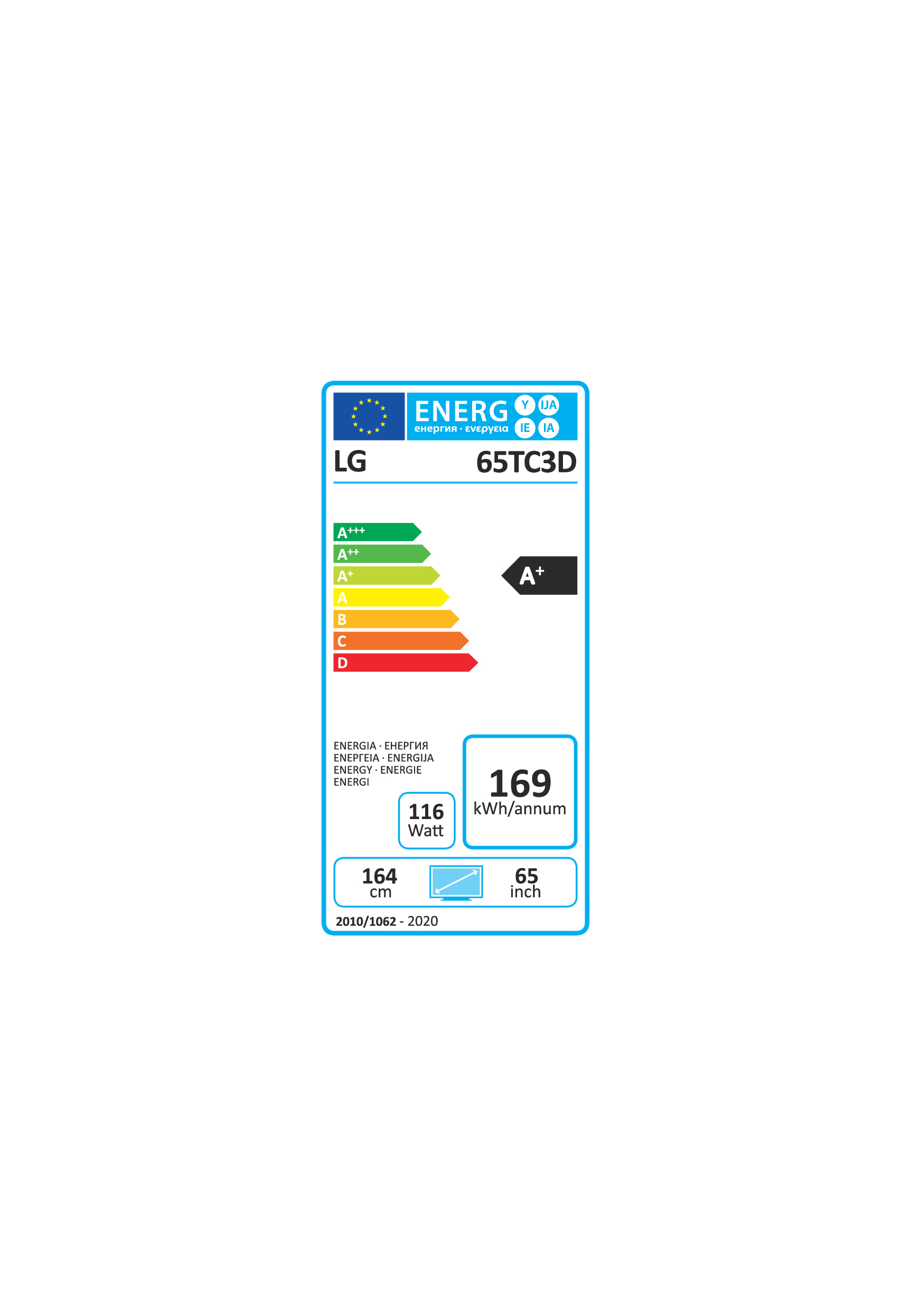
- ManualUser manual ↗
- Product information sheetEU Product Fiche ↗
- DocumentQUICK SETUP GUIDE ↗
Specifications
Key specifications
- Display diagonalSize of the display for this product, measured diagonally, usually in inches.
- 165.1 cm (65")
- Cables includedSpecifies the types and quantities of connection cables provided with the product (e.g., 3.5 mm to 3.5 mm or SATA).
- AC, HDMI
- Remote control includedComponent of an electronics device, most commonly a television set, DVD player and home theater systems originally used for operating the device wirelessly from a short line-of-sight distance.
- Yes
- Quick start guideInstructions, either online, as a computer program or in paper form, to allow you to set up and start using the product quickly.
- Yes
- Stylus includedIndicates whether a stylus is provided as part of the product package.
- Yes
- Operating temperature (T-T)The minimum and maximum temperatures at which the product can be safely operated.
- 0 - 40 °C
- Operating relative humidity (H-H)The range of relative humidity, expressed as a percentage, within which the device can function correctly without damage or performance loss.
- 10 - 80%
- Power consumption (typical)Amount of power consumed by this model, often expressed in watts (W). Typical values that manufacturers give are power consumption when off, standby/suspended mode, typical use, maximum usage.
- 120 W
- Power consumption (standby)The amount of electricity that is consumed when the product is on standby.
- 0.5 W
- AC input voltageThe voltage of the AC electricity that is inputted into the product.
- 100 - 240 V
Show all 45 specificationsShow key specifications only
Display
- Display diagonalSize of the display for this product, measured diagonally, usually in inches.
- 165.1 cm (65")
- Aspect ratioThe aspect ratio is the ratio of the width of a shape to its height. For example, 4:3 is common for standard displays and 16:9 is the ratio for Widescreen TV.
- 16:9
- Display brightnessBrightness is the amount of radiating light emitted from the screen. The brightness rating is measured in candellas per square meter, commonly known as 'nits'.
- 450 cd/m²
- Display resolutionThe number of distinct pixels in each dimension that can be displayed. It is usually quoted as width × height, with the units in pixels: for example, "1024 × 768" means the width is 1024 pixels and the height is 768 pixels. The higher the number of pixels, the sharper the image.
- 1920 x 1080 pixels
- Panel typeThe technology used to manufacture the panel, such as AMOLED or AH-IPS.
- IPS
- TouchscreenA screen of a laptop, smartphone, etc., that responds to touch so you can control the interface using your fingers.
- Yes
- Multi-touchIndicates whether the interface can recognize and respond to multiple points of contact simultaneously.
- Yes
- Touch technologyTechnology of touch sensetive screen e.g. dual-touch.
- Multi-touch
- Viewing angle, horizontalMaximum horizontal angle at which a display can be viewed with acceptable visual performance.
- 178°
- Viewing angle, verticalMaximum vertical angle at which a display can be viewed with acceptable visual performance.
- 178°
- Accuracy touchThe precision level of the touch recognition, typically expressed as the margin of error in millimetres.
- 2 mm
Packaging content
- Cables includedSpecifies the types and quantities of connection cables provided with the product (e.g., 3.5 mm to 3.5 mm or SATA).
- AC, HDMI
- Remote control includedComponent of an electronics device, most commonly a television set, DVD player and home theater systems originally used for operating the device wirelessly from a short line-of-sight distance.
- Yes
- Batteries includedIndicates whether the required batteries are supplied with the product.
- No
- Quick start guideInstructions, either online, as a computer program or in paper form, to allow you to set up and start using the product quickly.
- Yes
- Stylus includedIndicates whether a stylus is provided as part of the product package.
- Yes
Weight & dimensions
- WidthThe measurement or extent of something from side to side.
- 1530.8 mm
- DepthThe distance from the front to the back of something.
- 71.7 mm
- HeightThe measurement of the product from head to foot or from base to top.
- 883.8 mm
- WeightWeight of the product without packaging (net weight). If possible, the net weight is given including standard accessories and supplies. Please note that sometimes the manufacturer leaves out the weight of accessories and/or supplies.
- 51 kg
Operational conditions
- Operating temperature (T-T)The minimum and maximum temperatures at which the product can be safely operated.
- 0 - 40 °C
- Operating relative humidity (H-H)The range of relative humidity, expressed as a percentage, within which the device can function correctly without damage or performance loss.
- 10 - 80%
Power
- Power consumption (typical)Amount of power consumed by this model, often expressed in watts (W). Typical values that manufacturers give are power consumption when off, standby/suspended mode, typical use, maximum usage.
- 120 W
- Power consumption (standby)The amount of electricity that is consumed when the product is on standby.
- 0.5 W
- AC input voltageThe voltage of the AC electricity that is inputted into the product.
- 100 - 240 V
- AC input frequencyThe range of alternating current frequencies the device can accept from the power source, measured in hertz (e.g., 45 - 65).
- 50 - 60 Hz
Design
- Product colourThe colour e.g. red, blue, green, black, white.
- Black
- VESA mountingIndicates whether the product supports the VESA mounting standard for attachment to compatible arms, brackets, or wall mounts.
- Yes
- Panel mounting interfaceThe product can be used wih VESA mounting interfaces.
- 300 x 300 mm
- Wall mountableThe product can be mounted on (attached to ) a wall.
- Yes
Features
- InterfaceInterface ports to connect pieces of equipment. USB (Universal Serial Bus) has become the most popular wired interface to connect peripherals. USB 2.0 supports speeds up to 480 Mbit/s (USB 1: 12 Mbit/s). The interface FireWire is also known as the IEEE 1394 standard. Enhanced IDE (EIDE)is sometimes referred to as Fast ATA, Fast IDE or ATA-2.
- USB
Ports & interfaces
- USB 2.0 ports quantityNumber of USB 2.0 ports (connecting interfaces) in the device. USB 2.0 was released in April 2000 (now called "Hi-Speed"), adding higher maximum signaling rate of 480 Mbit/s (effective throughput up to 35 MB/s or 280 Mbit/s), USB 2.0 ports are usually black.
- 2
- HDMI ports quantityThe number of sockets (ports) for HDMI connections. HDMI (High-Definition Multimedia Interface) is a compact audio/video interface for transferring uncompressed video data and compressed/uncompressed digital audio data from a HDMI-compliant device ("the source device") to a compatible computer monitor, video projector, digital television, or digital audio device. HDMI is a digital replacement for…
- 3
- RGB ports quantityThe number of available RGB connection interfaces on the device.
- 1
- Ethernet LAN (RJ-45) portsNumber of Ethernet LAN (RJ-45) ports (connecting interfaces) in the device. Ethernet LAN (RJ-45) ports allow a computer to connect to the ethernet.
- 1
- RS-232 portsThe number of sockets (ports) for RS-232. An RS-232 serial port was once a standard feature of a personal computer, used for connections to modems, printers, mice, data storage, uninterruptible power supplies, and other peripheral devices. Now it has been largely replaced by USB and other ports.
- 2
Network
- Wi-FiPopular technology that allows an electronic device to exchange data or connect to the internet wirelessly using radio waves.
- Yes
Audio
- Built-in speaker(s)The device contains speaker(s) to produce sound.
- Yes
- Number of built-in speakersThe total quantity of integrated audio output drivers installed within the unit.
- 2
- Speaker powerThe electrical power output delivered to the audio output components, typically measured in Watts (W).
- 20 W
Storage
- User memoryThe amount of available storage space for the user to save data and applications, measured in MB.
- 64 GB
Packaging data
- Package widthThe distance from one side of the packaging to the other.
- 1650 mm
- Package depthThe distance from the front to the back of the packaging.
- 225 mm
- Package heightThe distance from the top to the bottom of the packaging.
- 1035 mm
- Package weightWeight of the packaged product.
- 59 kg
Database Right data-sheet 2026 Icecat. All rights reserved. Provided “as is”, without warranty — check details with the store before buying.
Price history (90 days, best daily price)
Price history is still being collected for this product — check back soon.
Alternative models
LG 75TC3D-B interactive whiteboard
190.5 cm (75") 3840 x 2160 pixels Touchscreen Black USB
LG 55TC3D-B interactive whiteboard
139.7 cm (55") 1920 x 1080 pixels Touchscreen Black USB

LG 55TC3D interactive whiteboard
139.7 cm (55") 1920 x 1080 pixels Touchscreen Black USB

LG 86TR3D interactive whiteboard 2.18 m
(86") Touchscreen Black USB

LG 65TC3D interactive whiteboard
165.1 cm (65") 1920 x 1080 pixels Touchscreen Black USB

DELL C8621QT interactive whiteboard 2.17 m
(85.6") 3840 x 2160 pixels Touchscreen Black