
LG 34UC97C-B computer monitor 86.4 cm (34") 3440 x 1440 pixels Quad HD LED Silver
- Screen: 86.4 cm (34"), 3440 x 1440 pixels, AH-IPS, Curved
- Refresh rate: 5 ms response time
- Brightness: 300 cd/m²
- Ports: 2 × HDMI, 1 × DisplayPort
- Stand: tilt, VESA 100 x 100 mm
- Extras: speakers
- Colour: Silver
Where to buy
We're not tracking prices for this product yet. Check current prices directly at:
We may earn a commission when you buy through links on this page — at no extra cost to you. Learn more
About this product
TRUE 21:9 CURVED ULTRAWIDE SCREEN REAL ESTATE.
34UC97C is a curved screen real estate and 3440x1440 UltraWide QHD resolution. This means one 34UC97C covers 2.4 larger display real estate than a 16:9 ratio Full HD panel. Just imagine one single monitor with 20% more pixel power than two 16:9 Full HD monitors put together, without the distracting bezel cutting across in the middle. Plus you are now officially done with ever-distracting bezel across the centre. Sound editors can have extensively wider sequence and more track decks in their Protools to get a bigger picture of their music, while video editors can save time since they do have to job back and forth between sequences in PremierPro. In general, this space will let you seamlessly use multiple graphic tools, thumbnail images, and web pages all at the same time. With the IPS screen supporting the 178' viewing angle with the curved panel lets you absorb everything without blind spots with the most important, ‘comfort’. The curve on 34UC97C IPS panel such superior viewing angle, wrapping the entire 34-inch screen around your range of vision. Topped with its aesthetic design, extraordinary changes in your workstation and entertainment suite await you.
34UC97C'S TRUE-TO-LIFE colour PALETTE SCOOPS RICH, VIRANCE OF REAL WORLD AND SPLASHES IT IN FRONT OF YOU.
-VISUAL COMFORT PLUS PIN-POINT colour EXPRESSION
QHD IPS Display with the curved IPS display, distortion of view. As your eyes are reaching both edges of monitor, what you discover sensing is surprising visual comfort that lets you capture every single details on the screen.
-sRGB OVER 99% colour SPACE
The QHD IPS supports sRGB over 99%, reproducing an accurate colour level on the 34UC97C that shoulders with sRGB colour code via Display Port. TUV Rheinland, authority in display performance, has certified 34UC97C for its true 10 bit colour depth. Such high-end immersive viewing experience 34UC97C delivers will make it really difficult to distinguish any difference in the colour on itself and colour outcome by graphic designers and photographers.
TESTED AND PROVEN. LET THE RESULT SPEAK.
LG UltraWide monitors have been receiving hails for its screen quality, and that is no accident. Globally-known technology certifying institutions have tested UltraWide monitors (including 34UC97) and given their thumbs up. Certifications* by TÜV Rheinland and Intertek, validation by UL on its IPS colour reproduction, wide viewing angle, and colour accuracy are the testimonies from the high standard for reliability. LG UltraWide monitors are also going beyond the quality test, and are being recognized by technology communities as these are awarded with Best Features Award by TweakTown*, as well as by PRAD*, known for its rigorous testing inside display technologies. In addition, LG UltraWide monitors have been tested on its performance and positively reviewed by a number of media, including tom's HARDWARE*, PC Games Hardware and others.
The numbers and figures speak loud. LG’s leading IPS technology is unparalleled in terms of display capacity to sustain colour and clarity from wider angle that stretches our expectation. Case in point- recent testing done by Intertek* on both VA and IPS panel for colour shift level, IPS panel has been found to have lower colour shift (all colour range above the standard) compared to that of VA panel. New products can talk the talk, but LG’s UltraWide monitors are moving well on ahead.
WANNA SEE HOW YOUR 34UC97C CAN BE WALL-MOUNTED?
In order to modify 34UC97C’s height and range of position to satisfy your needs, we are happy to inform that 34UC97C can be wall-mounted hassle-free. You can install bracket-equipped 34UC97C to any compatible stand or wall-mount system with the wall-mount (100mm x 100mm) bracket included in the box.
If you cannot find it from the box, please contact your local LG office (UK : 0344 847 5454, IE : 01 686 9454 ) to be provided with the wall-mount bracket upon request.
BREATHE IN, BREATHE OUT. WE WON’T LET YOU GET LOST IN OUR 21:9 ULTRAWIDE SCREEN SPACE.
With all the immersive screen space you have now with UC97C, your attention span feels somewhat challenged. Ready couple clicks away, LG prepared pre-proportioned screen split function that windows do not interfere and create clumsy layers of tasks at hand. Without ever-hindering screen overlaps, cluttering your multi-tool tasking, imagine yourself seamlessly searching for images on the web, doing Photoshop touch-ups of the image, then dragging the product unto PowerPoint, with all the windows spaciously open.
TWO DIFFERENT DEVICES CAN NO LONGER FORCE YOU TO USE TWO SEPARATE MONITORS. SUBDUE THEM UNDER DUAL LINK UP & DUAL CONTROLLER.
If you are in a situation where you have to work with, say, PC and Mac simultaneously, your attention strain let alone physical fatigue from manoeuvring your chair left to right are a real bummer. But not to despair. UC97C has another efficiency function, Dual Link-up feature. Two Individual devices connected to the monitor in a 1:1 spatial ratio, allowing the monitor to divide up the screen for both outputs. So, if you have to, you can certainly fit two different worlds into our 21:9 Curved UltraWide UC97C. Not only that, while those two devices are show in a single UC97C, you can even fuse the contents from one device to the other one. Dual Controller software will allow your documents from transferring without the help of data transferring device.
Documents
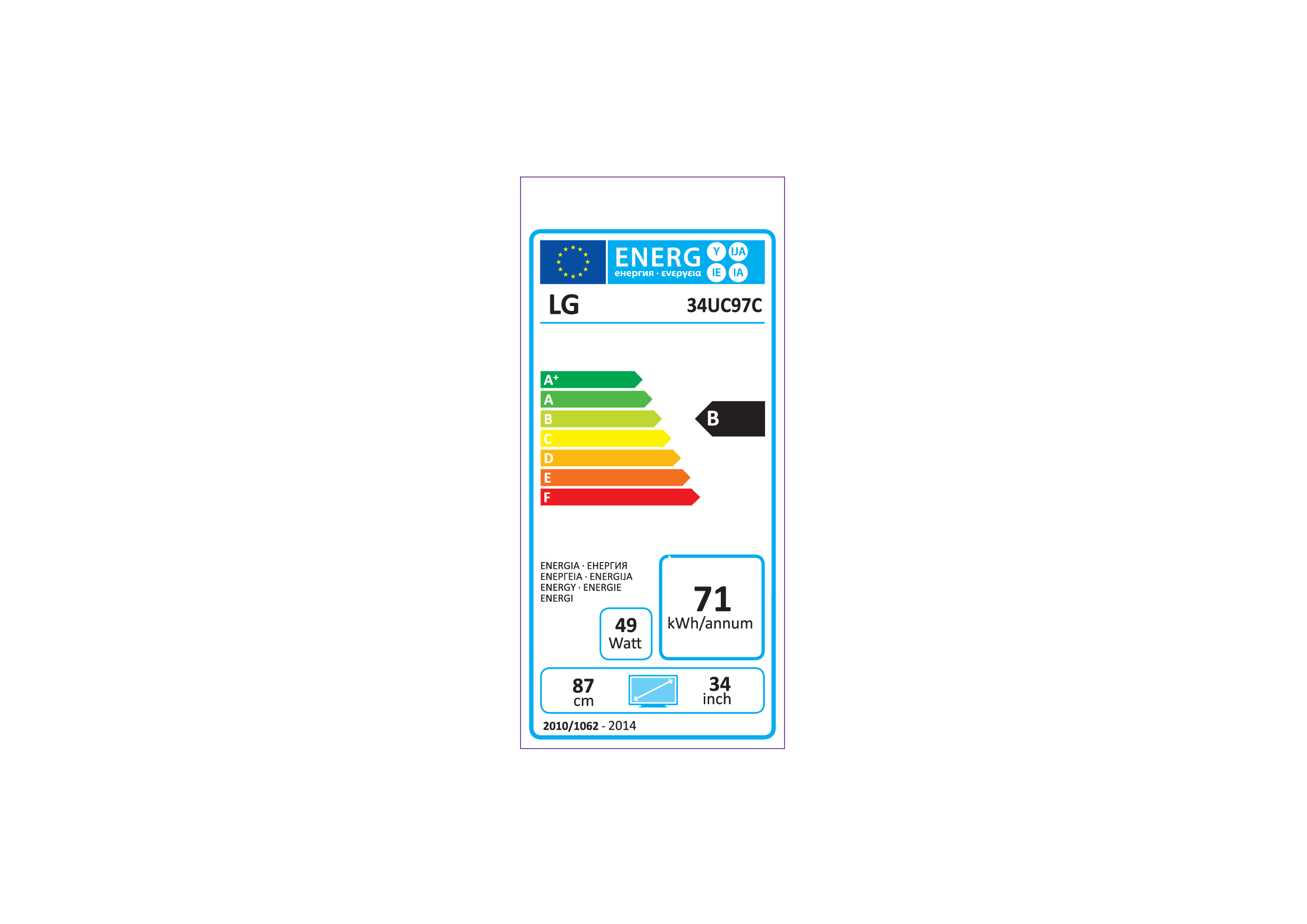
- Product information sheetEU Product Fiche ↗
Specifications
Key specifications
- Display diagonalSize of the display for this product, measured diagonally, usually in inches.
- 86.4 cm (34")
- Display resolutionThe number of distinct pixels in each dimension that can be displayed. It is usually quoted as width × height, with the units in pixels: for example, "1024 × 768" means the width is 1024 pixels and the height is 768 pixels. The higher the number of pixels, the sharper the image.
- 3440 x 1440 pixels
- Panel typeThe technology used to manufacture the panel, such as AMOLED or AH-IPS.
- AH-IPS
- Screen shapeDescribes the physical curvature of the display panel, such as whether it is flat or curved.
- Curved
- Response timeThe response time is the time difference between the moment that a source (for example a video card) sends a signal and that equipment (for example a monitor) receives or display the signal. (Used abbreviations: R/F = Rise and Fall.)
- 5 ms
- Display brightness (typical)Display brightness, measured by its Luminance, presented as a figure in nits. Typical brightness ratings for monitors range from 250 to 350 nits with a target value of between 80 to 120 nits being suitable for most displays in a normal viewing environment.
- 300 cd/m²
- HDMI ports quantityThe number of sockets (ports) for HDMI connections. HDMI (High-Definition Multimedia Interface) is a compact audio/video interface for transferring uncompressed video data and compressed/uncompressed digital audio data from a HDMI-compliant device ("the source device") to a compatible computer monitor, video projector, digital television, or digital audio device. HDMI is a digital replacement for…
- 2
- DisplayPorts quantityNumber of DisplayPorts. A DisplayPort is a digital display interface developed by the Video Electronics Standards Association (VESA). The interface is primarily used to connect a video source to a display device such as a computer monitor, though it can also be used to carry audio, USB, and other forms of data.
- 1
- Tilt adjustmentThe tilt, which means the angle at which the device is pointing (up or down), can be changed.
- Yes
- Panel mounting interfaceThe product can be used wih VESA mounting interfaces.
- 100 x 100 mm
- Built-in speaker(s)The device contains speaker(s) to produce sound.
- Yes
- Product colourThe colour e.g. red, blue, green, black, white.
- Silver
Show all 75 specificationsShow key specifications only
Design
- VESA mountingIndicates whether the product supports the VESA mounting standard for attachment to compatible arms, brackets, or wall mounts.
- Yes
- Product colourThe colour e.g. red, blue, green, black, white.
- Silver
- Panel mounting interfaceThe product can be used wih VESA mounting interfaces.
- 100 x 100 mm
- LED indicatorsThe specific status lights available on the unit to provide visual feedback on its current state or connectivity (e.g., AC input, ACT, or Access).
- Power
Audio
- Built-in speaker(s)The device contains speaker(s) to produce sound.
- Yes
- Number of speakersThe quantity of speakers included in/with the product.
- 2
- RMS rated powerRMS (Root mean square) is a measure of the continuous power required by a device, in particular audio amplifiers and loudspeakers.
- 14 W
Display
- Display diagonalSize of the display for this product, measured diagonally, usually in inches.
- 86.4 cm (34")
- Display resolutionThe number of distinct pixels in each dimension that can be displayed. It is usually quoted as width × height, with the units in pixels: for example, "1024 × 768" means the width is 1024 pixels and the height is 768 pixels. The higher the number of pixels, the sharper the image.
- 3440 x 1440 pixels
- Native aspect ratioThe aspect ratio is the ratio of the width of an image to its height. The native aspect ratio is the one which the projector/display is particularly designed for. Images shown in native aspect ratio will utilize the entire resolution of the display and achieve maximum brightness. Images shown in other than native aspect ratio will always have less resolution and less brightness than images shown…
- 21:9
- Display technologyThe technology used in the display e.g. plasma, LED.
- LED
- TouchscreenA screen of a laptop, smartphone, etc., that responds to touch so you can control the interface using your fingers.
- No
- HD typeType of supported High Definition (e.g. Full HD, 4K Ultra HD).
- Quad HD
- Panel typeThe technology used to manufacture the panel, such as AMOLED or AH-IPS.
- AH-IPS
- Backlight typeThe technology used to illuminate the display panel, such as CCFL or various LED configurations (e.g., Edge LED, Full-Array).
- W-LED
- Display brightness (typical)Display brightness, measured by its Luminance, presented as a figure in nits. Typical brightness ratings for monitors range from 250 to 350 nits with a target value of between 80 to 120 nits being suitable for most displays in a normal viewing environment.
- 300 cd/m²
- Response timeThe response time is the time difference between the moment that a source (for example a video card) sends a signal and that equipment (for example a monitor) receives or display the signal. (Used abbreviations: R/F = Rise and Fall.)
- 5 ms
- Display surfaceThe finish of the screen's outer layer, which determines how light reflects off the surface (e.g. Glossy, Matte, or Anti-glare).
- Matt
- Screen shapeDescribes the physical curvature of the display panel, such as whether it is flat or curved.
- Curved
- Supported graphics resolutionsThe graphic resolutions that can be displayed by the device. The graphic resolution describes the width and height dimensions of a display, such as a computer monitor, measured in pixels.
- 3440 x 1440
- Aspect ratioThe aspect ratio is the ratio of the width of a shape to its height. For example, 4:3 is common for standard displays and 16:9 is the ratio for Widescreen TV.
- 21:9
- Contrast ratio (typical)The difference in light intensity between the brightest white and the darkest black.
- 1000:1
- Contrast ratio (dynamic)A property of a display system, defined as the ratio of the luminance of the brightest color (white) to that of the darkest color (black) that the system is capable of producing.
- 5000000:1
- Viewing angle, horizontalMaximum horizontal angle at which a display can be viewed with acceptable visual performance.
- 178°
- Viewing angle, verticalMaximum vertical angle at which a display can be viewed with acceptable visual performance.
- 178°
- Display number of coloursThe total number of distinct colours that the device is capable of displaying (e.g. 1.07 billion colours).
- 1.073 billion colours
- Pixel pitchThis is the parameter of a picture tube, which specifies the shortest distance between two dots of the same colour. The principle is: the smaller the dot pitch, the better sharpness of image.
- 0.2628 x 0.2628 mm
- Viewable size, horizontalThe viewable size is often somewhat smaller than the actual size of a monitor, because there is a border around the image.
- 79.4 cm
- Viewable size, verticalThe height of the screen area that can actually display an image, measured in millimetres or inches.
- 34 cm
- Digital horizontal frequencyThe range of horizontal scanning frequencies the device can support, measured in kHz.
- 30 - 90 kHz
- Digital vertical frequencyThe range of refresh rates the device can support when operating in digital mode, measured in Hertz (Hz).
- 56 - 61 Hz
- DDC/CIIndicates whether the product supports the Display Data Channel Command Interface for controlling device settings via software.
- Yes
- Colour gamut standardThe specific color space standard the device is designed to reproduce, such as Adobe RGB or DCI-P3.
- sRGB
- Colour gamutThe range of colours that the display can accurately reproduce, typically expressed as a percentage of a standard colour space (e.g. sRGB or Adobe RGB).
- 99%
Thin Client
- Thin client installedThe product includes a thin client, which is a computer or a computer program which depends heavily on some other computer (its server) to fulfill its computational roles. This is different from the traditional fat client, which is a computer designed to take on these roles by itself. The specific roles assumed by the server may vary, from providing data persistence (for example, for diskless nod…
- No
Performance
- On/off switchThe button which is pressed to switch the device on or off.
- Yes
Other features
- TV tuner integratedDevice has an in-built TV tuner.
- No
- Supplied AC adapter typeThe type of power supply provided with the product to connect it to an alternating current source (e.g. AC).
- LED
Power
- Energy efficiency class (legacy scale)The energy efficiency rating of the product based on the previous labeling scale (e.g. A+++).
- B
- Power consumption (typical)Amount of power consumed by this model, often expressed in watts (W). Typical values that manufacturers give are power consumption when off, standby/suspended mode, typical use, maximum usage.
- 49 W
- Power consumption (off)The amount of electrical energy consumed by the device when it is switched off, measured in watts.
- 0.3 W
- AC input voltageThe voltage of the AC electricity that is inputted into the product.
- 100 - 240 V
- AC input frequencyThe range of alternating current frequencies the device can accept from the power source, measured in hertz (e.g., 45 - 65).
- 50 - 60 Hz
- Annual energy consumptionThe amount of energy used by the product per year.
- 71 kWh
Features
- Mean time between failures (MTBF)Statistical model used to indicate product/mechanism reliability; expressed in hours and percentage of duty cycle. This number (in hours) does not indicate the mean time before failure for a single unit/mechanism.
- 50000 h
- Plug and PlayIndicates whether this product supports is "plug and play". Plug and play is hardware or software that, after being installed ("plugged in"), can immediately be used ("played with"), as opposed to hardware or software which requires configuration.
- Yes
Certificates
- CertificationSpecifies the official standards, safety approvals, or regulatory certifications the product has received.
- UL(cUL) TUV-Type FCC-B, CE CCC, BSMI EPA ErP
Packaging content
- Cables includedSpecifies the types and quantities of connection cables provided with the product (e.g., 3.5 mm to 3.5 mm or SATA).
- DisplayPort, HDMI
Weight & dimensions
- Width (with stand)The total horizontal measurement of the product when the supporting stand is attached, measured in millimetres.
- 830.5 mm
- Depth (with stand)The measurement of the product from front to back when any supporting accessory or base is attached, expressed in millimetres or centimetres.
- 225.6 mm
- Height (with stand)The total vertical measurement of the product including its base or support structure, expressed in millimetres or centimetres.
- 472.9 mm
- Weight (with stand)The total mass of the unit including its supporting base, measured in kilograms or grams.
- 9 kg
- Width (without stand)The horizontal measurement of the device excluding the base or support structure, expressed in millimetres.
- 830.5 mm
- Depth (without stand)The measurement of the product from front to back without its base or support, typically expressed in millimetres or centimetres.
- 99 mm
- Height (without stand)The vertical measurement of the device when the stand is removed, measured in mm.
- 370.3 mm
- Weight (without stand)The mass of the device excluding the support base, measured in g.
- 8.25 kg
Security
- Cable lock slotHoles on the edge of devices through which a cable lock can be passed, so the device can be locked to a desk etc.
- No
Ergonomics
- Tilt adjustmentThe tilt, which means the angle at which the device is pointing (up or down), can be changed.
- Yes
- Tilt angle rangeThe minimum and maximum angles at which the unit can be tilted, typically expressed in degrees.
- -5 - 15°
Management features
- On Screen Display (OSD)Indicates whether the device can display a graphical menu or information directly on the screen for adjusting settings and viewing status.
- Yes
Network
- Wi-FiPopular technology that allows an electronic device to exchange data or connect to the internet wirelessly using radio waves.
- No
- BluetoothBluetooth is a low-power radio technology developed to replace the cables and wires currently used to link or connect electronic devices such as personal computers, printers, and a wide variety of handheld devices including mobile phones. Because it uses radio-wave connectivity, a Bluetooth-enabled device has a constant, established connection to whatever browser it uses. This saves the user the…
- No
- Ethernet LANAn Ethernet LAN (Local Area Network) interface is present, for a wired conection via a cable.
- No
Ports & interfaces
- USB hub versionThe technical standard of the USB hub, if available, which determines the maximum data transfer speed (e.g., 3.2 Gen 1).
- 3.2 Gen 1 (3.1 Gen 1)
- USB Type-A downstream ports quantityThe number of USB Type-A ports available for connecting peripheral devices to the unit.
- 3
- DVI portDigital Visual Interface (DVI) is a video display interface to connect a video source to a display device, such as a computer monitor.
- No
- HDMI ports quantityThe number of sockets (ports) for HDMI connections. HDMI (High-Definition Multimedia Interface) is a compact audio/video interface for transferring uncompressed video data and compressed/uncompressed digital audio data from a HDMI-compliant device ("the source device") to a compatible computer monitor, video projector, digital television, or digital audio device. HDMI is a digital replacement for…
- 2
- DisplayPorts quantityNumber of DisplayPorts. A DisplayPort is a digital display interface developed by the Video Electronics Standards Association (VESA). The interface is primarily used to connect a video source to a display device such as a computer monitor, though it can also be used to carry audio, USB, and other forms of data.
- 1
- Audio outputThe type of audio output that the device produces, and the connector(s).
- Yes
- Headphone outThe socket for connecting headphones to the device.
- Yes
- HDCPHigh-bandwidth Digital Content Protection (HDCP) is a form of digital copy protection to prevent copying of digital audio and video content as it travels across connections.
- Yes
Packaging data
- Package widthThe distance from one side of the packaging to the other.
- 904 mm
- Package depthThe distance from the front to the back of the packaging.
- 175 mm
- Package heightThe distance from the top to the bottom of the packaging.
- 513 mm
- Package weightWeight of the packaged product.
- 11.5 kg
Database Right data-sheet 2026 Icecat. All rights reserved. Provided “as is”, without warranty — check details with the store before buying.
Expert reviews
- –
hexus.net2015
Coming to market with an RRP of £799.99 ($1,149.99) the LG 34UC97 is a premium purchase for any type of user. For context, the same money would buy consumers a pair of UHD displays, three QHD displays or even nine FHD displays. In that regard the LG 34UC9...
- +
- Sleek design and subtle curve, Excellent productivity potential, Wide viewing angles, Extensive I/O options
- −
- Expensive, High power consumption, Limited stand adjustments
- 80
techradar.com2015
The high price is this screen's biggest problem – in other areas, its curved display is attractive for work and play, image quality is high and it's got a huge diagonal size....
- +
- Sharp, high resolution, Huge diagonal, Slick, effective curved design, Great image quality
- −
- More expensive than rivals, Lack of adjustment options, Uniformity is mediocre
- –
gizmodo.co.uk2015
The £799 LG 34UC97 is a beautiful monitor, with a smart and stylish design. That 3440×1440 pixel curved display isn't Ultra HD-detailed, but it's a damn sight better than 1080p, and it has generally pretty impressive colour and contrast reproduction for a...
Read the review at gizmodo.co.uk ↗ - 80
reviewed.com2015
A bounty of strengths, but no selling point over the flat version Like the 34UM95 before it, the 34UC97 is a solid display. Its IPS panel is rich with color and its QHD resolution provides ample screen real estate. Additional features, such as LG's Sc...
Read the review at reviewed.com ↗
Price history (90 days, best daily price)
Price history is still being collected for this product — check back soon.
Alternative models

LG 28LF4520
computer monitor 71.1 cm (28") 1366 x 768 pixels HD LED Black

LG 22MB37PU
computer monitor 55.9 cm (22") 1920 x 1080 pixels Full HD LED Black

LG 24MB37PM-W
computer monitor 60.5 cm (23.8") 1920 x 1080 pixels Full HD LED White

LG 29UC97C
computer monitor 73.7 cm (29") 2560 x 1080 pixels Full HD LED Black

LG 22MB37PU-W
computer monitor 54.6 cm (21.5") 1920 x 1080 pixels Full HD LED White

LG 24MP47HQ-P
computer monitor 61 cm (24") 1920 x 1080 pixels Full HD LED Black