
LG 27GK750F-B computer monitor 68.6 cm (27") 1920 x 1080 pixels Full HD LED Black, Red
- Screen: 68.6 cm (27"), 1920 x 1080 pixels, TN, Flat
- Refresh rate: 240 Hz, 2 ms response time
- Brightness: 400 cd/m²
- Adaptive sync: AMD FreeSync
- Ports: 2 × HDMI, 1 × DisplayPort
- Stand: height-adjustable, tilt, VESA 100 x 100 mm
- Extras: USB hub
- Colour: Black, Red
Where to buy
We're not tracking prices for this product yet. Check current prices directly at:
We may earn a commission when you buy through links on this page — at no extra cost to you. Learn more
About this product
240Hz Refresh Rate
Games are smoother and more thrilling at a higher refresh rate, and this 240Hz monitor can refresh the image on screen up to an astounding 240 times per second. Enjoy high-speed gaming with virtually no motion blur or stuttering.
1ms Motion Blur Reduction
1ms Motion Blur Reduction allows gamers to enjoy the precision and accuracy needed to play at a high level. With a response time that is virtually 1ms, blurring and ghosting are dramatically reduced to make the in-game action smoother and gamer’s reactions more precise.
AMD FreeSync Technology
LG's monitors with AMD FreeSync technology reduces the tearing and stuttering that occur between a graphic card’s frame rate and a monitor’s refresh rate. Thanks to FreeSync, gaming enthusiasts can experience seamless, fluid movement throughout any hi-res, heavy-duty game.
Custom Gaming Environment
Optimize the display of different games, then switch between different modes quickly and easily. Precise presets for FPS, RTS and other genres are just a few clicks away. Users can also adjust for personal preferences, including crosshair shapes, brightness, aspect ratio and much more.
Advanced Gaming Features
Serious gaming features for serious gamers. Dynamic Action Sync assures smooth, action while Black Stabilizer reveals enhanced detail in dark scenes. The Crosshair feature helps enhance accuracy in first-person shooter games.
Documents
- BrochureProduct Brochure ↗
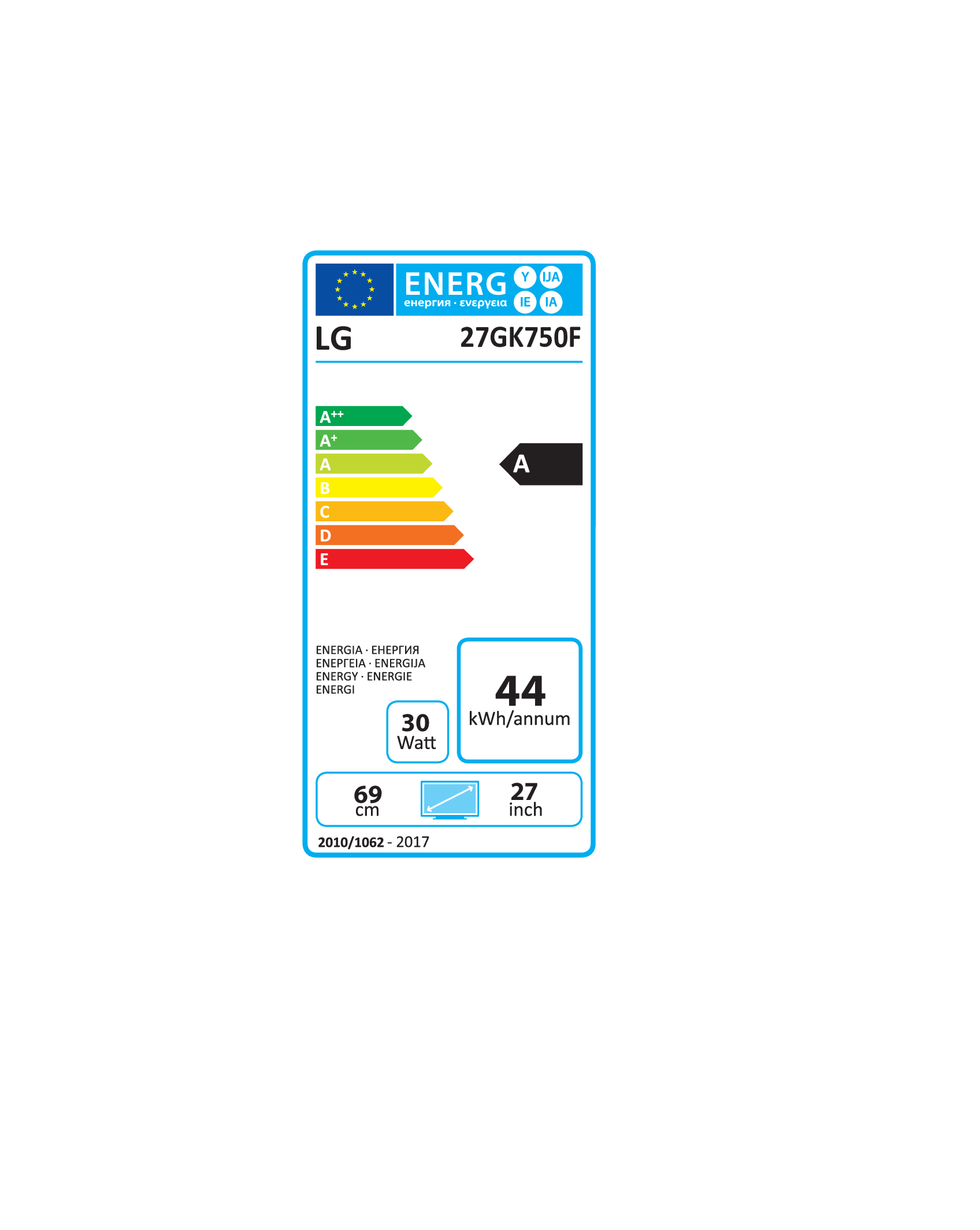
- Product information sheetEU Product Fiche ↗
- ManualUser manual ↗
Specifications
Key specifications
- Display diagonalSize of the display for this product, measured diagonally, usually in inches.
- 68.6 cm (27")
- Display resolutionThe number of distinct pixels in each dimension that can be displayed. It is usually quoted as width × height, with the units in pixels: for example, "1024 × 768" means the width is 1024 pixels and the height is 768 pixels. The higher the number of pixels, the sharper the image.
- 1920 x 1080 pixels
- Panel typeThe technology used to manufacture the panel, such as AMOLED or AH-IPS.
- TN
- Screen shapeDescribes the physical curvature of the display panel, such as whether it is flat or curved.
- Flat
- Maximum refresh rateThe highest number of times per second the image is updated, measured in hertz (Hz).
- 240 Hz
- Response timeThe response time is the time difference between the moment that a source (for example a video card) sends a signal and that equipment (for example a monitor) receives or display the signal. (Used abbreviations: R/F = Rise and Fall.)
- 2 ms
- Display brightness (typical)Display brightness, measured by its Luminance, presented as a figure in nits. Typical brightness ratings for monitors range from 250 to 350 nits with a target value of between 80 to 120 nits being suitable for most displays in a normal viewing environment.
- 400 cd/m²
- AMD FreeSyncThe product includes AMD Freesync Technology for the dynamic synchronization of the graphic card and the monitor in order to avoid screen tearing.
- Yes
- HDMI ports quantityThe number of sockets (ports) for HDMI connections. HDMI (High-Definition Multimedia Interface) is a compact audio/video interface for transferring uncompressed video data and compressed/uncompressed digital audio data from a HDMI-compliant device ("the source device") to a compatible computer monitor, video projector, digital television, or digital audio device. HDMI is a digital replacement for…
- 2
- DisplayPorts quantityNumber of DisplayPorts. A DisplayPort is a digital display interface developed by the Video Electronics Standards Association (VESA). The interface is primarily used to connect a video source to a display device such as a computer monitor, though it can also be used to carry audio, USB, and other forms of data.
- 1
- Height adjustmentThe part of the device that can be adjusted to change the height.
- Yes
- Tilt adjustmentThe tilt, which means the angle at which the device is pointing (up or down), can be changed.
- Yes
- Panel mounting interfaceThe product can be used wih VESA mounting interfaces.
- 100 x 100 mm
- Built-in USB hubWhether or not the device features a USB hub to connect more than one other device via USB.
- Yes
Show all 71 specificationsShow key specifications only
Design
- VESA mountingIndicates whether the product supports the VESA mounting standard for attachment to compatible arms, brackets, or wall mounts.
- Yes
- Market positioningUnder which category can the device be positioned in the market, e.g. camera phone.
- Gaming
- Product colourThe colour e.g. red, blue, green, black, white.
- Black, Red
- Panel mounting interfaceThe product can be used wih VESA mounting interfaces.
- 100 x 100 mm
Ports & interfaces
- Built-in USB hubWhether or not the device features a USB hub to connect more than one other device via USB.
- Yes
- USB hub versionThe technical standard of the USB hub, if available, which determines the maximum data transfer speed (e.g., 3.2 Gen 1).
- 3.2 Gen 1 (3.1 Gen 1)
- USB upstream port typeThe connector type used for the upstream connection to a host device (e.g., USB Type-B or USB Type-C).
- USB Type-B
- Number of upstream portsThe total number of available ports used to connect the device to a computer or another network source.
- 1
- USB Type-A downstream ports quantityThe number of USB Type-A ports available for connecting peripheral devices to the unit.
- 2
- DVI portDigital Visual Interface (DVI) is a video display interface to connect a video source to a display device, such as a computer monitor.
- No
- HDMI ports quantityThe number of sockets (ports) for HDMI connections. HDMI (High-Definition Multimedia Interface) is a compact audio/video interface for transferring uncompressed video data and compressed/uncompressed digital audio data from a HDMI-compliant device ("the source device") to a compatible computer monitor, video projector, digital television, or digital audio device. HDMI is a digital replacement for…
- 2
- DisplayPorts quantityNumber of DisplayPorts. A DisplayPort is a digital display interface developed by the Video Electronics Standards Association (VESA). The interface is primarily used to connect a video source to a display device such as a computer monitor, though it can also be used to carry audio, USB, and other forms of data.
- 1
- Headphone outThe socket for connecting headphones to the device.
- Yes
- Headphone outputsNumber of sockets /ports where headphones are connected.
- 1
- HDCPHigh-bandwidth Digital Content Protection (HDCP) is a form of digital copy protection to prevent copying of digital audio and video content as it travels across connections.
- Yes
Performance
- AMD FreeSyncThe product includes AMD Freesync Technology for the dynamic synchronization of the graphic card and the monitor in order to avoid screen tearing.
- Yes
- VESA Adaptive Sync supportIndicates whether the device supports the VESA Adaptive-Sync standard to synchronize the refresh rate with the GPU to reduce screen tearing.
- Yes
Display
- Display diagonalSize of the display for this product, measured diagonally, usually in inches.
- 68.6 cm (27")
- Display resolutionThe number of distinct pixels in each dimension that can be displayed. It is usually quoted as width × height, with the units in pixels: for example, "1024 × 768" means the width is 1024 pixels and the height is 768 pixels. The higher the number of pixels, the sharper the image.
- 1920 x 1080 pixels
- Native aspect ratioThe aspect ratio is the ratio of the width of an image to its height. The native aspect ratio is the one which the projector/display is particularly designed for. Images shown in native aspect ratio will utilize the entire resolution of the display and achieve maximum brightness. Images shown in other than native aspect ratio will always have less resolution and less brightness than images shown…
- 16:9
- Display technologyThe technology used in the display e.g. plasma, LED.
- LED
- TouchscreenA screen of a laptop, smartphone, etc., that responds to touch so you can control the interface using your fingers.
- No
- HD typeType of supported High Definition (e.g. Full HD, 4K Ultra HD).
- Full HD
- Panel typeThe technology used to manufacture the panel, such as AMOLED or AH-IPS.
- TN
- Display brightness (typical)Display brightness, measured by its Luminance, presented as a figure in nits. Typical brightness ratings for monitors range from 250 to 350 nits with a target value of between 80 to 120 nits being suitable for most displays in a normal viewing environment.
- 400 cd/m²
- Display brightness (min)The minimum luminance level of the screen, measured in candelas per square metre (cd/m²).
- 320 cd/m²
- Response timeThe response time is the time difference between the moment that a source (for example a video card) sends a signal and that equipment (for example a monitor) receives or display the signal. (Used abbreviations: R/F = Rise and Fall.)
- 2 ms
- Display surfaceThe finish of the screen's outer layer, which determines how light reflects off the surface (e.g. Glossy, Matte, or Anti-glare).
- Matt
- Screen shapeDescribes the physical curvature of the display panel, such as whether it is flat or curved.
- Flat
- Supported graphics resolutionsThe graphic resolutions that can be displayed by the device. The graphic resolution describes the width and height dimensions of a display, such as a computer monitor, measured in pixels.
- 1920 x 1080 (HD 1080)
- Contrast ratio (typical)The difference in light intensity between the brightest white and the darkest black.
- 1000:1
- Dynamic contrast ratio marketing nameThe proprietary brand name used by the manufacturer to describe the technology that automatically adjusts the backlight to improve the contrast ratio (e.g., ASUS Smart Contrast Ratio).
- Mega Contrast
- Maximum refresh rateThe highest number of times per second the image is updated, measured in hertz (Hz).
- 240 Hz
- Viewing angle, horizontalMaximum horizontal angle at which a display can be viewed with acceptable visual performance.
- 170°
- Viewing angle, verticalMaximum vertical angle at which a display can be viewed with acceptable visual performance.
- 160°
- Display number of coloursThe total number of distinct colours that the device is capable of displaying (e.g. 1.07 billion colours).
- 16.78 million colours
- DDC/CIIndicates whether the product supports the Display Data Channel Command Interface for controlling device settings via software.
- Yes
- NTSC coverage (typical)The percentage of the NTSC color gamut that the device is capable of reproducing.
- 72%
Features
- Country of originCountry where the device is made. Aka Country of manufacture (COM).
- China
Other features
- Exterior finish typeThe material or surface treatment applied to the outer casing of the unit (e.g. brushed steel, matt, or painted).
- Matt
Power
- Energy efficiency class (legacy scale)The energy efficiency rating of the product based on the previous labeling scale (e.g. A+++).
- A
- Power consumption (typical)Amount of power consumed by this model, often expressed in watts (W). Typical values that manufacturers give are power consumption when off, standby/suspended mode, typical use, maximum usage.
- 30 W
- Power consumption (off)The amount of electrical energy consumed by the device when it is switched off, measured in watts.
- 0.3 W
- Power consumption (PowerSave)The amount of electrical energy consumed by the device when it is operating in a power-saving mode, measured in Watts.
- 0.5 W
- AC input voltageThe voltage of the AC electricity that is inputted into the product.
- 100 - 240 V
- AC input frequencyThe range of alternating current frequencies the device can accept from the power source, measured in hertz (e.g., 45 - 65).
- 50 - 60 Hz
- DC-in jackThe socket/plug where the DC electricity supply connects to the device.
- Yes
Certificates
- CertificationSpecifies the official standards, safety approvals, or regulatory certifications the product has received.
- UL(cUL), TUV-Type, FCC-B, CE, Erp, Windows 10
Packaging content
- Cables includedSpecifies the types and quantities of connection cables provided with the product (e.g., 3.5 mm to 3.5 mm or SATA).
- AC, DisplayPort, HDMI
Weight & dimensions
- Width (with stand)The total horizontal measurement of the product when the supporting stand is attached, measured in millimetres.
- 624.8 mm
- Depth (with stand)The measurement of the product from front to back when any supporting accessory or base is attached, expressed in millimetres or centimetres.
- 272.3 mm
- Height (with stand)The total vertical measurement of the product including its base or support structure, expressed in millimetres or centimetres.
- 466.1 mm
- Weight (with stand)The total mass of the unit including its supporting base, measured in kilograms or grams.
- 6.34 kg
- Width (without stand)The horizontal measurement of the device excluding the base or support structure, expressed in millimetres.
- 624.8 mm
- Depth (without stand)The measurement of the product from front to back without its base or support, typically expressed in millimetres or centimetres.
- 40.4 mm
- Height (without stand)The vertical measurement of the device when the stand is removed, measured in mm.
- 370.3 mm
- Weight (without stand)The mass of the device excluding the support base, measured in g.
- 4.6 kg
Security
- Cable lock slotHoles on the edge of devices through which a cable lock can be passed, so the device can be locked to a desk etc.
- No
Ergonomics
- Height adjustmentThe part of the device that can be adjusted to change the height.
- Yes
- Adjustable height (max)The maximum distance the unit can be raised vertically from its lowest position, measured in millimetres.
- 11 cm
- PivotIndicates whether the device can be rotated 90 degrees to switch between landscape and portrait orientation.
- Yes
- Pivot angleThe range of motion available for rotating the unit around its vertical axis, typically measured in degrees.
- 0 - 90°
- SwivellingIndicates whether the product has a mechanism that allows it to rotate horizontally.
- Yes
- Swivel angle rangeThe minimum and maximum degrees to which the unit can be rotated horizontally.
- -20 - 20°
- Tilt adjustmentThe tilt, which means the angle at which the device is pointing (up or down), can be changed.
- Yes
- Tilt angle rangeThe minimum and maximum angles at which the unit can be tilted, typically expressed in degrees.
- -5 - 5°
Management features
- On Screen Display (OSD)Indicates whether the device can display a graphical menu or information directly on the screen for adjusting settings and viewing status.
- Yes
Packaging data
- Package widthThe distance from one side of the packaging to the other.
- 793 mm
- Package depthThe distance from the front to the back of the packaging.
- 193 mm
- Package heightThe distance from the top to the bottom of the packaging.
- 508 mm
- Package weightWeight of the packaged product.
- 8.95 kg
Database Right data-sheet 2026 Icecat. All rights reserved. Provided “as is”, without warranty — check details with the store before buying.
Expert reviews
- –
tftcentral.co.uk2018
The 27GK750F is obviously aimed at gamers and for that target market we felt that it did very well. There are not many screens on the market with a native 240Hz refresh rate and fast TN Film panel, and most are in the smaller 24.5" size. This is a slightl...
- +
- Very good gaming performance with fast response times, 240Hz native refresh rate, FreeSync and low input lag, Motion Blur Reduction works very well, including excellent support at 240Hz, Decent range of options and gaming extras
- −
- Aimed at gamers and so more limited for general/other uses given TN Film panel technology, Limited minimum brightness adjustment range, Calibration crushes contrast ratio - stick to default mode
Price history (90 days, best daily price)
Price history is still being collected for this product — check back soon.
Alternative models

LG 27UK850-W
computer monitor 68.6 cm (27") 3840 x 2160 pixels 4K Ultra HD LED Black, White

LG 32GK850G-B
computer monitor 80 cm (31.5") 2560 x 1440 pixels Quad HD LED Black, Red

LG 24MP59G-P
computer monitor 60.5 cm (23.8") 1920 x 1080 pixels Full HD LED Black

LG 32UD59-B
computer monitor 80 cm (31.5") 3840 x 2160 pixels 4K Ultra HD LED Black

LG 32UD89-W
computer monitor 80 cm (31.5") 3840 x 2160 pixels 4K Ultra HD LED Black, Silver, White

LG 27UD59-B
computer monitor 68.6 cm (27") 3840 x 2160 pixels 4K Ultra HD LED Black, Silver
