
LG 25UM65-P computer monitor 63.5 cm (25") 2560 x 1080 pixels Full HD LED Black
- Screen: 63.5 cm (25"), 2560 x 1080 pixels, IPS
- Refresh rate: 5 ms response time
- Brightness: 300 cd/m²
- Ports: 2 × HDMI, 1 × DisplayPort
- Stand: tilt, VESA 75 x 75 mm
- Extras: speakers
- Colour: Black
Where to buy
We're not tracking prices for this product yet. Check current prices directly at:
We may earn a commission when you buy through links on this page — at no extra cost to you. Learn more
About this product
21:9 ULTRAWIDE FULL HD
With comfort, have everyone enjoy the finest visual quality of a 21:9 ratio wide screen in your room. Watch your movies or surf the web.
You will be astonished by the great visual quality of IPS UltraWide Full HD. Enjoy a panoramic theatre experience from your couch.
21:9 RATIO
25UM65's 21:9 ratio provides a better environment for multitasking in comparison to 23-inch 16:9 monitors. You will see the full lengths of your spread sheets, and be able to research in a separate window, spaciously located beside it. Maximize your work efficiency and eliminate scrolling and window switching.
TRIPLE MONITOR
When you connect UltraWide to your laptop as a dual monitor, it provides not one but two separate and large screens. In a narrow workspace with your laptop, now you can have three screens to work with three different programs. Put Outlook and PowerPoint on the UltraWide, and freely cruise the Internet on your laptop. A convenience unthinkable with conventional 16:9 monitors.
READER MODE
Reducing blue light to protect your eyes, Reader Mode provides optimal condition for reading. With just a touch of a button, you can comfortably read on the monitor for as long as you would like to.
IPS DISPLAY
As LG IPS Monitor features consistency and less changes in colour temperature, it offers a colour impression identical to that of the original image. You can enjoy lifelike picture picture quality without any colour shift whether you are standing or lying down.
It allows you to enjoy any content, such as action movies, web surfing and RPG games for a long time in comfort.
FLICKER SAFE
Protect your eyes from exhausting flickers and blue lights. LG's new Flicker Safe system is always on to reduce the flicker level to almost-zero. In addition, activate the Reader Mode to minimize harmful blue lights with a simple touch of a hot-key. Spend as long as you want working, gaming, or watching movies without burdening your eyes. Use the convenient and easy hot keys for more satisfaction.
JOYSTICK
The joystick is a harmony of accurate menu controls and analogue sensitivity. With the fun control of a conventional joystick, its modern technology and design allow for simple control with a pleasant touch. In addition, intuitive UI with no overlapping is easier to understand and select menus.
Documents
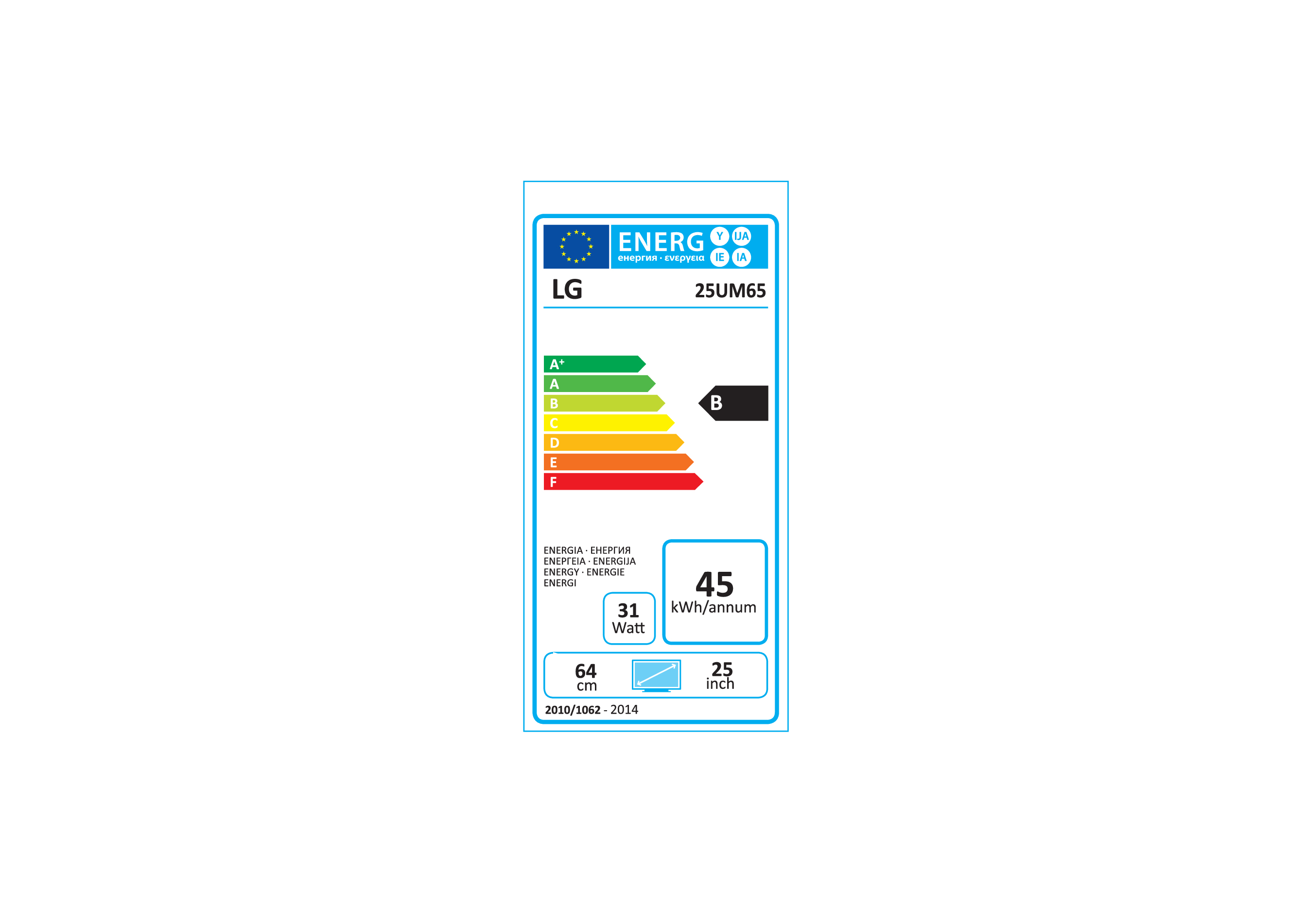
- Product information sheetEU Product Fiche ↗
Specifications
Key specifications
- Display diagonalSize of the display for this product, measured diagonally, usually in inches.
- 63.5 cm (25")
- Display resolutionThe number of distinct pixels in each dimension that can be displayed. It is usually quoted as width × height, with the units in pixels: for example, "1024 × 768" means the width is 1024 pixels and the height is 768 pixels. The higher the number of pixels, the sharper the image.
- 2560 x 1080 pixels
- Panel typeThe technology used to manufacture the panel, such as AMOLED or AH-IPS.
- IPS
- Response timeThe response time is the time difference between the moment that a source (for example a video card) sends a signal and that equipment (for example a monitor) receives or display the signal. (Used abbreviations: R/F = Rise and Fall.)
- 5 ms
- Display brightness (typical)Display brightness, measured by its Luminance, presented as a figure in nits. Typical brightness ratings for monitors range from 250 to 350 nits with a target value of between 80 to 120 nits being suitable for most displays in a normal viewing environment.
- 300 cd/m²
- HDMI ports quantityThe number of sockets (ports) for HDMI connections. HDMI (High-Definition Multimedia Interface) is a compact audio/video interface for transferring uncompressed video data and compressed/uncompressed digital audio data from a HDMI-compliant device ("the source device") to a compatible computer monitor, video projector, digital television, or digital audio device. HDMI is a digital replacement for…
- 2
- DisplayPorts quantityNumber of DisplayPorts. A DisplayPort is a digital display interface developed by the Video Electronics Standards Association (VESA). The interface is primarily used to connect a video source to a display device such as a computer monitor, though it can also be used to carry audio, USB, and other forms of data.
- 1
- Tilt adjustmentThe tilt, which means the angle at which the device is pointing (up or down), can be changed.
- Yes
- Panel mounting interfaceThe product can be used wih VESA mounting interfaces.
- 75 x 75 mm
- Built-in speaker(s)The device contains speaker(s) to produce sound.
- Yes
- Product colourThe colour e.g. red, blue, green, black, white.
- Black
Show all 72 specificationsShow key specifications only
Design
- Product colourThe colour e.g. red, blue, green, black, white.
- Black
- Panel mounting interfaceThe product can be used wih VESA mounting interfaces.
- 75 x 75 mm
- LED indicatorsThe specific status lights available on the unit to provide visual feedback on its current state or connectivity (e.g., AC input, ACT, or Access).
- Yes
Audio
- Built-in speaker(s)The device contains speaker(s) to produce sound.
- Yes
- Number of speakersThe quantity of speakers included in/with the product.
- 2
- RMS rated powerRMS (Root mean square) is a measure of the continuous power required by a device, in particular audio amplifiers and loudspeakers.
- 6 W
Multimedia
- Built-in cameraThe product has an integrated camera.
- No
Display
- Display diagonalSize of the display for this product, measured diagonally, usually in inches.
- 63.5 cm (25")
- Display resolutionThe number of distinct pixels in each dimension that can be displayed. It is usually quoted as width × height, with the units in pixels: for example, "1024 × 768" means the width is 1024 pixels and the height is 768 pixels. The higher the number of pixels, the sharper the image.
- 2560 x 1080 pixels
- Native aspect ratioThe aspect ratio is the ratio of the width of an image to its height. The native aspect ratio is the one which the projector/display is particularly designed for. Images shown in native aspect ratio will utilize the entire resolution of the display and achieve maximum brightness. Images shown in other than native aspect ratio will always have less resolution and less brightness than images shown…
- 21:9
- Display technologyThe technology used in the display e.g. plasma, LED.
- LED
- TouchscreenA screen of a laptop, smartphone, etc., that responds to touch so you can control the interface using your fingers.
- No
- HD typeType of supported High Definition (e.g. Full HD, 4K Ultra HD).
- Full HD
- Panel typeThe technology used to manufacture the panel, such as AMOLED or AH-IPS.
- IPS
- Backlight typeThe technology used to illuminate the display panel, such as CCFL or various LED configurations (e.g., Edge LED, Full-Array).
- W-LED
- Display brightness (typical)Display brightness, measured by its Luminance, presented as a figure in nits. Typical brightness ratings for monitors range from 250 to 350 nits with a target value of between 80 to 120 nits being suitable for most displays in a normal viewing environment.
- 300 cd/m²
- Response timeThe response time is the time difference between the moment that a source (for example a video card) sends a signal and that equipment (for example a monitor) receives or display the signal. (Used abbreviations: R/F = Rise and Fall.)
- 5 ms
- Display surfaceThe finish of the screen's outer layer, which determines how light reflects off the surface (e.g. Glossy, Matte, or Anti-glare).
- Matt
- Supported graphics resolutionsThe graphic resolutions that can be displayed by the device. The graphic resolution describes the width and height dimensions of a display, such as a computer monitor, measured in pixels.
- 2560 x 1080
- Aspect ratioThe aspect ratio is the ratio of the width of a shape to its height. For example, 4:3 is common for standard displays and 16:9 is the ratio for Widescreen TV.
- 21:9
- Contrast ratio (typical)The difference in light intensity between the brightest white and the darkest black.
- 1000:1
- Contrast ratio (dynamic)A property of a display system, defined as the ratio of the luminance of the brightest color (white) to that of the darkest color (black) that the system is capable of producing.
- 5000000:1
- Viewing angle, horizontalMaximum horizontal angle at which a display can be viewed with acceptable visual performance.
- 178°
- Viewing angle, verticalMaximum vertical angle at which a display can be viewed with acceptable visual performance.
- 178°
- Display number of coloursThe total number of distinct colours that the device is capable of displaying (e.g. 1.07 billion colours).
- 16.78 million colours
- Pixel pitchThis is the parameter of a picture tube, which specifies the shortest distance between two dots of the same colour. The principle is: the smaller the dot pitch, the better sharpness of image.
- 0.2286 x 0.2286 mm
- Horizontal scan rangeThe range of horizontal frequencies the device can process and display, measured in kHz.
- 30 - 90 kHz
- Vertical scan rangeThe range of vertical frequencies the device can process and display, measured in hertz (Hz).
- 56 - 75 Hz
- Viewable size, horizontalThe viewable size is often somewhat smaller than the actual size of a monitor, because there is a border around the image.
- 58.4 cm
- Viewable size, verticalThe height of the screen area that can actually display an image, measured in millimetres or inches.
- 25 cm
- Colour gamut standardThe specific color space standard the device is designed to reproduce, such as Adobe RGB or DCI-P3.
- sRGB
Thin Client
- Thin client installedThe product includes a thin client, which is a computer or a computer program which depends heavily on some other computer (its server) to fulfill its computational roles. This is different from the traditional fat client, which is a computer designed to take on these roles by itself. The specific roles assumed by the server may vary, from providing data persistence (for example, for diskless nod…
- No
Packaging content
- AC adapter includedIndicates whether a power supply unit for connecting the device to an AC outlet is provided in the package.
- Yes
- Cables includedSpecifies the types and quantities of connection cables provided with the product (e.g., 3.5 mm to 3.5 mm or SATA).
- HDMI
Other features
- TV tuner integratedDevice has an in-built TV tuner.
- No
- Supplied AC adapter typeThe type of power supply provided with the product to connect it to an alternating current source (e.g. AC).
- LCD
Certificates
- CertificationSpecifies the official standards, safety approvals, or regulatory certifications the product has received.
- UL(cUL), FCC-B, CE, CB, CCC, BSMI, KC, EPA, ROHS, REACH
Weight & dimensions
- Width (with stand)The total horizontal measurement of the product when the supporting stand is attached, measured in millimetres.
- 609 mm
- Depth (with stand)The measurement of the product from front to back when any supporting accessory or base is attached, expressed in millimetres or centimetres.
- 188.4 mm
- Height (with stand)The total vertical measurement of the product including its base or support structure, expressed in millimetres or centimetres.
- 383 mm
- Weight (with stand)The total mass of the unit including its supporting base, measured in kilograms or grams.
- 4.1 kg
- Width (without stand)The horizontal measurement of the device excluding the base or support structure, expressed in millimetres.
- 609 mm
- Depth (without stand)The measurement of the product from front to back without its base or support, typically expressed in millimetres or centimetres.
- 40 mm
- Height (without stand)The vertical measurement of the device when the stand is removed, measured in mm.
- 281.4 mm
- Weight (without stand)The mass of the device excluding the support base, measured in g.
- 3.78 kg
Operational conditions
- Operating temperature (T-T)The minimum and maximum temperatures at which the product can be safely operated.
- 10 - 35 °C
- Storage temperature (T-T)The minimum and maximum temperatures at which the product can be safely stored.
- -20 - 60 °C
- Operating relative humidity (H-H)The range of relative humidity, expressed as a percentage, within which the device can function correctly without damage or performance loss.
- 10 - 80%
- Storage relative humidity (H-H)The permissible range of relative humidity, expressed as a percentage, within which the product can be stored without damage.
- 5 - 90%
Power
- Power consumption (typical)Amount of power consumed by this model, often expressed in watts (W). Typical values that manufacturers give are power consumption when off, standby/suspended mode, typical use, maximum usage.
- 31 W
- Power consumption (standby)The amount of electricity that is consumed when the product is on standby.
- 0.5 W
- AC input voltageThe voltage of the AC electricity that is inputted into the product.
- 90 - 240 V
- AC input frequencyThe range of alternating current frequencies the device can accept from the power source, measured in hertz (e.g., 45 - 65).
- 47/63 Hz
- DC-in jackThe socket/plug where the DC electricity supply connects to the device.
- Yes
Security
- Cable lock slotHoles on the edge of devices through which a cable lock can be passed, so the device can be locked to a desk etc.
- No
Ergonomics
- Tilt adjustmentThe tilt, which means the angle at which the device is pointing (up or down), can be changed.
- Yes
- Tilt angle rangeThe minimum and maximum angles at which the unit can be tilted, typically expressed in degrees.
- -5 - 20°
- On Screen Display (OSD) languagesThe list of available languages for the device's display interface (e.g., AFR for Afrikaans, ARA for Arabic).
- Simplified Chinese, German, English, Spanish, Finnish, French, Italian, Japanese, Polish, Portuguese, Russian, Swedish, Ukrainian
Management features
- On Screen Display (OSD)Indicates whether the device can display a graphical menu or information directly on the screen for adjusting settings and viewing status.
- Yes
Features
- Plug and PlayIndicates whether this product supports is "plug and play". Plug and play is hardware or software that, after being installed ("plugged in"), can immediately be used ("played with"), as opposed to hardware or software which requires configuration.
- Yes
Ports & interfaces
- DVI portDigital Visual Interface (DVI) is a video display interface to connect a video source to a display device, such as a computer monitor.
- Yes
- DVI-D ports quantityThis is the amount of DVI-I interfaces. Digital Visual Interface (DVI) is a video display interface developed by the Digital Display Working Group (DDWG). The digital interface is used to connect a video source to a display device, such as a computer monitor. DVI-D means DVI digital, which means it can only support digital, but not analog.
- 1
- HDMI ports quantityThe number of sockets (ports) for HDMI connections. HDMI (High-Definition Multimedia Interface) is a compact audio/video interface for transferring uncompressed video data and compressed/uncompressed digital audio data from a HDMI-compliant device ("the source device") to a compatible computer monitor, video projector, digital television, or digital audio device. HDMI is a digital replacement for…
- 2
- DisplayPorts quantityNumber of DisplayPorts. A DisplayPort is a digital display interface developed by the Video Electronics Standards Association (VESA). The interface is primarily used to connect a video source to a display device such as a computer monitor, though it can also be used to carry audio, USB, and other forms of data.
- 1
- Audio inputThe type of audio input that the device requires, and the connection needed.
- Yes
- Headphone outThe socket for connecting headphones to the device.
- Yes
- Headphone outputsNumber of sockets /ports where headphones are connected.
- 1
- Headphone connectivityHow headphones connect to a device e.g. wirelessly or via a cable and connector.
- 3.5 mm
- HDCPHigh-bandwidth Digital Content Protection (HDCP) is a form of digital copy protection to prevent copying of digital audio and video content as it travels across connections.
- Yes
Packaging data
- Package widthThe distance from one side of the packaging to the other.
- 683 mm
- Package depthThe distance from the front to the back of the packaging.
- 356 mm
- Package heightThe distance from the top to the bottom of the packaging.
- 133 mm
Database Right data-sheet 2026 Icecat. All rights reserved. Provided “as is”, without warranty — check details with the store before buying.
Price history (90 days, best daily price)
Price history is still being collected for this product — check back soon.
Alternative models

LG 27M45HQ-B
computer monitor 68.6 cm (27") 1920 x 1080 pixels Full HD LED Black

LG 24MP55HQ-P
computer monitor 60.5 cm (23.8") 1920 x 1080 pixels Full HD LED Black

LG 27MP75HM-P
computer monitor 68.6 cm (27") 1920 x 1080 pixels Full HD LED Black

LG 24MB35PM
computer monitor 60.5 cm (23.8") 1920 x 1080 pixels Full HD LCD Anthracite
LG 23MP75HM-P
computer monitor 58.4 cm (23") 1920 x 1080 pixels Full HD LED Black

LG 24M45HQ-B
computer monitor 59.9 cm (23.6") 1920 x 1080 pixels Full HD LED Black