
LG 24MP58VQ-P computer monitor 60.5 cm (23.8") 1920 x 1080 pixels Full HD LED Black
- Screen: 60.5 cm (23.8"), 1920 x 1080 pixels, IPS, Flat
- Refresh rate: 5 ms response time
- Brightness: 250 cd/m²
- Ports: 1 × HDMI
- Stand: tilt
- Colour: Black
Where to buy
We're not tracking prices for this product yet. Check current prices directly at:
We may earn a commission when you buy through links on this page — at no extra cost to you. Learn more
About this product
Living color with LG IPS
IPS matrix ensures truly live image without color distortion and viewing comfort to the eye in any suitable position even in a long time
The updated design of the stand - ArcLine
Update Stand ArcLine monitor adds extra sophistication.
Sophisticated design
LG designers have made the monitor casing is incredibly thin, which gives the monitor a special refinement and sophistication that perfectly fit into any interior.
Visual comfort when working behind the monitor
Did you know that when working with a monitor Your eyes are exposed to the negative impact of screen flicker? Over time, the work behind the monitor, computer games or watching movies can cause fatigue and strain of view. Technology "Lack of Flicker" and "Reading Mode" will help reduce the negative effects of flicker and blue, maximizing visual comfort for your eyes when working at the monitor.
The effect of total immersion in the game
The "stabilizer black" will help improve the visibility even in the darkest scenes of game.
Monitor settings Control with the mouse
OSD functions facilitates monitor setup, allowing for the configuration settings instead of physical buttons on a conventional mouse. Preset modes help you quickly switch between the display options, and configure specific settings for the selected software.
Efficient multitasking mode
4-Screen Split Specialized software will split the screen into several areas to increase efficiency and optimal user-friendly layout of windows on the desktop. By default, split screen is available for a maximum of 4 areas occupied by different applications, which gives 14 windows on the screen layout options. For example, you can work in the main window, and simultaneously watch the video in a small pop-up window thanks to the Picture-in-Picture.
"Violation of color" function
Specialized software algorithm conversion allows people who are color distinguish the colors of objects on the monitor.
Documents
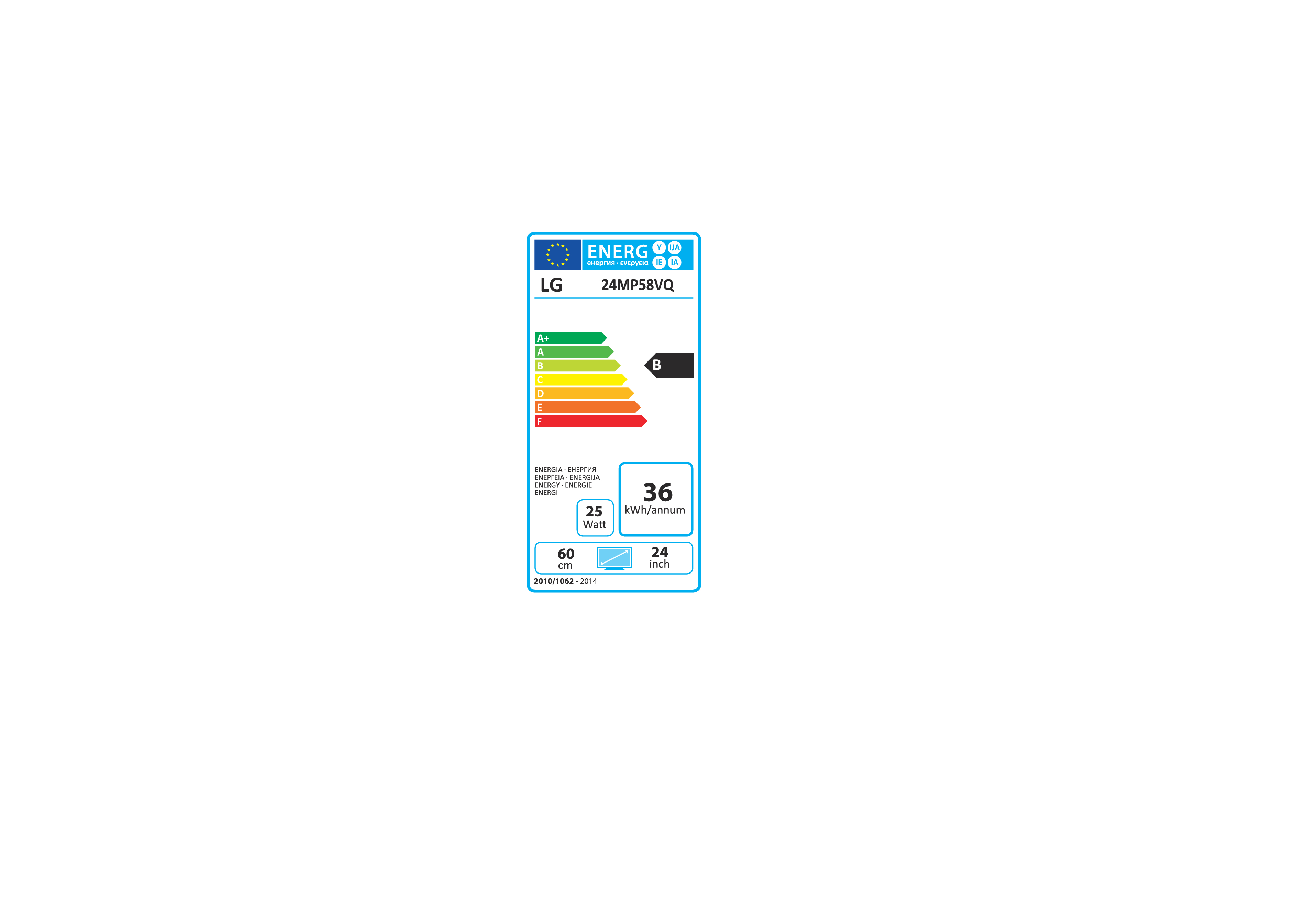
- Product information sheetEU Product Fiche ↗
Specifications
Key specifications
- Display diagonalSize of the display for this product, measured diagonally, usually in inches.
- 60.5 cm (23.8")
- Display resolutionThe number of distinct pixels in each dimension that can be displayed. It is usually quoted as width × height, with the units in pixels: for example, "1024 × 768" means the width is 1024 pixels and the height is 768 pixels. The higher the number of pixels, the sharper the image.
- 1920 x 1080 pixels
- Panel typeThe technology used to manufacture the panel, such as AMOLED or AH-IPS.
- IPS
- Screen shapeDescribes the physical curvature of the display panel, such as whether it is flat or curved.
- Flat
- Response timeThe response time is the time difference between the moment that a source (for example a video card) sends a signal and that equipment (for example a monitor) receives or display the signal. (Used abbreviations: R/F = Rise and Fall.)
- 5 ms
- Display brightness (typical)Display brightness, measured by its Luminance, presented as a figure in nits. Typical brightness ratings for monitors range from 250 to 350 nits with a target value of between 80 to 120 nits being suitable for most displays in a normal viewing environment.
- 250 cd/m²
- HDMI ports quantityThe number of sockets (ports) for HDMI connections. HDMI (High-Definition Multimedia Interface) is a compact audio/video interface for transferring uncompressed video data and compressed/uncompressed digital audio data from a HDMI-compliant device ("the source device") to a compatible computer monitor, video projector, digital television, or digital audio device. HDMI is a digital replacement for…
- 1
- Tilt adjustmentThe tilt, which means the angle at which the device is pointing (up or down), can be changed.
- Yes
- Product colourThe colour e.g. red, blue, green, black, white.
- Black
Show all 46 specificationsShow key specifications only
Design
- VESA mountingIndicates whether the product supports the VESA mounting standard for attachment to compatible arms, brackets, or wall mounts.
- No
- Product colourThe colour e.g. red, blue, green, black, white.
- Black
- Feet colourThe colour of the feet, which are the projecting part on which a device/piece of furniture, or each of its legs, stands.
- Black
Ports & interfaces
- Built-in USB hubWhether or not the device features a USB hub to connect more than one other device via USB.
- No
- VGA (D-Sub) ports quantityNumber of VGA (D-Sub) ports (connecting interfaces) in the device. The VGA (D-Sub) connector is a 15 pin connector between a computer and a monitor. It was first introduced in 1987 by IBM.
- 1
- DVI portDigital Visual Interface (DVI) is a video display interface to connect a video source to a display device, such as a computer monitor.
- Yes
- DVI-D ports quantityThis is the amount of DVI-I interfaces. Digital Visual Interface (DVI) is a video display interface developed by the Digital Display Working Group (DDWG). The digital interface is used to connect a video source to a display device, such as a computer monitor. DVI-D means DVI digital, which means it can only support digital, but not analog.
- 1
- HDMI ports quantityThe number of sockets (ports) for HDMI connections. HDMI (High-Definition Multimedia Interface) is a compact audio/video interface for transferring uncompressed video data and compressed/uncompressed digital audio data from a HDMI-compliant device ("the source device") to a compatible computer monitor, video projector, digital television, or digital audio device. HDMI is a digital replacement for…
- 1
- Headphone outThe socket for connecting headphones to the device.
- Yes
- Headphone outputsNumber of sockets /ports where headphones are connected.
- 1
- Headphone connectivityHow headphones connect to a device e.g. wirelessly or via a cable and connector.
- 3.5 mm
Audio
- Built-in speaker(s)The device contains speaker(s) to produce sound.
- No
Multimedia
- Built-in cameraThe product has an integrated camera.
- No
Display
- Display diagonalSize of the display for this product, measured diagonally, usually in inches.
- 60.5 cm (23.8")
- Display resolutionThe number of distinct pixels in each dimension that can be displayed. It is usually quoted as width × height, with the units in pixels: for example, "1024 × 768" means the width is 1024 pixels and the height is 768 pixels. The higher the number of pixels, the sharper the image.
- 1920 x 1080 pixels
- Native aspect ratioThe aspect ratio is the ratio of the width of an image to its height. The native aspect ratio is the one which the projector/display is particularly designed for. Images shown in native aspect ratio will utilize the entire resolution of the display and achieve maximum brightness. Images shown in other than native aspect ratio will always have less resolution and less brightness than images shown…
- 16:9
- Display technologyThe technology used in the display e.g. plasma, LED.
- LED
- TouchscreenA screen of a laptop, smartphone, etc., that responds to touch so you can control the interface using your fingers.
- No
- HD typeType of supported High Definition (e.g. Full HD, 4K Ultra HD).
- Full HD
- Panel typeThe technology used to manufacture the panel, such as AMOLED or AH-IPS.
- IPS
- Display brightness (typical)Display brightness, measured by its Luminance, presented as a figure in nits. Typical brightness ratings for monitors range from 250 to 350 nits with a target value of between 80 to 120 nits being suitable for most displays in a normal viewing environment.
- 250 cd/m²
- Response timeThe response time is the time difference between the moment that a source (for example a video card) sends a signal and that equipment (for example a monitor) receives or display the signal. (Used abbreviations: R/F = Rise and Fall.)
- 5 ms
- Screen shapeDescribes the physical curvature of the display panel, such as whether it is flat or curved.
- Flat
- Supported graphics resolutionsThe graphic resolutions that can be displayed by the device. The graphic resolution describes the width and height dimensions of a display, such as a computer monitor, measured in pixels.
- 1920 x 1080 (HD 1080)
- Contrast ratio (typical)The difference in light intensity between the brightest white and the darkest black.
- 1000:1
- Viewing angle, horizontalMaximum horizontal angle at which a display can be viewed with acceptable visual performance.
- 178°
- Viewing angle, verticalMaximum vertical angle at which a display can be viewed with acceptable visual performance.
- 178°
- Display number of coloursThe total number of distinct colours that the device is capable of displaying (e.g. 1.07 billion colours).
- 16.78 million colours
- DDC/CIIndicates whether the product supports the Display Data Channel Command Interface for controlling device settings via software.
- Yes
Power
- Energy efficiency class (legacy scale)The energy efficiency rating of the product based on the previous labeling scale (e.g. A+++).
- B
- Power consumption (typical)Amount of power consumed by this model, often expressed in watts (W). Typical values that manufacturers give are power consumption when off, standby/suspended mode, typical use, maximum usage.
- 25 W
- Annual energy consumptionThe amount of energy used by the product per year.
- 36 kWh
- DC-in jackThe socket/plug where the DC electricity supply connects to the device.
- Yes
Sustainability
- Sustainability certificatesThe environmental or ethical certifications the product has received to verify its sustainability standards (e.g., ASC or ACT Organic).
- EPEAT Gold, ENERGY STAR
Packaging content
- Stand includedIndicates whether a support stand is supplied with the product.
- Yes
Weight & dimensions
- Width (with stand)The total horizontal measurement of the product when the supporting stand is attached, measured in millimetres.
- 550.5 mm
- Depth (with stand)The measurement of the product from front to back when any supporting accessory or base is attached, expressed in millimetres or centimetres.
- 186.8 mm
- Height (with stand)The total vertical measurement of the product including its base or support structure, expressed in millimetres or centimetres.
- 419 mm
- Width (without stand)The horizontal measurement of the device excluding the base or support structure, expressed in millimetres.
- 550.5 mm
- Depth (without stand)The measurement of the product from front to back without its base or support, typically expressed in millimetres or centimetres.
- 85.5 mm
- Height (without stand)The vertical measurement of the device when the stand is removed, measured in mm.
- 332.1 mm
Ergonomics
- Height adjustmentThe part of the device that can be adjusted to change the height.
- No
- Tilt adjustmentThe tilt, which means the angle at which the device is pointing (up or down), can be changed.
- Yes
- Tilt angle rangeThe minimum and maximum angles at which the unit can be tilted, typically expressed in degrees.
- -2 - 15°
Features
- Plug and PlayIndicates whether this product supports is "plug and play". Plug and play is hardware or software that, after being installed ("plugged in"), can immediately be used ("played with"), as opposed to hardware or software which requires configuration.
- Yes
Other features
- 3DThe device can be used with 3D technology.
- No
Database Right data-sheet 2026 Icecat. All rights reserved. Provided “as is”, without warranty — check details with the store before buying.
Price history (90 days, best daily price)
Price history is still being collected for this product — check back soon.
Alternative models

LG 24MP68VQ-P
computer monitor 60.5 cm (23.8") 1920 x 1080 pixels Full HD LED Black

LG 27MP89HM-S
computer monitor 68.6 cm (27") 1920 x 1080 pixels Full HD LED Black, White

LG 32MP58HQ-P
computer monitor 80 cm (31.5") 1920 x 1080 pixels Full HD LED Black

LG 24MP88HV-S
computer monitor 60.5 cm (23.8") 1920 x 1080 pixels Full HD LED White
LG 22MP58VQ-P
computer monitor 54.6 cm (21.5") 1920 x 1080 pixels Full HD LED Black

LG 24M47VQ-P
computer monitor 61 cm (24") 1920 x 1080 pixels Full HD LED Black