
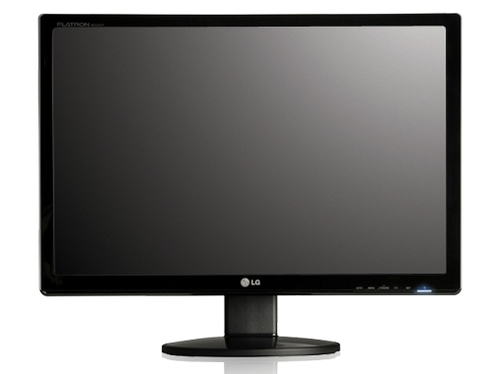
LG 17" LCD L1730SF computer monitor 43.2 cm (17") 1280 x 1024 pixels Touchscreen Grey
- Screen: 43.2 cm (17"), 1280 x 1024 pixels, Flat
- Refresh rate: 16 ms response time
- Colour: Grey
All 24 specificationsProduct page at lge.com ↗
Versions
 5 ms
 16 ms
Where to buy
We're not tracking prices for this product yet. Check current prices directly at:
We may earn a commission when you buy through links on this page — at no extra cost to you. Learn more
About this product
17" Stylish Design TFT LCD Monitor
The LG L1730SF provides users with a choice of input, offering users touch screen functionality. Designed for Commercial applications, with a 4 way resistive sensor and Dual Hinge for positioning at any level.
Pivot Enabled
Pivot function enables the computer display to rotate for different applications: landscape, portrait making, or word processing.
Touch Screen
Touch screen makes it easy for children and other users who have difficulty using auxillary devices (e.g. mouse or keyboard).
Specifications
Design
- Product colourThe colour e.g. red, blue, green, black, white.
- Grey
Performance
- NVIDIA G-SYNCIndicates whether the product supports NVIDIA G-SYNC technology to synchronize the display refresh rate with the GPU to eliminate screen tearing.
- No
- AMD FreeSyncThe product includes AMD Freesync Technology for the dynamic synchronization of the graphic card and the monitor in order to avoid screen tearing.
- No
Display
- Display diagonalSize of the display for this product, measured diagonally, usually in inches.
- 43.2 cm (17")
- Display resolutionThe number of distinct pixels in each dimension that can be displayed. It is usually quoted as width × height, with the units in pixels: for example, "1024 × 768" means the width is 1024 pixels and the height is 768 pixels. The higher the number of pixels, the sharper the image.
- 1280 x 1024 pixels
- TouchscreenA screen of a laptop, smartphone, etc., that responds to touch so you can control the interface using your fingers.
- Yes
- Display brightnessBrightness is the amount of radiating light emitted from the screen. The brightness rating is measured in candellas per square meter, commonly known as 'nits'.
- 300 cd/m²
- Response timeThe response time is the time difference between the moment that a source (for example a video card) sends a signal and that equipment (for example a monitor) receives or display the signal. (Used abbreviations: R/F = Rise and Fall.)
- 16 ms
- Screen shapeDescribes the physical curvature of the display panel, such as whether it is flat or curved.
- Flat
- Contrast ratio (typical)The difference in light intensity between the brightest white and the darkest black.
- 500:1
- Viewing angle, horizontalMaximum horizontal angle at which a display can be viewed with acceptable visual performance.
- 160°
- Viewing angle, verticalMaximum vertical angle at which a display can be viewed with acceptable visual performance.
- 160°
- Display number of coloursThe total number of distinct colours that the device is capable of displaying (e.g. 1.07 billion colours).
- 16.78 million colours
- Pixel pitchThis is the parameter of a picture tube, which specifies the shortest distance between two dots of the same colour. The principle is: the smaller the dot pitch, the better sharpness of image.
- 0.264 x 0.264 mm
- Horizontal scan rangeThe range of horizontal frequencies the device can process and display, measured in kHz.
- 30 - 83 kHz
- Vertical scan rangeThe range of vertical frequencies the device can process and display, measured in hertz (Hz).
- 56 - 75 Hz
Other features
- Dimensions (WxDxH)Dimensions of the product (Width x Depth x Height).
- 398 x 228 x 402 mm
Weight & dimensions
- Weight (without stand)The mass of the device excluding the support base, measured in g.
- 6.7 kg
Power
- Power consumption (typical)Amount of power consumed by this model, often expressed in watts (W). Typical values that manufacturers give are power consumption when off, standby/suspended mode, typical use, maximum usage.
- 40 W
- Power consumption (standby)The amount of electricity that is consumed when the product is on standby.
- 1 W
Ports & interfaces
- Number of upstream portsThe total number of available ports used to connect the device to a computer or another network source.
- 1
- VGA (D-Sub) ports quantityNumber of VGA (D-Sub) ports (connecting interfaces) in the device. The VGA (D-Sub) connector is a 15 pin connector between a computer and a monitor. It was first introduced in 1987 by IBM.
- 1
- DVI portDigital Visual Interface (DVI) is a video display interface to connect a video source to a display device, such as a computer monitor.
- No
- RS-232 portsThe number of sockets (ports) for RS-232. An RS-232 serial port was once a standard feature of a personal computer, used for connections to modems, printers, mice, data storage, uninterruptible power supplies, and other peripheral devices. Now it has been largely replaced by USB and other ports.
- 1
Database Right data-sheet 2026 Icecat. All rights reserved. Provided “as is”, without warranty — check details with the store before buying.
Price history (90 days, best daily price)
Price history is still being collected for this product — check back soon.
Alternative models

LG W2242PM
computer monitor 55.9 cm (22") 1680 x 1050 pixels

LG L1942TE
computer monitor 48.3 cm (19") 1280 x 1024 pixels

LG M2262D-PC
computer monitor 54.6 cm (21.5") 1920 x 1080 pixels Full HD Black

LG L1942SE
computer monitor 48.3 cm (19") 1280 x 1024 pixels

LG M2062D
computer monitor 50.8 cm (20") 1600 x 900 pixels Black
LG N1941W-PF
computer monitor 47 cm (18.5") 1360 x 768 pixels Black