
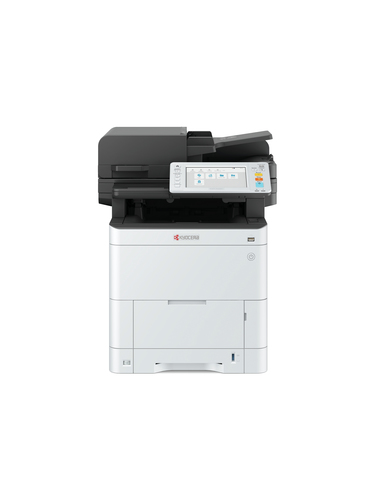
KYOCERA ECOSYS MA4000cix Laser A4 1200 x 1200 DPI 40 ppm
- Technology: Laser
- Functions: Colour printing, Colour scanning, Colour copying
- Print speed: 40 ppm
- Paper: up to A4, two-sided printing, 350 sheets input
- Print resolution: 1200 x 1200 DPI
- Connections: Ethernet, USB
All 123 specificationsProduct page at kyoceradocumentsolutions.eu ↗
Where to buy
We're not tracking prices for this product yet. Check current prices directly at:
We may earn a commission when you buy through links on this page — at no extra cost to you. Learn more
About this product
This powerful and reliable A4 device ensures excellent running costs for medium and large-sized work groups while complying to newest environment standards.
ECOSYS makes your office more efficient
Kyocera solutions always work with the environment in mind, but the ECOSYS range do this more than any other product on the market.
Multi-Functional Products for day-to-day tasks
Kyocera provides the industry’s most comprehensive line of award-winning low to high volume devices.
A4 printer for all needs
High quality, high reliability and high efficiency are essential.
ECOSYS: The cost-efficient solution
Unique to Kyocera, ECOSYS provides long-lasting printers at an economical cost.
Documents
- BrochureProduct Brochure ↗
- ManualUser manual ↗
Specifications
Key specifications
- Print technologyIndicates the method used to print by this product.
- Laser
- PrintingProducing a paper copy of information stored on a computer.
- Colour printing
- ScanningTo convert a document or picture into digital form for storage or processing on a computer, by scanning it using a scanner.
- Colour scanning
- CopyingDescription of copying function (colour or monochrome).
- Colour copying
- Print speed (black, normal quality, A4/US Letter)The print speed of a printer for black & white A4 pages, normal quality. The exact speed varies depending on the system configuration, software program, and document complexity.
- 40 ppm
- Maximum ISO A-series paper sizeThe maximum paper size the device can handle, defined by ISO A-series.
- A4
- Duplex printingFeature of computer printers and multifunction printers (MFPs) that allows the printing of a sheet of paper on both sides (automatically or manually)
- Yes
- Total input capacityThe maximum number of sheets of paper that can be held in all input trays and feeders combined.
- 350 sheets
- Maximum resolutionMaximum printing resolution.
- 1200 x 1200 DPI
- Ethernet LANAn Ethernet LAN (Local Area Network) interface is present, for a wired conection via a cable.
- Yes
- USB portThe device features a socket into which a USB cable can be plugged.
- Yes
Show all 123 specificationsShow key specifications only
Design
- Product colourThe colour e.g. red, blue, green, black, white.
- Black, White
- Market positioningUnder which category can the device be positioned in the market, e.g. camera phone.
- Business
- Built-in displayA display which is part of the product, so you do not need to attach another display.
- Yes
- Control typeThe way in which the device is controlled.
- Touch
- Colour displayIndicates whether the device is equipped with a screen capable of displaying multiple colours.
- Yes
Memory
- Internal memoryThe amount of memory, usually measured in bytes (e.g. MB, GB), which is installed in the system's hardware.
- 2000 MB
- Maximum internal memoryThe maximum amount of memory inside a product, usually measured in bytes e.g megabytes (MB) or gigabytes (GB).
- 3000 MB
- Memory slotsNumber and type of memory expansion slots, including connector and memory module descriptions.
- 1
Network
- Wi-FiPopular technology that allows an electronic device to exchange data or connect to the internet wirelessly using radio waves.
- No
- Ethernet LANAn Ethernet LAN (Local Area Network) interface is present, for a wired conection via a cable.
- Yes
- Cabling technologyType of cable technology performance.
- 10/100/1000Base-T(X)
- Ethernet LAN data ratesThe different speed levels of the Ethernet LAN connection.
- 10,100,1000 Mbit/s
- Mobile printing technologiesApps etc. which allow users to send a print job from a smartphone or tablet to a printer via a wireless network.
- Apple AirPrint, Kyocera Mobile Print, Mopria Print Service
Paper handling
- Maximum ISO A-series paper sizeThe maximum paper size the device can handle, defined by ISO A-series.
- A4
- Paper tray media typesSpecifies the different kinds of materials that can be loaded into the paper tray, such as envelopes, card stock, or coated paper.
- Banner, Labels, Plain paper, Pre-printed
- ISO A-series sizes (A0...A9)Different sizes of paper from A0 (big) to A9 (small). A4 is the most common size used for printing documents.
- A4, A5, A6
- ISO B-series sizes (B0...B9)The supported paper dimensions based on the ISO 216 B-series standard (e.g. B0, B1, B2).
- B5, B6
- Non-ISO print media sizesThe specific paper dimensions supported by the device that do not follow the International Organization for Standardization (ISO) standards (e.g., Executive or Folio).
- Folio, Legal, Letter
- Paper tray media weightThe range of supported media thickness that can be loaded into the tray, measured in grams per square metre (e.g., 60-220 g/m²).
- 60 - 220 g/m²
- Multi-Purpose Tray media weightThe minimum and maximum weight of the media supported by the multi-purpose tray, measured in grams per square metre (g/m²).
- 60 - 220 g/m²
Input & output capacity
- Total number of input traysThe total count of available paper input trays, including the main cassette and any optional or multipurpose trays (e.g. 2).
- 2
- Total input capacityThe maximum number of sheets of paper that can be held in all input trays and feeders combined.
- 350 sheets
- Total output capacityThe maximum number of sheets that can be held in the output tray after printing.
- 250 sheets
- Paper tray 1 input capacityThe maximum number of sheets of paper that can be loaded into the first input tray.
- 250 sheets
- Multi-Purpose trayIndicates whether the device includes a versatile input tray for handling various media types or sizes.
- Yes
- Multi-Purpose tray input capacityThe maximum number of sheets of paper that can be loaded into the versatile input tray.
- 100 sheets
- Maximum number of input traysThe total number of paper input trays that can be installed or used by the device (e.g. 2).
- 5
- Maximum input capacityThe maximum quantity of items that can be loaded into the input mechanism at one time.
- 2050 sheets
- Maximum output capacityMaximum number of sheets this product can hold in all available standard and optional output trays.
- 250 sheets
Features
- Maximum duty cycleThe maximum number of prints/copies made by a printer/copier in a fixed period.
- 100000 pages per month
- Windows operating systems supportedWindows vesions wich can be used with the device.
- Yes
- Duplex functionsThe product has the ability to print, scan etc. on both sides of a sheet of paper.
- Copy, Print, Scan
- Digital senderDevice similar to a scanner which converts paper documents into digital information for emailing, archiving, document management and more.
- Yes
- Number of print cartridgesThe amount of print cartridges. A print cartridge is a container holding a quantity of ink which is inserted into a inkjet printer mechanism.
- 4
- Printing coloursThe colours that can be produced by the printer.
- Black, Cyan, Magenta, Yellow
- Page description languagesThe set of page description languages supported by the device for interpreting and rendering print jobs (e.g. BPL or BR-Script 3).
- JPEG, OpenXPS, PCL 5c, PCL 6, PCL XL, PCLm, PDF, PWG, PostScript 3, TIFF, URF, XPS
- All-In-One-multitaskingIndicates whether the device is designed to handle multiple different tasks simultaneously or in rapid succession.
- Yes
- Replacement cartridgesSpecifies the compatible ink or toner cartridges required for the device.
- TK-5380
Fax
- FaxingTo send an exact copy of a document made by electronic scanning and transmitted as data by telecommunications links.
- No
Scanning
- ScanningTo convert a document or picture into digital form for storage or processing on a computer, by scanning it using a scanner.
- Colour scanning
- Duplex scanningFeature of computer scanners and multifunction printers (MFPs) that allows the automatic scanning of a sheet of paper on both sides.
- Yes
- Optical scanning resolutionHow many pixels a scanner can see. Most commonly, this is measured in dots per inch (dpi).For example, a typical flatbed scanner will use a scanning head with 300 sensors per inch, so it can sample 300 dots per inch (dpi) in one direction. To scan in the other direction, it will move the scanning head along the page, stopping 300 times per inch, so it can scan 300 dpi in the other direction as we…
- 600 x 600 DPI
- Maximum scan resolutionThe highest level of detail the device can capture during a scan, measured in dots per inch (dpi).
- 1200 x 1200 DPI
- Scanner typeIndicates the type of scanner this product is.
- Flatbed & ADF scanner
- Scan toSpecifies the available destinations where scanned documents can be sent, such as a cloud service, e-mail address, or network folder (e.g., FTP or CIFS).
- E-mail, FTP, File, Print, SMB, TWAIN, USB, WIA
- Scan speed (colour)The number of colour pages the device can scan per minute, measured in ppm.
- 50 ppm
- Scan speed (black)The maximum number of pages the device can scan per minute when processing black and white documents, measured in ppm.
- 60 ppm
- Duplex scan speed (colour)The number of pages the device can scan per minute when operating in automatic double-sided mode for colour documents, measured in ppm.
- 100 ppm
- Duplex scan speed (black)The number of pages the device can scan per minute when automatically scanning both sides of a page in black and white, measured in ppm.
- 120 ppm
- Document formats supportedThe type of document formats that can be read/produced with this device e.g. .docx, .pdf.
- PDF, XPS
- Greyscale levelsThe number of distinct shades of grey that the device can reproduce or capture, typically expressed as a numerical value (e.g. 256).
- 256
- Scan driversThe scanning interfaces and software protocols supported by the device for communication with computer applications (e.g. TWAIN, WIA).
- TWAIN, WIA
Copying
- CopyingDescription of copying function (colour or monochrome).
- Colour copying
- Duplex copyingIndicates whether the device supports automatic double-sided copying.
- Yes
- Maximum copy resolutionThe greatest amount of detail that can be produced by a copy of a document.
- 600 x 600 DPI
- Maximum copy sizeThe largest paper format that the device can process when duplicating documents (e.g. A3).
- A4
- Copy speed (black, normal quality, A4)The number of black-and-white pages processed per minute for standard A4 documents at normal quality, measured in cpm.
- 17.5 cpm
- Copy speed (colour, normal quality, A4)The number of colour pages produced per minute when printing standard A4 documents at normal quality, measured in cpm.
- 17.5 cpm
- Time to first copy (black, normal)The time elapsed from the moment a command is sent until the first black-and-white output is produced in normal quality mode, measured in seconds.
- 5.8 s
- Time to first copy (colour, normal)The time elapsed from the moment a print command is sent until the first colour page is completely printed in normal quality mode, measured in seconds.
- 6.2 s
- Maximum number of copiesThe highest quantity of duplicates that can be produced in a single operation, measured in copies.
- 999 copies
- Copier resizeThe range of scaling percentages available to increase or decrease the size of the original during the copying process.
- 25 - 400%
- N-in-1 copy functionIndicates whether the device can combine multiple pages from the original document onto a single sheet of paper during copying.
- Yes
- N-in-1 copy function (N=)The maximum number of original items that can be combined and output onto a single sheet (e.g. 4 or 16).
- 2, 4
- Copy programming functionIndicates whether the device supports a function to copy and transfer stored programming settings to another unit.
- Yes
- ID-card copy functionIndicates whether the device can automatically scan and combine both sides of an identification document onto a single page.
- Yes
Printing
- Print technologyIndicates the method used to print by this product.
- Laser
- PrintingProducing a paper copy of information stored on a computer.
- Colour printing
- Duplex printingFeature of computer printers and multifunction printers (MFPs) that allows the printing of a sheet of paper on both sides (automatically or manually)
- Yes
- Maximum resolutionMaximum printing resolution.
- 1200 x 1200 DPI
- Print speed (black, normal quality, A4/US Letter)The print speed of a printer for black & white A4 pages, normal quality. The exact speed varies depending on the system configuration, software program, and document complexity.
- 40 ppm
- Duplex printing modeSpecifies how the device handles double-sided printing, such as automatically flipping the page or requiring the user to do so manually.
- Auto
- Print resolution colourThe maximum detail level for colour output, typically expressed as the number of addressable dots per inch (dpi).
- 1200 x 1200 DPI
- Print resolution blackThe maximum detail level of the printed image when using black ink or toner, typically measured in dots per inch (dpi).
- 1200 x 1200 DPI
- Print speed (colour, normal quality, A4/US Letter)The number of colour outputs produced per minute at normal quality for A4 or US Letter sizes, measured in ppm.
- 40 ppm
- Duplex print speed (black, normal quality, A4/US Letter)The number of units processed per minute when printing on both sides of the paper in black and normal quality, measured in ppm.
- 20 ppm
- Duplex print speed (colour, normal quality, A4/US Letter)The number of colour pages printed per minute when using automatic double-sided printing at normal quality, measured in ppm.
- 20 ppm
- Warm-up timeTime needed before printing after power switched on.
- 26 s
- Time to first page (black, normal)The time elapsed from the moment the print command is sent until the first page is completely printed in black, measured in seconds (e.g. 5 s).
- 5.4 s
- N-in-1 print functionIndicates whether the device supports printing multiple pages of a document onto a single sheet of paper.
- Yes
- N-up printingThe maximum number of document pages that can be printed on a single side of a sheet of paper (e.g. 4 or 16).
- 2, 4
- Secure printingIndicates whether the device supports the protection of sensitive content by requiring authentication at the unit before the output is released.
- Yes
Certificates
- Compliance certificatesIndicates which regulatory, safety, and environmental standards the product complies with, as verified by recognized authorities or certification bodies.
- CE, GS mark, cTUVus
Packaging content
- Cartridge(s) includedIndicates whether the product is supplied with the necessary cartridges for immediate use.
- Yes
- Included cartridge capacity (black)The total number of pages that can be printed using the black ink or toner cartridge supplied with the product.
- 6000 pages
- Included cartridge capacity (CMY)The total number of pages that can be printed using the cyan, magenta, and yellow ink or toner cartridges supplied with the product.
- 5000 pages
- Imaging unit includedIndicates whether the imaging unit is supplied together with the product.
- Yes
- Cables includedSpecifies the types and quantities of connection cables provided with the product (e.g., 3.5 mm to 3.5 mm or SATA).
- AC
Weight & dimensions
- WidthThe measurement or extent of something from side to side.
- 480 mm
- DepthThe distance from the front to the back of something.
- 577.5 mm
- HeightThe measurement of the product from head to foot or from base to top.
- 575 mm
- WeightWeight of the product without packaging (net weight). If possible, the net weight is given including standard accessories and supplies. Please note that sometimes the manufacturer leaves out the weight of accessories and/or supplies.
- 39 kg
Sustainability
- Sustainability complianceIndicates whether the product complies with established environmental and sustainability standards.
- Yes
- Sustainability certificatesThe environmental or ethical certifications the product has received to verify its sustainability standards (e.g., ASC or ACT Organic).
- EPEAT Gold
Software
- Mac operating systems supportedMac operating systems e.g. OS X can be used with the device.
- Mac OS X 10.0 Cheetah, Mac OS X 10.1 Puma, Mac OS X 10.10 Yosemite, Mac OS X 10.11 El Capitan, Mac OS X 10.12 Sierra, Mac OS X 10.13 High Sierra, Mac OS X 10.14 Mojave, Mac OS X 10.15 Catalina, Mac OS X 10.15.3 Catalina, Mac OS X 10.2 Jaguar, Mac OS X 10.3 Panther, Mac OS X 10.4 Tiger, Mac OS X 10.5 Leopard, Mac OS X 10.6 Snow Leopard, Mac OS X 10.9 Mavericks, Mac OS X 11.0 Big Sur, Mac OS X 12.0 Monterey, Mac OS X 13.0 Ventura
- Linux operating systems supported8 RT. Linux (9.4, 9.5), Red Hat Enterprise Linux 5.0 (supported with a pre-built package); SUSE Linux (10.3, 11.0, 11, 11.1, 11.2), Fedora (9, 9.0, 10, 10.0, 11.0, 11, 12, 12.0), Ubuntu (8.04, 8.04.1, 8.04.2, 8.10, 9.04, 9.10, 10.04), Debian (5.0, 5.0.1, 5.0.2, 5.0.3)
- Yes
System requirements
- Other operating systems supportedLists additional operating systems that are compatible with the product (e.g. Android, ChromeOS or FreeBSD).
- ChromeOS
Power
- Power consumption (printing)The amount of electrical energy used by the device during the active printing process, measured in watts.
- 573.6 W
- Power consumption (copying)The amount of electrical energy used by the device during the copying process, measured in watts.
- 575 W
- Power consumption (ready)The amount of electrical energy consumed by the device when it is powered on but not actively performing a task, measured in Watts.
- 18.8 W
- Power consumption (sleep)The amount of electrical energy consumed by the device when it is in sleep mode, typically measured in watts (W).
- 0.5 W
- AC input voltageThe voltage of the AC electricity that is inputted into the product.
- 220 - 240 V
- AC input frequencyThe range of alternating current frequencies the device can accept from the power source, measured in hertz (e.g., 45 - 65).
- 50/60 Hz
Display
- DisplayThe description of display that can includes display type, resolution, size etc.
- LCD
- Display diagonalSize of the display for this product, measured diagonally, usually in inches.
- 17.8 cm (7")
Storage
- Card reader integratedA card reader is a device that enables reading and, in some cases, writing data to and from a memory card.
- Yes
- Compatible memory cardsTypes of memory cards which can be used with this product.
- SD
Performance
- Built-in processorWhether or not a processor is built into the device.
- Yes
- Sound pressure level (printing)The average noise level emitted by the device during the printing process, measured in decibels (dB).
- 53 dB
- Sound pressure level (copying)The noise level emitted by the device during the copying process, measured in dB.
- 53 dB
- Sound pressure level (standby)The amount of noise emitted by the device while it is in standby mode, measured in decibels (dB).
- 30 dB
- Security algorithmsSecurity algorithms are used to provide authentication, cipher key generation, integrity and radio link privacy to users on mobile networks. The security algorithms supported are the ones that can be used with this product.
- SNMPv3, TLS
- Image formats supportedThe type of image files that the device can use/display e.g. gif, JPEG (jpg).
- JPEG, TIFF
Processor
- Processor familyA family of processors is a group of processors produced by one company over a short period of time e.g. Intel Pentium processors.
- ARM Cortex-A9
- Processor frequencyThe clock rate is the fundamental rate in cycles per second (measured in hertz) at which a computer performs its most basic operations such as adding two numbers. There are more factors, like internal memory size, that influence a computer's actual response time.
- 1200 MHz
- Processor coresThe number of central processing units ('cores') in a processor. Some processors have 1 core, others have 2 (e.g. Intel Core Duo) or more (e.g. the Intel Xeon E7-2850 has 10 cores).
- 2
Ports & interfaces
- Direct printingWith direct printing it is possible to print your photographs or other documents directly to a printer from a compatible device, without the use of a computer.
- Yes
- USB portThe device features a socket into which a USB cable can be plugged.
- Yes
- Optional connectivitySpecifies the additional communication interfaces that can be added to the unit, such as Bluetooth, Ethernet, or various serial connections.
- Ethernet, Wireless LAN
Packaging data
- Package widthThe distance from one side of the packaging to the other.
- 623 mm
- Package depthThe distance from the front to the back of the packaging.
- 728 mm
- Package heightThe distance from the top to the bottom of the packaging.
- 789 mm
- Package weightWeight of the packaged product.
- 51 kg
Database Right data-sheet 2026 Icecat. All rights reserved. Provided “as is”, without warranty — check details with the store before buying.
Price history (90 days, best daily price)
Price history is still being collected for this product — check back soon.
Alternative models

KYOCERA TASKalfa MA3500ci Laser A4 1200 x 1200 DPI 35 ppm
KYOCERA ECOSYS MA3500cix Laser A4 1200 x 1200 DPI 35 ppm

KYOCERA ECOSYS MA3500cix/Plus Laser A4 1200 x 1200 DPI 35 ppm

KYOCERA ECOSYS MA3500cifx Laser A4 1200 x 1200 DPI 35 ppm

KYOCERA ECOSYS MA3500cifx Laser A4 1200 x 1200 DPI 35 ppm
