
HP LA22f computer monitor 55.9 cm (22") 1680 x 1050 pixels Black
- Screen: 55.9 cm (22"), 1680 x 1050 pixels
- Refresh rate: 5 ms response time
- Brightness: 250 cd/m²
- Ports: 1 × DisplayPort
- Colour: Black
Where to buy
We're not tracking prices for this product yet. Check current prices directly at:
We may earn a commission when you buy through links on this page — at no extra cost to you. Learn more
Specifications
Key specifications
- Display diagonalSize of the display for this product, measured diagonally, usually in inches.
- 55.9 cm (22")
- Display resolutionThe number of distinct pixels in each dimension that can be displayed. It is usually quoted as width × height, with the units in pixels: for example, "1024 × 768" means the width is 1024 pixels and the height is 768 pixels. The higher the number of pixels, the sharper the image.
- 1680 x 1050 pixels
- Response timeThe response time is the time difference between the moment that a source (for example a video card) sends a signal and that equipment (for example a monitor) receives or display the signal. (Used abbreviations: R/F = Rise and Fall.)
- 5 ms
- Display brightness (typical)Display brightness, measured by its Luminance, presented as a figure in nits. Typical brightness ratings for monitors range from 250 to 350 nits with a target value of between 80 to 120 nits being suitable for most displays in a normal viewing environment.
- 250 cd/m²
- DisplayPorts quantityNumber of DisplayPorts. A DisplayPort is a digital display interface developed by the Video Electronics Standards Association (VESA). The interface is primarily used to connect a video source to a display device such as a computer monitor, though it can also be used to carry audio, USB, and other forms of data.
- 1
- Product colourThe colour e.g. red, blue, green, black, white.
- Black
Show all 40 specificationsShow key specifications only
Design
- Product colourThe colour e.g. red, blue, green, black, white.
- Black
- LED indicatorsThe specific status lights available on the unit to provide visual feedback on its current state or connectivity (e.g., AC input, ACT, or Access).
- Power
Audio
- Built-in speaker(s)The device contains speaker(s) to produce sound.
- No
Multimedia
- Built-in cameraThe product has an integrated camera.
- No
Display
- Display diagonalSize of the display for this product, measured diagonally, usually in inches.
- 55.9 cm (22")
- Display resolutionThe number of distinct pixels in each dimension that can be displayed. It is usually quoted as width × height, with the units in pixels: for example, "1024 × 768" means the width is 1024 pixels and the height is 768 pixels. The higher the number of pixels, the sharper the image.
- 1680 x 1050 pixels
- TouchscreenA screen of a laptop, smartphone, etc., that responds to touch so you can control the interface using your fingers.
- No
- Display brightness (typical)Display brightness, measured by its Luminance, presented as a figure in nits. Typical brightness ratings for monitors range from 250 to 350 nits with a target value of between 80 to 120 nits being suitable for most displays in a normal viewing environment.
- 250 cd/m²
- Response timeThe response time is the time difference between the moment that a source (for example a video card) sends a signal and that equipment (for example a monitor) receives or display the signal. (Used abbreviations: R/F = Rise and Fall.)
- 5 ms
- Contrast ratio (typical)The difference in light intensity between the brightest white and the darkest black.
- 1000:1
- Viewing angle, horizontalMaximum horizontal angle at which a display can be viewed with acceptable visual performance.
- 160°
- Viewing angle, verticalMaximum vertical angle at which a display can be viewed with acceptable visual performance.
- 160°
- Pixel pitchThis is the parameter of a picture tube, which specifies the shortest distance between two dots of the same colour. The principle is: the smaller the dot pitch, the better sharpness of image.
- 0.282 x 0.282 mm
Thin Client
- Thin client installedThe product includes a thin client, which is a computer or a computer program which depends heavily on some other computer (its server) to fulfill its computational roles. This is different from the traditional fat client, which is a computer designed to take on these roles by itself. The specific roles assumed by the server may vary, from providing data persistence (for example, for diskless nod…
- No
Features
- Country of originCountry where the device is made. Aka Country of manufacture (COM).
- China
- Plug and PlayIndicates whether this product supports is "plug and play". Plug and play is hardware or software that, after being installed ("plugged in"), can immediately be used ("played with"), as opposed to hardware or software which requires configuration.
- Yes
Other features
- TV tuner integratedDevice has an in-built TV tuner.
- No
- Supplied AC adapter typeThe type of power supply provided with the product to connect it to an alternating current source (e.g. AC).
- LCD
- 3DThe device can be used with 3D technology.
- No
Weight & dimensions
- Width (with stand)The total horizontal measurement of the product when the supporting stand is attached, measured in millimetres.
- 511.2 mm
- Depth (with stand)The measurement of the product from front to back when any supporting accessory or base is attached, expressed in millimetres or centimetres.
- 254.9 mm
- Height (with stand)The total vertical measurement of the product including its base or support structure, expressed in millimetres or centimetres.
- 373.5 mm
- Width (without stand)The horizontal measurement of the device excluding the base or support structure, expressed in millimetres.
- 511.2 mm
- Depth (without stand)The measurement of the product from front to back without its base or support, typically expressed in millimetres or centimetres.
- 62 mm
- Height (without stand)The vertical measurement of the device when the stand is removed, measured in mm.
- 333.5 mm
- Weight (without stand)The mass of the device excluding the support base, measured in g.
- 11.3 kg
Operational conditions
- Operating temperature (T-T)The minimum and maximum temperatures at which the product can be safely operated.
- 5 - 35 °C
- Operating relative humidity (H-H)The range of relative humidity, expressed as a percentage, within which the device can function correctly without damage or performance loss.
- 20 - 80%
Power
- Power consumption (typical)Amount of power consumed by this model, often expressed in watts (W). Typical values that manufacturers give are power consumption when off, standby/suspended mode, typical use, maximum usage.
- 36 W
- Power consumption (standby)The amount of electricity that is consumed when the product is on standby.
- 1 W
- AC input voltageThe voltage of the AC electricity that is inputted into the product.
- 100 - 240 V
- AC input frequencyThe range of alternating current frequencies the device can accept from the power source, measured in hertz (e.g., 45 - 65).
- 50 - 60 Hz
Security
- Cable lock slotHoles on the edge of devices through which a cable lock can be passed, so the device can be locked to a desk etc.
- Yes
Ergonomics
- Swivel angle rangeThe minimum and maximum degrees to which the unit can be rotated horizontally.
- -170 - 170°
- Tilt angle rangeThe minimum and maximum angles at which the unit can be tilted, typically expressed in degrees.
- -5 - 30°
Ports & interfaces
- USB hub versionThe technical standard of the USB hub, if available, which determines the maximum data transfer speed (e.g., 3.2 Gen 1).
- 2.0
- USB Type-A downstream ports quantityThe number of USB Type-A ports available for connecting peripheral devices to the unit.
- 2
- VGA (D-Sub) ports quantityNumber of VGA (D-Sub) ports (connecting interfaces) in the device. The VGA (D-Sub) connector is a 15 pin connector between a computer and a monitor. It was first introduced in 1987 by IBM.
- 1
- DVI-D ports quantityThis is the amount of DVI-I interfaces. Digital Visual Interface (DVI) is a video display interface developed by the Digital Display Working Group (DDWG). The digital interface is used to connect a video source to a display device, such as a computer monitor. DVI-D means DVI digital, which means it can only support digital, but not analog.
- 1
- DisplayPorts quantityNumber of DisplayPorts. A DisplayPort is a digital display interface developed by the Video Electronics Standards Association (VESA). The interface is primarily used to connect a video source to a display device such as a computer monitor, though it can also be used to carry audio, USB, and other forms of data.
- 1
Database Right data-sheet 2026 Icecat. All rights reserved. Provided “as is”, without warranty — check details with the store before buying.
Price history (90 days, best daily price)
Price history is still being collected for this product — check back soon.
Alternative models
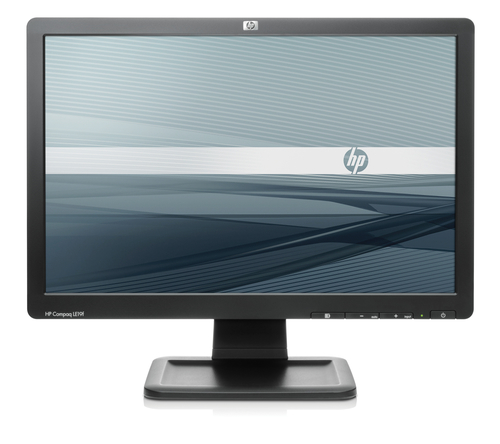
HP LE19f
computer monitor 48.3 cm (19") 1440 x 900 pixels Black

HP ZR24w
computer monitor 61 cm (24") 1920 x 1200 pixels Full HD Black

HP 2210m
computer monitor 54.6 cm (21.5") 1920 x 1080 pixels Full HD

HP ZR22w
computer monitor 54.6 cm (21.5") 1920 x 1080 pixels Full HD Black

HP L2151ws
computer monitor 54.6 cm (21.5") 1920 x 1080 pixels Full HD Black

HP NP447A8
computer monitor 48.3 cm (19") 1440 x 900 pixels Black
Accessories & compatible products

Neomounts FPMA-C050BLACK Monitor/TV mount ceiling 10-30" - h 60-85 cm

Neomounts FPMA-D935D Monitor arm 14-27"

Neomounts FPMA-D960 Monitor arm 10-30"

Neomounts FPMA-W25 Monitor/TV mount wall 10-30" - ultra-flat

Neomounts FPMA-D960D Monitor arm 10-27"
