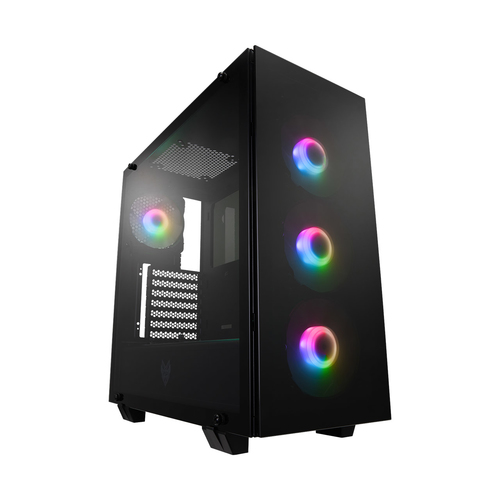
FSP CMT140 Midi Tower Black
- USB 2.0 ports quantity: 2
- USB 3.2 Gen 1 (3.1 Gen 1) Type-A ports quantity: 1
- Form factor: Midi Tower
- Type: PC
- Product colour: Black
- Supported motherboard form factors: ATX, micro ATX
Where to buy
We're not tracking prices for this product yet. Check current prices directly at:
We may earn a commission when you buy through links on this page — at no extra cost to you. Learn more
About this product
CMT140/CMT141 PC cases are compact and provide a supreme performance system build for minimailist gamers. The internal layout of the CMT140 and CMT141 is simple and friendly for quick build-up in a short time, besides, its internal black coating steel structure gives your build a high quality looking compared with so many entry-level PC cases. The fully-windowed side panel to show the world your loved components, and thanks to its acrylic material to keep you safe at the same time. With expansive storage space of 2 x SSD and 2 x HDD for high flexibility to system upgrade and featured with one port of USD3.0 and two ports of USB2.0 on the front panel for transmitting data at high speed. CMT140 comes with a pre-installed 120mm fan on the rear, and if you are a fanatic of RGB lighting, CMT141 with an addressable RGB fan on the rear is the ideal choice for you. Your initial demand on a PC case can be satisfied by CMT140 and CMT141.
Specifications
Key specifications
- USB 2.0 ports quantityNumber of USB 2.0 ports (connecting interfaces) in the device. USB 2.0 was released in April 2000 (now called "Hi-Speed"), adding higher maximum signaling rate of 480 Mbit/s (effective throughput up to 35 MB/s or 280 Mbit/s), USB 2.0 ports are usually black.
- 2
- USB 3.2 Gen 1 (3.1 Gen 1) Type-A ports quantityThe total number of available USB 3.2 Gen 1 (formerly 3.1 Gen 1) Type-A connection ports on the device.
- 1
- Form factorThe shape or design of the product.
- Midi Tower
- TypeCharacteristics of the device.
- PC
- Product colourThe colour e.g. red, blue, green, black, white.
- Black
- Supported motherboard form factorsDesign of the supported motherboards.
- ATX, micro ATX
- Number of 3.5" baysA drive bay is a standard-area for adding hardware to a computer. Most drive bays are fixed to the inside of a case, but some can be removed. A 3.5" drive bay is for floppy disks.
- 2
- Supported HDD sizesThe size of the hard disk drives which can be used by the device.
- 2.5,3.5"
- Number of front fans supported (max)The maximum quantity of cooling fans that can be installed in the front section of the chassis.
- 3
- Front fans diameters supportedThe size of the cooling fans that can be installed at the front of the unit, measured in millimetres (e.g. 120).
- 120,140 mm
Show all 33 specificationsShow key specifications only
Ports & interfaces
- USB 2.0 ports quantityNumber of USB 2.0 ports (connecting interfaces) in the device. USB 2.0 was released in April 2000 (now called "Hi-Speed"), adding higher maximum signaling rate of 480 Mbit/s (effective throughput up to 35 MB/s or 280 Mbit/s), USB 2.0 ports are usually black.
- 2
- USB 3.2 Gen 1 (3.1 Gen 1) Type-A ports quantityThe total number of available USB 3.2 Gen 1 (formerly 3.1 Gen 1) Type-A connection ports on the device.
- 1
- Audio inputThe type of audio input that the device requires, and the connection needed.
- Yes
- Audio outputThe type of audio output that the device produces, and the connector(s).
- Yes
Power supply
- Power supply includedThere is a power supply with this product.
- No
- Supported power supply form factorsThe physical dimensions and mounting standards of the power supply units that can be installed in the device (e.g. ATX, SFX, MicroATX).
- ATX
Design
- Form factorThe shape or design of the product.
- Midi Tower
- Product colourThe colour e.g. red, blue, green, black, white.
- Black
- Supported motherboard form factorsDesign of the supported motherboards.
- ATX, micro ATX
- Number of 2.5" baysThe total number of available slots for installing 2.5-inch storage drives (e.g. SSDs).
- 2
- Number of expansion slotsThe total number of available slots for installing additional hardware components to extend the functionality of the device.
- 7
- Side windowA side window is a transparent side (or part of side) in a housing which enables you to see the internal space of the device.
- Yes
- On/off buttonIndicates whether the product has a dedicated physical button to power the device on or off.
- Yes
- Maximum CPU cooler heightThe maximum height of the CPU heatsink that can be installed within the unit, measured in mm.
- 16 cm
- Maximum graphics card lengthThe maximum length of a graphics card that can be physically installed inside the unit, measured in millimetres.
- 31.5 cm
Features
- TypeCharacteristics of the device.
- PC
- MaterialThe material from which a thing is or can be made e.g. wood, plastic.
- Acrylic, SPCC
Expansion slots
- Number of 3.5" baysA drive bay is a standard-area for adding hardware to a computer. Most drive bays are fixed to the inside of a case, but some can be removed. A 3.5" drive bay is for floppy disks.
- 2
Weight & dimensions
- WidthThe measurement or extent of something from side to side.
- 208 mm
- DepthThe distance from the front to the back of something.
- 330 mm
- HeightThe measurement of the product from head to foot or from base to top.
- 403 mm
Storage
- Supported HDD sizesThe size of the hard disk drives which can be used by the device.
- 2.5,3.5"
Cooling
- Number of front fans supported (max)The maximum quantity of cooling fans that can be installed in the front section of the chassis.
- 3
- Front fans diameters supportedThe size of the cooling fans that can be installed at the front of the unit, measured in millimetres (e.g. 120).
- 120,140 mm
- Rear fans installedSpecifies the number and size of the cooling fans pre-installed at the rear of the unit (e.g., 1x 120 mm).
- 1x 120 mm
- Number of rear fans supported (max)The maximum quantity of cooling fans that can be installed in the rear section of the unit.
- 1
- Rear fans diameters supportedThe diameters of the cooling fans that can be installed at the rear of the unit, measured in millimetres (e.g. 120 or 140).
- 120 mm
- Number of top fans supported (max)The maximum number of cooling fans that can be installed in the upper section of the chassis.
- 2
- Top fans diameters supportedThe diameters of the cooling fans that can be installed in the top section of the unit, measured in mm (e.g. 120, 140).
- 120 mm
- Front radiator sizes supportedThe dimensions of the radiators that can be installed in the front section of the unit, measured in mm (e.g. 240, 360).
- 240 mm
Power
- Power supply locationWhere the power supply is positioned.
- Bottom
Performance
- Reset buttonIndicates whether the device features a dedicated button to restore the unit to its original factory settings.
- Yes
Logistics data
- Harmonized System (HS) codeThe standardized numerical method of classifying traded products used by customs authorities around the world to identify goods for tariffs and statistics.
- 84733080
Database Right data-sheet 2026 Icecat. All rights reserved. Provided “as is”, without warranty — check details with the store before buying.
Price history (90 days, best daily price)
Price history is still being collected for this product — check back soon.